1. Bubuka
Thank you for choosing the Thunderobot KG3089C Wired Mechanical Keyboard. This manual provides essential information for the proper setup, operation, and maintenance of your new keyboard. Please read these instructions carefully before use to ensure optimal performance and longevity of the product.

Gambar 1.1: Ti luhur ka handap view of the Thunderobot KG3089C Wired Mechanical Keyboard, showcasing its compact layout and vibrant RGB backlighting on the keys.
2. Eusi Paket
Punten parios yén sadaya barang aya dina pakét:
- 1 x Thunderobot KG3089C Wired Mechanical Keyboard
- 1 x Manual Pamaké (dokumén ieu)
3. Parentah Setup
Follow these steps to connect your keyboard to your computer:
- Buka bungkus kibor: Cabut keyboard sacara saksama tina bungkusanna.
- Nyambung ka Komputer: Locate an available USB port on your personal computer. Insert the USB connector of the Thunderobot KG3089C keyboard into the USB port.
- Pamasangan supir: Kiborna tiasa dipasang sareng dianggo. Sistem operasi anjeun kedahna sacara otomatis ngadeteksi sareng masang driver anu diperyogikeun. Biasana henteu peryogi pamasangan parangkat lunak tambahan.
- Verifikasi: Once connected, the keyboard's backlighting should illuminate, indicating it is powered on and ready for use. Test by typing in a text editor.
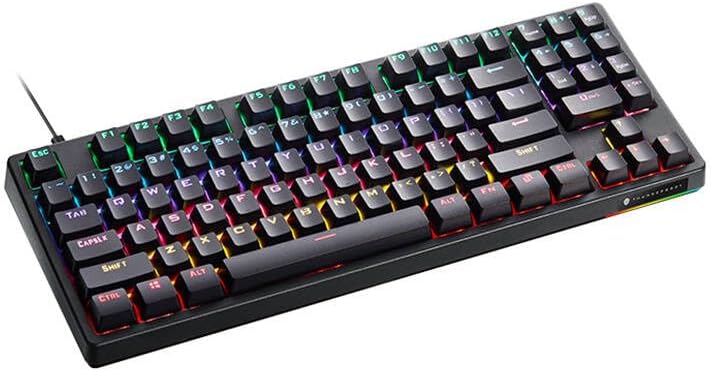
Gambar 3.1: Angled view of the Thunderobot KG3089C keyboard, showing its compact design and the wired connection extending from the top.
4. Parentah Operasi
4.1 Fungsi Keyboard Dasar
The Thunderobot KG3089C functions as a standard QWERTY keyboard. All keys perform their labeled functions upon a single press.
4.2 Kombinasi Tombol Fungsi (FN)
The FN key (Function key) allows access to secondary functions printed on certain keys. To activate these functions, press and hold the FN konci, teras pencét tombol fungsi anu dipikahoyong.
- FN + F1-F12: These combinations typically control multimedia functions such as volume, media playback, and other system shortcuts. Refer to the specific legends on your keyboard's F-keys.
- FN + Windows Key: This combination often locks or unlocks the Windows key to prevent accidental presses during gaming.
- FN + Specific Keys (e.g., INS, HOME, PGUP, PGDN, DEL, END): These keys are commonly used to cycle through various backlighting effects and modes.
- FN + kenop panah: These combinations may adjust backlighting brightness or the speed/direction of lighting effects.
4.3 Backlighting Control
Your keyboard features customizable RGB backlighting. Use the FN key in combination with designated keys (often INS, HOME, PGUP, PGDN, DEL, END, and arrow keys) to:
- Change lighting modes (e.g., static, breathing, wave).
- Saluyukeun tingkat kacaangan.
- Modify effect speed or direction.
Experiment with these combinations to find your preferred lighting setup.
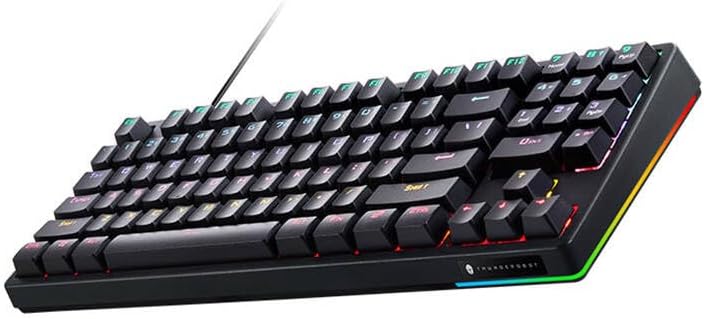
Gambar 4.1: Angled view of the Thunderobot KG3089C keyboard, highlighting the RGB lighting strip along its side, which complements the key backlighting.
5. Pangropéa
Pangropéa anu leres mastikeun umur panjang sareng kinerja keyboard anjeun:
- beberesih: Disconnect the keyboard from your computer before cleaning. Use a soft, dry cloth to wipe the surface. For dust and debris between keys, use compressed air. Avoid using liquid cleaners directly on the keyboard.
- Panyimpenan: Lamun teu dipaké pikeun période nambahan, nyimpen kibor di tempat garing, tiis jauh ti sinar panonpoé langsung jeung hawa ekstrim.
- Hindarkeun Tumpahan: Cairan tiasa ngaruksak komponén internal sacara parah. Ati-ati nalika nginum inuman caket kibor.
- Perawatan kabel: Do not bend or crimp the USB cable excessively. This can damage the internal wires and affect connectivity.
6. Cara ngungkulan
If you encounter issues with your Thunderobot KG3089C keyboard, refer to the following common solutions:
- Keyboard Teu Ngabales:
- Pastikeun kabel USB tos aman dicolokkeun kana kibor sareng komputer.
- Coba sambungkeun kibor ka port USB anu béda dina komputer anjeun.
- Test the keyboard on another computer to determine if the issue is with the keyboard or the computer's USB port.
- Balikan deui komputer anjeun.
- Lampu latar teu jalan atanapi salah:
- Check if the backlighting is turned off or set to the lowest brightness level using the FN key combinations.
- Pastikeun kibor disambungkeun leres sareng nampi kakuatan.
- If a specific key's backlight is not working, it might indicate a hardware issue.
- Konci Henteu Ngadaptar atanapi Ngetik Ganda:
- Ensure no debris is lodged under the keycap. Gently remove the keycap (if designed to be removable) and clean the switch area.
- If the issue persists across multiple keys, consider updating your computer's USB drivers or testing on another system.
If these steps do not resolve the issue, please contact Thunderobot customer support for further assistance.
7. Spésifikasi
Key technical specifications for the Thunderobot KG3089C Wired Mechanical Keyboard:
| Fitur | Spésifikasi |
|---|---|
| merek | Gunturbot |
| Ngaran modél | KG3089C |
| Identifier produk | JG080G004 |
| Téhnologi konektipitas | Kabel (USB) |
| Katerangan kibor | Mékanis |
| Pindah Tipe | Click (Blue Switch) |
| Alat nu cocog | Komputer Pribadi |
| Bahan | palastik |
| Warna | Hideung |
| Beurat | 850 g |
| Sumber Daya | Kabel Listrik |
8. Garansi jeung Rojongan
Thunderobot products are designed and manufactured to the highest quality standards. For information regarding warranty coverage, terms, and conditions, please refer to the warranty card included with your product or visit the official Thunderobot websitus.
For technical support, product inquiries, or service requests, please contact Thunderobot customer support through their official channels. Details can typically be found on the product packaging or the company's websitus.