1. Bubuka jeung Leuwihview
Thank you for choosing the Bontempi HarmonyKeys 49-Key Digital Keyboard. This manual provides essential information for setting up, operating, and maintaining your new instrument. Designed for beginners and aspiring musicians, this keyboard offers a range of features to enhance your musical journey.
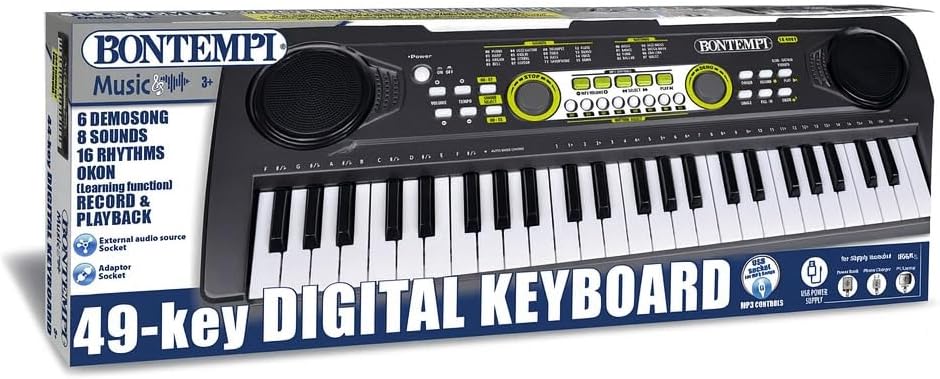
Figure 1: Bontempi HarmonyKeys 49-Key Digital Keyboard.
2. Naon dina Box
Mangga parios eusi pakét anjeun pikeun mastikeun yén sadaya barang aya:
- Bontempi HarmonyKeys 49-Key Digital Keyboard
- Kabel Tipe-C USB
- Mikropon kondenser
- Manual Pitunjuk (dokumén ieu)
3. Setélan
3.1 suplai kakuatan
The keyboard can be powered in two ways:
- Kabel USB Tipe-C: Connect the included USB Type-C cable to the keyboard's power input and to a power bank, PC, or a compatible USB charger (not included).
- Batré: Insert 3 AA 1.5V batteries (not included) into the battery compartment located on the underside of the keyboard. Ensure correct polarity.
3.2 Sambungan Mikropon
Connect the included condenser microphone to the dedicated microphone input jack on the keyboard. This allows for vocal accompaniment while playing.
3.3 Music Stand (if applicable)
If your model includes a music stand, gently insert it into the designated slots on the top panel of the keyboard. This provides a convenient place for sheet music or a tablet.
Video 1: Demonstration of a Bontempi digital keyboard, showing power-on, sound selection, and basic playing. Note: This video features a 54-key model, but the operational principles are similar.
4. Parentah Operasi
4.1 Daya Hurung/Pareuman
Pencét éta POWER button to turn the keyboard on or off. The keyboard features an automatic shutdown function to save power after a period of inactivity.
4.2 Volume Control
Ngagunakeun éta JILID + jeung VOLUME - buttons to adjust the overall sound level.
4.3 Sound Selection (16 Tones)
Pencét éta SORA button and then use the number keys or arrow buttons to select from 16 different musical tones (e.g., Piano, Organ, Guitar, Trumpet).
4.4 Rhythm Selection (8 Rhythms)
Pencét éta RITMA button and then use the number keys or arrow buttons to select from 8 different rhythms (e.g., Rock, Disco, Waltz).
4.5 Lagu Demo
The keyboard includes 6 pre-recorded demo songs. Press the DEMO button to cycle through and play these songs. Press EUREUN pikeun ngeureunkeun playback.
4.6 Ngarekam jeung Playback
- Ka RECORD: Pencét éta REC button. Play your desired melody.
- Ka PLAYBACK: Pencét éta ulin button to listen to your recorded performance.
4.7 Fungsi Diajar OKON
The OKON (One Key One Note) function assists beginners by allowing them to play along with demo songs by pressing any key. The keyboard will automatically correct the note to match the melody.
4.8 Effects (Echo, Sustain, Vibrato)
Activate or deactivate effects by pressing the corresponding buttons: ECHO, SUSTAIN, jeung NGAGETAR. Experiment with these to add depth and character to your music.
4.9 MP3 Playback via USB
Selapkeun stik USB anu ngandung MP3 files into the USB port. Use the dedicated volume and track advancement controls to manage MP3 playback.
Video 2: Children demonstrating the use of a portable electronic keyboard, including playing and singing with a microphone. This illustrates the interactive and learning features.
5. Pangropéa
To ensure the longevity and optimal performance of your Bontempi HarmonyKeys Digital Keyboard, follow these maintenance guidelines:
- beberesih: Use a soft, dry cloth to wipe the surface of the keyboard. Do not use abrasive cleaners, solvents, or waxes, as these can damage the finish.
- Panyimpenan: Simpen kibor di tempat anu tiis sareng garing, jauh tina sinar panonpoé langsung, suhu anu ekstrim, sareng kalembaban anu luhur.
- Penanganan: Ulah nepi ka ngalungkeun kibor atawa ngabalukarkeun keuna ku benturan anu kuat. Ulah neundeun barang anu beurat di luhurna.
- Batré: Upami nganggo batré, cabut batré upami kibor moal dianggo kanggo waktos anu panjang pikeun nyegah bocor.
6. Cara ngungkulan
If you encounter any issues with your keyboard, please refer to the following common problems and solutions:
| Masalah | Mungkin Cukang lantaranana | Solusi |
|---|---|---|
| Taya sora | Low volume, no power, headphones connected | Increase volume, check power supply (USB or batteries), disconnect headphones. |
| Konci teu ngabales | Keyboard not powered on, internal issue | Ensure power is on. If problem persists, contact customer support. |
| Ngarékam teu jalan | Incorrect recording procedure | Ensure you press REC before playing and ulin ngadangukeun. |
| Masalah pamuteran MP3 | USB stick not formatted correctly, unsupported file ngetik | Ensure USB stick is FAT32 formatted and contains only MP3 files. |
If you experience any issues not covered here, please contact Bontempi customer support for assistance.
7. Spésifikasi
| Fitur | Rincian |
|---|---|
| Nomer modél | 15 4901 |
| Jumlah konci | 49 |
| Ukuran (L x W x H) | 53.4 cm x 5.9 cm x 5.9 cm |
| Bahan | palastik |
| Sumber Daya | USB Type-C (cable included) or 3 x AA 1.5V batteries (not included) |
| Konektipitas | USB, 3.5 mm Headphone Jack, Microphone Input |
| Nada Musik | 16 |
| Wirahma | 8 |
| Fitur husus | OKON Learning Function, Recording & Playback, Echo, Sustain, Vibrato Effects, MP3 Playback, Automatic Shutdown |
| UPC | 047663558363 |
8. Garansi jeung Rojongan
Bontempi products are manufactured to high-quality standards. For warranty information and customer support, please refer to the warranty card included with your purchase or visit the official Bontempi websitus. Simpen bukti pameseran anjeun pikeun klaim garansi.


