1. Bubuka
This manual provides essential information for the installation, operation, and maintenance of your FERMAX Smart Video Intercom Kin FMX1445. Please read this manual thoroughly before using the device to ensure proper functionality and safety. Keep this manual for future reference.
2. Émbaran Kasalametan
Pitunjuk Kasalametan Penting:
- Pastikeun sadaya sambungan listrik saluyu sareng kode sareng peraturan lokal.
- Installation should be performed by qualified personnel to prevent electrical shock or damage to the device.
- Ulah ngalaan alat ka suhu ekstrim, kalembaban, atawa sinar panonpoé langsung.
- Avoid placing the device near sources of strong electromagnetic interference.
- Do not attempt to open or repair the device yourself. Refer all servicing to qualified service personnel.
- Clean the device only with a soft, dry cloth. Do not use liquid or aerosol cleaners.
3. Eusi Paket
Pastikeun yén sadaya item aya dina bungkusan:
- FERMAX Smart Video Intercom Kin FMX1445 Outdoor Panel
- Pamasangan Bracket sareng Screws
- Panyambung Wiring
- Manual pangguna (dokumén ieu)
- Gancang Mimitian Guide

Image 1: FERMAX Smart Video Intercom Kin FMX1445 outdoor panel. This image shows the main unit with its camera, screen, and card reader.
4. Produk Langkungview
The FERMAX Smart Video Intercom Kin FMX1445 is an advanced video intercom system designed for secure access control and communication. Key features include:
- Kaméra Resolusi Tinggi: Provides clear video feed of visitors.
- Témbongkeun terpadu: Shows welcome messages, time, and call status.
- Audio Dua Arah: Enables communication with visitors.
- Konektipitas Wi-Fi: Allows remote access and control via a smartphone application.
- Deteksi gerak: Alerts users to activity at the entrance.
- Kontrol Aksés: Supports various methods for entry, such as card readers or facial recognition (depending on specific model configuration).
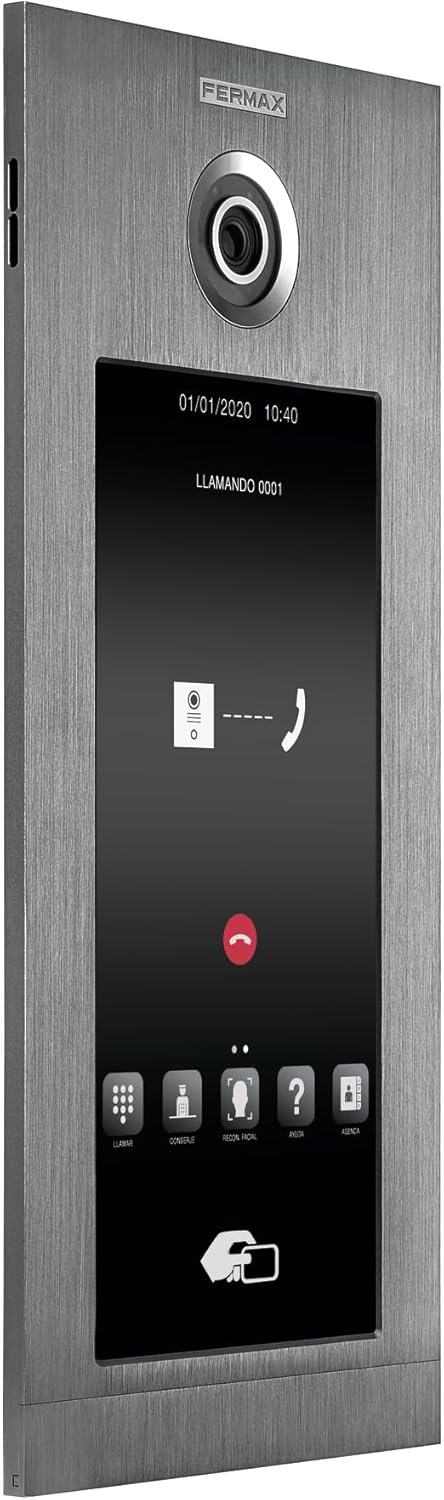
Image 2: Screen interface of the intercom during a call. This image displays the digital keypad, call buttons, and facial recognition option on the screen.
5. Setup jeung Instalasi
Proper installation is crucial for the optimal performance of your FERMAX Smart Video Intercom. It is recommended that installation be performed by a professional electrician or installer.
5.1. Pasang Panel Luar Ruangan
- Choose a suitable location for the outdoor panel, typically near the main entrance, at a height that allows the camera to capture visitors' faces clearly.
- Paké bracket ningkatna disadiakeun salaku citakan pikeun tanda titik pangeboran dina témbok.
- Bor liang sareng pasang colokan témbok upami diperyogikeun.
- Ngamankeun bracket ningkatna kana témbok ngagunakeun screws disadiakeun.
- Route necessary wiring through the wall opening to the back of the panel.

Image 3: FERMAX Smart Video Intercom Kin FMX1445 installed on a wall next to an entrance. This image demonstrates a typical installation scenario.
5.2. Sambungan listrik
- Connect the power supply wires to the designated terminals on the intercom panel. Refer to the wiring diagram in the Quick Start Guide for specific connections.
- Connect the lock control wires to your electric door strike or gate opener.
- Pastikeun sadaya sambungan aman sareng insulated.
5.3. Konfigurasi Jaringan (Wi-Fi)
- Power on the intercom unit.
- Follow the on-screen prompts or refer to the Quick Start Guide to connect the device to your local Wi-Fi network.
- Download the FERMAX app on your smartphone or tablet.
- Register an account and add your intercom device by following the in-app instructions. This typically involves scanning a QR code on the device or entering a serial number.
6. Parentah Operasi
6.1. Ngawalon Telepon a
- When a visitor presses the call button on the outdoor panel, your indoor monitor (if applicable) and smartphone app will receive a notification.
- On the indoor monitor, press the "Answer" button to establish two-way audio and video communication.
- On the smartphone app, tap the notification to open the app and answer the call.
6.2. Granting Access
- During an active call, press the "Unlock" button on your indoor monitor or smartphone app to remotely open the connected door or gate.
- For card access models, present a registered access card to the reader on the outdoor panel.
6.3. Gerak Deteksi Tanda
- The intercom is equipped with motion detection. When motion is detected, you may receive a notification on your smartphone app.
- Adjust motion detection sensitivity and notification settings within the FERMAX app.

Image 4: A person interacting with the FERMAX Smart Video Intercom. This image illustrates the user experience with the device.
7. Pangropéa
- beberesih: Wipe the outdoor panel and screen with a soft, damp lawon. Ulah make cleaners abrasive, pangleyur, atawa bahan kimia kasar.
- Pembaruan firmware: Periodically check the FERMAX app for available firmware updates to ensure optimal performance and security. Follow the in-app instructions for updating.
- Pamariksaan Konéktivitas: Regularly verify that your intercom is connected to your Wi-Fi network and that the app is receiving notifications.
8. Cara ngungkulan
| Masalah | Mungkin Cukang lantaranana | Solusi |
|---|---|---|
| Henteu aya kakuatan pikeun unit. | Power cable disconnected or power outage. | Check power connections. Verify power supply is active. |
| Teu bisa nyambung ka Wi-Fi. | Sandi Wi-Fi salah, sinyal lemah, atanapi masalah router. | Ensure correct password. Move router closer or use a Wi-Fi extender. Restart router. |
| Teu aya pidéo atanapi audio nalika nelepon. | Network issue, camera/microphone malfunction. | Check network connection. Restart the intercom. If problem persists, contact support. |
| Konci panto teu dibuka. | Wiring issue, lock malfunction, or incorrect settings. | Verify lock wiring. Test the lock independently. Check app settings for lock control. |
| Bewara gerakan teu ditampi. | Motion detection disabled, app notifications off, or network issue. | Enable motion detection in the app. Check phone notification settings. Ensure stable network connection. |
9. Spésifikasi
| Fitur | Rincian |
|---|---|
| Modél | FMX1445 |
| merek | FERMAX |
| Téknologi Komunikasi Nirkabel | Wifi |
| Tipe Siaga | Gerak Ngan |
| Jumlah Unit | 1.0 Ngitung |
| Produsén | FERMAX |
| ASIN | B0CVZZPW1 |
10. Garansi jeung Rojongan
FERMAX products are designed for reliability and performance. For specific warranty details, please refer to the warranty card included with your product or visit the official FERMAX website. For technical support, troubleshooting assistance, or service inquiries, please contact FERMAX customer support through their official channels.
Sumberdaya Online: For additional information, FAQs, and software downloads, please visit the Toko FERMAX di Amazon or the official FERMAX websitus.


