1. Bubuka
This manual provides instructions for the ALLIMITY replacement remote control. This remote is designed to function with various Nordmende TV models, offering a direct replacement experience without the need for complex setup. Please refer to the compatible models listed on the product packaging or in the specifications section to ensure compatibility with your television.
2. Produk Langkungview
The ALLIMITY replacement remote control is engineered for ease of use and reliability. It is lightweight, features an ergonomic design for comfortable handling, and provides stable remote control performance with a long transmission distance.
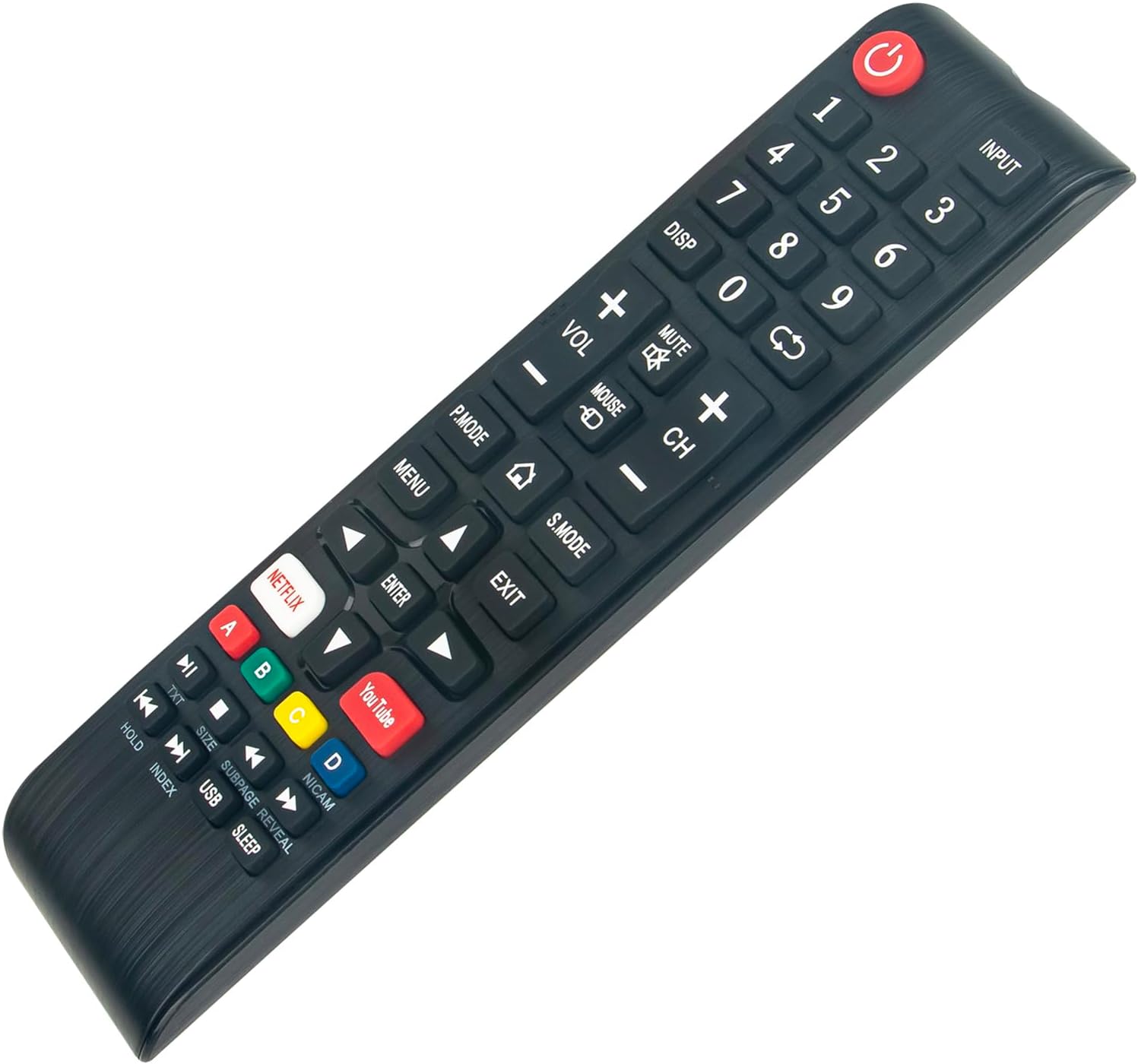
Gambar 2.1: Top-handap view of the ALLIMITY replacement remote control, highlighting the button layout and design.
Fitur konci:
- Henteu Dibutuhkeun Pemrograman: Siap dianggo langsung tina kotakna.
- Fungsi pinuh: Designed to replicate all functions of your original remote control.
- Desain ergonomis: Lightweight and comfortable to hold for extended periods.
- Kinerja Stabil: Offers reliable signal transmission over a practical distance.
3. Setélan
This ALLIMITY replacement remote control requires no programming or complex installation. Simply insert the batteries, and it will be ready for use with your compatible Nordmende TV.
3.1 Pamasangan batré
- Panggihan kompartemen batré dina tonggong kadali jauh.
- Geser muka kompartemen batréna.
- Selapkeun dua batré AAA (teu kaasup), mastikeun terminal positif (+) jeung négatip (-) align bener jeung markings jero kompartemen nu.
- Tutup panutup kompartemen batré aman.
Catetan: Salawasna anggo batré anyar sareng gentos duanana batré dina waktos anu sami. Ulah nyampur batré lami sareng énggal atanapi jinis batré anu béda.
4. Parentah Operasi
The remote control operates using infrared (IR) technology. Ensure there is a clear line of sight between the remote control and the TV's IR receiver for optimal performance. The maximum effective range is approximately 10 meters (33 feet).

Gambar 4.1: Angled view of the remote control, illustrating its ergonomic design and button placement for operation.
4.1 Fungsi Tombol
The remote control features standard TV functions and dedicated buttons for popular streaming services:
- Kakuatan (⏻): Ngahurungkeun atawa mareuman TV.
- Input: Milih sumber input (HDMI, AV, jsb.).
- Tombol Jumlah (0-9): Pilihan saluran langsung.
- DISP: Nampilkeun inpormasi dina layar.
- VOL (+/-): Nyetél polumeu kaluhur atanapi kahandap.
- Bisu: Ngajempékeun atanapi nganonaktipkeun sora TV.
- CH (+/-): Robah saluran kaluhur atanapi kahandap.
- P.MODE: Pilihan Modeu Gambar.
- S. MODÉ: Pilihan Modeu Sora.
- MENU: Ngaksés ménu utama TV.
- KALUAR: Kaluar tina ménu atanapi pungsi ayeuna.
- Tombol Navigasi (Luhur, Handap, Kénca, Katuhu, ENTER): Navigates ngaliwatan ménu jeung confirms selections.
- NETFLIX: Aksés langsung ka aplikasi Netflix.
- YouTube: Aksés langsung ka aplikasi YouTube.
- Kancing Berwarna (A, B, C, D): Functionality varies by TV model and context (e.g., teletext, interactive features).
- TXT: Fungsi Teleteks.
- HOLD, INDEX, SIZE, SUBPAGE, REVEAL, USB, SLEEP: Additional functions, refer to your TV's manual for specific usage.
5. Pangropéa
5.1 Ngabersihan Remote Control
Pikeun ngabersihkeun kadali jauh, usap pabeungeutannana kalayan lembut sareng kaen garing. Keur kokotor bandel, rada dampBilas lawon ku cai atanapi pembersih anu hampang sareng henteu abrasif. Hindarkeun nganggo bahan kimia anu keras atanapi bahan abrasif, sabab ieu tiasa ngaruksak lapisan luar remote atanapi komponén internal.
5.2 Ngagantian batré
Replace batteries when the remote's response becomes sluggish or stops working. Follow the battery installation steps outlined in Section 3.1. Dispose of used batteries responsibly according to local regulations.
5.3 Panyimpenan
When not in use for extended periods, it is recommended to remove the batteries from the remote control to prevent leakage and potential damage. Store the remote in a cool, dry place away from direct sunlight and extreme temperatures.
6. Cara ngungkulan
If you encounter issues with your ALLIMITY replacement remote control, please refer to the following common troubleshooting steps:
- Jauh teu ngabales:
- Pastikeun batré diselapkeun leres kalayan polaritasna anu leres.
- Ganti batré heubeul ku nu anyar.
- Pariksa naha aya halangan antara jauh sareng panarima IR TV.
- Arahkeun remot langsung ka panarima IR TV.
- Short transmission range:
- Ganti batré ku nu anyar.
- Ensure there are no strong light sources (like direct sunlight or bright fluorescent lights) interfering with the IR signal.
- Tombol husus teu jalan:
- This remote is designed to be fully functional. If a specific button does not work, ensure your TV model supports that function.
- Clean the remote control, especially around the non-functional button, to remove any debris.
If the issue persists after trying these steps, please verify the compatibility of the remote with your specific TV model.
7. Spésifikasi
| merek | KAKATAAN |
| Nomer Modél (Jarak Jauh) | MM-ND39S3400T-NP |
| Warna | Hideung |
| Téhnologi konektipitas | Infrabeureum (IR) |
| Fitur husus | Enteng |
| Rentang maksimum | 10 Méter (kira-kira 33 suku) |
| Jumlah Kancing | 3 (This seems incorrect based on image, likely refers to main control types. The remote has many more physical buttons.) |
| Tipe Controller | Tombol Control |
| Alat nu cocog | Nordmende TV models: ND39S3400T, ND24S3400T, ND32S4100M, ND32S400T-SMART-SAT, D55KFS5700TUHD-SMART, ND32S4000T-SMART |
8. Garansi jeung Rojongan
Specific warranty information for this ALLIMITY replacement remote control is not provided in the product details. For any support inquiries or further assistance, please refer to the seller or the platform where the product was purchased. Information regarding spare parts availability and software updates is also not available.


