1. Bubuka
This manual provides essential information for the safe and efficient operation of your DALTON KS10Pro Portable Karaoke Machine. Please read this manual thoroughly before using the product and retain it for future reference.
The DALTON KS10Pro is an all-in-one portable karaoke system designed for versatile audio entertainment. It features Bluetooth connectivity, dual wireless microphones, and various input options for music playback and vocal performance.
2. Naon dina Box
Saatos ngabongkar bungkusan, pastikeun sadaya barang anu didaptarkeun di handap aya sareng dina kaayaan anu saé:
- 2 Mikropon Wireless UHF
- 4 AA Batteries (for microphones)
- 1 Kabel Daya
- 1 Storage Box (for microphones)
- 1 Buku Panduan (dokumen ieu)
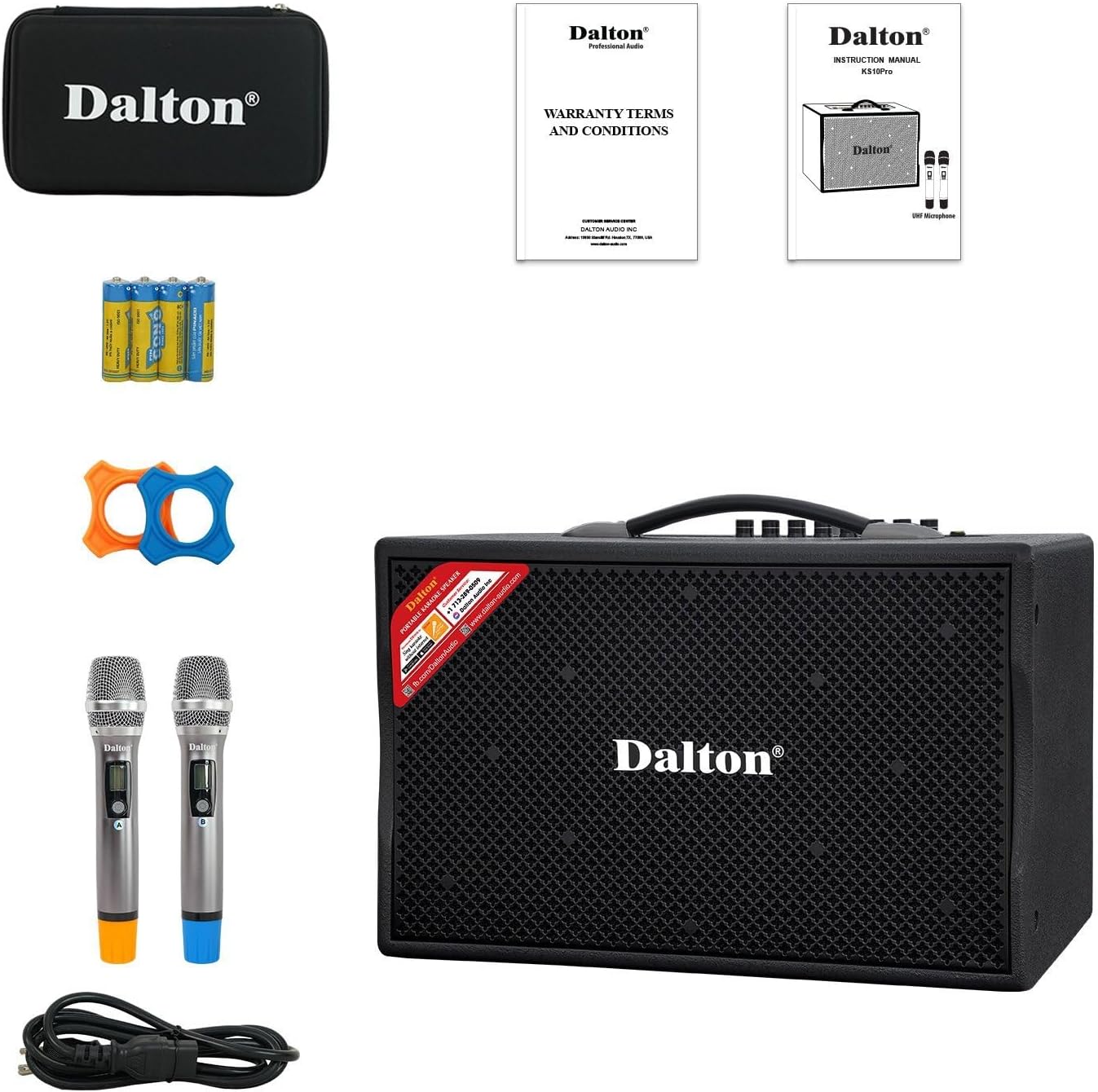
Image: The complete package contents of the DALTON KS10Pro Portable Karaoke Machine, showing the main speaker unit, two wireless microphones, power cable, AA batteries, and a storage case.
3. Setup Guide
3.1 Ngecas Awal
Before first use, fully charge the karaoke machine. Connect the provided power cable to the AC120V/60Hz input on the rear panel of the speaker and plug it into a power outlet. The 'CHARGE' indicator light will illuminate. Charging is complete when the 'CHARGE' light turns off or changes color (refer to specific model indicators if different).
Video: A demonstration of the DALTON KS10Pro Portable Bluetooth Speaker, highlighting its features and portability. This video shows the speaker being moved and its control panel.
3.2 Setup Mikropon
- Insert the 4 AA batteries into the wireless microphones.
- Turn on each microphone using its power switch. The microphones should automatically pair with the speaker.
- Place the non-roll rings on the microphones for added protection and stability.
3.3 Connecting to a Music Source
The KS10Pro offers multiple connectivity options:
- Bluetooth:
- Turn on the karaoke machine.
- Aktipkeun Bluetooth dina smartphone, tablet, atanapi alat anu sanés.
- Milarian pikeun "Dalton BT03" (or similar, refer to your device's Bluetooth list) and pair.
- Once connected, you can play music wirelessly from your device.
- USB: Selapkeun USB drive nu ngandung MP3 files into the USB port on the control panel. The speaker will automatically detect and play the music.
- AUX IN: Connect an external audio device (e.g., TV, MP3 player) using an AUX cable to the AUX IN ports on the rear panel.

Image: The DALTON KS10Pro Portable Karaoke Machine highlighting its connectivity options: Bluetooth, AUX, and USB, indicating versatile music playback.
Video: A demonstration of a karaoke machine playing songs from YouTube, showing the screen interface and song selection. This video illustrates how to select and play music for karaoke.
4. Parentah Operasi
4.1 Powering on / Pareum
Locate the 'POWER' switch on the control panel. Flip it to 'ON' to power on the device. Flip it to 'OFF' to power off.
4.2 Adjusting Volume and Effects
The control panel features various knobs for fine-tuning your audio experience:
- MUSIK VOL: Nyaluyukeun volume musik sacara umum.
- MUSIC TREBLE/BASS: Controls the treble and bass levels of the music.
- MIC VOL: Saluyukeun polumeu mikropon.
- MIC TREBLE/BASS: Controls the treble and bass levels of the microphones.
- ECHO: Adds an echo effect to the microphone vocals.
- TUNDA: Adjusts the delay of the echo effect.

Gambar: A lengkep view of the DALTON KS10Pro control panel, showing all knobs and inputs for adjusting music and microphone settings, including volume, treble, bass, echo, and delay.
4.3 Pamakéan portabel
The KS10Pro is designed for portability with 360-degree wheels and a sturdy handle, allowing you to easily move it to any location for indoor or outdoor events.

Image: A woman demonstrating the portability of the DALTON KS10Pro karaoke speaker, easily moving it across a floor using its built-in wheels and handle.
5. Pangropéa
- beberesih: Use a soft, dry cloth to clean the exterior of the speaker and microphones. Avoid using harsh chemicals or abrasive materials.
- Panyimpenan: Simpen unit dina tempat anu tiis sareng garing jauh tina sinar panonpoé langsung sareng suhu anu ekstrim.
- Perawatan batré: Pikeun umur batre anu optimal, eusian pinuh unit sateuacan disimpen dina waktos anu lami sareng eusian deui unggal 3 bulan sakali.
6. Cara ngungkulan
| Masalah | Mungkin Cukang lantaranana | Solusi |
|---|---|---|
| Taya kakuatan | Batré béak; Kabel listrik teu nyambung. | Ngecas unit; Pastikeun kabel kakuatan disambungkeun aman. |
| Taya sora tina speaker | Volume too low; Incorrect input mode selected; Device not paired (Bluetooth). | Increase MUSIC VOL; Select correct input mode (Bluetooth/USB/AUX); Re-pair Bluetooth device. |
| Taya sora tina mikropon | Microphone off; Batteries depleted; MIC VOL too low. | Hurungkeun mikropon; Ganti batré; Naékkeun VOL MIC. |
| Kualitas sora goréng | Interference; Incorrect TREBLE/BASS settings. | Move away from other electronic devices; Adjust MUSIC/MIC TREBLE/BASS knobs. |
Video: Instructions on how to connect a karaoke machine to a TV using an optical cable. This video demonstrates the process of setting up audio output from a TV to an external speaker.
7. Spésifikasi
| Fitur | Rincian |
|---|---|
| merek | DALTON |
| Nomer modél | KS10Pro |
| Kaluaran Wattage | 300 Watt |
| Ukuran Woofer | 10 inci |
| Ukuran Tweeter | 1 inci |
| Téhnologi konektipitas | AUX, Bluetooth, USB |
| Sumber Daya | Batré Powered |
| Item Beurat | 33.9 pon |
| Dimensi produk | 21.3 x 12.6 x 17.6 inci |
| Bahan | Steel, Wooden Cabinet |
| Jumlah Saluran | 2 |
| Alat nu cocog | TV, Guitar, USB, AUX IN, Wireless Microphone |

Image: An exploded diagram of the DALTON KS10Pro speaker, illustrating its internal components including the 300W power output, 10-inch woofer, and 1-inch tweeter for harmonizing sounds.
8. Jaminan & Dukungan
For warranty information and customer support, please refer to the documentation included in your product packaging or visit the official DALTON websitus. Simpen resi pameseran anjeun salaku bukti pameseran pikeun klaim garansi.
Rencana perlindungan sayogi kanggo mésér nyalira:
- Plan Protection 2 Taun
- Plan Protection 3 Taun
- Ngajaga Lengkep: Hiji rencana nyertakeun sadaya pameseran katukang sareng ka hareup anu layak


