Bubuka
Hatur nuhun pikeun meuliasing the SHARP XL-B530 Micro Component System. This system is designed to provide high-quality audio playback from various sources, including Bluetooth wireless streaming, CD, USB, AM/FM radio, and auxiliary input. This manual provides detailed instructions for setting up, operating, and maintaining your new audio system to ensure optimal performance and longevity.
Émbaran Kasalametan penting
- Baca sagala parentah taliti saméméh pamakéan.
- Simpen manual ieu kanggo rujukan ka hareup.
- Ulah ngalaan unit ka hujan atawa Uap.
- Pastikeun ventilasi anu leres di sabudeureun unit. Ulah meungpeuk bukaan ventilasi.
- Ulah nempatkeun unit deukeut sumber panas kayaning radiators, registers panas, kompor, atawa alat sejenna (kaasup ampLiifiers) anu ngahasilkeun panas.
- Nangtayungan kabel kakuatan tina keur leumpang dina atawa pinched.
- Ngan anggo kantétan/aksésori anu ditunjuk ku produsén.
- Cabut colokan alat ieu nalika badai kilat atanapi nalika henteu dianggo kanggo waktos anu lami.
- Rujuk sadayana jasa ka tanaga jasa anu mumpuni.
Eusi pakét
Punten parios yén sadaya item di handap ieu kalebet dina pakét anjeun:
- Unit Utama (Sistem Komponén Mikro)
- Speaker Units (x2)
- Kadali jauh
- Kabel listrik
- Antena FM
- AM Loop Anteneu
- Manual pangguna (dokumén ieu)
Produk Leuwihview
Familiarize yourself with the components and controls of your SHARP XL-B530 system.
Main Unit and Speakers

Gemblengna view of the SHARP XL-B530 Micro Component System, including the main unit, two speakers, and the remote control.
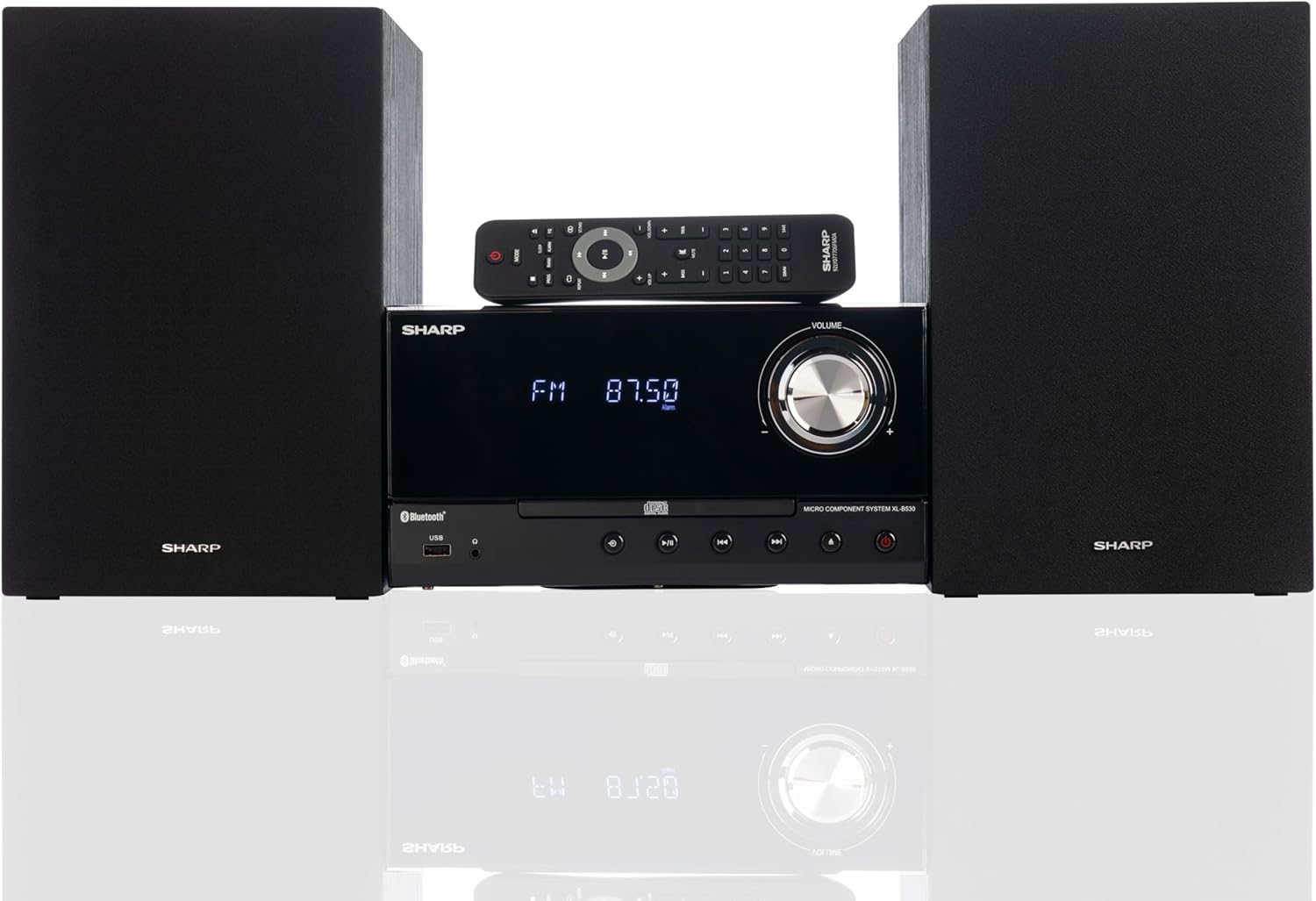
Front panel of the main unit, showing the LCD display, volume knob, CD tray, and control buttons.
Sambungan Panel Rear

The rear panel of the main unit, featuring speaker terminals, FM antenna input, AM antenna input, and auxiliary input ports.
Kadali jauh
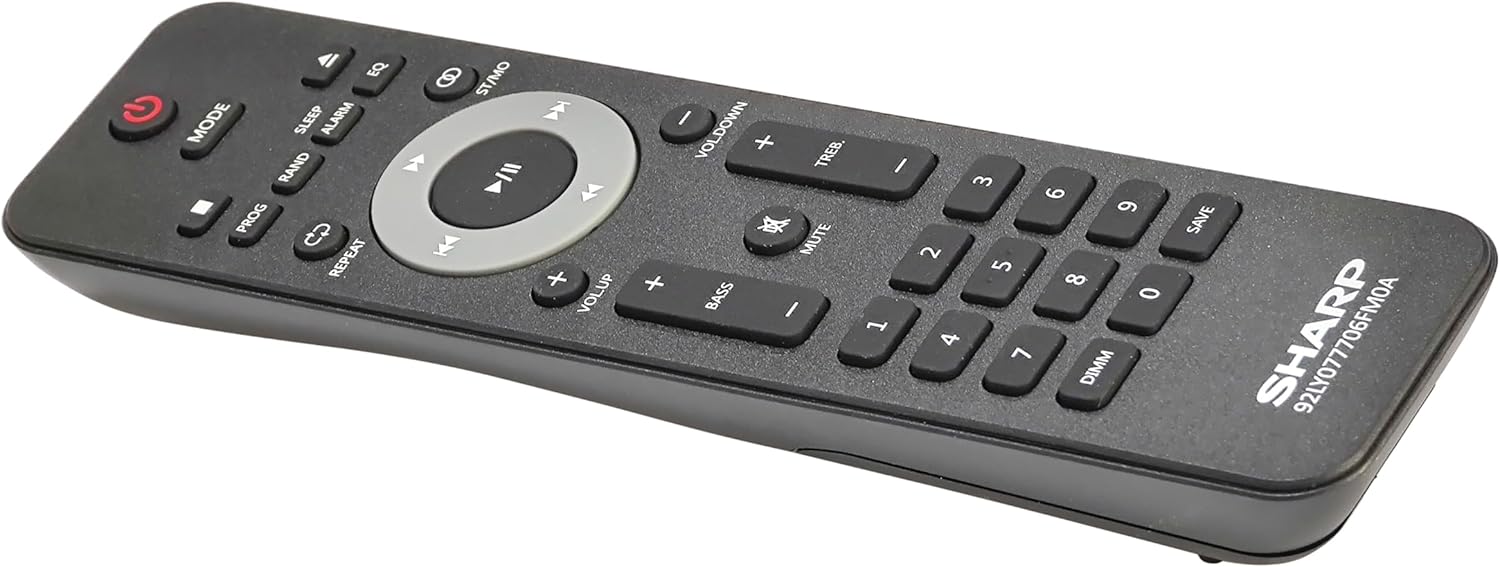
Diwincik view of the remote control, showing various function buttons for power, mode, playback, volume, and sound adjustments.
Disetél
Follow these steps to set up your micro component system.
1. Sambungan Speaker
- Identify the left and right speaker cables.
- Connect the red (+) wire from each speaker to the red (+) terminal on the main unit's rear panel.
- Connect the black (-) wire from each speaker to the black (-) terminal on the main unit's rear panel.
- Ensure a secure connection for both speakers.
2. Sambungan anteneu
- Anteneu FM: Connect the supplied FM wire antenna to the FM antenna jack on the rear panel. Extend the wire fully for best reception.
- Antena AM: Assemble the AM loop antenna and connect its wires to the AM antenna terminals on the rear panel. Rotate the antenna for optimal AM reception.
3. Sambungan Daya
- Ensure all other connections are made.
- Plug the power cord into the AC IN jack on the rear of the main unit.
- Insert the other end of the power cord into a wall outlet.
Parentah Operasi
This section details how to use the various functions of your SHARP XL-B530 system.
Daya Hurung/Pareuman
- Pencét éta POWER tombol dina Unit utama atawa kadali jauh pikeun ngahurungkeun atawa mareuman sistem.
Pilihan Sumber
- Pencét éta MODÉ button on the main unit or remote control repeatedly to cycle through available sources: CD, Bluetooth, USB, FM, AM, AUX.
Puteran CD
- Pencét éta MODÉ tombol pikeun milih mode 'CD'.
- Pencét éta BUKA/TUTUP tombol pikeun muka baki CD.
- Place a CD (CD/MP3/WMA/CD-R/CD-RW) with the label side up into the tray.
- Pencét éta BUKA/TUTUP tombol deui pikeun nutup baki. Putereun bakal dimimitian sacara otomatis.
- Paké MUTER / Reureuh, EUREUN, LEWAT (maju/mundur), jeung Pilarian tombol pikeun kontrol.
Papasangan Bluetooth
- Pencét éta MODÉ tombol pikeun milih mode 'Bluetooth'. Pintonan bakal nunjukkeun 'BT' sareng lampu kilat, nunjukkeun yén éta siap dipasangkeun.
- Dina alat Bluetooth anjeun (smartphone, tablet, jsb.), aktipkeun Bluetooth sareng milarian alat anu sayogi.
- Select 'SHARP XL-B530' from the list.
- Once paired, the display will stop flashing and show 'BT CONNECTED'. You can now stream audio from your device.
USB Playback
- Selapkeun USB flash drive kana port USB dina panel hareup.
- Pencét éta MODÉ tombol pikeun milih mode 'USB'.
- Sistem bakal otomatis ngadeteksi sareng mimiti muterkeun audio anu cocog files (MP3/WMA).
- Use playback controls similar to CD mode.
Radio AM/FM

The SHARP XL-B530 system displaying an FM radio frequency, highlighting its digital tuner capabilities.
- Pencét éta MODÉ button to select 'FM' or 'AM' mode.
- Scan Otomatis: Pencét jeung tahan tombol MUTER / Reureuh tombol pikeun otomatis nyeken sareng nyimpen stasiun anu sayogi.
- Tuning Manual: Ngagunakeun éta LEWAT tombol pikeun nyetel frékuénsi anu dipikahoyong sacara manual.
- Stasion prasetél: Use the number buttons on the remote to directly select saved preset stations.
Pangaturan Volume sareng Sora

A close-up of one of the SHARP XL-B530 speakers, illustrating the adjustable bass and treble sound output.
- Volume: Puterkeun VOLUME kenop dina unit utama atanapi nganggo VOL + / VOL- tombol dina kadali jauh.
- Bass/Tréble: Ngagunakeun éta BASS+ / BASS- jeung TREB+ / TREB- buttons on the remote control to adjust sound characteristics.
- Kaseueuran: Pencét éta KASUNGKULAN button on the remote to enhance bass and treble at low volumes.
- EQ: Pencét éta EQ button on the remote to cycle through preset equalizer modes.
Pangropéa
Perawatan anu leres bakal mastikeun umur panjang sistem anjeun.
- beberesih: Use a soft, dry cloth to clean the exterior of the unit. For stubborn stains, dampen the cloth lightly with water. Do not use abrasive cleaners or solvents.
- Perawatan CD: Nanganan CD ku edges maranéhanana. Bersihkeun CD anu kotor nganggo kaen anu lemes sareng henteu lint, usap ti tengah ka luar.
- Ventilasi: Pastikeun bukaan ventilasi teu diblokir ku lebu atawa lebu.
- Panyimpenan: Upami nyimpen unit kanggo waktos anu lami, cabut colokan tina stop kontak listrik teras simpen di tempat anu tiis sareng garing.
Pamérésan masalah
If you encounter issues with your system, refer to the following common problems and solutions.
| Masalah | Mungkin Cukang lantaranana | Solusi |
|---|---|---|
| Taya kakuatan | ari kakuatan teu disambungkeun; Stopkontak teu aktip | Pastikeun kabel listrik dicolokkeun sacara aman; Coba outlet béda |
| Taya sora | Volume too low; Speakers not connected; Incorrect source selected | Increase volume; Check speaker connections; Select correct input source |
| CD teu diputer | CD inserted incorrectly; CD is dirty or scratched; Incorrect mode | Insert CD correctly (label side up); Clean or replace CD; Select CD mode |
| Bluetooth teu dipasangkeun | Bluetooth mode not selected; Device too far; Device already paired to another unit | Select Bluetooth mode; Move device closer; Disconnect from other devices and try again |
| panarimaan radio goréng | Antenna not connected or positioned poorly; Interference | Connect and adjust antenna position; Move unit away from other electronic devices |
| Kadali jauh teu jalan | Batteries are dead or inserted incorrectly; Obstruction between remote and unit | Replace batteries, check polarity; Remove any obstructions; Ensure remote is pointed at the unit's sensor |
spésifikasi
| Fitur | Spésifikasi |
|---|---|
| Nomer modél | XL-B530(BK) |
| Daya Kaluaran | 200W Max (100W RMS) |
| Konektipitas | Bluetooth, USB, Input Aux |
| Kasaluyuan disc | CD, CD-R/RW, MP3, WMA |
| Tuner | AM/FM Stereo Digital Tuner (50 station presets) |
| Tipe Speaker | Stereo |
| Ukuran produk (L x W x H) | 25 x 11 x 9.6 inci |
| Item Beurat | 18 pon |
| Warna | Oak Hideung |
Garansi sareng Rojongan
Kanggo inpormasi garansi sareng dukungan téknis, mangga tingal kartu garansi anu kalebet dina produk anjeun atanapi kunjungan ka SHARP resmi websitus. Simpen resi pameseran anjeun salaku bukti pameseran pikeun klaim garansi.
For further assistance, you may contact SHARP customer service through their official channels.


