Bubuka
Welcome to the SENTRY Ultra-Light Bluetooth Earbuds user manual. These earbuds are designed to provide a seamless and immersive audio experience, perfect for active lifestyles. With an ultra-light design, LED power display, and intelligent touch controls, you can enjoy high-quality sound and convenient operation. Please read this manual carefully to ensure proper use and maintenance of your new earbuds.
Eusi pakét
- SENTRY Ultra-Light Bluetooth Earbuds (Left and Right)
- Portabel Ngecas Case
- Kabel Ngecas USB
- Manual pamaké
Fitur produk
- Témbongkeun Daya LED: Transparent design on the charging case allows real-time battery monitoring.
- Desain kompak: Ultra-compact and space-saving, making them highly portable.
- Bass Acoustic Design: Advanced dynamic drivers deliver crystal-clear audio with enhanced bass and treble.
- Kadali Touch Intelligent: Effortlessly manage volume, music tracks, calls, and voice assistants.
- Stable Connections: Advanced Bluetooth technology ensures lag-free and reliable performance.
Produk Leuwihview
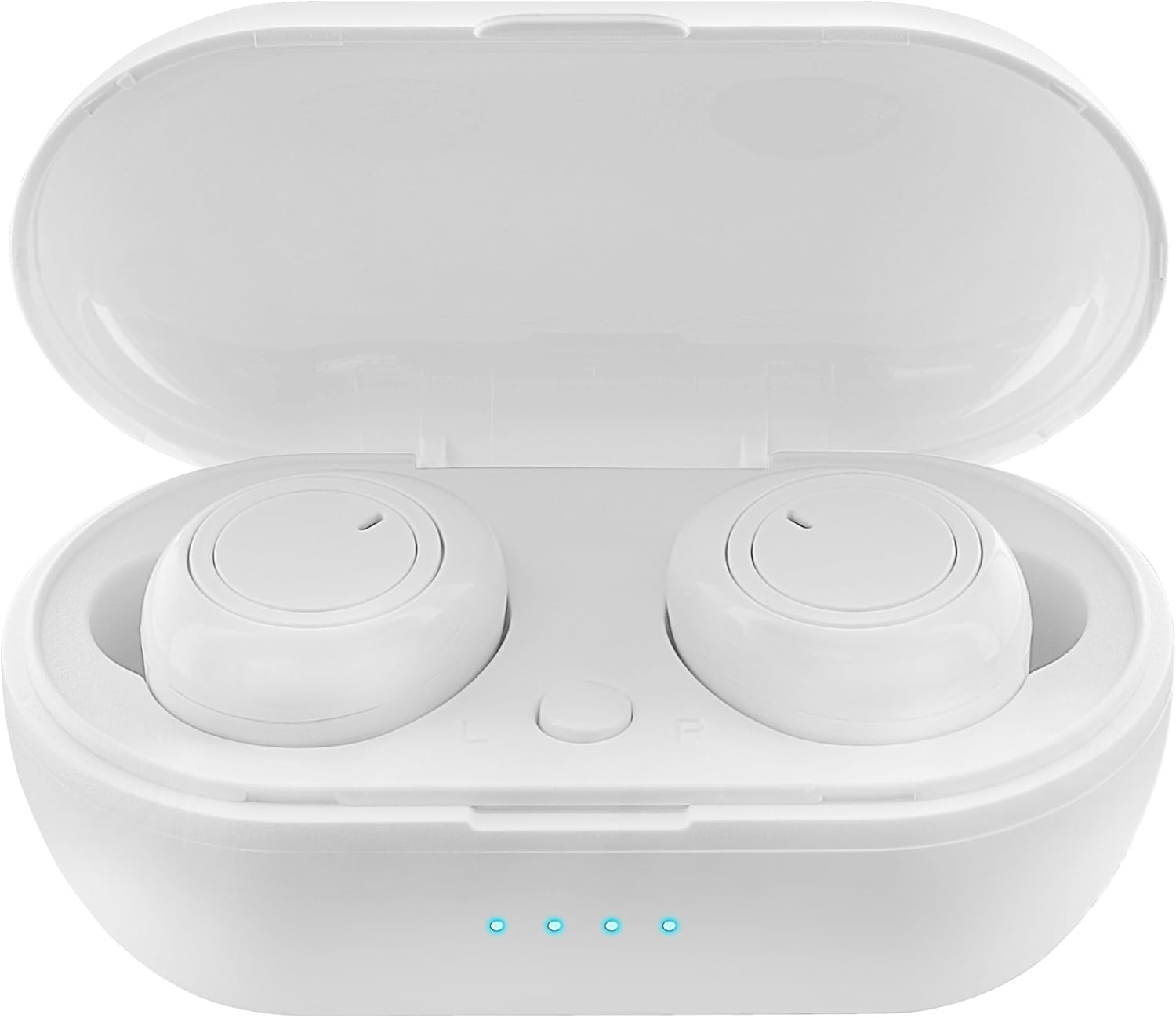
Figure 1: Earbuds in Charging Case with LED Indicators. The charging case features a transparent lid and three blue LED lights indicating battery status.

Figure 2: Individual Earbuds (Front View). Each earbud features a circular touch control area for easy operation.

Figure 3: Individual Earbuds (Side View). The ergonomic design ensures a comfortable and secure fit in the ear.
Disetél
1. Ngecas Earbuds jeung Case
- Teundeun earbuds kana wadah ngecas. Pastikeun aranjeunna leres seated.
- Sambungkeun kabel ngecas USB ka port ngecas dina case jeung ka sumber kakuatan (misalna adaptor témbok USB, port USB komputer).
- The LED display on the charging case will indicate the charging status. A full charge is indicated when all lights are solid.
- Allow approximately 1-2 hours for a full charge of both earbuds and the case.
2. Nyapasangkeun sareng Alat Anjeun
- Buka wadah ngecas. Earbud bakal otomatis asup kana modeu pairing (ditunjukkeun ku lampu kedip-kedip dina earbud).
- Dina smartphone Anjeun atawa alat Bluetooth-diaktipkeun, buka setélan Bluetooth.
- Milarian pikeun new devices and select "SENTRY Earbuds" (or similar name) from the list.
- Once connected, the earbud lights will stop flashing, and you will hear a confirmation tone.
- Earbuds bakal otomatis nyambung deui ka alat dipasangkeun panungtungan sawaktos nyandak kaluar tina wadahna, upami Bluetooth diaktipkeun dina alat.
Parentah Operasi
Your SENTRY Ultra-Light Bluetooth Earbuds feature intelligent touch controls for easy management of your audio and calls.
| Fungsi | Aksi |
|---|---|
| Puter/Reureuh Musik | Ketok tunggal dina boh earbud |
| Lagu salajengna | Ketok dua kali dina earbud Katuhu |
| Lagu saméméhna | Ketok dua kali dina ceuli Kénca |
| Ngajawab / mungkas Telepon | Ketok tunggal dina boh earbud |
| Nolak Telepon | Pencét jeung tahan boh earbud salila 2 detik |
| Aktipkeun Asisten Sora | Ketok tilu kali dina boh earbud |
| Volume Up | Pencét terus tahan earbud katuhu |
| Volume Turun | Pencét terus tahan earbud kénca |
Pangropéa
- beberesih: Anggo lawon anu lemes, garing, henteu lint pikeun ngabersihan earbuds sareng wadah ngecas. Ulah make bahan kimia kasar atawa bahan abrasive.
- Panyimpenan: Nalika henteu dianggo, simpen earbuds dina wadah ngecasna pikeun ngajagi sareng tetep dicas. Nyimpen dina tiis, tempat garing jauh ti sinar panonpoé langsung jeung suhu ekstrim.
- Perawatan batré: Pikeun manjangkeun umur batre, ulah miceun sapinuhna earbuds sareng sering ngecas wadahna. Ngeusi batre aranjeunna rutin, sanajan teu di pamakéan konstan.
- Tahan cai: Earbud ieu henteu tahan cai. Hindarkeun kakeunaan cai, késang, atanapi kalembaban anu luhur.
Pamérésan masalah
- Earbuds teu dipasangkeun: Ensure both earbuds are charged. Place them back in the case, close the lid, then open it again to re-enter pairing mode. Check your device's Bluetooth settings and try reconnecting.
- Ngan hiji earbud jalan: Try placing both earbuds back in the charging case, closing the lid, and then taking them out again. This often re-syncs them.
- Teu aya sora: Pariksa tingkat volume dina alat sareng earbud anjeun. Pastikeun earbud disambungkeun kalayan leres kana alat anjeun.
- Masalah ngecas: Ensure the charging cable is securely connected to both the case and the power source. Try a different USB port or charger. Clean the charging contacts on the earbuds and inside the case.
- Kualitas sora goréng: Ensure the earbuds are properly seated in your ears. Try cleaning any debris from the earbud grilles.
spésifikasi
| Fitur | Rincian |
|---|---|
| Ngaran modél | 5002-407 |
| Téhnologi konektipitas | Nirkabel (Bluetooth) |
| Téknologi Komunikasi Nirkabel | Bluetooth |
| Rentang Umur (Deskripsi) | Dewasa |
| Waktu Ngecas | Approximately 1-2 Hours (for earbuds and case) |
| Alat nu cocog | Smartphones, Apple Devices |
| Tipe Kontrol | Kontrol Média |
| Fitur kabel | Tanpa Kabel |
| Tingkat Résistansi Cai | Henteu Tahan Cai |
| Rentang Frékuénsi | 20Hz - 20kHz |
| Métode kontrol | Toél |
| Kahirupan batré | Nepi ka 12 Jam (kalayan wadah ngecas) |
| Tipe Supir Audio | Supir dinamis |
| Mawa Case Warna | Bodas |
| Wangun Earpiece | Dibuleudkeun |
| merek | SENTRY |
| Warna | Bodas |
| Panempatan Ceuli | Dina Ceuli |
| Faktor Bentuk | Dina Ceuli |
| Kontrol bising | Euweuh |
Garansi sareng Rojongan
SENTRY products are designed for reliability and performance. For information regarding warranty coverage and customer support, please refer to the warranty card included with your product or visit the official SENTRY websitus. Anjeun oge bisa nganjang ka SENTRY Store on Amazon pikeun émbaran produk tambahan jeung sumber rojongan.