
Bubuka
The BAOFENG UV-5RM is a versatile multi-band two-way radio designed for reliable communication across various environments. It features a 1.77-inch LCD screen, 999 memory channels, and supports USB-C charging. This device is suitable for outdoor activities, professional use, and emergency communication, offering features like NOAA weather alerts, frequency hopping, and scramble functions for enhanced privacy.
This manual provides essential information for the proper setup, operation, and maintenance of your UV-5RM radio to ensure optimal performance and longevity.
Eusi pakét
Sateuacan neraskeun setelan, mangga pariksa yén sadaya item aya dina pakét anjeun:
- Unit Radio BAOFENG UV-5RM
- anteneu
- Batré Litium-Ion Rechargeable
- Kabel Ngecas USB-C
- Desktop Charger Dock
- Klip sabuk
- Tali Leungeun
- Manual pangguna (dokumén ieu)
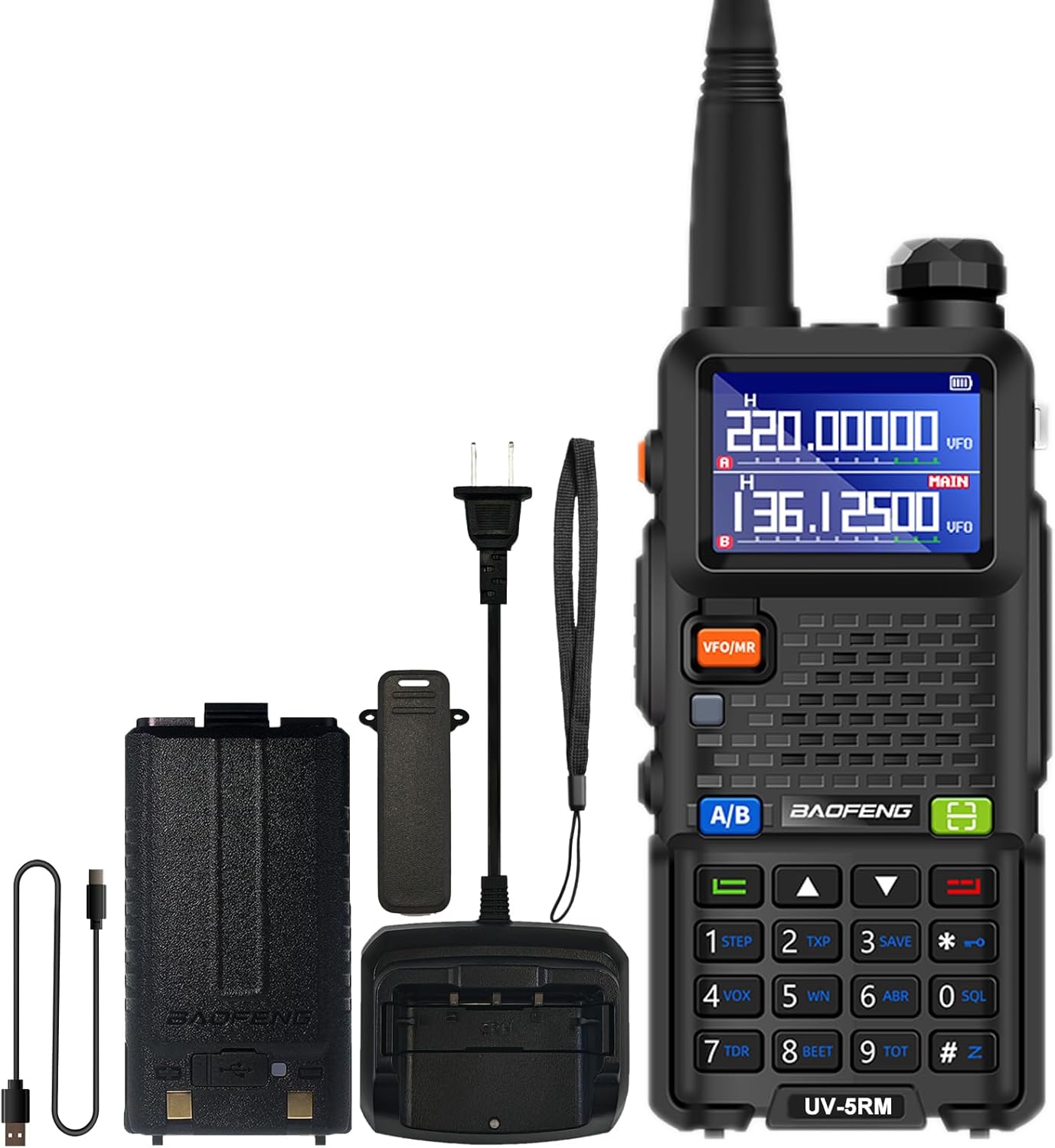
Image: The BAOFENG UV-5RM radio unit with its standard accessories, including the antenna, battery, and charging components.
Disetél
1. Ngapasangkeun Antena
Carefully screw the antenna clockwise into the connector on the top of the radio until it is finger-tight. Do not overtighten.
2. Masang Batré
Align the battery pack with the grooves on the back of the radio. Slide the battery upwards until it clicks into place. To remove, press the release latch (if present) and slide the battery downwards.
3. Ngecas Batré
The UV-5RM offers two charging methods:
- Ngagunakeun Desktop Charger: Place the radio (with battery installed) into the charging dock. Ensure the charging contacts align. The indicator light on the charger will show the charging status.
- Ngagunakeun Port USB-C: Connect the provided USB-C cable to the port on the back of the battery pack and to a compatible USB power source (e.g., car charger, power bank, laptop, USB wall adapter).
A full charge typically takes several hours. The radio can be charged in your car, with a power bank, or any USB interface device, providing flexibility for charging on the go.

Image: The BAOFENG UV-5RM radio demonstrating both USB-C direct charging and charging via its desktop dock.
4. Attaching the Belt Clip and Hand Strap
Secure the belt clip to the back of the radio using the provided screws. Attach the hand strap to the designated loop for added security during use.
Parentah Operasi
Radio Liwatview jeung Kontrol

Image: Labeled diagram of the BAOFENG UV-5RM radio highlighting key components and controls.
- anteneu: Pikeun ngirimkeun sareng nampi sinyal.
- Senter: Lampu LED internal pikeun katerangan.
- Kenop Daya/Volume: Puterkeun pikeun ngahurungkeun/mareuman radio sareng nyaluyukeun volume.
- Layar LCD 1.77": Displays frequency, channel, battery status, and other information.
- Tombol FM: Ngaktipkeun fungsi radio FM.
- Tombol PTT (Pencét Pikeun Ngobrol): Pencét terus tahan pikeun ngirim, leupaskeun pikeun narima.
- Tombol VFO/MR: Ngaganti antara Modeu Frékuénsi (VFO) sareng Modeu Kanal (MR).
- 2-pin Jack: For connecting external audio accessories like headsets or programming cables.
- Mic: Mikropon pikeun input sora.
- Tombol Scan: Initiates frequency or channel scanning.
- Tombol Menu: Ngaksés setélan menu radio.
- Papan tombol: Pikeun input frékuénsi langsung, pilihan saluran, sareng navigasi ménu.
- Palabuhan USB-C: Pikeun ngecas batré langsung.
1. Hurung/Pareum sareng Pangaluyuan Volume
Rotate the Power/Volume knob clockwise to turn the radio on. Continue rotating clockwise to increase volume, and counter-clockwise to decrease volume. Rotate fully counter-clockwise until a click is heard to turn the radio off.
2. Frequency and Channel Mode (VFO/MR)
Pencét éta VFO/Mr tombol pikeun pindah antara:
- Modeu Frékuénsi (VFO): Allows direct input of frequencies using the keypad.
- Mode Saluran (MR): Allows selection of pre-programmed memory channels (up to 999).
3. One Key Match Frequency Function
This feature allows for quick frequency matching with another radio.
- Lengkah 1: Turn on your UV-5RM radio. Press and hold the Pilarian button (often labeled with a magnifying glass icon or similar) until the screen displays "SEARCH".
- Lengkah 2: Press and hold the transmit button on the other radio you wish to match. Your UV-5RM will search for and decode its frequency and CTCSS/DCS tones. Once finished, press a confirmation button (e.g., MENU or KALUAR) on your UV-5RM to save.
- Lengkah 3: Switch to channel mode to select the newly matched channel. The screen will display the frequency of the other radio, enabling communication.

Image: Visual guide for the 'One Key Match Frequency' feature, illustrating the steps to quickly synchronize frequencies with another radio.
4. Nepikeun jeung Narima
Pikeun ngirimkeun, pencét jeung tahan tombol PTT button and speak clearly into the microphone. Release the PTT button to switch to receive mode.
5. VOX Function (Hands-Free Communication)
The Voice Operated eXchange (VOX) function allows you to transmit without pressing the PTT button. When VOX is enabled, the radio will automatically transmit when it detects your voice. Adjust VOX sensitivity in the menu settings.
6. Fungsi Radio FM
Pencét éta FM button to activate the built-in FM radio. You can scan for local radio stations and enjoy entertainment when not actively communicating.
7. NOAA Weather Radio
The UV-5RM supports NOAA weather channels, providing access to real-time weather alerts and forecasts. Refer to the menu for specific NOAA channel settings and activation.
8. Pemrograman
The radio can be programmed using CHIRP software and a compatible programming cable (sold separately). This allows for advanced customization of frequencies, channels, and other settings.
Pangropéa
- beberesih: Ngagunakeun lemes, damp lawon pikeun ngabersihkeun bagian luar radio. Entong nganggo bahan kimia anu kasar atanapi pembersih anu abrasif.
- Perawatan batré: Pikeun manjangkeun umur batré, ulah ngecas batré kaleuleuwihi atanapi ngosongkeun batréna sagemblengna. Simpen radio sareng batréna di tempat anu tiis sareng garing upami henteu dianggo salami lami.
- Panyimpenan: Simpen radio di tempat anu garing, bébas kekebul, sareng jauh tina sinar panonpoé langsung sareng suhu anu ekstrim.
- Tahan cai: The BAOFENG UV-5RM is henteu tahan cai. Avoid exposing the radio to rain, splashes, or immersion in water.
Pamérésan masalah
| Masalah | Mungkin Cukang lantaranana | Solusi |
|---|---|---|
| Radio teu hurung. | Batréna teu dicas atanapi dipasangna teu leres. | Pastikeun batre tos dicas pinuh sareng didudukan leres. |
| Teu tiasa ngirim atanapi nampi. | Frékuénsi/saluran salah, anteneu teu dipasang, atanapi batré lemah. | Verify frequency/channel, check antenna connection, charge battery. |
| Kualitas audio goréng. | Volume too low, squelch level too high, or interference. | Adjust volume, lower squelch level, move away from interference sources. |
| Keypad teu ngaréspon. | Keypad lock activated. | Refer to the manual for keypad unlock procedure (usually a long press of a specific key). |
spésifikasi
| Nomer modél | UV-5RM |
| merek | BAOFENG |
| Jumlah Saluran | 999 |
| Rentang Frékuénsi | VHF: 144-148 MHz / UHF: 420-450 MHz (Multi-Band) |
| tampilan | Layar LCD 1.77 inci |
| Ngecas | USB-C Charging, Desktop Charger |
| Jenis Batré | Litium-Ion (kaasup) |
| Batré Rata Kahirupan | Nepi ka 48 Jam |
| Ngawangkong Range Maximum | Up to 6 Miles (environment dependent) |
| Fitur husus | NOAA, VOX, FM Radio, LED Flashlight, Squelch, Battery Save, Repeater, CTCSS/DCS, Scan, TOT, BCL, DTMF, Power-on Password, Frequency Hopping, Scramble Functions |
| Tingkat Résistansi Cai | Henteu Tahan Cai |

Image: A comparison chart detailing the enhanced features of the BAOFENG UV-5RM model compared to the UV-5R, including channel capacity, screen size, battery, and charging options.
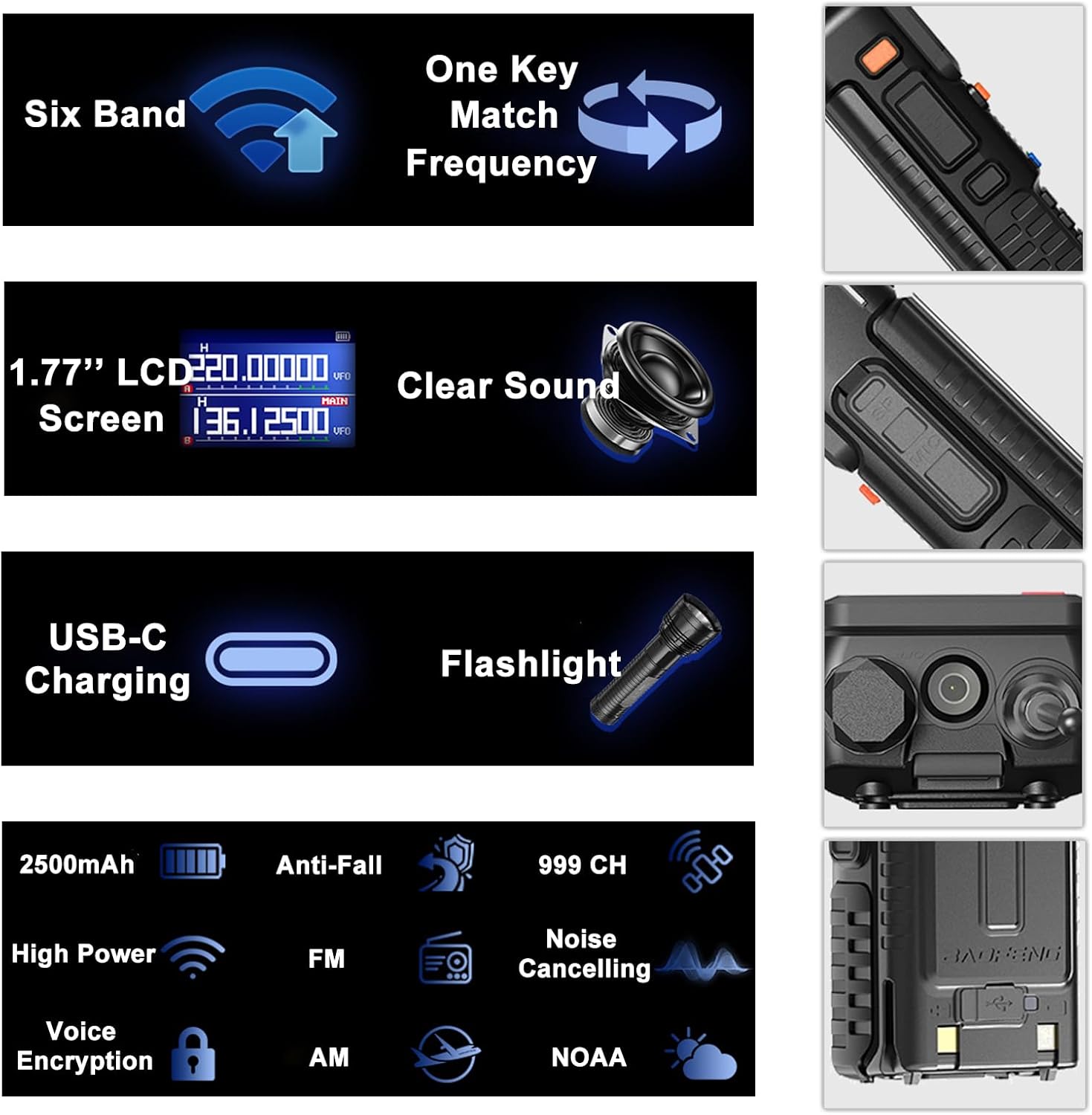
Image: An infographic summarizing the main features of the BAOFENG UV-5RM, such as multi-band capability, one-key frequency matching, USB-C charging, and a 1.77-inch LCD screen.

Gambar: Detil view of the 1.77-inch LCD screen on the BAOFENG UV-5RM, illustrating its dual display capability and clear readability.
Garansi sareng Rojongan
Garansi: The BAOFENG UV-5RM Two Way Radio comes with a 1-year warranty. This warranty is provided exclusively through "Shiqun Electronics Co., Ltd." Please retain your proof of purchase for warranty claims.
Kanggo dukungan téknis, bantuan ngungkulan masalah, atanapi patarosan garansi, mangga ngahubungi penjual atanapi pusat layanan resmi. Tingali dokuméntasi pameseran anjeun kanggo detil kontak khusus.