Bubuka
Hatur nuhun pikeun meuliasing the WHATOOK Portable Handheld Mini Fan. This manual provides important information regarding the setup, operation, maintenance, and troubleshooting of your new fan. Please read this manual thoroughly before using the product to ensure safe and optimal performance.
This compact and powerful fan is designed to provide efficient personal cooling with its ultra-high wind speed and long-lasting rechargeable battery, making it ideal for various scenarios including travel, outdoor activities, and daily use.
Fitur produk
- Ultra-high Wind Speed: Achieves up to 8.5m/s, providing powerful and rapid cooling.
- Batré Awét & Ngecas Gancang: Offers 6-10 hours of operation on a single charge, with 2A fast charging for quick replenishment (2.5 hours for 80% charge).
- High Speed Brushless Motor: Operates at up to 13,500 RPM for superior airflow.
- Wind Gathering Design: Engineered for concentrated and effective airflow.
- Portabel & Kompak: Lightweight and small design for easy carrying and storage.
- Digital tampilan: Shows current gear and battery level.

Figure 1: Illustration of the fan's powerful airflow and comparison to standard fans.

Gambar 2: Detil view of the high-speed brushless motor and its components.
Naon Kaasup
Mangga parios eusi pakét nalika unboxing:
- 1 x WHATOOK High Speed Fan
- 1 x Type C 2A Cable
- 1 x Tali Silikon
- 1 x Manual Pamaké (dokumén ieu)

Figure 3: Contents of the WHATOOK Portable Fan package.
Disetél
- Muatan Awal: Before first use, fully charge the fan using the provided Type C 2A cable. Connect the cable to the fan's charging port and a compatible USB power source (e.g., wall adapter, computer USB port). The digital display will indicate charging status.
- Pasang Lanyard (Opsional): If desired, attach the silicone lanyard to the designated loop on the fan's handle for convenient carrying.
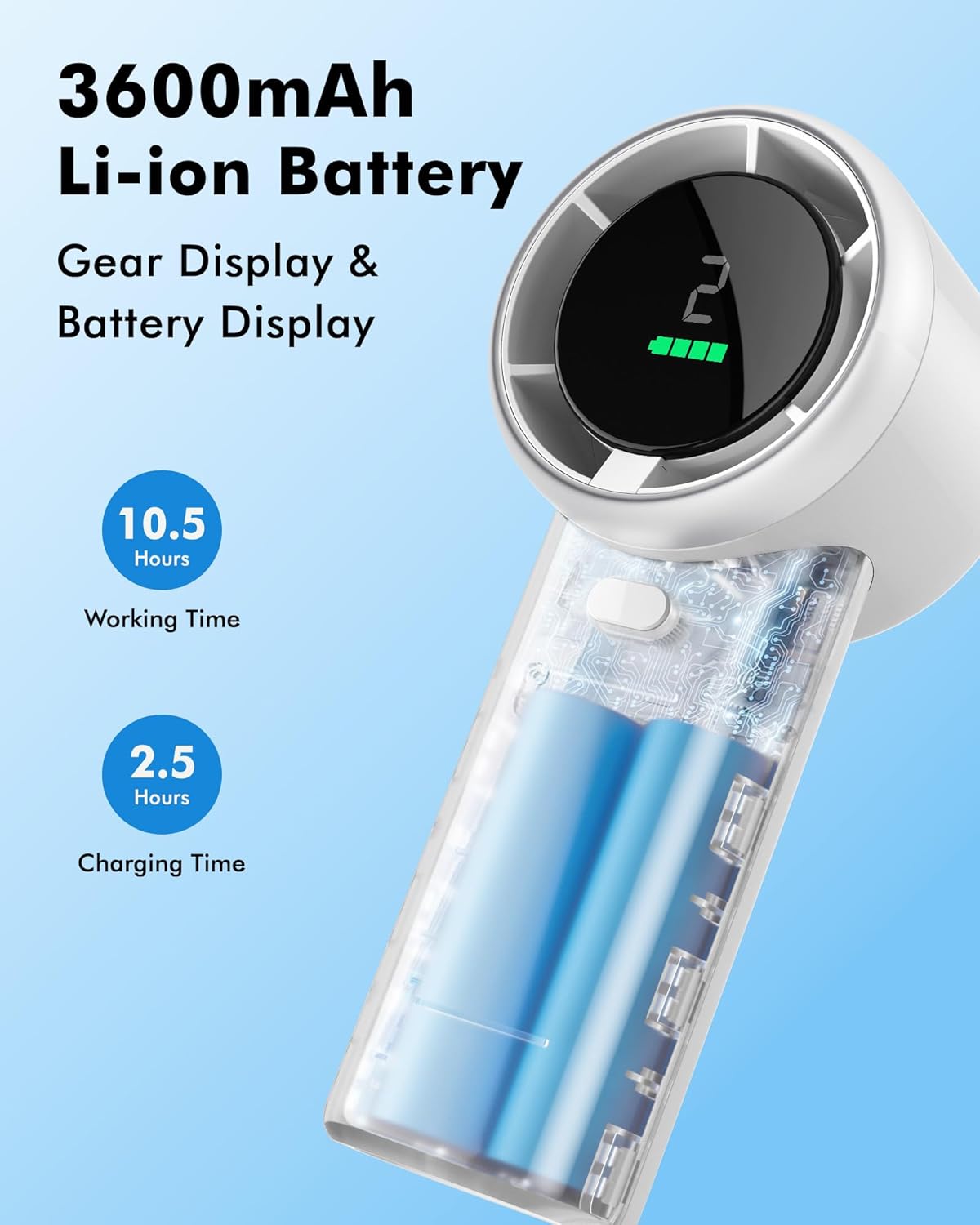
Figure 4: The fan's 3600mAh Li-ion battery and digital display.
Parentah Operasi
The WHATOOK Portable Fan features a simple one-button control for ease of use.
- Hurungkeun/Pareuman: Press and hold the power button (located on the handle) for 2 seconds to turn the fan on or off.
- Saluyukeun Laju Kipas: Once the fan is on, short press the power button to cycle through the 5 available speed settings. The digital display will show the current speed level (1-5).
- Digital tampilan: The display shows the current fan speed (1-5) and the remaining battery level.

Figure 5: The WHATOOK Portable Fan in operation, displaying speed and battery.

Figure 6: The fan is suitable for various scenarios, providing personal cooling wherever needed.
Parentah ngecas
To charge your WHATOOK Portable Fan:
- Locate the Type C charging port on the fan's handle.
- Insert the provided Type C 2A cable into the fan's charging port.
- Connect the other end of the USB cable to a compatible USB power source (e.g., a 5V/2A wall adapter, power bank, or computer USB port).
- The digital display will show the charging progress. A full charge typically takes approximately 2.5 hours to reach 80% capacity.
- Saatos dicas pinuh, pegatkeun sambungan kabel ngecas.
A fully charged fan can provide 6-10 hours of continuous use, depending on the selected speed setting.
Pangropéa
To ensure the longevity and optimal performance of your fan, follow these maintenance guidelines:
- beberesih: Use a soft, dry cloth to wipe the exterior of the fan. Do not use abrasive cleaners or immerse the fan in water.
- Panyimpenan: Upami henteu dianggo salami lami, simpen kipas di tempat anu tiis, garing, sareng jauh tina sinar panonpoé langsung sareng suhu anu ekstrim.
- Perawatan batré: To preserve battery life, avoid fully discharging the battery frequently. Recharge the fan when the battery indicator is low.
Pamérésan masalah
| Masalah | Mungkin Cukang lantaranana | Solusi |
|---|---|---|
| Kipas angin teu hurung. | Batré béak. | Charge the fan using the provided Type C cable. |
| Fan produces weak airflow. | Low battery level or fan is on a low speed setting. | Recharge the fan or increase the speed setting by short pressing the power button. |
| Kipas nyieun sora anu teu biasa. | Obstruction in the fan blades or internal issue. | Pareuman kipas sareng parios naha aya anu ngahalangan. Upami masalahna teras-terasan, hubungi dukungan palanggan. |
| Ngecasna laun atanapi teu tiasa dianggo. | Kabel, adaptor, atanapi port ngecas anu rusak. | Ensure you are using the original Type C 2A cable and a compatible power adapter. Try a different cable or adapter. |
spésifikasi
| Fitur | Rincian |
|---|---|
| merek | KUMAHA |
| Ngaran modél | WHATOOK Portable Fan (LH2203) |
| Warna | Bodas |
| Sumber Daya | Didukung ku batré (2 batré Lithium Ion kalebet) |
| Kapasitas batré | 3600mAh (implied from 10.5 hours working time and 2.5 hours charging time in images) |
| Waktos Gawé | Nepi ka 10.5 jam (gumantung kana setélan laju) |
| Waktu Ngecas | Kira-kira 2.5 jam (kanggo ngecas 80%) |
| Kacepetan Angin Max | 8.5 m/s |
| Laju Motor | Nepi ka 13,500 RPM |
| Jumlah Tingkat Speed | 5 |
| Métode kontrol | Touch (One-button control) |
| Dimensi produk | 1.97 "D x 2.35" W x 5.5" H |
| Item Beurat | 7.8 ons |
| Bahan Sabeulah | palastik |

Gambar 7: Babandingan spésifikasi anu lengkep.
Garansi sareng Rojongan
For warranty information or technical support, please contact WHATOOK customer service through the retailer where the product was purchased or visit the official WHATOOK brand store online. Please retain your proof of purchase for any warranty claims.
For further assistance, you may refer to the WHATOOK store on Amazon: WHATOOK Store
