1. Bubuka
Hatur nuhun pikeun meuliasing the Kaiser Professional 15-inch Speaker System, Model GEM-9520. This manual provides essential information for the safe and efficient operation of your new speaker system. Please read it thoroughly before use and retain it for future reference.
2. Émbaran Kasalametan
- Sumber Daya: Anggo ngan ukur adaptor kakuatan anu ditangtukeun. Pastikeun voltage cocog catu daya lokal Anjeun.
- Cai sareng Uap: Do not expose the speaker to water, rain, or high humidity. Avoid placing liquid-filled objects on the speaker.
- Ventilasi: Pastikeun ventilasi di sabudeureun spiker cekap. Ulah ngahalangan liang ventilasi naon waé.
- Panas: Jauhkeun speaker tina sumber panas sapertos radiator, pancatat panas, kompor, atanapi alat sanés anu ngahasilkeun panas.
- beberesih: Disconnect the power before cleaning. Use a dry, soft cloth. Do not use liquid cleaners or aerosol cleaners.
- Palayanan: Entong nyobian ngalayanan produk ieu nyalira. Rujuk sadayana ngalayanan ka tanaga jasa anu mumpuni.
- panempatan: Place the speaker on a stable, flat surface or securely mount it on the provided tripod. Avoid placing it in direct sunlight or near strong magnetic fields.
3. Eusi Paket
Pastikeun yén sadaya item aya dina bungkusan:
- Kaiser GEM-9520 Professional 15-inch Speaker System
- Mikropon kabel
- Speaker Tripod Stand
- Kabel Daya
- Manual pangguna (dokumén ieu)

Image: Kaiser GEM-9520 speaker system with included microphone and tripod stand.
4. Produk Langkungview
The Kaiser GEM-9520 is a versatile 15-inch professional speaker system designed for various audio applications. It features multiple input options, LED lighting, and a robust design.
Panel hareup
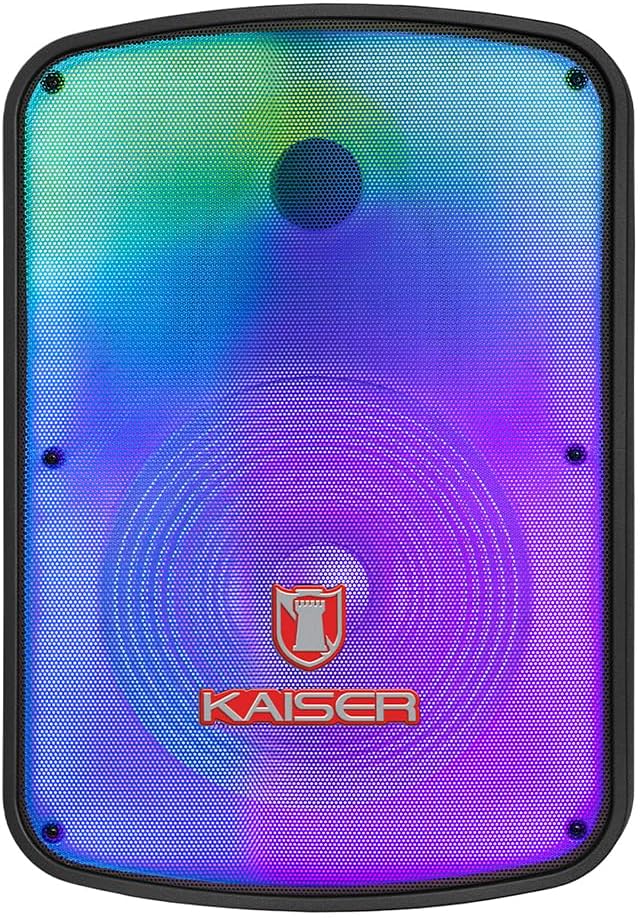
Gambar: Hareupeun view of the Kaiser GEM-9520 speaker, showcasing the 15-inch driver and integrated LED lighting.
Panel Control Pungkur
The rear panel houses all input/output connections and control knobs.

Gambar: Tukangeun view of the Kaiser GEM-9520 speaker, displaying the control panel with various inputs and adjustments.

Gambar: Detil view of the control panel, showing the display, volume, equalizer, and input ports.
Included Microphone and Tripod

Image: The wired microphone included with the Kaiser GEM-9520 speaker system.
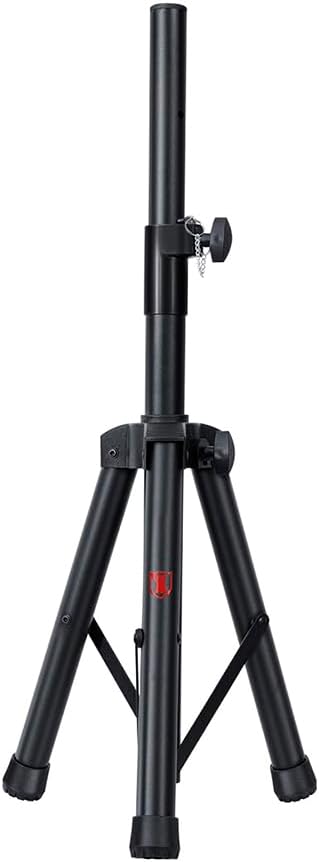
Image: The adjustable tripod stand for mounting the speaker.
5. Setélan
5.1 Ngabongkar bungkusan sareng Penempatan Awal
- Sacara saksama miceun sadaya komponén tina bungkusan.
- Place the speaker on a flat, stable surface or prepare for tripod mounting.
5.2 Tripod Assembly and Speaker Mounting
- Unfold the tripod legs and extend them to a stable position. Ensure all locking mechanisms are secure.
- Adjust the height of the tripod to your desired level and secure the locking pin and knob.
- Carefully lift the speaker and place its bottom mounting hole onto the tripod pole. Ensure it is seated firmly.

Image: Close-up of the tripod stand, showing its adjustable components.
5.3 Power Connection and Initial Charge
- Connect the provided power cable to the speaker's power input port on the rear panel.
- Colokkeun tungtung kabel daya anu sanésna kana stop kontak listrik anu cocog.
- For optimal battery life, fully charge the speaker before its first use. The charging time is approximately 3 hours.
6. Parentah Operasi
6.1 Daya Hurung/Pareuman
Locate the power switch on the rear control panel. Flip it to the 'ON' position to power on the speaker. Flip it to 'OFF' to power off.
6.2 Pamilihan Mode
Press the 'MODE' button on the control panel to cycle through available input modes: Bluetooth, USB, Micro SD, AUX, and FM Radio.
6.3 Volume and Equalizer Controls
- Volume: Rotate the 'VOLUME' knob to adjust the overall output volume.
- Treble (Agudos): Use the 'AGUDOS' knob to adjust the high-frequency response.
- Bass (Bajos): Use the 'BAJOS' knob to adjust the low-frequency response.
6.4 Sambungan Bluetooth
- Switch the speaker to Bluetooth mode. The display will show 'BLUE' and a pairing indicator will flash.
- Dina alat sélulér anjeun (smartphone, tablet, laptop), aktipkeun Bluetooth sareng milarian alat anu sayogi.
- Select 'Kaiser GEM-9520' (or similar name) from the list.
- Sakali dipasangkeun, spiker bakal ngaluarkeun sora konfirmasi, sareng indikator Bluetooth bakal eureun kedip-kedip.
6.5 Putereun USB/Micro SD
- Selapkeun USB flash drive atawa kartu Micro SD (saméméhna dieusian ku audio MP3 files) kana palabuhan masing-masing.
- The speaker will automatically switch to USB/Micro SD mode and begin playback. If not, press the 'MODE' button.
- Use the playback controls (Play/Pause, Next/Previous Track) on the control panel to manage your music.
6.6 Input AUX
- Connect an external audio device (e.g., MP3 player, computer) to the 'AUX' input port on the speaker using a 3.5mm audio cable.
- Switch the speaker to AUX mode using the 'MODE' button.
- Kontrol playback sareng polumeu tina alat anu disambungkeun.
6.7 Pamakéan Mikropon
- Connect the wired microphone to the 'MIC' input port on the rear panel.
- Adjust the microphone volume using the 'VOL MIC' knob.
- Adjust the echo effect using the 'ECO' knob.

Image: Close-up of the wired microphone, showing its ON/OFF switch.
6.8 Microphone Audio Priority Function
This function automatically lowers the background music volume when the microphone is in use, making the voice clearer and more prominent. To activate/deactivate this function, refer to the specific button or switch on the control panel labeled for 'Mic Priority' or similar.

Image: Diagram illustrating the microphone audio priority function, which lowers music volume when the microphone is active.
6.9 KSR-LINK Function
The KSR-LINK function allows you to wirelessly connect two compatible Kaiser speakers for a stereo sound experience. Refer to the specific instructions for KSR-LINK pairing, usually involving pressing a dedicated button on both speakers simultaneously.
7. Pangropéa
- beberesih: Wipe the speaker's exterior with a soft, dry cloth. Do not use abrasive cleaners, waxes, or solvents.
- Panyimpenan: Lamun teu dipaké pikeun période nambahan, nyimpen speaker dina tiis, tempat garing, jauh ti sinar panonpoé langsung jeung hawa ekstrim.
- Perawatan batré: Pikeun manjangkeun umur batré, ulah sering ngosongkeun batréna. Cas deui speaker sacara rutin, sanajan teu dianggo.
8. Cara ngungkulan
| Masalah | Mungkin Cukang lantaranana | Solusi |
|---|---|---|
| Taya kakuatan | Kabel daya teu nyambung; Batré kosong; Saklar daya pareum. | Pastikeun kabel daya disambungkeun kalayan pageuh sareng dicolokkeun. Cas batréna. Puterkeun saklar daya ka 'ON'. |
| Taya sora | Volume too low; Incorrect input mode; External device not playing. | Increase the master volume. Select the correct input mode. Ensure the connected device is playing and its volume is up. |
| Bluetooth teu nyambung | Speaker not in pairing mode; Device too far; Previously paired device connected. | Ensure speaker is in Bluetooth pairing mode. Move device closer to speaker. Disconnect from other Bluetooth devices. |
| Mikropon teu jalan | Microphone not connected; Microphone volume too low; Microphone switch off. | Ensure microphone is securely plugged in. Increase 'VOL MIC' knob. Turn the microphone's ON/OFF switch to 'ON'. |
| panarimaan radio FM goréng | Weak signal; No external antenna. | Reposition the speaker. Extend any built-in antenna or connect an external one if available. |
9. Spésifikasi
| Fitur | Spésifikasi |
|---|---|
| Modél | GEM-9520 |
| Kaluaran Wattage | 25000 Watts (PMPO) |
| Ukuran Speaker | 15 inci |
| Sumber Daya | Batré |
| Kahirupan Batré (Rata-rata) | 6 Jam |
| Waktu Ngecas | 3 Jam |
| Téhnologi konektipitas | AUX, Bluetooth, USB |
| Input audio | Microphone, USB, Micro SD, 3.5 mm, 6.3 mm |
| Fitur husus | High-resolution audio, LED light, USB port, Microphone Audio Priority, KSR-LINK |
| Tipe Pamasangan | Floor Mount (Tripod included) |
| Bahan | palastik |
| Ukuran produk (L x W x H) | 45 x 35 x 64 cm |
| Beurat produk | 10.85 kg |
10. Garansi jeung Rojongan
This Kaiser product is covered by a manufacturer's warranty. For specific warranty terms and conditions, please refer to the warranty card included in your product packaging or contact Kaiser customer support. For technical assistance or service inquiries, please visit the official Kaiser websitus atanapi ngahubungan departemén layanan palanggan maranéhna.


