1. Produk Langkungview
The MokerLink 16-Port Gigabit Ethernet Switch is an unmanaged network switch designed for expanding network connectivity in home or small office environments. It features 16 Gigabit Ethernet ports, offering high-speed data transfer with plug-and-play simplicity. The fanless metal design ensures quiet and stable operation.

Gambar 1: Leuwihview of the MokerLink 16-Port Gigabit Ethernet Switch, highlighting its full Gigabit ports, plug and play functionality, power-saving features, wall-mountable design, LED indicators, and fanless operation.
Fitur konci:
- 16 Pelabuhan Ethernet Gigabit: Provides 16 10/100/1000Mbps RJ45 ports for high-speed network connections.
- Nyolok sareng Puter: Requires no configuration, making setup quick and easy.
- Desain tanpa kipas: Ensures silent operation, suitable for various environments.
- Logam Awét Casing: Offers robust protection and efficient heat dissipation.
- Énergi Éfisién: Features power-saving functionality (IEEE 802.3az EEE support) to reduce energy consumption.
- Penempatan Fleksibel: Supports desktop or wall-mount installation.
2. Eusi Paket
Pastikeun yén sadaya item aya dina bungkusan:
- 1 x MokerLink 16-Port Gigabit Ethernet Switch
- 1 x Power Adapter (DC 12V / 1.0A)
- 1 x Manual Pamaké (dokumén ieu)
3. Setup jeung Instalasi
Follow these steps to set up your MokerLink Gigabit Ethernet Switch:
- Pilih Lokasi: Place the switch on a stable desktop or mount it on a wall. Ensure adequate ventilation around the device.
- Sambungkeun Kakuatan: Insert the DC plug of the power adapter into the switch's DC input port. Plug the other end of the power adapter into a standard electrical outlet. The power LED indicator will illuminate.
- Sambungkeun Alat Jaringan: Connect your network devices (e.g., computers, printers, network-attached storage, routers, IP cameras, wireless access points) to any of the 16 RJ45 ports using standard Ethernet cables. The switch supports auto MDI/MDIX, so crossover cables are not required.
- Pariksa sambungan: Once a device is connected, the corresponding port's LED indicator will light up (green for link, flashing for data transmission).
- Pamasangan témbok (Opsional): If wall mounting, use appropriate screws and anchors (not included) with the mounting holes on the switch.
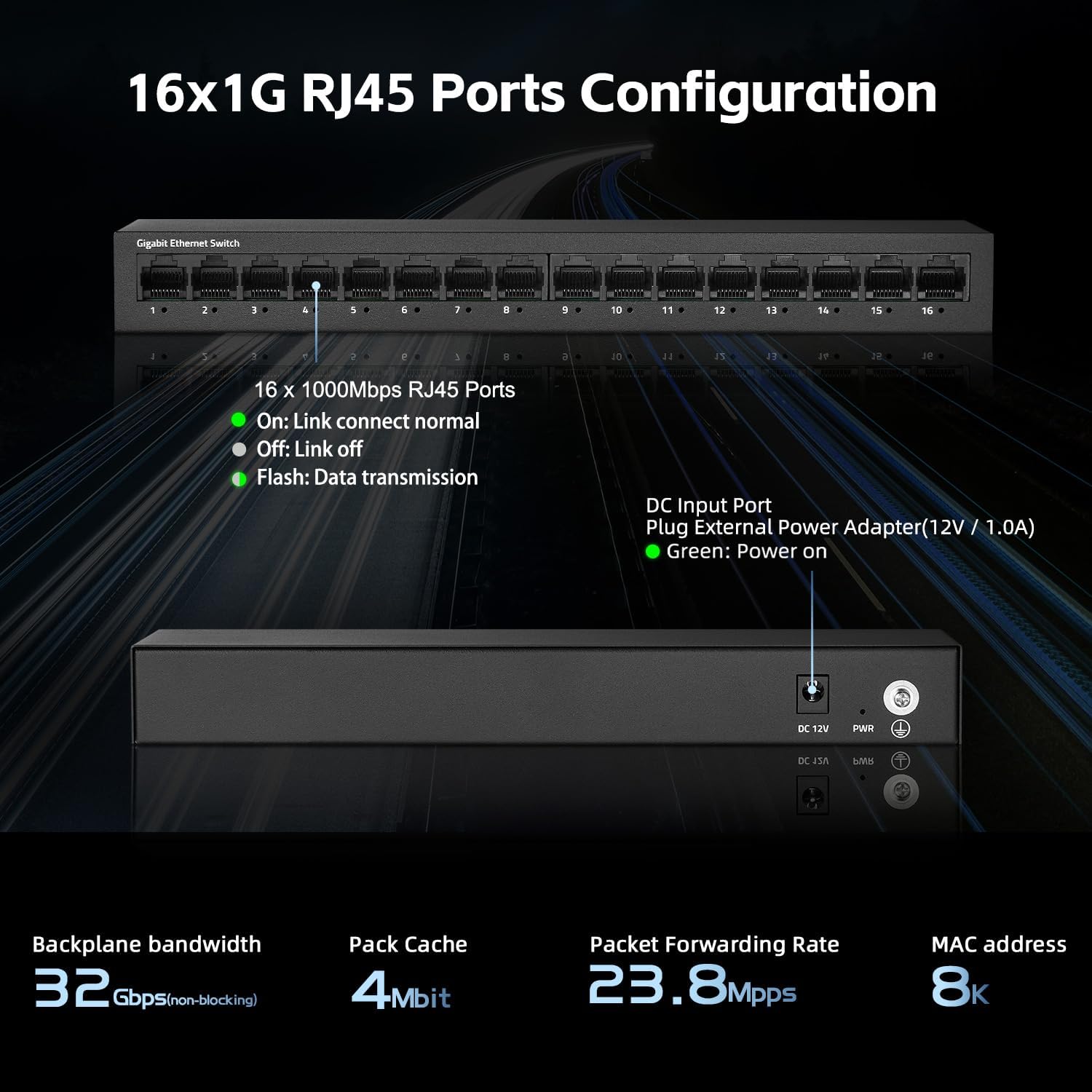
Gambar 2: Tukangeun view of the switch showing the DC input port and power LED indicator.

Figure 3: Ethernet cables connected to the switch ports.

Gambar 4: Kelample of the switch mounted on a wall, demonstrating its flexible placement options.
4. Parentah Operasi
The MokerLink 16-Port Gigabit Ethernet Switch is an unmanaged device, meaning it operates automatically without requiring user configuration. Simply connect your devices, and the switch will handle network traffic efficiently.
Indikator LED:
| Indikator | Status | Katerangan |
|---|---|---|
| kakuatan LED | Héjo | Saklar dihurungkeun. |
| Port Link/Act LEDs (1-16) | Héjo (Padet) | A device is connected to the port, and the link is active. |
| Héjo (Flashing) | Data keur dikirimkeun atawa narima ngaliwatan port. | |
| Pareum | No device is connected, or the connected device is powered off/inactive. |

angka 5: Tutup-up view of the port LED indicators, showing a green light for an active link.
Fungsi Otomatis:
- Negosiasi otomatis: Each port automatically detects the link speed of the connected network device (10/100/1000Mbps) and adjusts for compatibility and optimal performance.
- MDI/MDIX Otomatis: Automatically detects the type of Ethernet cable (straight-through or crossover) and adjusts accordingly, eliminating the need for specific cable types.
- Non-Blocking Wire Speed: All ports can simultaneously transmit and receive data at their full wire speed without congestion.
5. Pangropéa sarta perawatan
To ensure the longevity and optimal performance of your MokerLink switch, follow these maintenance guidelines:
- Lingkungan: Operate the switch within its specified temperature range (0°C to 45°C). Avoid placing it in direct sunlight, near heat sources, or in areas with high humidity.
- beberesih: Anggo lawon anu lembut sareng garing pikeun ngabersihan bagian luar saklar. Entong nganggo pembersih cair atanapi aerosol.
- Ventilasi: Ensure that the ventilation holes on the sides of the switch are not blocked to allow for proper heat dissipation. The fanless design relies on natural convection.
- Sasayogian tanaga: Use only the provided power adapter. If the adapter is damaged, replace it with an equivalent approved adapter.
- Manajemén Kabel: Organize network cables neatly to prevent strain on the ports and accidental disconnections.

Figure 6: The switch features a fanless metal design for efficient heat dissipation and energy saving.
6. Cara ngungkulan
If you encounter issues with your MokerLink switch, refer to the following common troubleshooting steps:
- Henteu aya kakuatan:
- Pastikeun adaptor daya disambungkeun pageuh kana saklar sareng stop kontak listrik anu tiasa dianggo.
- Pariksa naha stop kontak listrik berpungsi ku cara nyolokkeun alat sejen.
- Verify the power LED on the switch is illuminated.
- Teu Aya Tautan/Kagiatan di Palabuhan:
- Ensure the Ethernet cable is securely connected to both the switch port and the network device.
- Check the status of the connected network device (e.g., computer is powered on, network adapter is enabled).
- Coba kabel Ethernet béda.
- Coba sambungkeun alat ka port béda dina saklar.
- Verify the link/activity LED for the port is illuminated (solid green for link, flashing for activity).
- Lambat Jaringan:
- Ensure all connected devices and cables support Gigabit Ethernet (1000Mbps). The switch will operate at the lowest common speed.
- Check for excessive network traffic or bandwidth-intensive applications running on connected devices.
- Restart the switch by unplugging and replugging the power adapter.
- Sambungan Intermittent:
- Inspect Ethernet cables for damage.
- Ensure the switch is placed in a stable environment, free from excessive heat or electromagnetic interference.
- Check for loose power or Ethernet cable connections.
7. Spésifikasi
| Fitur | Katerangan |
|---|---|
| Modél | 16*1G Unmanaged |
| Palabuhan | 16 x 10/100/1000Mbps Port RJ45 |
| Ngalihkeun Kamampuh | 32 Gbps |
| Packet Neraskeun Laju | 23.8 Mpps |
| Méja Alamat MAC | 8K |
| Pigura Jumbo | 9K (Standard for Gigabit Ethernet) |
| Standar | IEEE 802.3, IEEE 802.3u, IEEE 802.3ab, IEEE 802.3x, IEEE 802.3az |
| Tipe panganteur | RJ45 |
| Métode Pangiriman | Toko-na-Teraskeun |
| Sasayogian tanaga | External Power Adapter (DC 12V / 1.0A) |
| Konsumsi Daya | Low power consumption (Energy Efficient Ethernet support) |
| Indikator LED | Power, Link/Act (per port) |
| Ukuran (L x W x H) | Kira-kira 10.16 x 5.04 x 3.23 inci (25.8 x 12.8 x 8.2 cm) |
| Item Beurat | Kira-kira 1.65 pon (0.75 kg) |
| Bahan Kasus | logam |
| Suhu Operasi | 0°C nepi ka 45°C (32°F nepi ka 113°F) |
| Kalembaban Operasi | 10% nepi ka 90% non-condensing |
| Pamasangan | Desktop or Wall-Mount |

Figure 7: Visual representation of the switch's high port speed and switching capacity.
8. Video Produk Resmi
The following videos provide additional information and visual guidance for the MokerLink 16-Port Gigabit Ethernet Switch:
Video 1: Produk Leuwihview (0:38)
Video pondok ieu nyayogikeun gambaran ringkesview of the MokerLink 16-Port Gigabit Ethernet Switch, highlighting its main features and design.
Video 2: Detailed Features and Usage (2:11)
A more in-depth video demonstrating the features and typical usage scenarios of the Gigabit Ethernet Switch.
Video 3: Installation and Connectivity (1:38)
This video guides you through the physical installation and connection process for the switch.
Video 4: Key Highlights (0:36)
A concise video highlighting important aspects and benefits of the MokerLink switch.
Video 5: Advanced Overview (1:25)
This video offers a more advanced look at the switch's capabilities and performance.
Video 6: Quick Feature Spotlight (0:20)
A very brief video focusing on a specific feature or benefit of the switch.
Video 7: Comprehensive Demonstration (2:59)
This comprehensive video provides a full demonstration of the MokerLink 16-Port Gigabit Ethernet Switch, from unboxing to operation.
9. Garansi jeung Rojongan
Inpormasi Garansi: For details regarding the product warranty, please refer to the warranty card included with your purchase or contact the seller/manufacturer directly. Warranty terms may vary by region and retailer.
Bantosan Téknis: If you require technical assistance or have questions not covered in this manual, please contact MokerLink customer support through their official websitus atanapi pangecér ti saha anjeun mésér produk.
Kanggo inpo nu leuwih lengkep, buka di MokerLink Store on Amazon.


