1. Bubuka
Thank you for choosing the iBasso Audio DX260 Portable Audio Player. The DX260 is a high-fidelity digital audio player designed to deliver an exceptional listening experience. Featuring an advanced Octa DAC Chip Matrix, a powerful Snapdragon 660 SoC, and a versatile Android 11 operating system, it supports a wide range of audio formats and connectivity options. This manual provides essential information on setting up, operating, maintaining, and troubleshooting your device to ensure optimal performance.

Hareupeun view of the iBasso Audio DX260 Portable Audio Player.
2. Fitur Produk
- Octa DAC Chip Matrix: Equipped with 8x Cirrus Logic CS43198 DAC chips for superior audio conversion.
- Powerful SoC: Snapdragon 660 processor ensures smooth operation and efficient audio processing.
- Sistem operasi: Runs on Android 11, offering a familiar and customizable user interface.
- Mémori: 4GB RAM and 64GB ROM for ample storage and multitasking capabilities.
- Pintonan resolusi luhur: 5.0-inch 1080x1920 On-Cell Capacitive Touch Panel for clear visuals and intuitive control.
- Kaluaran serbaguna: Features 4.4mm Balanced Phone Out/Line Out, 3.5mm Phone Out/Line Out, 3.5mm SPDIF Output, and USB-OTG Digital Output.
- Konéktipitas nirkabel: Supports Wi-Fi (802.11b/g/n/ac 2.4GHz/5GHz) and Bluetooth 5.0 with various codecs (AAC, SBC, aptX, aptX HD, LDAC for transmit; AAC, SBC for receive).
- Wangunan awét: Constructed with an aluminum alloy body.

The DX260 features an Octa DAC Chip Matrix with 8x Cirrus Logic CS43198 DACs.

Powered by a Snapdragon 660 SoC with 4GB RAM and 64GB ROM.
3. Eusi Paket
Saatos muka bungkusan, mangga pastikeun sadaya item di handap ieu aya:
- iBasso Audio DX260 Portabel Audio Player
- Gancang Mimitian Guide
- Pelindung layar (saméméhna dilarapkeun atanapi kalebet)
- USB-C to A Charging Cable
- Coaxial Digital Cable
- 4.4mm Burn-in Cable
- Kartu Garansi Produk
- Dedicated TPU Case
4. Kontrol jeung palabuhan
Familiarize yourself with the physical controls and ports of your DX260:
- Jilid Kenop: Perenahna di sisi, dianggo pikeun nyaluyukeun tingkat kaluaran audio.
- Tombol Daya: Typically integrated with the volume knob or nearby, used for power on/off and screen lock.
- Tombol Kontrol Puteran: Play/Pause, Next Track, Previous Track buttons for media control.
- Palabuhan USB-C: For charging, data transfer, and USB-DAC functionality.
- Slot Kartu MicroSD: Pikeun ékspansi gudang kalayan kartu microSD.
- 3.5mm Audio Jack: Standard single-ended headphone output and line out.
- 4.4mm Balanced Audio Jack: Balanced headphone output and line out for enhanced audio performance.
- 3.5mm SPDIF Output: kaluaran audio digital.

Samping view showing the volume knob and playback control buttons.

Handapeun view displaying the USB-C port, MicroSD card slot, and audio outputs.
5. Setélan
5.1. Ngecas Awal
Before first use, fully charge your DX260. Connect the provided USB-C to A charging cable to the device's USB-C port and the other end to a compatible USB power adapter (not included) or a computer's USB port. The device supports QC3.0/PD3.0 fast charging. A full charge takes approximately 2.5 hours.
5.2. Powering on / Pareum
- Pikeun Ngahurungkeun: Pencet jeung tahan tombol Daya dugi layar hurung.
- Pikeun mareuman: Press and hold the Power button until a power-off menu appears on the screen. Select "Power Off" to shut down the device.
- Konci layar/Buka konci: Pencét sakeudeung tombol Daya pikeun ngonci atanapi muka konci layar.
5.3. Nyelapkeun Kartu MicroSD
The DX260 supports microSD cards for expanded storage. Locate the microSD card slot on the device. Gently insert the microSD card into the slot until it clicks into place. To remove, push the card in slightly until it springs out.
5.4. Konfigurasi awal
Upon first power-on, follow the on-screen prompts to complete the initial setup, including language selection, Wi-Fi connection, and Google account setup (optional, for Android features).
6. Parentah Operasi
6.1. User Interface (Android 11 & Mango OS)
The DX260 operates on Android 11, providing access to various apps and settings. It also features a dedicated Mango OS mode for optimized audio playback, which can be accessed through the system settings or a quick toggle.
The DX260 features the Mango OS for dedicated audio playback.
6.2. Puterkeun Musik
- Ngamuat Musik: Mindahkeun musik files to the device's internal storage or a microSD card via USB connection to a computer.
- Using the Music Player: Open the pre-installed music player app (e.g., Mango Player) to browse and play your audio files.
- Kontrol volume: Use the physical volume knob on the side to adjust the playback volume.
- Sambungan Headphone: Connect your headphones to either the 3.5mm or 4.4mm balanced output jack.
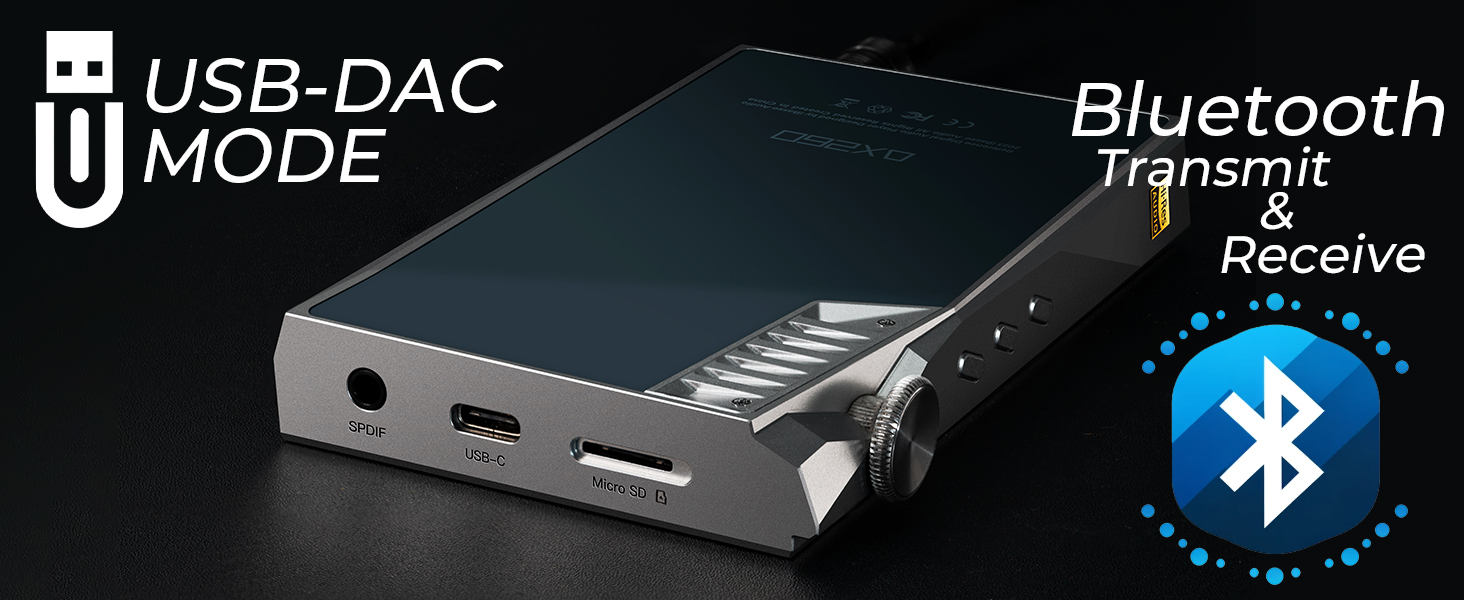
6.3. USB-DAC Mode
The DX260 can function as a high-quality USB-DAC for your computer or other compatible devices.
- Connect the DX260 to your computer using the USB-C cable.
- On the DX260, select "USB-DAC Mode" from the notification panel or settings.
- Your computer should recognize the DX260 as an audio output device. Select it as the default playback device in your computer's sound settings.
6.4. Konektipitas Bluetooth
The DX260 supports both Bluetooth transmission (sending audio to Bluetooth headphones/speakers) and reception (receiving audio from a source device).
- Pikeun ngirimkeun: Go to Bluetooth settings, enable Bluetooth, and pair with your desired Bluetooth audio device.
- Pikeun Nampi: Enable Bluetooth reception mode on the DX260 (if available in settings) and pair it with your source device (e.g., smartphone).

The DX260 supports both USB-DAC mode and Bluetooth transmit/receive.
7. Pangropéa
- beberesih: Anggo lawon anu lemes, garing, sareng henteu buluan pikeun ngabersihkeun alat. Entong nganggo pembersih cair atanapi aerosol.
- Perawatan layar: The screen protector helps prevent scratches. If it becomes damaged, replace it with a new one.
- Perawatan batré: Pikeun manjangkeun umur batré, ulah sering-sering ngecas alat sacara pinuh. Simpen alat di tempat anu tiis sareng garing upami henteu dianggo salami lami.
- Panyimpenan: Jauhkeun alat tina suhu anu ekstrim, sinar panonpoé langsung, sareng kalembaban anu luhur.
8. Cara ngungkulan
8.1. Alat Teu Bisa Dihurungkeun
- Pastikeun batréna geus dieusian. Sambungkeun alat ka sumber daya tur ngidinan eta ngecas salila sahenteuna 30 menit samemeh nyoba ngahurungkeun deui.
- Try holding the Power button for a longer duration (e.g., 10-15 seconds) for a forced restart.
8.2. Taya Kaluaran Sora
- Pariksa tingkat polumeu.
- Ensure headphones are properly connected to the correct audio jack (3.5mm or 4.4mm).
- Uji nganggo headphone anu béda pikeun ngaluarkeun masalah headphone.
- Verify that the correct output mode is selected in the device settings (e.g., Phone Out vs. Line Out).
8.3. Device Freezes or Becomes Unresponsive
- Pencét jeung tahan tombol Daya salila kira 10-15 detik pikeun maksa balikan deui.
- If the issue persists, consider performing a factory reset (note: this will erase all data on the device). Back up important files sateuacan neraskeun.
8.4. Wi-Fi or Bluetooth Connectivity Issues
- Pastikeun Wi-Fi/Bluetooth diaktipkeun dina setélan.
- Restart the DX260 and the router/Bluetooth device.
- Forget the network/device and try reconnecting.
- Ensure the device is within range of the Wi-Fi network or Bluetooth accessory.
9. Spésifikasi
| Fitur | Spésifikasi |
|---|---|
| Bahan Awak | Aluminium Alloy |
| Ukuran (L x W x H) | 123mm x 74.5mm x 17.5mm |
| Beurat | 229g |
| tampilan | 5.0-inch 1080x1920 On-Cell Capacitive Touch Panel |
| Sistem operasi | Android 11 |
| SoC | Snapdragon 660 |
| Ram | 4GB |
| Rom | 64GB |
| Chip DAC | Cirrus Logic CS43198 x 8 |
| Max Sampling Rate (USB-DAC) | PCM 384kHz/32bit | DSD256 |
| Format Audio Dirojong | APE, FLAC, WAV, WMA, AAC, ALAC, AIFF, OGG, MP3, DFF, DSF, DXD, DST |
| Kaluaran | 4.4mm Balanced Phone Out/Line Out, 3.5mm Phone Out/Line Out, 3.5mm SPDIF Output, USB-OTG Digital Output |
| Wifi | 802.11b/g/n/ac (2.4GHz/5GHz) |
| Vérsi Bluetooth | 5.0 |
| Bluetooth Transmit Codecs | AAC, SBC, aptX, aptX HD, LDAC |
| Bluetooth Receive Codecs | AAC, SBC |
| Batré | 4400 mAh 3.8V |
| Max Continuous Playback Time | Approx. 14 hours (varies by usage) |
| Standar Ngecas | QC3.0/PD3.0 |
| Waktu Ngecas | Kira-kira. 2.5 jam |

Detailed specifications of the iBasso DX260.
10. Garansi jeung Rojongan
The iBasso Audio DX260 comes with a product warranty. Please refer to the included Product Warranty Card for details regarding warranty terms, conditions, and duration. For technical support, service, or further inquiries, please contact your local iBasso Audio distributor or visit the official iBasso Audio websitus. Simpen bukti pameseran anjeun pikeun klaim garansi.


