1. Bubuka
This manual provides detailed instructions for the GHUST MR23GA Replacement Magic Voice Remote Control. This remote is designed as a direct replacement for select LG C3, B3, G3, UR9000, QNED75, and QNED80 Series OLED and QNED EVO Smart TVs, offering seamless functionality without the need for complex programming.

Figure 1: GHUST MR23GA Remote Control - Front View
This image displays the front of the black remote control, showcasing its full array of buttons including the power button, number pad, navigation controls, volume and channel buttons, voice command button, and dedicated shortcut buttons for streaming services like Netflix and Prime Video.
2. Émbaran Kasalametan
- Jauhkeun batré tina jangkauan barudak.
- Ulah campur batré heubeul jeung anyar, atawa tipena béda accu.
- Cabut batré upami kadali jauh henteu dianggo kanggo waktos anu panjang.
- Ulah ngantepkeun remot kontrol ka sinar panonpoé langsung, panas, atanapi kalembaban.
- Avoid dropping or subjecting the remote control to strong impacts.
3. Eusi Paket
The package should contain the following item:
- 1 x GHUST MR23GA Replacement Magic Voice Remote Control
Catetan: Batré AAA teu kalebet sareng kedah dipésér misah.
4. Produk Langkungview
The GHUST MR23GA remote control is designed for ease of use and durability, featuring a compact size and precise control. It is made of high-quality ABS materials.

Figure 2: Key Features of the Remote Control
This image illustrates the remote control alongside text indicating its key features: "Key sensitive" for responsive button presses, "Made of ABS materials" for durability, and "Advanced chip for precise control" ensuring reliable performance.

Figure 3: Ease of Use and Durability
This image emphasizes the remote's user-friendly design and robust construction, with icons and text indicating "more durable," "Signal stabilization," and "multiple functions." It also highlights that "No setup or programming required" for immediate use.
4.1. Tombol potong kompas
The remote control includes dedicated shortcut buttons for quick access to popular streaming applications and services:
- Netflix
- Perdana Video
- Disney +
- Saluran LG
- Sleting
- Alexa (Voice Search)

Figure 4: Dedicated Shortcut Buttons
This image shows the lower section of the remote control, clearly displaying the dedicated shortcut buttons for Netflix, Prime Video, Disney+, LG Channels, Sling, and Alexa, allowing for quick access to these applications.
5. Setélan
5.1. Masang Batré
The GHUST MR23GA remote control requires two (2) AAA batteries (not included) for operation. Follow these steps to install them:
- Teangan tempat panutup kompartemen batré dina tonggong kadali jauh.
- Geser panutup ka handap atawa pencét kancing pikeun mukakeunana.
- Selapkeun dua batré AAA, mastikeun terminal positif (+) jeung négatip (-) align bener jeung markings jero kompartemen nu.
- Tutup panutup kompartemen batré ku cara ngageser deui kana tempatna nepi ka klik aman.
No programming or additional setup is required. Once batteries are installed, the remote is ready for use with compatible LG Smart TVs.
6. Ngoperasikeun Remote Control
6.1. Kasaluyuan
This replacement remote control is compatible with the following LG Smart TV models:
- OLED42C3AUA, OLED42C3PUA, OLED48C3PUA, OLED55C3PUA, OLED65C3AUA, OLED77C3PUA, OLED83C3PUA (LG C3 Series)
- OLED55B3PUA, OLED65B3PUA, OLED77B3PUA (LG B3 Series)
- OLED55G3PUA, OLED65G3PUA, OLED77G3PUA, OLED83G3PUA (LG G3 Series)
- 43UR9000PUA, 50UR9000PUA, 55UR9000PUA, 65UR9000PUA, 75UR9000PUA (LG UR9000 Series)
- 43QNED75URA, 50QNED75URA, 55QNED75URA, 65QNED75URA, 75QNED75URA (LG QNED75 Series)
- 50QNED80URA, 55QNED80URA, 65QNED80URA, 75QNED80URA, 86QNED80URA (LG QNED80 Series)
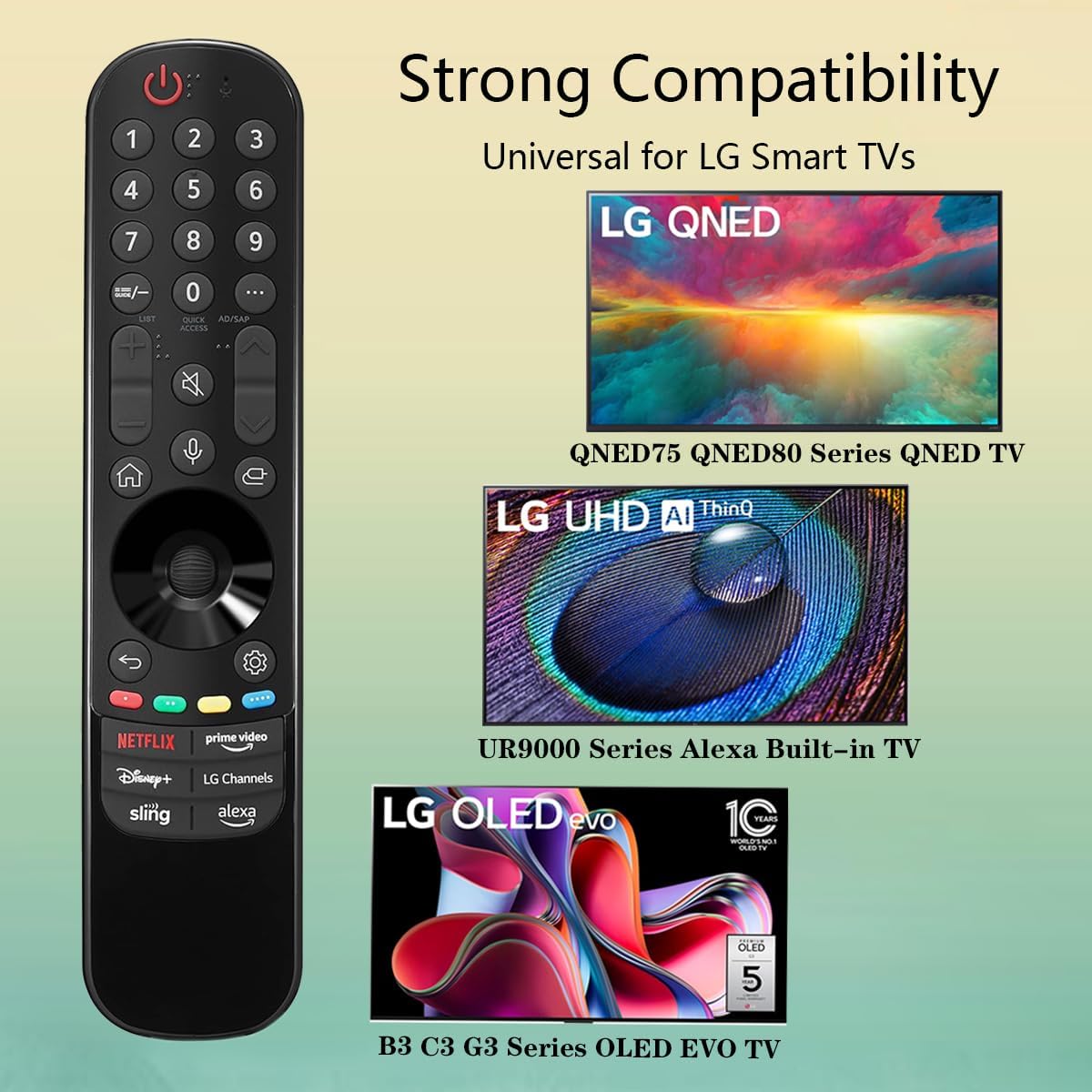
Figure 5: Strong Compatibility with LG Smart TVs
This image visually represents the broad compatibility of the remote control, showing it works with LG QNED (QNED75, QNED80 Series), LG UHD AI ThinQ (UR9000 Series Alexa Built-in TV), and LG OLED evo (B3, C3, G3 Series OLED EVO TV).
6.2. Fungsi Dasar
Point the remote control directly at your LG Smart TV. Press the desired buttons to control your television. Functions include:
- Tombol Daya: Ngahurungkeun atawa mareuman TV.
- Pad Nomer: Pikeun input saluran langsung.
- Volume Kaluhur/Turun: Nyaluyukeun polumeu TV.
- Saluran luhur/handap: Robah saluran TV.
- Tombol Navigasi (Kaluhur, Turun, Kénca, Katuhu, OK): Pikeun menu navigasi jeung pilihan.
- Tombol Balik: Mulih ka layar atawa ménu saméméhna.
- Tombol imah: Accesses the TV's home screen or smart hub.
- Voice Command Button: Activates voice control for compatible TVs (requires TV to support voice features).
- Tombol potong kompas: Directly launch Netflix, Prime Video, Disney+, LG Channels, Sling, and Alexa.
7. Pangropéa
7.1. Ngabersihan Remote Control
To clean the remote control, use a soft, dry cloth. Do not use liquid cleaners, sprays, or abrasive materials, as these may damage the remote's surface or internal components.
7.2. Ngagantian batré
If the remote control's response becomes sluggish or it stops functioning, the batteries may need to be replaced. Refer to Section 5.1 for instructions on installing new batteries.
8. Cara ngungkulan
- Jauh teu ngabales:
- Ensure batteries are inserted correctly with correct polarity (+/-).
- Ganti batré anu lami ku batré AAA anu énggal.
- Make sure there are no obstructions between the remote and the TV's IR receiver.
- Ensure the remote is pointed directly at the TV.
- Paréntah sora teu jalan:
- Verify that your LG Smart TV model supports voice control features.
- Ensure the TV's internet connection is stable, as voice commands often require online processing.
- Tombol husus teu jalan:
- Check for any physical damage or debris under the button.
- If only certain shortcut buttons are not working, ensure your TV's software is up to date and the corresponding apps are installed and functional.
9. Spésifikasi
| Atribut | Rincian |
|---|---|
| Nomer modél | MR23GA |
| merek | GUSTI |
| Dimensi produk | 7.3 x 1.6 x 1.2 inci |
| Item Beurat | 2.29 ons |
| Batré Diperlukeun | 2 x AAA (teu kaasup) |
| Warna | Hideung |
| Fitur husus | Pilarian Sora |
| Alat nu cocog | Television (Specific LG Smart TV models) |

Gambar 6: Diménsi Remote Control
This image provides a visual representation of the remote control's dimensions, showing its length as 7.3 inches, width as 1.6 inches, and thickness as 1.2 inches.
10. Garansi jeung Rojongan
For any questions regarding the quality of our products or for technical assistance, please contact GHUST customer service. We are committed to resolving any issues promptly to ensure your satisfaction.
Punten tingal dokuméntasi pameseran anjeun pikeun istilah garansi khusus sareng inpormasi kontak.


