1. Bubuka
The SwitchBot WiFi Water Leak Detector is a smart device designed to provide real-time alerts for water leaks, drips, or flooding in your home. Equipped with high-sensitivity probes and a 100dB adjustable alarm, it ensures timely detection and notification. This device connects directly to your 2.4GHz Wi-Fi network, eliminating the need for an additional hub, and can send notifications directly to your app and email. Its IP67 waterproof design ensures durability in high-humidity environments, and it boasts a battery life of up to 2 years.

The SwitchBot WiFi Water Leak Detector, featuring its main unit, extended sensor cable, and a smartphone displaying the SwitchBot app interface for monitoring.
2. Setup Guide
2.1 Eusi pakét
Before beginning, please ensure all components are present in the package:
- SwitchBot Water Leak Detector (Main Unit)
- 1-meter Extended Probe Cable
- 2 x Batré AAA (tos dipasang atanapi kalebet)
- Manual pangguna (dokumén ieu)
2.2 Pamasangan batré
The device operates on 2 x AAA batteries, providing up to 2 years of battery life. Ensure batteries are correctly inserted according to polarity markings.

Illustration of the battery compartment, showing the placement of two AAA batteries for power.
2.3 Pamasangan Aplikasi sareng Pamasangan Alat
To utilize the smart features and receive remote notifications, download the SwitchBot app and pair your device:
- Download the SwitchBot app from your smartphone's app store (iOS or Android).
- Buka aplikasi sareng jieun akun atanapi log in.
- Ketok ikon '+' di pojok katuhu luhur pikeun nambahkeun alat anyar.
- Select 'Water Leak Detector' from the list of devices.
- Follow the on-screen instructions to connect the detector to your 2.4GHz Wi-Fi network. No hub is required for this connection.
- Once connected, you can customize alert settings and device names within the app.
2.4 Panempatan sareng Pamasangan
The detector is designed for versatile placement. Its compact size makes it suitable for various locations. The 1-meter extended probe allows for detection in hard-to-reach or specific water level monitoring scenarios.
- For Drip/Leak Detection: Place the main unit or the extended probe in areas prone to leaks, such as under sinks, near water heaters, dishwashers, washing machines, or in basements. The device can detect water levels as low as 0.5mm.
- For Water Level Monitoring: Use the extended probe to monitor water levels in bathtubs, fish tanks, or sumps.

Simple setup steps: Install batteries, place the sensor, and configure alerts in the app.

Examples of suitable locations for the water leak detector, such as near bathtubs, fish tanks, and washing machines.
3. Operasi
3.1 Leak Detection and Alerts
The SwitchBot Water Leak Detector offers comprehensive monitoring capabilities:
- Drip Detection: Identifies small drips.
- Immersion Detection: Detects when the sensor is submerged.
- Deteksi Tingkat Cai: Monitors specific water levels using the extended probe.
Upon detection of water, the device will trigger a 100dB audible alarm and send real-time notifications.

The detector monitors for dripping, leaking, and changes in water levels.
3.2 Notification Methods
You will receive alerts through multiple channels:
- Bewara Aplikasi: Real-time push notifications to your SwitchBot app.
- Email Reminders: Alerts sent to your registered email address.
- Noise Alarms: A loud 100dB alarm from the device itself.
- Alexa panggeuing: Voice alerts through compatible Alexa devices (requires integration).

The device supports multiple alert types including audible alarms, app notifications, email, and voice alerts.
3.3 Adjusting Alarm Settings
The alarm volume and duration can be adjusted via the SwitchBot app. This allows you to set a maximum alarm sound or mute it if necessary, for example, to avoid disturbing neighbors.
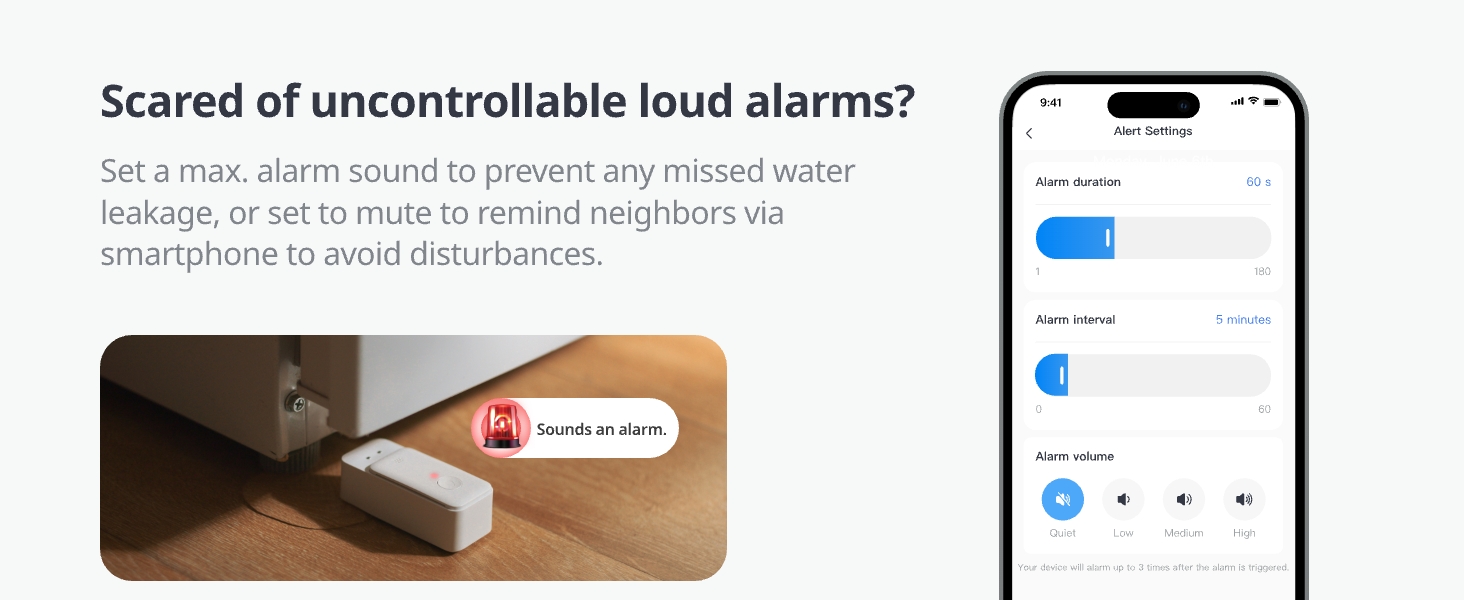
Customize alarm duration and volume settings through the SwitchBot app.
3.4 Pamaduan Smart Home
The Water Leak Detector can integrate with the SwitchBot ecosystem and third-party services like Alexa, Google Assistant, Siri, IFTTT, and SmartThings. This allows for advanced automations, such as turning off electrical equipment via a SwitchBot Plug Mini in case of a leak.

Integrate with SwitchBot Plug Mini to automate actions, such as controlling a water pump based on water levels.
4. Pangropéa
4.1 Ngagantian batré
The device is powered by 2 x AAA batteries. The SwitchBot app will send a notification when the battery level is low, reminding you to replace them. To replace batteries, open the battery compartment, remove the old batteries, and insert new ones, ensuring correct polarity.

Receive in-app notifications when the battery is low, prompting timely replacement.
4.2 Cleaning and Durability
The SwitchBot Water Leak Detector features an IP67 waterproof rating, meaning it is protected against immersion in water up to 1 meter for 30 minutes. This makes it highly durable in wet environments. To clean the device, wipe it with a soft, damp lawon. Ulah make bahan kimia kasar atawa bahan abrasive.

The device is IP67 waterproof, designed to withstand wet and humid conditions.
5. Cara ngungkulan
| Masalah | Mungkin Cukang lantaranana | Solusi |
|---|---|---|
| Taya béja nu katarima | Device not connected to Wi-Fi; App notifications disabled; Low battery. | Check Wi-Fi connection in app; Enable app notifications; Replace batteries. |
| Alarm teu disada | Alarm volume set to mute in app; Device malfunction. | Adjust alarm volume in SwitchBot app; Contact support if issue persists. |
| Alat offline dina aplikasi | Wi-Fi signal weak or disconnected; Device out of range; Low battery. | Ensure strong 2.4GHz Wi-Fi signal; Move device closer to router; Replace batteries. |
| Inaccurate water detection | Sensor probes are dirty; Improper placement. | Clean sensor probes; Adjust placement to ensure proper contact with water. |
6. Spésifikasi
| Fitur | Rincian |
|---|---|
| Nomer modél | W4402010 |
| Diménsi | 1.14 x 1.26 x 3.07 inci (Unit Utama) |
| Beurat | 2.4 ons |
| Sumber Daya | 2 x AAA Batteries (3 Volts DC) |
| Kahirupan batré | Up to 2 years (Alkaline) |
| Konektipitas | Wi-Fi 2.4GHz |
| Tingkat Noise | 100 dB (Adjustable) |
| Peunteun waterproof | IP67 |
| Téknologi Sénsor | Contact Sensor with Extended Probe |
| Métode kontrol | App, Voice (Alexa, Google, Siri, IFTTT, SmartThings) |
| Komponén Kaasup | Water Leak Detector with Cable |

Diménsi leuwihview of the SwitchBot Water Leak Detector.
7. Jaminan & Dukungan
7.1 Émbaran jaminan
For detailed warranty information, please refer to the official SwitchBot website or contact SwitchBot customer support. Warranty terms typically cover manufacturing defects for a specified period from the date of purchase.
7.2 Rojongan Palanggan
If you encounter any issues or have questions regarding your SwitchBot WiFi Water Leak Detector, please visit the official SwitchBot support page or contact their customer service team. You can often find FAQs, troubleshooting guides, and contact information on their websitus:
Official SwitchBot Store: Visit SwitchBot Store on Amazon


