Produk Leuwihview
The Montech AX 120 ARGB Fan is designed to enhance your PC's cooling performance and aesthetic appeal. Featuring a modern hexagonal RGB ring with 20 LEDs, this fan offers vibrant illumination. It incorporates advanced PWM controls for smart fan speed adjustments based on system temperature, ranging from 600 RPM to 1600 RPM. Engineered for quiet operation, it maintains noise levels under 27.9 dB(A) through optimized frames and blades. The fan is built with a high-end HDB bearing, ensuring a lifespan of 40,000 hours, and includes integrated anti-vibration pads to reduce resonance noise.

Gambar 1: Hareup-sisi view of the Montech AX 120 ARGB Fan, showcasing its hexagonal RGB lighting.
Naon dina Box
Upon unboxing your Montech AX 120 ARGB Fan, you will find the following components:
- Montech AX 120 ARGB Fan (1 unit)
- Mounting Screws (typically included for installation)
Setup sareng Instalasi
Proper installation ensures optimal performance and longevity of your Montech AX 120 ARGB Fan. Follow these steps carefully:
1. Nyiapkeun Sistim anjeun
- Pastikeun komputer anjeun pareum sareng dicabut tina stop kontak témbok.
- Buka casing PC anjeun pikeun ngakses lokasi pemasangan kipas.
2. Pasang Fan
Identify the desired mounting location within your PC case (e.g., front, rear, top, bottom). The fan can be configured for intake or exhaust airflow depending on its orientation.

Gambar 2: Tukangeun view of the fan, indicating the power connector and product information.
- Position the fan against the mounting holes in your case.
- Secure the fan using the provided mounting screws. Ensure they are tightened firmly but do not overtighten to avoid damaging the fan frame. The fan features integrated anti-vibration pads at each corner to minimize noise from resonance.

Figure 3: Detail of the integrated anti-vibration pads on the fan frame.
3. Nyambungkeun Kipas
The Montech AX 120 ARGB Fan uses a 4-pin connector for both power and PWM control, and a separate ARGB connector for lighting.
- Connect the 4-pin fan cable to an available 4-pin fan header on your motherboard. This allows for PWM (Pulse Width Modulation) control of the fan speed.
- Connect the ARGB cable to a compatible 3-pin 5V ARGB header on your motherboard or an ARGB controller. Catetan: Do not connect to a 12V RGB header, as this may damage the LEDs.

Gambar 4: Kelample of Montech AX 120 ARGB Fans installed in a PC system.
Parentah Operasi
Kontrol Kacepetan Kipas (PWM)
The Montech AX 120 ARGB Fan supports PWM control, allowing your motherboard or fan controller to dynamically adjust the fan speed based on system temperature. This ensures efficient cooling when needed and quiet operation during lighter loads.
- Rentang laju: 600 RPM to 1600 RPM.
- Configure fan curves in your motherboard's BIOS/UEFI settings or through compatible software provided by your motherboard manufacturer.
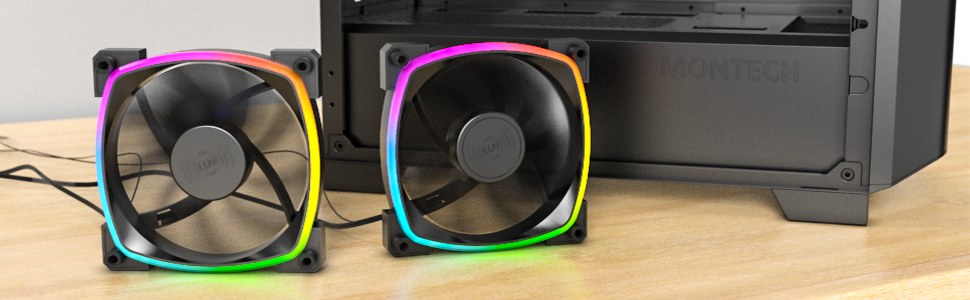
Figure 5: Visual representation of PWM fan speed adjustment.
Kontrol Lampu ARGB
The fan's addressable RGB lighting can be controlled via your motherboard's ARGB software (e.g., ASUS Aura Sync, MSI Mystic Light Sync, GIGABYTE RGB Fusion, ASRock Polychrome Sync) or a dedicated ARGB controller. This allows for synchronization with other ARGB components and customization of lighting effects.
Silent Performance
The Montech AX 120 ARGB Fan is engineered for quiet operation, with noise levels typically under 27.9 dB(A) at maximum speed. This is achieved through optimized blade design and the inclusion of anti-vibration pads.

Figure 6: The fan's low noise output, measured at approximately 27.0 dB.
Pangropéa
Pangropéa anu rutin ngabantosan mastikeun umur panjang sareng kinerja kipas anjeun anu optimal.
- beberesih: Périodik ngabersihan bilah kipas jeung pigura pikeun miceun akumulasi lebu. Paké hawa dikomprés atawa sikat lemes. Pastikeun kipas dipareuman sareng dipegatkeun samemeh beberesih.
- Bearing Lifespan: The fan features a Hydro Dynamic Bearing (HDB) with an estimated lifespan of 40,000 hours, providing long-term reliability without requiring lubrication.

Angka 7: Ngabeledug view illustrating the fan's durable components, including the HDB bearing.
Pamérésan masalah
If you encounter issues with your Montech AX 120 ARGB Fan, refer to the following common problems and solutions:
| Masalah | Mungkin Cukang lantaranana | Solusi |
|---|---|---|
| Kipas teu muter |
|
|
| Lampu ARGB teu jalan |
|
|
| Noise atawa geter kaleuleuwihan |
|
|
spésifikasi
| Fitur | Rincian |
|---|---|
| Nomer modél | AX120 PWM HIDEUNG |
| Diménsi | 4.72 x 4.72 x 0.98 inci (120mm x 120mm x 25mm) |
| Beurat | 5.93 ons |
| Laju kipas | 600 - 1600 RPM (kadali PWM) |
| Tingkat Noise | 27.9 dB(A) (Max) |
| Tiupan hawa | (Information not provided in source, typically measured in CFM) |
| Tekanan statik | (Information not provided in source, typically measured in mmH2O) |
| Jenis Bearing | Bantalan Hidro Dinamis (HDB) |
| Jangka waktu hirup | 40,000 jam |
| Panyambung kakuatan | 4-Pin PWM |
| Panyambung ARGB | 3-Pin 5V ARGB |
| Voltage | 12 Volts (Fan), 5 Volts (ARGB) |
| Wattage | 4.2 watt |
| Bahan | palastik |
| Alat nu cocog | PC kaulinan |
Garansi sareng Rojongan
Kanggo inpormasi garansi sareng dukungan téknis, mangga tingal ka Montech resmi websitus atanapi ngahubungi layanan palangganna sacara langsung. Sarat sareng katangtuan garansi tiasa bénten-bénten gumantung kana daérah sareng pangecér.
Resmi Montech Websitus: www.montechpc.com


