
1. Bubuka
The artfone A400 is a 4G mobile phone designed for ease of use, particularly for seniors. It features large buttons, a clear 2.4-inch display, and essential functions like an SOS emergency button, time reporting, and a charging dock for convenient power management. This manual provides detailed instructions to help you get the most out of your device.

Figure 1: artfone A400 4G Senior Mobile Phone with Charging Dock.
2. Naon dina Box
Please check the contents of your artfone A400 package:
- Kabel USB
- Adaptor kakuatan
- Batré
- Ngecas Dock
- Manual (ieu dokumén)
3. Setélan
3.1. Nyelapkeun Kartu SIM sareng Batré
To begin using your phone, you need to insert the SIM card and battery.
- Cabut panutup tukang telepon sacara saksama.
- Insert your Nano SIM card(s) into the designated slot(s). Ensure the gold contacts face downwards and the card is correctly oriented as indicated on the phone.
- Place the battery into the battery compartment, aligning the contacts.
- Ganti panutup tukang, pencét pageuh nepi ka klik kana tempatna.

Gambar 2: Hareup jeung tukang view of the artfone A400, illustrating the location for SIM and battery insertion.
3.2. Ngecas Telepon
Sateuacan dianggo anu munggaran, eusian pinuh batré telepon.
- Ngagunakeun Dock Ngecas: Connect the power adapter to the charging dock. Place the phone into the dock, ensuring it sits securely and the charging indicator appears on the screen.
- Using USB Type-C Cable: Alternatively, connect the USB Type-C cable directly to the phone's charging port and then to the power adapter.
A full charge typically takes approximately 2-3 hours. The 1800mAh battery provides a super long standby time.
4. Parentah Operasi
4.1. Daya Hurung / Pareum
- Pikeun Ngahurungkeun: Pencét terus tahan tombol beureum 'End Call' (tombol daya) nepi ka layar hurung.
- Pikeun mareuman: Press and hold the red 'End Call' button until the power off options appear, then confirm.
4.2. Nyieun jeung Nampa Telepon
- Nelepon: Dial the number using the large keypad buttons and press the green 'Call' button.
- Narima Telepon: When the phone rings, press the green 'Call' button to answer.
- Nutup Telepon: Pencét tombol beureum 'Réngsékeun Telepon'.

Figure 3: The artfone A400 features large, user-friendly PU material buttons and a clear 2.4-inch display with large fonts.
4.3. Adjusting Volume and Lock/Unlock
- Penyesuaian volume: Use the dedicated volume buttons located on the side of the phone to increase or decrease call and ringtone volume.
- Konci/Buka konci: A separate side button is provided for locking and unlocking the keypad, preventing accidental presses.
4.4. SOS Emergency Call Function
The artfone A400 includes a crucial SOS button for emergencies. This feature is disabled by default and requires setup.
- Disetél: Navigate to the SOS settings in the phone's menu. You can set up to five emergency contact numbers and a custom help message.
- Aktipkeun: In an emergency, press and hold the SOS button on the back of the phone for three seconds. The phone will automatically dial the stored numbers one by one and send the help message.

Figure 4: The SOS button on the back of the artfone A400 supports up to 5 emergency numbers.
4.5. Speed Dial (M1, M2, 2-9, *, #)
Easily call frequently used contacts:
- Disetél: Assign contacts to the M1, M2, and number keys (2-9, *, #) through the phone's settings.
- Pamakéan: Long-press the assigned key to instantly dial the corresponding contact.
4.6. Senter
The phone features a convenient built-in flashlight.
- Aktipkeun: Use the dedicated side switch to quickly turn the flashlight on or off.
4.7. Time Reporting Button
The time reporting button provides an audible announcement of the current time.
- Pamakéan: Press the designated time reporting button (often a side button or a specific key combination) to hear the time announced.

Figure 5: The time reporting button on the artfone A400 provides audible time announcements.
4.8. Fungsi séjén
The artfone A400 includes several other useful features:
- Kaméra: A 2MP camera for basic photo capture.
- Radio FM: Dengékeun stasiun radio karesep anjeun.
- Jam alarem: Setel alarm pikeun panginget.
- Kalénder: Lacak tanggal sareng acara.
- Pamuter MP3/MP4: Enjoy audio and video files.
- Bluetooth: Sambungkeun ka asesoris nirkabel anu cocog.
- T9 Input: Facilitates text input with predictive text.

Figure 6: The artfone A400 features a user-friendly UI with clear icons for easy navigation to Contacts, Messages, Settings, Tools, Multimedia, Internet, SOS, and Call logs.
5. Pangropéa
- beberesih: Anggo lawon anu lemes sareng garing pikeun ngabersihkeun permukaan telepon. Hindarkeun pembersih cair atanapi bahan anu kasar.
- Perawatan batré: Pikeun manjangkeun umur batré, hindari suhu anu ekstrim. Ulah ngantep telepon dina kaayaan batré anu pinuh dina waktu anu lila.
- Panyimpenan: Store the phone in a cool, dry place away from direct sunlight and moisture when not in use.
6. Cara ngungkulan
| Masalah | Mungkin Cukang lantaranana | Solusi |
|---|---|---|
| Telepon teu hurung | Batré lemah atawa béak. | Charge the phone for at least 30 minutes before attempting to turn it on. |
| Teu bisa nyieun/nampa telepon | No SIM card inserted or SIM card not properly seated. No network signal. | Ensure SIM card is correctly inserted. Check network signal strength. Contact your service provider if issues persist. |
| Batré teu ngecas | Charging cable/dock not connected properly. Faulty charger/cable. | Ensure all connections are secure. Try a different power outlet or charging cable/dock if available. |
| Henteu aya sora nalika nelepon | Volume is too low. Speaker is blocked. | Increase volume using the side buttons. Ensure the speaker is not covered. |
7. Spésifikasi
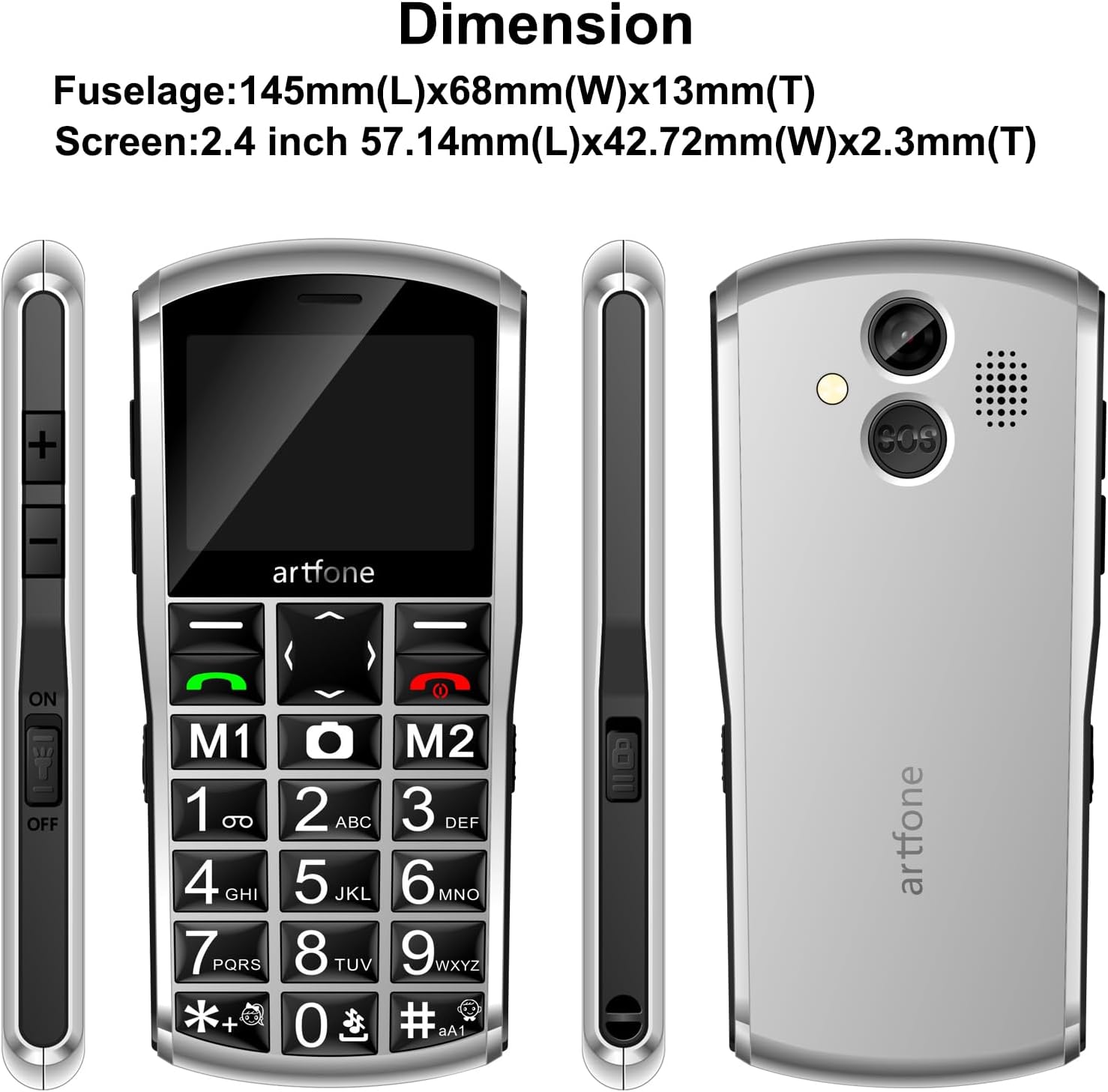
Figure 7: Dimensions of the artfone A400 mobile phone.
| Fitur | Rincian |
|---|---|
| Ngaran modél | A400 |
| merek | artfone |
| Ukuran layar | 2.4 inci |
| Resolusi | 240 x 320 |
| Téhnologi sélular | 4G, 3G, 2G |
| Sistem operasi | artfone OS |
| RAM Mémori Dipasang Ukuran | 48 MB |
| Kapasitas Panyimpenan Mémori | 0.13 GB |
| Téhnologi konektipitas | USB Type C, Bluetooth |
| Batré | 1 batré Litium Ion (kaasup) |
| Ukuran Paket | 15.2 x 11.9 x 5.9 cm |
| Item Beurat | 100 g |
| Produsén | artfone |
| Negara asal | Cina |
8. Garansi jeung Rojongan
8.1. Émbaran jaminan
The artfone A400 typically comes with a standard manufacturer's warranty. Please refer to the warranty card included in your package for specific terms and conditions. In general, a return policy of 30 days for refund/replacement is offered.
8.2. Rojongan Palanggan
For any technical assistance, troubleshooting beyond this manual, or warranty claims, please contact artfone customer support. You can usually find contact information on the manufacturer's websitus atanapi ngalangkungan pangecér tempat anjeun mésér alat éta.