1. Bubuka
This manual provides comprehensive instructions for the proper setup, operation, and maintenance of the Sartorius GL2202i-2S Gold Scale. Adhering to these guidelines will ensure accurate and reliable performance of your precision weighing instrument.
2. Émbaran Kasalametan
Perhatikeun pancegahan kaamanan di handap ieu pikeun nyegah tatu sareng karusakan kana alat:
- Operate the scale only in a stable, level environment free from excessive vibrations, drafts, and extreme temperature fluctuations.
- Do not expose the scale to corrosive chemicals or liquids.
- Ensure the power supply matches the specifications indicated on the device.
- Ulah nepi ka muragkeun timbangan atawa ngagebugan beurat.
- Only qualified personnel should perform repairs or internal adjustments.
3. Produk Langkungview
The Sartorius GL2202i-2S is a precision gold scale designed for accurate weighing applications. Key components include the weighing pan, digital display, and control panel.
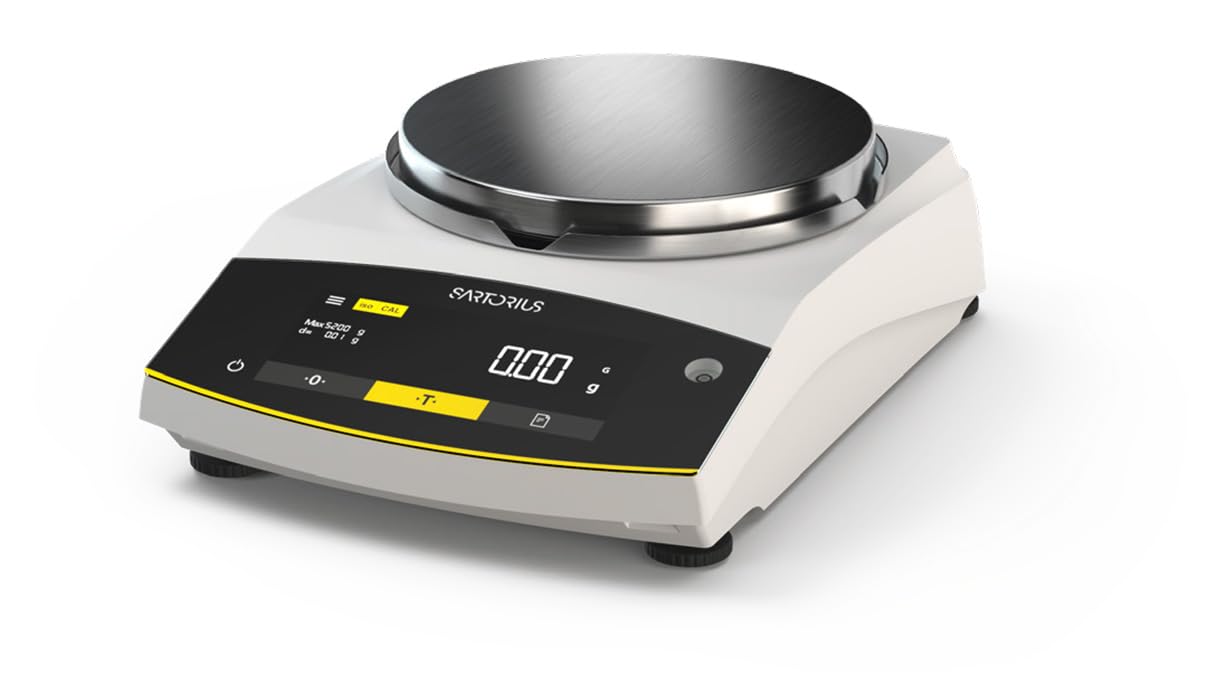
Figure 1: Sartorius GL2202i-2S Gold Scale. This image shows the scale's stainless steel weighing pan, the digital display, and the control buttons for operation.
Komponén utama:
- Panci Timbangan: Stainless steel platform for placing items to be weighed.
- Digital tampilan: Hybrid display (LED and touch technology) showing weight readings and operational status.
- Panél kontrol: Buttons for power, tare, calibration, and menu navigation.
- Leveling kaki: Adjustable feet to ensure the scale is perfectly level.
4. Setélan
4.1 Ngabongkar bungkusan
Carefully remove the scale and all accessories from the packaging. Retain the original packaging for future transport or storage.
4.2 Nempatkeun
Place the scale on a firm, stable, and level surface. Avoid locations subject to:
- Direct sunlight or heat sources.
- Strong air currents (drafts from doors, windows, or air conditioning).
- Vibrations from machinery or heavy traffic.
- Rapid temperature changes.
4.3 Leveling Skala
Adjust the leveling feet located at the bottom of the scale until the air bubble in the level indicator (usually located near the display) is centered. This ensures accurate weighing results.
4.4 Sambungan Daya
Connect the provided power adapter to the scale's power input and then to a suitable electrical outlet. Allow the scale to warm up for at least 30 minutes after initial power-on for optimal stability.
5. Parentah Operasi
5.1 Daya Hurung/Pareuman
Pencét éta Kakuatan button (often marked with a circle and a vertical line) to turn the scale on or off. The display will show a self-test sequence before settling at zero.
5.2 Timbangan Dasar
- Ensure the display reads 0.00 g before placing any item on the pan.
- Carefully place the item to be weighed onto the center of the weighing pan.
- Wait for the reading to stabilize. The stable reading will be displayed.
- Remove the item from the pan.
5.3 Fungsi Tare
Fungsi tara ngamungkinkeun anjeun nimbang barang dina wadah ku cara ngurangan beurat wadahna.
- Teundeun wadah kosong dina pan timbangan.
- Pencét éta Taré button (often marked with a 'T' or '->0<-'). The display will reset to 0.00 g.
- Add the item to be weighed into the container. The display will show the net weight of the item.
- Remove both the item and container from the pan.
6. Kalibrasi
The Sartorius GL2202i-2S features an automatic, built-in calibration and adjustment function. Regular calibration ensures the highest level of accuracy. Refer to the on-screen prompts or the scale's specific menu for initiating the automatic calibration process. Ensure the scale is stable and free from any load during calibration.
7. Pangropéa jeung beberesih
7.1 beberesih
To maintain the scale's performance and appearance:
- Disconnect the scale from the power supply before cleaning.
- Ngusap permukaan luar kalayan lemes, damp lawon sarta detergent hampang.
- Ulah nganggo pembersih abrasif, pangleyur, atanapi bahan kimia anu keras, sabab ieu tiasa ngaruksak lapisan atanapi komponén internal.
- Ensure no liquids enter the scale's housing or display area.
- The stainless steel weighing pan can be removed and cleaned separately with appropriate cleaning agents.
7.2 Panyimpenan
If storing the scale for an extended period, ensure it is clean, dry, and stored in its original packaging or a protective container in a stable environment.
8. Cara ngungkulan
Bagian ieu ngabahas masalah umum anu anjeun tingali. Pikeun masalah teu didaptarkeun di dieu, kontak rojongan customer.
| Masalah | Mungkin Cukang lantaranana | Solusi |
|---|---|---|
| Display shows "Err" or unstable readings. | Scale not level, vibrations, drafts, overload, or internal error. | Check leveling, move to a stable location, ensure no load exceeds capacity, restart the scale. |
| Skala teu daya on. | Power cable disconnected, faulty outlet, or power adapter issue. | Verify power cable connection, try a different outlet, check power adapter. |
| Bacaan teu akurat. | Needs calibration, environmental factors, or dirty pan. | Perform calibration, ensure stable environment, clean weighing pan. |
9. Spésifikasi
- model: GL2202i-2S
- merek: Sartorius
- Capacity x Readability: 2200 gx 0.01 g
- Ukuran Pan: 180 mm (Diameter)
- beurat: Kira-kira 12.00 lb (5.44 kg)
- Jenis tampilan: Hybrid (LED and Touchscreen)
- Fitur husus: Automatic, built-in calibration and adjustment function
- warna: Bodas
10. Garansi jeung Rojongan
For warranty information, technical support, or service inquiries, please refer to the documentation provided with your purchase or contact Sartorius customer service directly. Keep your purchase receipt and model number readily available when contacting support.


