
1. Produk Langkungview
The PAUTIX SP645E RGB+CCT LED Controller Kit is designed for controlling PAUTIX RGB+CCT COB LED strip lights. This kit offers versatile control options including a 2.4G RF wireless remote, smartphone APP control, and a one-button switch on the control box. It supports various lighting effects, music synchronization, group control, and includes timer and memory functions for enhanced user experience.
Fitur konci:
- Kasaluyuan: Specifically designed for PAUTIX RGB+CCT COB LED strips (6-pin, 2700K-6500K).
- Sababaraha Métode Kontrol: Smartphone APP (BanlanX), 2.4G RF remote control, and a physical control box button.
- Cahaya dinamis: Built-in music mode and multiple dynamic lighting effects.
- Kontrol Grup: Manage multiple controllers simultaneously via the mobile APP or a single remote.
- Fitur kanyamanan: Timer function for scheduled on/off, and memory function to retain settings after power loss.
- Kalibrasi Suhu Warna: Supports channel order calibration via the APP.
2. Eusi Paket
Pastikeun yén sadaya item aya dina bungkusan:
- 1 × 2.4G RF Remote Control
- 1 × Controller Box
- 1 × Buku Panduan
3. Parentah Setup
3.1 Cék kasaluyuan
This controller is ONLY compatible with PAUTIX RGB+CCT COB LED strips that use a 6-pin connector. It is not compatible with other types of LED strip lights, such as single color temperature, CCT, RGB, RGBW LED, or other PWM strip lights. Please ensure your LED strip light matches these specifications before proceeding.

Image: The controller is shown connected to a 6-pin RGB+CCT COB LED strip. A diagram illustrates the 6-pin connector dimensions (16mm/0.62in width, 6mm/0.23in height) for compatibility verification. The image emphasizes that the controller is designed for PAUTIX 6-PIN RGB+CCT COB LED Strip Light and may not be compatible with other brands.
3.2 Diagram Hubungan
Follow these steps to connect the controller to your LED strip light and power supply:
- Pastikeun sadaya komponén dipareuman sateuacan ngadamel sambungan.
- Connect the 6-pin output of the SP645E controller box to the 6-pin input of your PAUTIX RGB+CCT COB LED strip light.
- Connect a DC5-24V power supply (not included) to the input of the SP645E controller box.
- Ensure the total power of the strip lights does not exceed the maximum output of the controller (6A). The controller supports simultaneous connection of two rolls of strip lights, provided the total power limit is respected.
- Once all connections are secure, you may power on the system.

Image: A diagram illustrating the connection sequence: Power Supply (DC5-24V, not included) connects to the Controller (SP645E, not included), which then connects to the RGB Strip Light (not included). The diagram also shows the RF Remote and a smartphone with the APP for control.
3.3 APP Installation and Pairing
To use smartphone APP control, download the "BanlanX" app:
- Milarian pikeun "BanlanX" in your device's app store (e.g., Apple App Store, Google Play Store).
- Alternatively, scan the QR code provided on the controller box or in the included user manual to download the app.
- Once installed, open the app and follow the on-screen instructions to add and pair your SP645E controller. Ensure Bluetooth is enabled on your smartphone.

Image: A three-step visual guide showing the BanlanX app interface for adding a device. Step 1: "My Devices" screen with "Add Device" button. Step 2: "Add Device" screen showing scanning for SP645E. Step 3: Device successfully added, showing control interface for "White Color Breathe" mode.
4. Parentah Operasi
4.1 Métode kontrol
The SP645E controller offers three ways to manage your LED strip lights:

Image: This image displays the three control methods: Smartphone APP control with Bluetooth connection, 2.4G RF Remote Control, and a simple One-Key Switch on the control box. Each method is depicted with its respective interface or device.
4.1.1 Smartphone APP Control (BanlanX)
The BanlanX app provides comprehensive control over your LED strip lights:
- Color and Brightness: Select any color and adjust brightness levels.
- Pangaruh dinamis: Access a variety of dynamic modes, music synchronization, and DIY effects.
- Modeu Musik: Capture music through your phone's microphone, player streaming, or the controller's built-in microphone.
- Fungsi Timer: Set schedules for the light strip to turn on or off automatically.
- Channel Calibration: Perform sequential channel calibration for color temperature adjustment.
4.1.2 2.4G RF Remote Control
The included 2.4G RF remote control allows for convenient wireless operation:
- rentang: Control your strip lights from any angle within 30 meters (99 feet) in an open area.
- Penyesuaian Caang: Features 17 built-in brightness levels, adjustable via the "BRI" buttons.
- papasangan:
- To Bind: Short press the ON button to turn on the light. Within 20 seconds after the controller is powered on, long press the ON button on the remote to bind/unbind the remote control.
- To Unbind/Clear All: Short press the OFF button to turn off the light. Within 20 seconds after the controller is powered on, first turn off the lights completely, and then long press the OFF button to clear all bound remote controls.
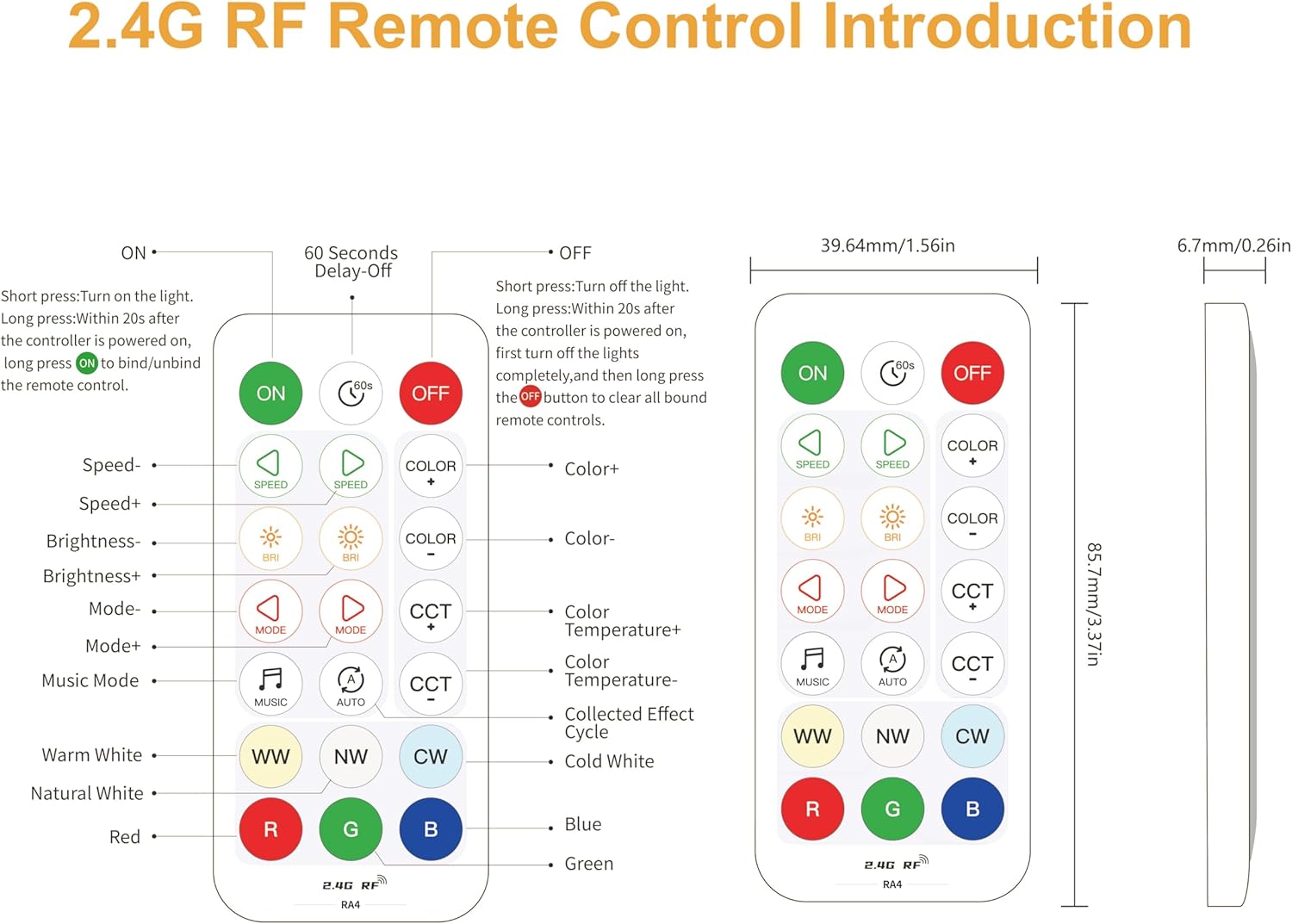
Image: A detailed diagram of the 2.4G RF remote control, showing all buttons and their corresponding functions. Buttons include ON/OFF, Speed+/-, Brightness+/-, Mode+/-, CCT+/-, Color+/-, Music Mode, WW (Warm White), NW (Natural White), CW (Cold White), Red, Green, Blue. Dimensions of the remote are also provided.
4.1.3 One-Button Switch (Control Box)
The control box itself features a simple one-button switch for basic on/off functionality. It also retains the last settings due to its memory function.
4.2 Fitur canggih
4.2.1 Kontrol Grup
The system supports flexible group control configurations:
- APP Grouping: Create groups within the mobile APP to add multiple controllers for simultaneous control.
- Kontrol Hiji-ka-Many: Use a single remote to control multiple controllers (no limit as long as they are within 30m/99ft).
- Kontrol loba-ka-hiji: Up to 5 remotes can control one controller simultaneously.
- Kontrol individu: Each strip can be controlled individually by pairing its controller with its dedicated remote.
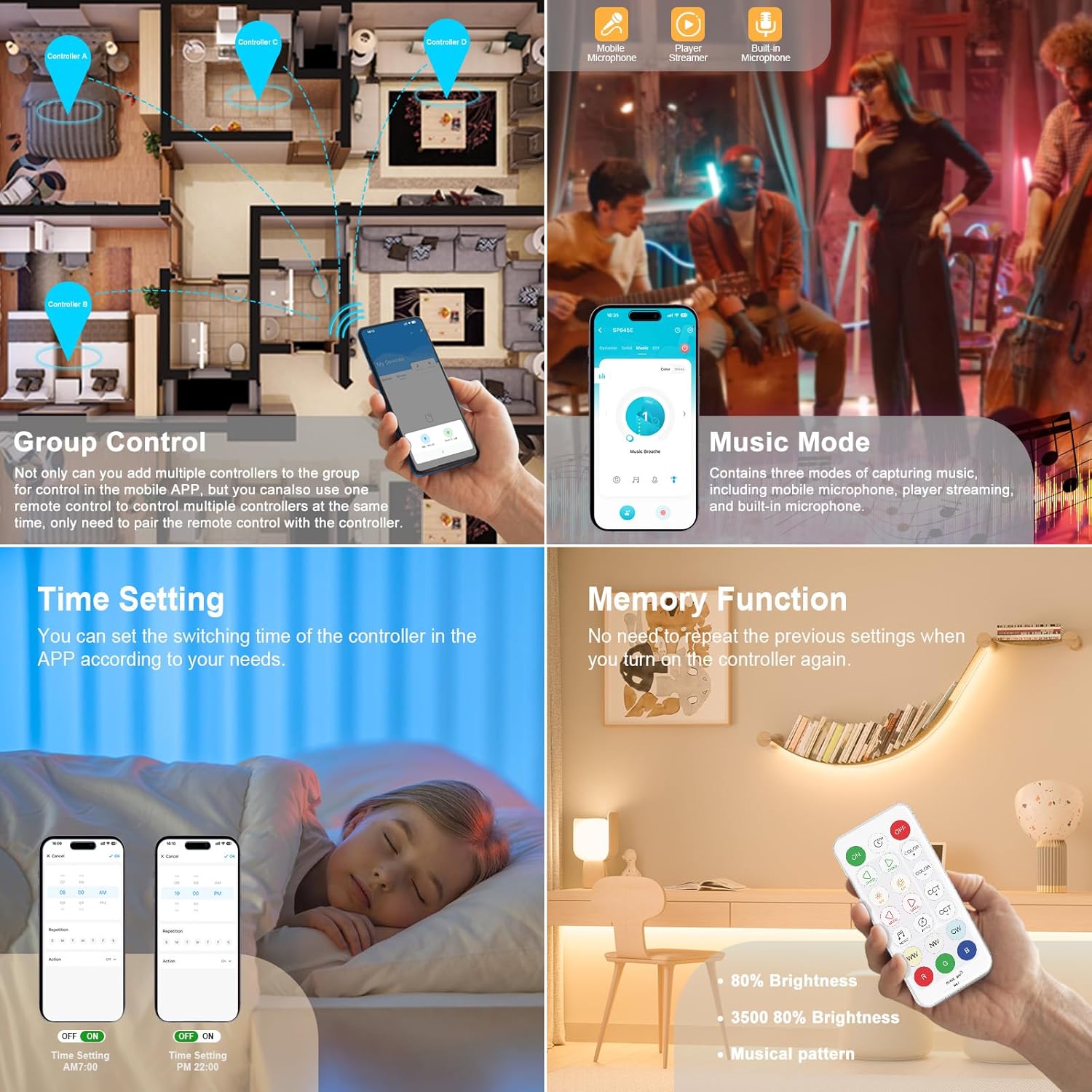
Image: A collage demonstrating several features. Top-left shows "Group Control" with a floor plan indicating multiple controllers (A, B, C, D) managed by a smartphone app. Top-right shows "Music Mode" with a smartphone displaying music capture options (mobile microphone, player streaming, built-in microphone). Bottom-left shows "Time Setting" with a smartphone app interface for scheduling. Bottom-right shows "Memory Function" with a remote control and a light strip retaining its settings.

Image: An illustration showing multiple rooms in a house, each with LED strip lights. The image demonstrates how multiple identical kits can be added to one group for control via a smartphone app, and how multiple remotes can control the same light strip/controller.
4.2.2 Modeu Musik
The music mode allows your LED lights to synchronize with audio. It supports three methods for capturing music:
- Mobile phone microphone
- Player streaming
- Built-in microphone on the controller

Image: A split image showing two features. On the left, LED lights are syncing with music, with icons for mobile microphone, player streaming, and built-in microphone. On the right, three dynamic modes are highlighted: Breath, Strobe, and Heart Beat, with corresponding visual effects.
4.2.3 Fungsi Timer
Use the BanlanX app to set specific times for your LED strip lights to turn on or off automatically. This eliminates the need for manual operation.
4.2.4 Fungsi Mémori
The controller features a memory function, which means it will retain the last used settings (color, brightness, mode) even after being powered off and on again. You do not need to reconfigure your preferred settings each time.
4.2.5 Pungsi Dimmable
Adjust the brightness of your LED strip lights from 0% to 100% using either the BanlanX app or the 2.4G RF remote control. The remote offers 17 distinct brightness levels.

Image: This image demonstrates the dimmable feature, showing a range of brightness from 20% to 100%. It displays a smartphone app interface for color and brightness selection, and highlights the "BRI" buttons on the RF remote for brightness adjustment, indicating 17 dimming levels.
4.2.6 Color Temperature Calibration
If you notice that the color temperature displayed by your strip light does not match your expectation, you can use the BanlanX app to easily calibrate the color temperature corresponding to the strip light and the remote control.

Image: A smartphone screen displaying the "Color Correction" interface within the BanlanX app. It prompts the user to select the current state of the light, with options for Red, Green, Blue, Cold White, and Warm White, to facilitate calibration.
5. Pangropéa
To ensure the longevity and optimal performance of your PAUTIX SP645E LED Controller Kit, follow these maintenance guidelines:
- beberesih: Gently wipe the controller box and remote control with a dry, soft cloth. Avoid using abrasive cleaners, solvents, or harsh chemicals.
- Lingkungan: Keep the device in a dry environment. Avoid exposure to moisture, high humidity, or extreme temperatures.
- Pareum listrik: Salawasna pegatkeun sambungan kakuatan saméméh ngalakukeun beberesih atawa perawatan.
- Panggantian Batré (Remot): If the remote control's performance degrades, replace its battery. Refer to the remote's specific instructions for battery type and replacement procedure.
6. Cara ngungkulan
If you encounter issues with your PAUTIX SP645E LED Controller Kit, refer to the following troubleshooting steps:
| Masalah | Mungkin Cukang lantaranana | Solusi |
|---|---|---|
| LED strip lights do not turn on. |
|
|
| Kadali jauh henteu ngaréspon. |
|
|
| APP cannot connect to the controller. |
|
|
| Controller or LED strip overheats. |
|
|
| Incorrect colors or color temperature. |
|
|
7. Spésifikasi
| Fitur | Rincian |
|---|---|
| Nomer modél | RA4 (SP645E) |
| Masukan Voltage | DC5-24V |
| PWM Single Channel Max Output Current | 2A |
| Total Max Kaluaran Ayeuna | 6A |
| Kasaluyuan | PAUTIX RGB+CCT COB LED strips (6-pin, 2700K-6500K) |
| Métode kontrol | Smartphone APP (BanlanX), 2.4G RF Remote Control, One-button switch |
| RF Remote Control Range | 30m / 99ft (open area) |
| Item Beurat | 1.44 ons |
| Ukuran Paket | 5.87 x 3.23 x 0.71 inci |
| Warna | Bodas |
8. Garansi jeung Rojongan
PAUTIX provides every customer with a garansi 5 taun for this product. If you encounter any difficulties during the use of the product or have any questions, please do not hesitate to contact PAUTIX customer service. We are committed to providing professional solutions and fast customer service response.
For support, please refer to the contact information provided with your purchase or visit the official PAUTIX websitus.