1. Bubuka
This manual provides essential information for the safe and efficient operation of your GOBOULT Drift+ Smart Watch. Please read it thoroughly before using the device to ensure proper functionality and to understand all features. The GOBOULT Drift+ Smart Watch features a 1.85-inch HD display, Bluetooth calling capabilities, comprehensive health monitoring, and multiple sports modes.

Image 1.1: GOBOULT Drift+ Smart Watch overview.

Image 1.2: Key features of the GOBOULT Drift+ Smart Watch.
2. Naon dina Box
Upon opening your GOBOULT Drift+ Smart Watch package, please verify that all the following items are included:
- GOBOULT Drift+ Smart Watch
- Kabel Ngecas
- Manual pangguna (dokumén ieu)
- Kartu Garansi
3. Setélan
3.1. Ngecas Alat
Before initial use, fully charge your GOBOULT Drift+ Smart Watch. Connect the provided charging cable to the charging port on the back of the watch and a standard USB power adapter (not included). The watch typically takes approximately 2.5 hours to fully charge.
3.2. Instalasi App sarta Papasangan
To unlock the full potential of your smart watch, download and install the companion application on your smartphone. The app is compatible with both iOS and Android operating systems.
- Scan the QR code in the quick start guide or search for the official GOBOULT app in your smartphone's app store (Google Play Store for Android, Apple App Store for iOS).
- Pasang aplikasi teras jieun akun atanapi lebet.
- Pastikeun Bluetooth diaktipkeun dina smartphone Anjeun.
- Open the GOBOULT app, navigate to the device pairing section, and select your Drift+ Smart Watch from the list of available devices.
- Follow the on-screen prompts on both your watch and smartphone to complete the pairing process.
4. Ngoperasikeun Smart Watch Anjeun
4.1. Tampilan jeung Napigasi
The GOBOULT Drift+ features a 1.85-inch HD display with 500 nits brightness, ensuring clear visibility even in bright outdoor conditions. Navigate through menus and functions by swiping across the touchscreen and using the physical button on the side.
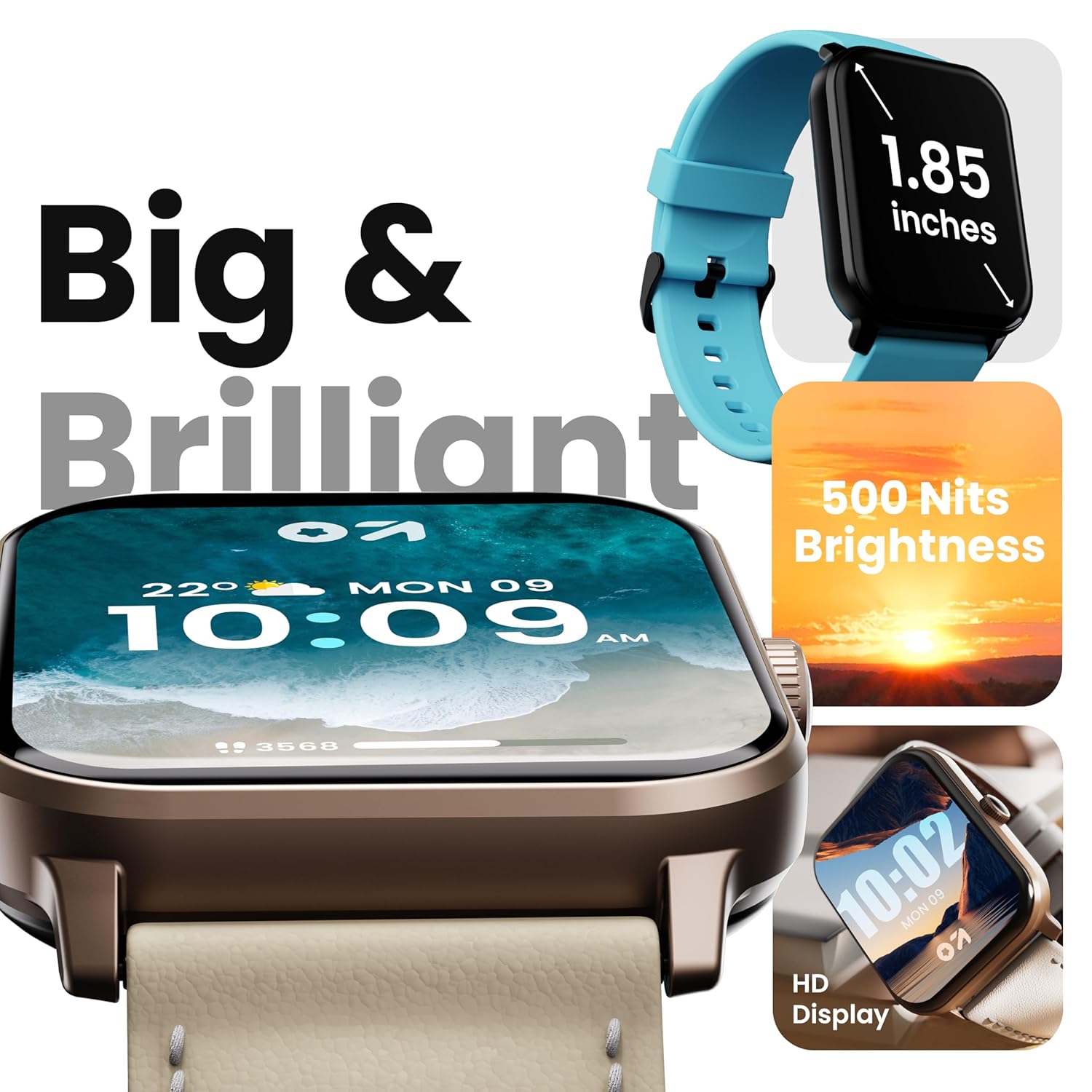
Image 4.1: High-definition display of the Drift+ Smart Watch.
4.2. Telepon Bluetooth
The smart watch supports seamless Bluetooth calling with a built-in speaker and microphone. Once paired with your smartphone, you can answer, reject, or make calls directly from your wrist.
- Ngajawab Telepon: Nalika aya telepon asup, ketok ikon héjo dina layar jam tangan.
- Nelepon: Aksés dial pad atanapi daptar kontak ngalangkungan antarmuka jam tangan pikeun ngamimitian nelepon.

Image 4.2: Bluetooth calling feature in action.
4.3. Pangimeutan Kaséhatan
The Drift+ Smart Watch provides comprehensive health insights through various sensors:
- Pangimeutan Denyut Jantung 24/7: Terus ngalacak denyut jantung anjeun sapopoe.
- SpO2 Blood Oxygen Tracking: Ukur tingkat jenuh oksigén getih.
- Monitoring tekanan darah: Nyadiakeun perkiraan tekanan darah.
- Nyukcruk Siklus Menstruasi Awéwé: Ngabantosan ngalacak sareng ngaduga siklus menstruasi.
- Panginget inuman cai: Ngajurung anjeun tetep caian.
- Panginget Sedentary: Ngaronjatkeun gerakan saatos période teu aktip.
Catetan: Data pangawasan kaséhatan ngan ukur kanggo rujukan sareng henteu kedah dianggo pikeun diagnosis atanapi pangobatan médis. Konsultasi ka ahli médis pikeun masalah anu aya hubunganana sareng kaséhatan.

Gambar 4.3: Fitur pangawasan kaséhatan.
4.4. Olahraga Mode
The watch offers over 100 sports modes to track various physical activities. Select your desired sport from the watch menu to record data such as steps, distance, calories burned, and duration.

Image 4.4: Tracking activity with sports modes.
4.5. Watch Faces and Customization
Personalize your watch with over 150 cloud-based watch faces. You can also create custom watch faces through the companion app to match your style.

Gambar 4.5: Tonton pilihan kustomisasi raray.
4.6. Smart Notifications and AI Voice Assistant
Receive notifications from your favorite social applications and messages directly on your watch. The integrated AI voice assistant provides hands-free assistance for various tasks.
5. Pangropéa
5.1. Tahan cai (IP68)
The GOBOULT Drift+ Smart Watch is IP68 water-resistant, meaning it is protected against dust and can withstand immersion in water up to 1.5 meters for up to 30 minutes. It is suitable for daily use, such as hand washing or light rain exposure. Avoid using it during swimming, diving, or in hot water/steam environments.

Image 5.1: IP68 water resistance.
5.2. beberesih sarta perawatan
Pikeun ngajaga penampilan sareng fungsi jam tangan anjeun:
- Ngusap arloji sareng tali sacara teratur nganggo lawon anu lembut sareng garing.
- Upami diperlukeun, make rada damp lawon pikeun beberesih, teras garingkeun nepi ka garing.
- Hindarkeun ngagunakeun bahan kimia kasar, pembersih abrasive, atanapi pangleyur.
- Tetep kontak ngecas beresih jeung garing.
5.3. Manajemén batré
The GOBOULT Drift+ offers extended battery life:
- Up to 7 days in regular usage mode.
- Up to 2-3 days with heavy Bluetooth calling.
- Nepi ka 25 dinten dina modeu siaga.
To optimize battery life, consider adjusting screen brightness, limiting background app refresh, and disabling unnecessary notifications.

Image 5.2: Battery life details.
6. Cara ngungkulan
If you encounter issues with your GOBOULT Drift+ Smart Watch, refer to the following common solutions:
| Masalah | Solusi anu mungkin |
|---|---|
| Arloji teu hurung | Pastikeun arloji dicas pinuh. Sambungkeun ka carjer sahenteuna 30 menit. |
| Teu tiasa dipasangkeun sareng smartphone | Ensure Bluetooth is enabled on your phone and watch. Restart both devices. Make sure the watch is within range of your phone. Check if the app is updated. |
| Data kaséhatan teu akurat | Pastikeun yén arloji dipaké pas dina pigeulang anjeun, henteu ketat teuing atanapi longgar teuing. Ngabersihan sénsor dina tonggong arloji. Hindarkeun gerakan kaleuleuwihan salami pangukuran. |
| Bewara teu katarima | Check app permissions on your phone to ensure notifications are allowed. Verify that notifications are enabled within the GOBOULT app settings. Ensure the watch is connected via Bluetooth. |
| Masalah nelepon Bluetooth | Ensure the watch is properly connected for calls (sometimes a separate Bluetooth connection is needed for audio). Check volume settings on both watch and phone. |
7. Spésifikasi
| Fitur | Rincian |
|---|---|
| merek | GOBOULT |
| Ngaran modél | Drift+ |
| Nomer Modél Item | 8906133851347 |
| Ukuran tampilan | 1.85 inci |
| Caang | 500 niis |
| Tahan cai | IP68 |
| Konektipitas | Bluetooth 5.1 |
| Kasaluyuan System Operasi | ios, Android |
| Jenis Batré | Litium Polimér |
| Waktu Ngeusi batre | 2.5 Jam |
| Rata Kahirupan Batré | 7 Days (normal usage) |
| Item Beurat | 38 g |
| Komponén Kaasup | Smart Watch, Charging Cable, User Manual, Warranty Card |
8. Garansi jeung Rojongan
Your GOBOULT Drift+ Smart Watch comes with a standard manufacturer's warranty. Please refer to the included Warranty Card for specific terms, conditions, and duration of coverage. For technical support, service, or warranty claims, please contact GOBOULT customer service through the contact information provided on the warranty card or the official GOBOULT websitus.
Manufacturer: Exotic Mile Private Limited, Boult Audio, B-67 Wazirpur Industrial Area, New Delhi 110052


