Bubuka
This manual provides comprehensive instructions for the setup, operation, and maintenance of your Blaupunkt 43QD7050 43-inch 4K Ultra HD QLED Google TV. Please read this manual thoroughly before using the television to ensure proper functionality and safety.

Gambar: Hareupeun view of the Blaupunkt 43QD7050 QLED Google TV, highlighting its display and features.
Émbaran Kasalametan penting
Salawasna turutan tindakan pencegahan kaamanan dasar nalika nganggo televisi ieu pikeun ngirangan résiko kahuruan, sengatan listrik, sareng tatu. Simpen manual ieu kanggo rujukan ka hareup.
- Ulah ngalaan televisi ka hujan atawa beueus.
- Entong meungpeung lawang angin.
- Pastikeun kabel listrik dipasangkeun grounding anu leres.
- Cabut colokan televisi nalika badai kilat atanapi nalika henteu dianggo kanggo waktos anu lami.
- Rujuk sadayana jasa ka tanaga jasa anu mumpuni.
Naon dina Box
Pastikeun sadaya komponén aya nalika muka bungkus televisi anjeun.
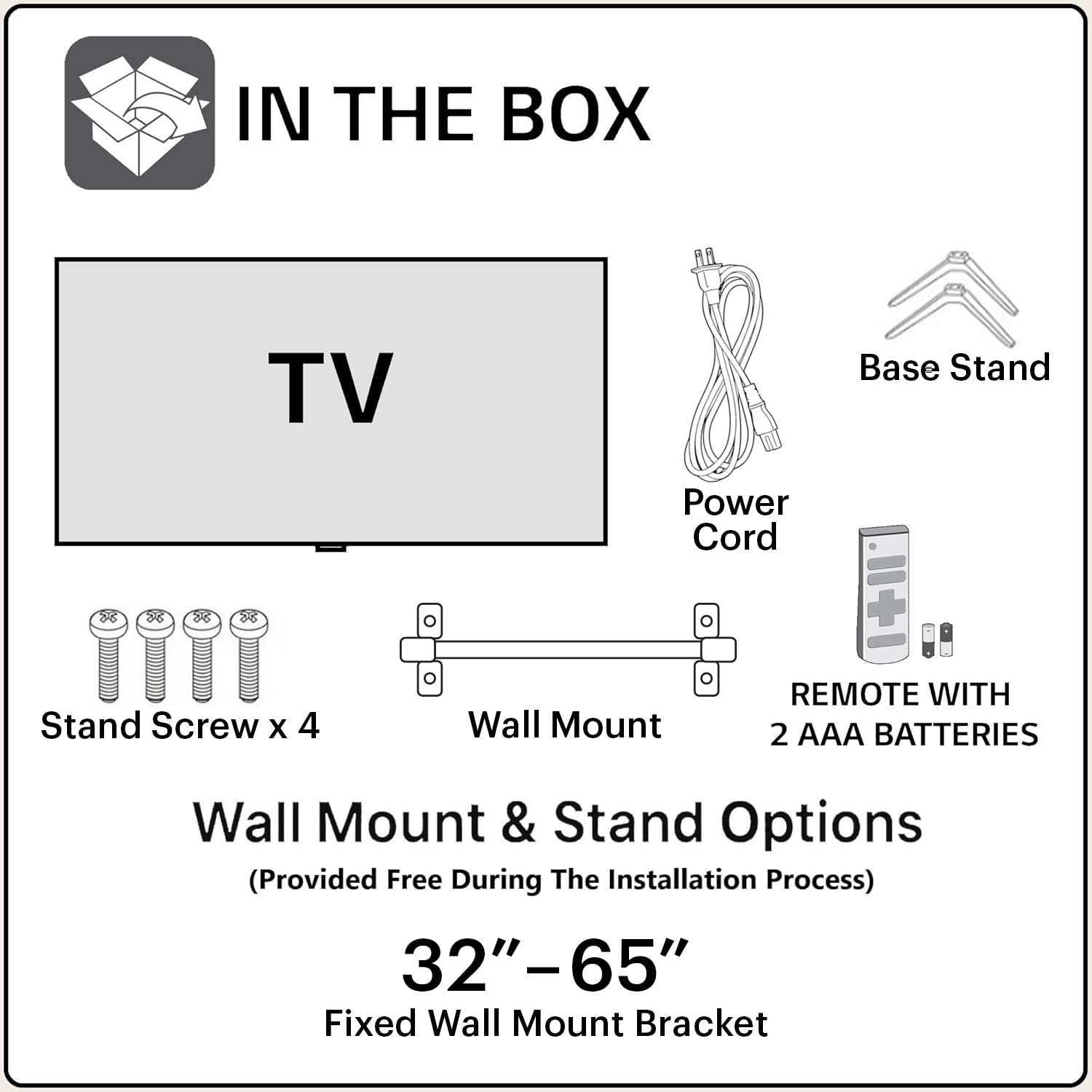
Image: Diagram showing the items included in the product packaging: TV, remote control, wall mount, stand screws, power cord, and AAA batteries.
- 1 x Blaupunkt 43QD7050 LED TV
- 1 x Kadali Jauh
- 1 x Wall Mount Bracket (for 32"-65" models)
- 2 x Batré AAA (pikeun kadali jauh)
- 1 x Kabel Listrik
- 1 x Base Stand Set (with 4 stand screws)
- Manual pangguna (dokumén ieu)
Fisik Leuwihview
Hareupeun View

Gambar: Hareupeun view of the television, showcasing the screen and minimal bezels.
Samping View

Gambar: Sisi profile of the television, illustrating its slim design.
Tukangeun View jeung Palabuhan

Gambar: Tukangeun view of the television, detailing the location of various input and output ports.
The rear panel of the TV includes various ports for connectivity:
- Port HDMI (x3): For connecting devices like gaming consoles, set-top boxes, and Blu-ray players. One port supports eARC.
- Port USB (x2): Pikeun nyambungkeun alat panyimpenan USB.
- Port Ethernet: Pikeun sambungan internét kabel.
- Antenna/Kabel Input: Pikeun nyambungkeun anteneu atawa TV kabel.
- Audio Kaluar: Pikeun nyambungkeun sistem audio éksternal.
- Input kakuatan: Pikeun nyambungkeun kabel listrik.
Guide Setup
1. Pamasangan Stand (Opsional)
If you choose to place the TV on a stand, follow these steps:
- Teundeun TV sacara saksama dina tempat anu lemes sareng datar pikeun nyegah karusakan layar.
- Align base stand jeung liang screw dina handap TV.
- Ngamankeun unggal stand jeung screws disadiakeun.
2. Pamasangan Tembok (Opsional)
The TV comes with a wall mount bracket. Professional installation is recommended for wall mounting. Ensure the wall can support the weight of the TV.
- Refer to the wall mount bracket's instructions for specific installation details.
- Ensure adequate ventilation around the mounted TV.
3. Nyambungkeun périferal
Sambungkeun alat éksternal anjeun ka palabuhan anu cocog dina panel pungkur TV.
- HDMI: Use HDMI cables to connect devices like set-top boxes, gaming consoles, or Blu-ray players.
- USB: Selapkeun drive USB pikeun muterkeun média.
- Ethernet: Sambungkeun kabel Ethernet pikeun sambungan internét kabel anu stabil.
- kakuatan: Sambungkeun kabel listrik ka input kakuatan TV lajeng ka stop kontak témbok.

Image: Visual representation of the TV's connectivity options including HDMI, Bluetooth, Dual Band Wi-Fi, and USB.
4. Mimiti Power On jeung Google TV Setup
- Colokkeun TV kana colokan listrik.
- Pencét tombol Daya dina remot kontrol atanapi TV.
- Turutan parentah dina-layar pikeun ngarengsekeun setelan awal, kaasup pilihan basa, sambungan jaringan (Wi-Fi atawa Ethernet), jeung akun Google asup.
Parentah Operasi
Fungsi Remote Control

Image: Layout of the Blaupunkt TV remote control, showing buttons for power, navigation, volume, and quick access to streaming services.
The remote control allows you to navigate the TV's features:
- Tombol Daya: Ngahurungkeun atawa mareuman TV.
- Pad Navigasi (Kaluhur/Turun/Kénca/Katuhu/OK): Pikeun menu navigasi jeung pilihan.
- Tombol Balik: Mulih ka layar saméméhna.
- Tombol imah: Ngaksés layar utama Google TV.
- Volume Kaluhur/Turun: Saluyukeun tingkat polumeu.
- Tombol Bisu: Ngajempékeun atanapi nganonaktipkeun sora.
- Tombol Aksés Gancang: Dedicated buttons for Netflix, Prime Video, YouTube, and other services.
- Tombol Asisten Google: Ngaktipkeun kadali sora.
Navigasi Antarmuka Google TV
Google TV organizes your content from various streaming services into a personalized home screen.

Image: Screenshot of the Google TV interface, displaying personalized movie and show recommendations and a unified watchlist.
- Use the navigation pad to browse through recommended content, apps, and settings.
- Select an item by pressing the OK kancing.
- Access the full list of installed apps from the "Apps" tab.
Fitur pinter
- Kontrol Sora (Asisten Google): Press the Google Assistant button on your remote and speak commands to search for content, control smart home devices, or get information.
- Pangeunteungan layar: Cast content from your compatible smartphone or tablet to the TV using the built-in casting feature.
- Aplikasi & Kaulinan: Access a wide range of applications and games from the Google Play Store.

Image: Display of the TV screen showcasing a selection of over 10,000 available apps and games, including popular streaming services.
Pangropéa
- Ngabersihan layar: Lap layar sacara lalaunan nganggo lawon anu lemes sareng henteu ngaganggu. Pikeun tanda anu bandel, anggo pembersih layar anu khusus dirancang pikeun televisi, anu dioleskeun kana lawon, sanés langsung kana layar.
- Ngabersihkeun Kabinet: Anggo kaén anu lembut sareng garing pikeun ngusap kabinet TV. Ulah make cleaners abrasive atawa pangleyur.
- Apdet parangkat lunak: The TV may receive automatic software updates. Ensure your TV is connected to the internet to receive these updates, which improve performance and add new features.
Pamérésan masalah
Tingal bagian ieu pikeun solusi masalah umum.
| Masalah | Solusi anu mungkin |
|---|---|
| Taya kakuatan | Pastikeun kabel listrikna dipasang pageuh kana TV sareng stop kontak anu tiasa dianggo. Pariksa lampu indikator daya dina TV. |
| Henteu aya gambar, tapi aya sora | Check the input source. Press the "Input" button on the remote to cycle through sources. Ensure external devices are powered on and connected correctly. |
| Henteu aya sora, tapi aya gambar | Check the volume level and ensure the TV is not muted. Verify audio settings in the TV menu. If using external speakers, check their connections and power. |
| Kadali jauh teu jalan | Ganti batré dina kadali jauh. Pastikeun teu aya halangan antara jauh sareng sénsor IR TV. |
| Kualitas gambar henteu saé | Check the cable connections. Adjust picture settings (brightness, contrast, sharpness) in the TV menu. For external devices, ensure they are outputting at the correct resolution. |
| Masalah sambungan Wi-Fi | Restart your router and modem. Go to the TV's network settings and reconnect to your Wi-Fi network. Ensure the TV is within range of your router. |
spésifikasi
Detailed technical specifications for the Blaupunkt 43QD7050 QLED Google TV.

Image: Diagram illustrating the physical dimensions of the Blaupunkt 43QD7050 TV, including screen size, width, height, and depth.
| Fitur | Rincian |
|---|---|
| Modél | 43QD7050 |
| Ukuran layar | 43 Inci (108 cm) |
| Téknologi tampilan | QLED |
| Resolusi | 4K Ultra HD (3840 x 2160) |
| Refresh Laju | 60 Hz |
| Sistem operasi | Google TV |
| Kaluaran sora | 60 Watt |
| Fitur Audio | Dolby Digital Plus, DTS TruSurround, CyberSound Gen2 Technology |
| Konektipitas | Dual Band Wi-Fi, 3 HDMI ports (eARC support), 2 USB ports, Ethernet, Bluetooth |
| Fitur husus | 4K HDR, Google Assistant, Screen Mirroring, HDR 10+ |
| Mémori (RAM/Panyimpenan) | 2 GB RAM / 16 GB Storage |
| Ukuran produk (L x W x H) | 97 x 10 x 55 cm (tanpa stand) |
| Item Beurat | 5.9 kg |
| Model Taun | 2024 |

Image: Representation of the MediaTek MT9602 processor, highlighting its quad-core ARM Cortex A53 CPU and Mali-G52MC1 GPU for performance.
Garansi sareng Rojongan
Your Blaupunkt 43QD7050 television comes with a manufacturer's warranty.
- Garansi produk: 1 taun ti tanggal pameseran.
- Remote Accessories Warranty: 6 bulan ti tanggal pameseran.
- Klaim Garansi: The brand warranty can be availed using the purchase invoice.
- Barang Teu Katutupan: Light bleeding and dot issues (Mura issues) occurring within acceptable Mura Inspection standards (2% guideline) are not considered panel defects and are not covered.
For customer support, service requests, or further inquiries, please contact:
- Kontak Bebas Pulsa: 1800-274-4342
- Email ID: consumercare@blaupunkttv.in
- Alamat Pabrikan: B-29,30,31, Phase-II, Noida, Gautam Buddha Nagar, Uttar Pradesh, 201301, India.
Please have your product model number (43QD7050) and purchase invoice ready when contacting support.


