1. Produk Langkungview
The Highpoint Rocket 1108A is a PCIe 3.0 x16 Host Bus Adapter (HBA) designed to provide high-performance storage solutions for M.2 NVMe SSDs. It is a fully independent, stand-alone NVMe storage solution for PCIe Gen3 platforms, offering broad compatibility without reliance on specific motherboard chipsets or operating systems.
This HBA can be easily integrated into any motherboard or server/workstation platform equipped with a free PCIe 3.0/4.0 x16 or x8 slot. It supports off-the-shelf M.2 NVMe SSDs of any capacity. The Rocket 1108A's performance-focused hardware architecture utilizes intelligent PCIe switch technology to ensure maximum transfer bandwidth is available for each device port, allocating up to x4 lanes of host bandwidth to each M.2 NVMe SSD as needed.
Fitur konci:
- Supports up to 8 NVMe SSDs.
- PCIe 3.0 x16 Host Interface, fully compliant with industry-standard PCIe 3.0 slots.
- No Bifurcation dependency or need for a specific brand/model of motherboard.
- Integrated, high-performance, intelligent PCIe Switch technology allocates up to x4 lanes to each M.2 Slot.
- Native, in-box NVMe driver support for all major OS platforms (Windows, macOS, Linux).
- Broad compatibility with current computing platforms including HP, Dell, Legacy Mac Pro, 2019 Mac Pro, 2023 Mac Pros, Apple M1 Platforms, and M2 platforms.
- Features a low-noise, hyper cooling solution.
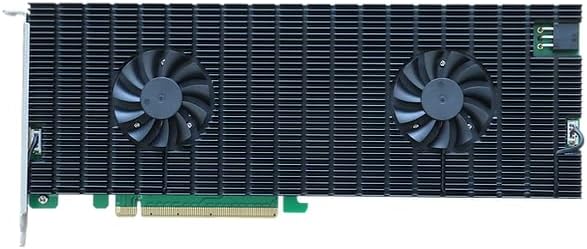
Gambar 1.1: Top view of the Highpoint Rocket 1108A HBA, showing the heatsink and dual cooling fans.

Figure 1.2: Diagram showing the intelligent PCIe switch technology, allocating x4 lanes to each of the 8 M.2 NVMe ports.
2. Eusi Paket
Sateuacan neraskeun pamasangan, mangga pariksa heula sadaya barang anu didaptarkeun di handap ieu aya dina pakét anjeun:
- Highpoint Rocket 1108A PCIe 3.0 x16 8-Port M.2 NVMe HBA
- Guide Instalasi Gancang
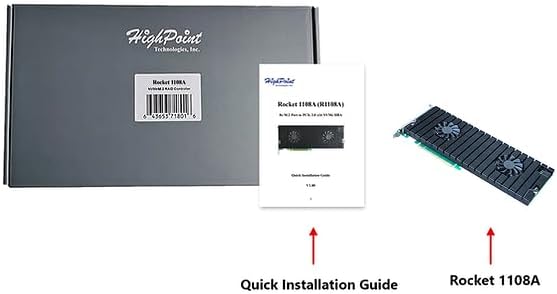
Figure 2.1: Package contents of the Highpoint Rocket 1108A, showing the HBA card, quick installation guide, and product box.
3. Setup jeung Instalasi
This section provides instructions for installing the Highpoint Rocket 1108A HBA into your system.
3.1 Sarat Sistim
- Available PCIe 3.0/4.0 x16 or x8 slot.
- Compatible operating system (Windows, macOS, Linux).
- M.2 NVMe SSDs (sold separately).
3.2 Pamasangan parangkat keras
- Sistem Pareum: Before beginning, ensure your computer system is completely powered off and disconnected from the power source.
- Casis Kabuka: Open your computer's chassis to access the motherboard and PCIe slots.
- Manggihan slot PCIe: Identify an available PCIe 3.0/4.0 x16 or x8 slot on your motherboard.
- Install HBA: Carefully align the Rocket 1108A HBA with the chosen PCIe slot and firmly press it down until it is securely seated. Ensure the retention clip (if present) engages.
- Install M.2 NVMe SSDs:
- If the heatsink is installed, you may need to remove it to access the M.2 slots. Refer to the "Maintenance" section for heatsink removal instructions.
- Gently insert each M.2 NVMe SSD into an available M.2 slot on the HBA at a slight angle.
- Press the SSD down until it is flat and secure it with the provided screw or retention mechanism.
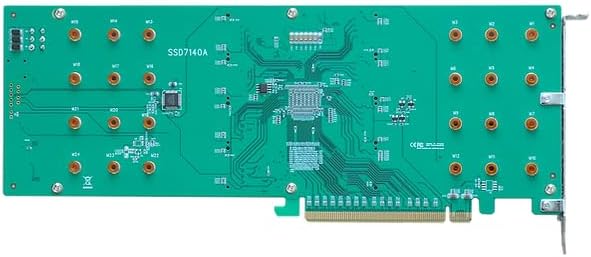
Gambar 3.1: Balik view of the HBA, illustrating the 8 M.2 NVMe ports where SSDs are installed (heatsink removed for clarity).
- Tutup Chassis: Once the HBA and SSDs are installed, close your computer's chassis and reconnect the power source.
3.3 Pamasangan Supir
The Highpoint Rocket 1108A HBA utilizes native, in-box NVMe driver support for most major operating systems, including Windows, macOS, and Linux. In most cases, no additional driver installation is required. The system should automatically detect and configure the HBA upon boot-up.
If your operating system does not automatically detect the HBA or the installed NVMe SSDs, please visit the official HighPoint websitus (www.highpoint-tech.com) for the latest driver downloads and support resources specific to your operating system.

Figure 3.2: The HBA supports native drivers across major operating systems.
4. Operating the HBA
Once the Highpoint Rocket 1108A HBA and NVMe SSDs are successfully installed and recognized by your operating system, they will function as standard storage devices.
4.1 Manajemén piringan
You can manage the installed NVMe SSDs using your operating system's built-in disk management tools:
- Windows: Use "Disk Management" to initialize, partition, and format the new drives.
- macOS: Use "Disk Utility" to erase, partition, and format the drives.
- Linux: Paké parabot kawas
fdisk,gparted, atawalsblkto manage the drives.
The HBA presents each M.2 NVMe SSD as an independent storage device, allowing for flexible configuration, including individual drive usage, software RAID, or other storage pooling technologies supported by your operating system.
5. Pangropéa
The Highpoint Rocket 1108A HBA is designed for reliable operation with minimal maintenance. However, periodic checks can help ensure optimal performance and longevity.
5.1 Sistim cooling
The HBA features a robust cooling solution with an aluminum heatsink and dual ultra-quiet fans. Ensure that the fans are free from dust and debris to maintain effective cooling. If necessary, gently clean the heatsink fins and fan blades with compressed air.

Angka 5.1: Ngabeledug view illustrating the cooling components: aluminum casing doubling as a heatsink, dual ultra-quiet cooling fans, vented bracket for heat dissipation, and thermal pad.
5.2 Heatsink Removal (for M.2 SSD Installation/Replacement)
To access the M.2 NVMe slots for SSD installation or replacement, the heatsink assembly may need to be removed. Follow these steps:
- Pareum listrik: Pastikeun sistem dipareuman sareng dipegatkeun tina sumber listrik.
- Remove HBA: Carefully remove the HBA from its PCIe slot.
- Unscrew Heatsink: Locate the screws securing the heatsink to the PCB. Carefully unscrew them.
- Gently Lift: Gently lift the heatsink assembly straight up from the PCB. Be mindful of any thermal pads that may be adhering.
- Install/Replace SSDs: Proceed with installing or replacing your M.2 NVMe SSDs.
- Reattach Heatsink: Align the heatsink with the PCB, ensuring thermal pads are correctly positioned, and re-secure it with the screws. Do not overtighten.


Gambar 5.2: Views of the HBA with and without the heatsink, demonstrating access to M.2 slots.
6. Cara ngungkulan
If you encounter issues with your Highpoint Rocket 1108A HBA, refer to the following common troubleshooting steps:
6.1 HBA Not Detected
- Pariksa Slot PCIe: Ensure the HBA is fully seated in the PCIe slot. Try reseating it or installing it in a different available PCIe 3.0/4.0 x16 or x8 slot.
- Sasayogian tanaga: Verify that your system's power supply is adequate for all installed components, including the HBA and NVMe SSDs.
- Setélan BIOS/UEFI: Check your motherboard's BIOS/UEFI settings to ensure the PCIe slot is enabled and configured correctly. Some motherboards may have settings related to PCIe bifurcation, though the Rocket 1108A does not require it.
- Supir: Although native drivers are typically sufficient, ensure your operating system is up-to-date. If issues persist, visit the HighPoint website for specific driver information.
6.2 NVMe SSDs Not Recognized
- SSD Seating: Ensure each M.2 NVMe SSD is correctly inserted and secured in its slot on the HBA.
- Kasaluyuan SSD: Verify that your M.2 NVMe SSDs are compatible with the NVMe standard.
- Manajemén piringan: Check your operating system's disk management utility (e.g., Windows Disk Management, macOS Disk Utility) to see if the drives are detected but uninitialized or unformatted.
- Heatsink Interference: Ensure the heatsink is properly installed and not interfering with the SSDs.
6.3 Masalah Performance
- Cooling: Ensure adequate airflow within your system chassis and that the HBA's cooling fans are operating correctly and free of dust. Overheating can lead to performance throttling.
- PCIe Lane Allocation: Confirm the HBA is installed in a PCIe x16 or x8 slot that provides sufficient bandwidth. While the HBA manages x4 lanes per SSD, the host slot bandwidth is crucial.
- Kaséhatan SSD: Check the health and performance of your individual NVMe SSDs using appropriate diagnostic tools.
7. Spésifikasi
| Fitur | Spésifikasi |
|---|---|
| merek | HighPoint |
| Nomer modél | R1108A |
| Runtuyan | R1108A |
| Panganteur Inangna | PCIe 3.0 x16 |
| NVMe Ports | 8 x M.2 NVMe (PCIe 3.0 x4 per port) |
| Faktor Bentuk | PCIe Add-in Card |
| Rojongan System Operasi | Windows, macOS, Linux (Native in-box drivers) |
| Niiskeun | Aluminum Heatsink with Dual Ultra-Quiet Fans |
| Item Beurat | 1.92 pon (kira-kira 0.87 kg) |
| Ukuran Paket | 13.24 x 7.64 x 2.8 inci (kira-kira 33.63 x 19.41 x 7.11 cm) |
| Warna | Green (PCB) |
8. Garansi jeung Rojongan
For detailed warranty information and technical support, please refer to the official HighPoint Technologies, Inc. websitus atanapi ngahubungan layanan palanggan maranéhanana langsung.
HighPoint Technologies, Inc. Official Websitus: www.highpoint-tech.com
This manual is intended as a guide for the installation and basic operation of the Highpoint Rocket 1108A HBA. For advanced configurations or specific technical inquiries, please consult the resources available on the manufacturer's websitus.


