1. Bubuka
This manual provides instructions for the ALLIMITY BN59-01300F Voice Remote Control. This remote is designed as a replacement for various Samsung QLED TV models, offering voice control functionality and standard television remote features.
Seri TV Samsung anu cocog:
- Q8FN Series (e.g., QN55Q8FN, QN65Q8FN, QN75Q8FN, QN82Q8FN)
- Q75CN Series (e.g., QN55Q75CN, QN65Q75CN)
- Q7CN Series (e.g., QN55Q7CN, QN65Q7CN)
- Q7FN Series (e.g., QN55Q7FN, QN65Q7FN, QN75Q7FN)
- Q75FN Series (e.g., QN55Q75FN, QN65Q75FN, QN75Q75FN)
- Q6FN Series (e.g., QN49Q6FN, QN55Q6FN, QN65Q6FN, QN75Q6FN, QN82Q6FN)
- Q65FN Series (e.g., QN49Q65FN, QN55Q65FN, QN65Q65FN, QN75Q65FN, QN82Q65FN)
- LS01R Series (e.g., QN55LS01R)
- And other specific models like QN65Q900RB, QN75Q900RB, QN82Q900RB, QN98Q900RB.
For a complete list of compatible models, please refer to the product packaging or contact customer support.
2. Eusi Paket
pakét ngawengku:
- 1 x ALLIMITY BN59-01300F Voice Remote Control
- 1 x Manual Pamaké (dokumén ieu)
3. Setélan
3.1 Pamasangan batré
The remote control requires two (2) AAA alkaline batteries (not included) for operation.
- Teangan tempat panutup kompartemen batré dina tonggong kadali jauh.
- Geser panutup ka handap pikeun muka kompartemen.
- Selapkeun dua batré AAA, mastikeun terminal positif (+) jeung négatip (-) align bener jeung markings jero kompartemen nu.
- Geser panutup kompartemen batré deui kana tempatna nepi ka klik aman.

Catetan: Salawasna gentos kadua batréna sakaligus ku anu énggal. Ulah nyampur batré anu lami sareng anu énggal atanapi jinis batré anu béda.
3.2 Nyapasangkeun kadali jauh
When you turn on your Samsung TV for the first time, the remote control should pair automatically. If automatic pairing does not occur, follow these steps:
- Pastikeun TV anjeun diaktipkeun.
- Point the ALLIMITY BN59-01300F remote control directly at the remote control sensor of your Samsung TV.
- Pencét jeung tahan tombol Balik deui tombol (panah melengkung) sareng Play / Reureuh button (triangle with two vertical lines) simultaneously for 3 seconds or more.
- A pairing message should appear on your TV screen, indicating successful pairing.
If pairing fails, ensure the batteries are correctly installed and charged, then repeat the pairing process. If issues persist, refer to the Troubleshooting section.
4. Parentah Operasi
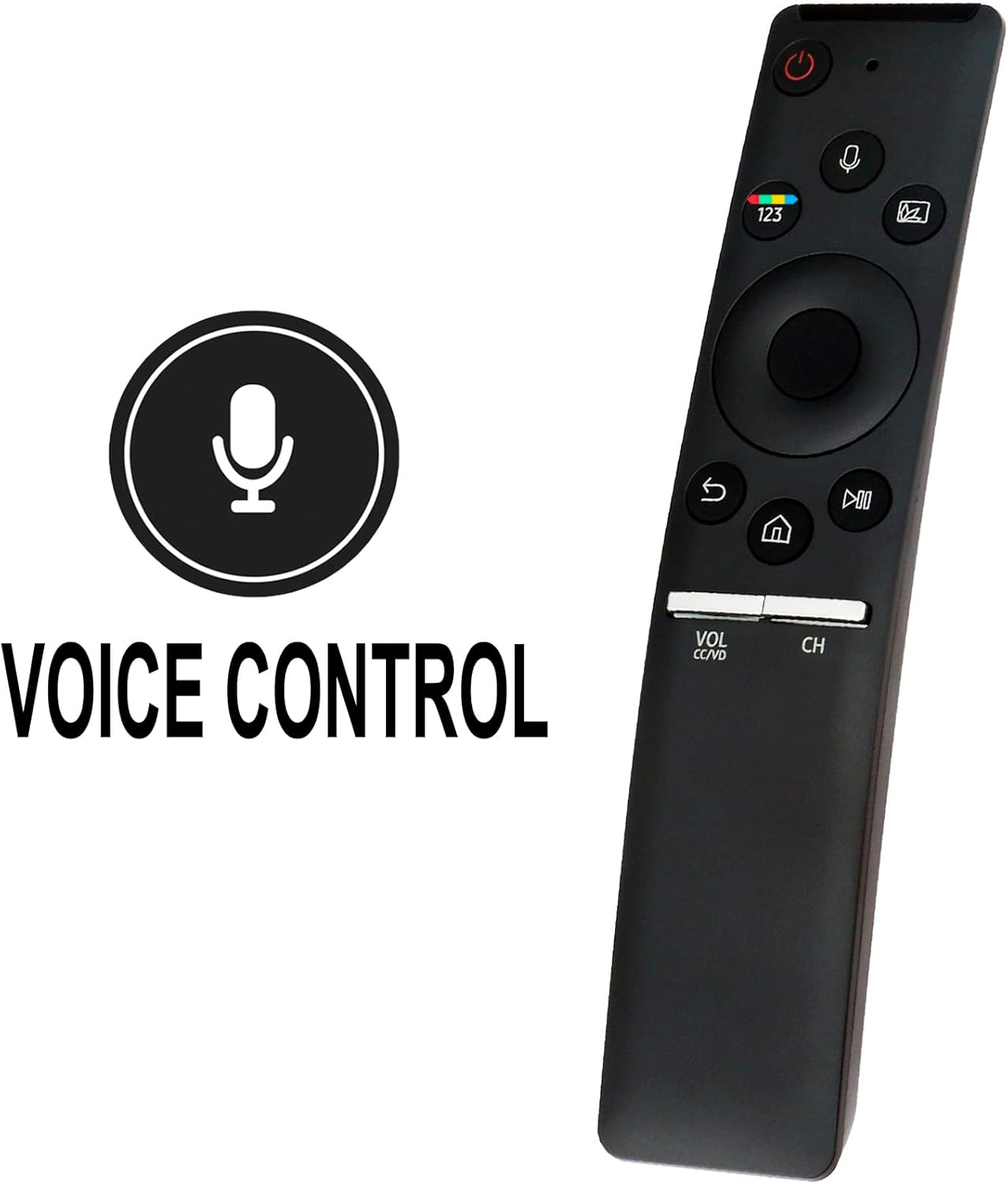
The ALLIMITY BN59-01300F remote control provides intuitive access to your Samsung TV's functions. Below are the primary button functions:
- Tombol Daya (⏻): Ngahurungkeun atawa mareuman TV.
- Tombol Kontrol Sora (🎙️): Activates the voice command feature. Press and hold to speak commands.
- Pad Angka (123): Displays the virtual number pad on the screen for direct channel input or other numerical entries.
- Ambient Mode/Color Button: Accesses Ambient Mode or other color-related functions depending on your TV model.
- Directional Pad (Up, Down, Left, Right) and Select Button: Navigates ménu jeung confirms selections.
- Tombol Balikkeun (↩): Mulih ka layar atawa ménu saméméhna.
- Tombol Bumi (🏠): Accesses the Smart Hub or Home screen.
- Tombol Puter/Reureuh (⏯): Controls media playback (play, pause).
- Volume Button (VOL CC/VD): Adjusts the volume. Press up for louder, down for quieter. Press the button itself to mute/unmute or access Closed Captioning/Video Description.
- Channel Button (CH): Changes channels. Press up for the next channel, down for the previous. Press the button itself to display the channel list.
4.1 Ngagunakeun Kontrol Sora
The remote features a built-in microphone for voice commands. To use this function:
- Pencét jeung tahan tombol Kontrol sora tombol (🎙️).
- Speak your command clearly into the microphone located at the top of the remote.
- Release the button when you have finished speaking.
Examples of voice commands include: "Change to Channel 5", "Open Netflix", "Milarian pikeun action movies", "Volume up".
5. Pangropéa
- beberesih: Ngusap kadali jauh ku lawon lemes, garing. Ulah make cleaners cair atawa bahan abrasive.
- Ngagantian batré: Replace batteries when the remote's response becomes sluggish or it stops functioning. Always use new AAA alkaline batteries.
- Panyimpenan: Upami remot moal dianggo dina waktos anu lami, cabut batréna pikeun nyegah bocor sareng poténsi karusakan.
6. Cara ngungkulan
| Masalah | Mungkin Cukang lantaranana / Solusi |
|---|---|
| Jauh teu ngabales. |
|
| Remote is not pairing with the TV. |
|
| Kontrol sora teu jalan. |
|
If you encounter problems not listed here or if the suggested solutions do not resolve the issue, please contact ALLIMITY customer support for assistance.
7. Spésifikasi
| Fitur | Rincian |
|---|---|
| Nomer modél | BN59-01300F |
| Bahan | palastik |
| Sumber Daya | 2 x Batré Alkali AAA (teu kalebet) |
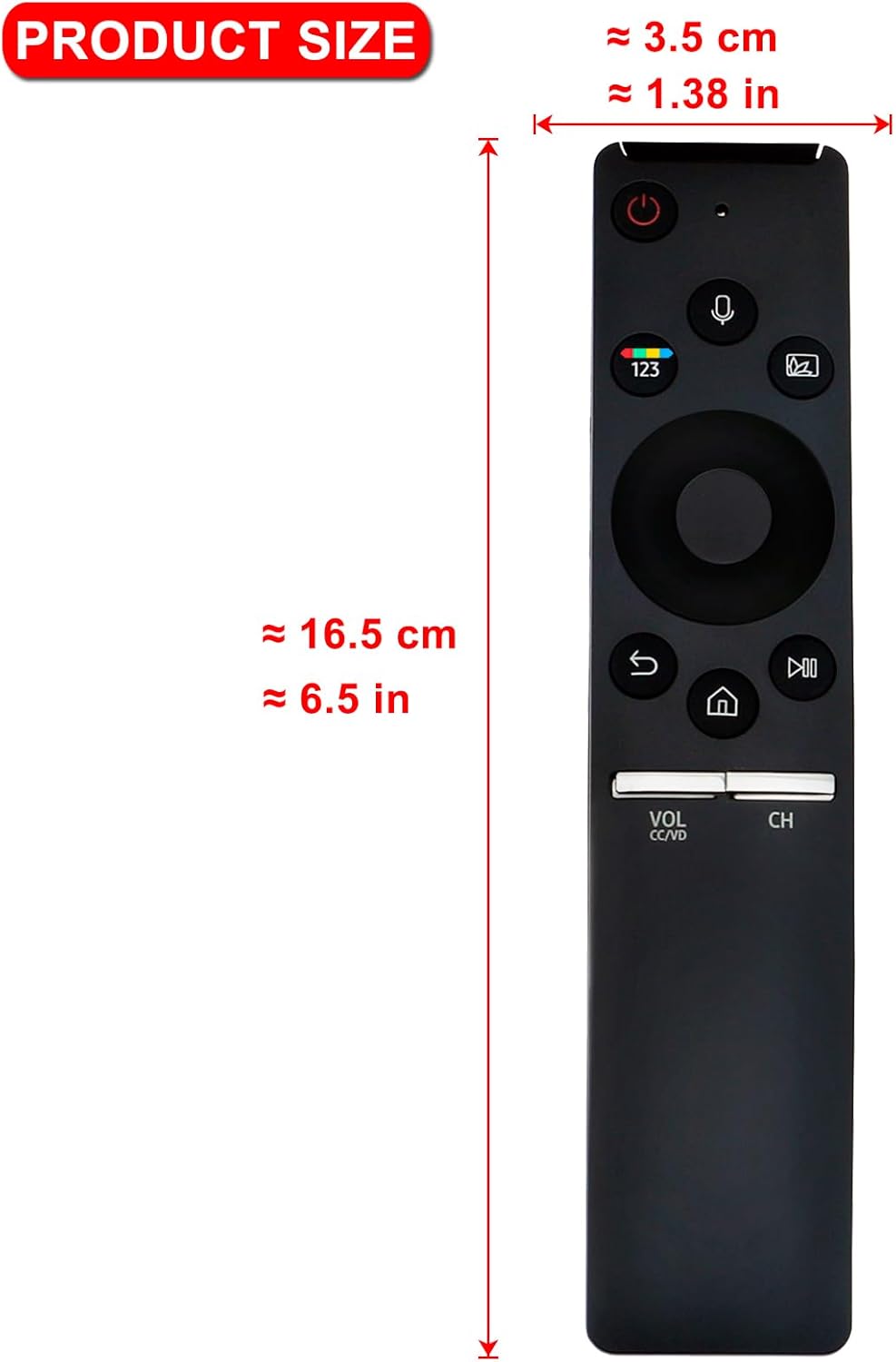
| Ukuran (L x W x H) | Approx. 16.5 cm (6.5 in) x 3.5 cm (1.38 in) x 1.5 cm (0.6 in) |
| Item Beurat | Approx. 1 ounce (without batteries) |
| Fitur husus | Pilarian Sora |
| Warna | Hideung |
| Alat nu cocog | Samsung QLED Televisions (specific models listed in Introduction) |
8. Garansi jeung Rojongan
For any questions, concerns, or issues regarding your ALLIMITY BN59-01300F Voice Remote Control, please contact ALLIMITY customer service. They are available to assist with troubleshooting, pairing difficulties, and general product inquiries.
Please refer to the contact information provided with your purchase or visit the official ALLIMITY websitus pikeun detil rojongan.
When contacting support, please have your product model number (BN59-01300F) and details of your issue ready to ensure efficient assistance.


