1. Émbaran Kasalametan
Read all instructions carefully before beginning installation. Failure to follow these instructions may result in electric shock, fire, or serious personal injury. This product must be installed in accordance with the applicable installation code by a person familiar with the construction and operation of the product and the hazards involved.
- Salawasna pegatkeun sambungan kakuatan di circuit breaker saméméh instalasi atawa ngalayanan.
- Pastikeun sadaya sambungan listrik aman sareng sasuai sareng kodeu lokal sareng ordinances.
- Kipas angin nyaéta damp rated, suitable for indoor and covered outdoor use. Do not expose to direct water spray.
- Mount the fan to a ceiling joist or a securely anchored outlet box capable of supporting the fan's weight.
2. Eusi Paket
Verify that all components listed below are present before beginning installation. If any parts are missing or damaged, contact Hinkley customer support.

Figure 2.1: Included components for the Hinkley Swell Smart Fan.
- Kanopi Langit-Langit
- Gantungan bracket
- Pamasangan Hardware
- Kipas Angin (3)
- Fan Housing + Motor
- Light Kit Cover
- Kit Lampu
- HIRO Remote Control
- Wall Control Components (Face Plate Bracket, Decorative Face Plate, Wall Cradle, Switch Cradle)
- Balance Kit
- Bola Uap Cap
- Parentah instalasi

Angka 2.2: Ngabeledug view of Hinkley Swell Smart Fan components.
3. Setup jeung Instalasi
Professional installation is recommended. Ensure power is OFF at the circuit breaker before proceeding.
3.1. Pertimbangan Pra-Pamasangan
- Ukuran Kamar: For optimal performance, select the appropriate fan size for your room. This 56-inch fan is generally suitable for rooms between 100-150 sq. ft.
- Lokasi Pasang: The fan must be mounted to a structurally sound ceiling joist or an approved outlet box.

Figure 3.1: Guide for choosing the correct fan size based on room area.
3.2. Mounting the Hanger Bracket
- Secure the hanger bracket to the ceiling outlet box using the provided mounting hardware. Ensure the bracket is firmly attached and can support the fan's weight.
- For outdoor or damp locations, ensure the ball moisture cap is correctly installed to protect electrical components.
3.3. Sambungan Wiring
- Connect the fan's electrical wires to the household wiring according to the wiring diagram in the full installation manual.
- Pastikeun yén sadaya kacang kawat dipasang sacara aman.
3.4. Assembling Fan
- Pasang bilah kipas kana perumahan motor.
- Install the integrated LED light kit and its cover.
- Carefully lift the fan assembly and hang it onto the hanger bracket.
- Secure the ceiling canopy to cover the wiring and mounting hardware.
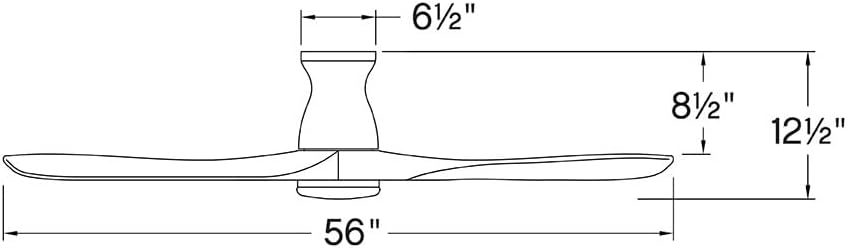
angka 3.2: dimensi produk pikeun tata instalasi.
4. Parentah Operasi
The Hinkley Swell Smart Fan offers multiple control options for convenience.
4.1. HIRO Remote Control
The included HIRO remote allows for direct control of fan speed, light, and direction.

Figure 4.1: HIRO Remote Control functions.
- Kipas Hurung / Pareum: Press the fan icon button to turn the fan on or off.
- Laju kipas: Use the 'up' and 'down' arrow buttons below the fan icon to adjust between 6 speeds.
- Lampu Hurung/Pareum: Press the light bulb icon button to toggle the integrated LED light.
- Peredupan cahaya: Use the 'up' and 'down' arrow buttons below the light icon to adjust brightness.
- Reverse Fan Direction: Press the circular arrow button to change the blade rotation direction.
4.2. Smart Home Integration (Wi-Fi, App, Voice Control)
The Hinkley Swell Smart Fan is Wi-Fi compatible, allowing integration with smart home systems for advanced control.

Figure 4.2: HIRO Smart Home features for the fan.
- Download the Hinkley smart app (refer to the full installation manual for app details and setup).
- Follow the in-app instructions to connect your fan to your home Wi-Fi network.
- Once connected, you can control the fan via the app, set schedules, and integrate with compatible voice assistants.
4.3. Seasonal Operation (Summer/Winter Modes)
Adjust the fan's direction to optimize air circulation for different seasons.

Figure 4.3: Understanding Summer and Winter fan modes.
- Modeu usum panas: Bilahna muter ka arah sabalikna jarum jam, ngadorong hawa ka handap pikeun nyiptakeun angin anu niiskeun.
- Modeu Usum tiis (Balik): Blades rotate clockwise, pulling air upwards to redistribute warm air trapped near the ceiling.
Video 4.1: This video from Hinkley Store provides an overview of various fan styles and features, which may offer visual context for fan operation and selection.
5. Pangropéa
Regular maintenance ensures optimal performance and longevity of your Hinkley Swell Smart Fan.
- beberesih: Debu bilah kipas sareng perumahan motor sacara périodik kalayan lemes, damp lawon. Ulah make cleaners abrasive atawa pangleyur.
- Kasaimbangan Blade: If the fan wobbles, use the included balance kit to correct any imbalance. Refer to the full installation manual for detailed balancing instructions.
- Sambungan listrik: Periodically check all electrical connections for tightness. Ensure power is disconnected at the circuit breaker before inspection.
6. Cara ngungkulan
If you encounter issues with your fan, refer to the following common troubleshooting steps. For more complex problems, consult the full installation manual or contact customer support.
- Kipas angin teu beroperasi: Check that the circuit breaker is on and the wall switch (if applicable) is in the 'on' position. Ensure all wiring connections are secure.
- Lampu Teu Gawé: Verify the light switch on the remote or wall control is on. Check wiring connections to the light kit.
- Oblong kaleuleuwihan: Ensure all blade screws are tightened. Use the provided balance kit to correct any blade imbalance. Confirm the hanger bracket is securely mounted.
- Remote Control Teu Ngabales: Check the battery in the remote control. Ensure the fan's receiver is not obstructed.
- Smart Features Not Connecting: Verify your Wi-Fi network is active and the fan is within range. Re-attempt the pairing process via the Hinkley smart app.
7. Spésifikasi
| merek | Hinkley |
| Ngaran modél | Swell Flush Illuminated 56" LED Smart Fan |
| Nomer modél | 903456FBB-LDD |
| Warna | Matte Black with Black Blades |
| Dimensi produk | 56 "D x 56" W x 12.75" H |
| Item Beurat | 28.6 pon |
| Jumlah wilah | 3 |
| Panjang sabeulah | 24.76 inci |
| Tipe Motor | DC (6-speed) |
| Sumber Cahaya | Integrated 16W LED |
| Kaluaran cahaya | 1320 lumens at 3000K |
| Kapasitas Aliran Udara | 4946 suku kubik per Menit |
| Voltage | 120 volt |
| Sumber Daya | Kabel Listrik |
| Métode kontrol | Aplikasi, Jauh, Sora |
| Pamakéan jero rohangan / outdoor | Jero rohangan, Luar rohangan (Damp dipeunteun) |
| Fitur husus | Dimmable, Hardwired, Integrated, Smart Fan |
| UPC | 640665025958 |
8. Garansi jeung Rojongan
For warranty information, please refer to the documentation included with your purchase or visit the official Hinkley website. For technical support, replacement parts, or further assistance, please contact Hinkley customer service directly.
Hinkley Customer Service: Refer to your product packaging or the Hinkley websitus pikeun inpo kontak ayeuna.