1. Produk Langkungview
The Frigga T71 Pro is a multi-use, real-time data logger designed for monitoring temperature, humidity, light, shock, tilt, and location. It supports 4G/5G global networks and features an external sensor for extended temperature range monitoring. This device is suitable for various applications requiring precise environmental control, such as cold chain logistics and pharmaceutical storage.
fitur konci ngawengku:
- Real-time reporting and alarming for multiple parameters.
- Automatic flight mode for airline compliance.
- Dual PDF report system for data traceability and backup.
- Large local storage capacity (50,000 data points).
- Rechargeable battery with long operational life.

Image 1.1: The Frigga T71 Pro device showing its display and various monitoring capabilities including dual temperature, humidity, light, shock, tilt, location, auto flight mode, and local PDF report backup.
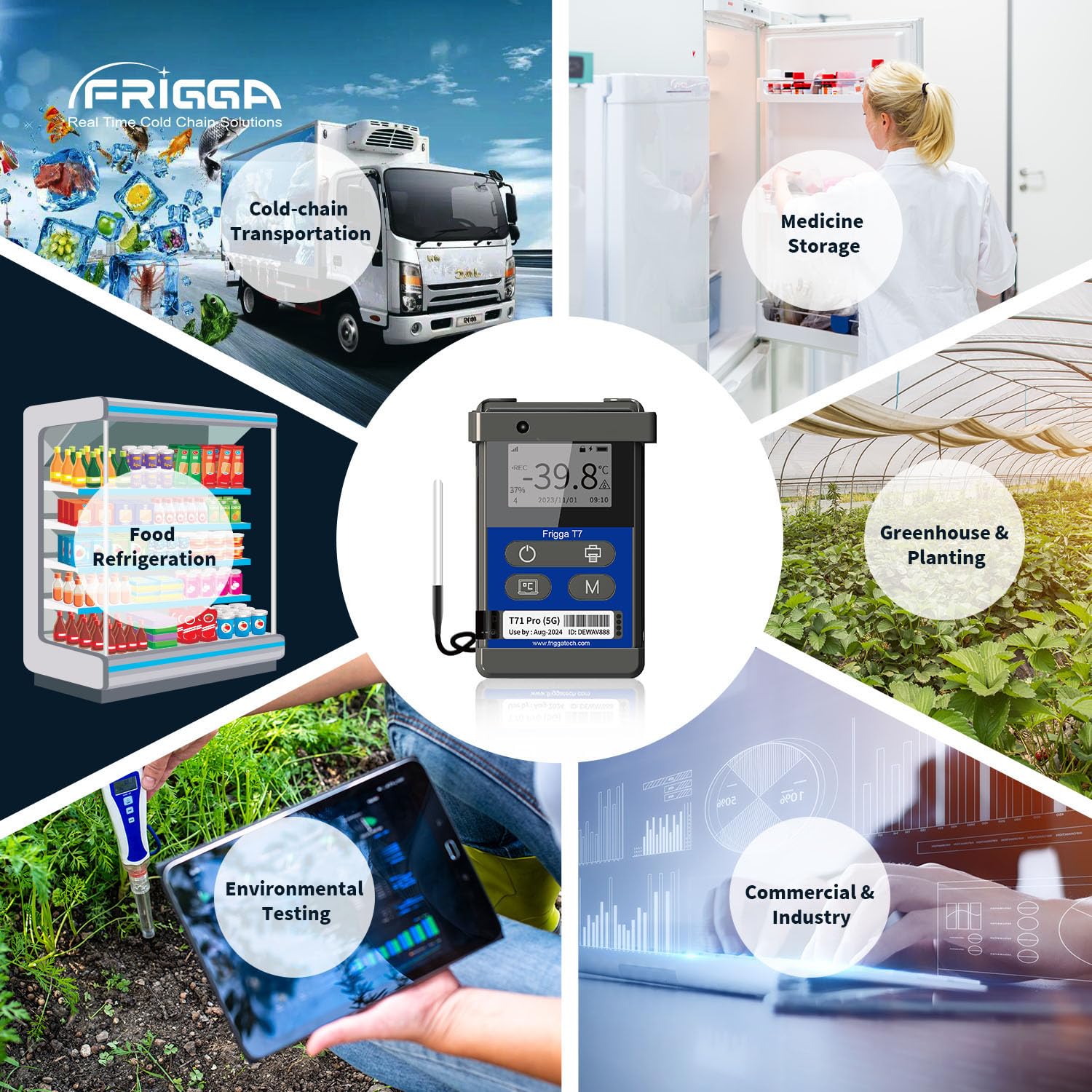
Image 1.2: Illustrates the diverse applications of the T71 Pro, such as cold-chain transportation, medicine storage, food refrigeration, greenhouse monitoring, environmental testing, and industrial use.
2. Device Components and Display
Familiarize yourself with the device's physical components and display indicators.

Image 2.1: Diagram identifying the Indicator LED, LCD Display, Start/Stop Key, Bluetooth Printing button, Display Info button, Sleep Mode (Flight Mode) button, Light Sensor, and Device ID label. The activation code (AC code) is located on the back of the device.
- Indikator LED: Provides status indications (e.g., recording, alarm).
- Layar LCD: Shows real-time data, status, and settings.
- Tombol ngamimitian/eureun: Initiates and terminates data recording.
- Percetakan Bluetooth: For connecting to a Bluetooth printer.
- Témbongkeun Info: Cycles through various display screens.
- Sleep Mode (Flight Mode): Activates/deactivates flight mode.
- Sénsor cahaya: Detects ambient light changes.
- ID paranti: Unique identifier for the logger.
3. Setup jeung Konfigurasi Awal
3.1 Ngecas Alat
Before initial use, fully charge the T71 Pro using the provided USB connector. The device is rechargeable and designed for long-lasting operation.
3.2 Aktipkeun Alat
Locate the Activation Code (AC code) on the back of your device. This code is required for initial setup and linking the device to the Frigga cloud platform.
3.3 Frigga Cloud Platform and App Setup
To utilize real-time monitoring and remote parameter settings, register an account on the Frigga cloud platform and download the Frigga mobile application (available for Android and iOS). Follow the on-screen instructions to add your T71 Pro device using its Device ID and Activation Code.
3.4 Remote Parameter Settings
Once connected to the Frigga cloud platform, you can remotely configure various parameters for your device, including:
- Temperature unit switch (Celsius/Fahrenheit).
- Settable alarm ranges for temperature and humidity.
- Data logging interval (e.g., 1, 2, 5, 10, 30, 60 minutes).

Image 3.1: The Frigga cloud platform interface for setting device parameters remotely, including temperature units, alarm thresholds, and data logging intervals.
4. Parentah Operasi
4.1 Ngamimitian sareng Ngeureunkeun Rékaman
Pencét éta Mimitian / Stop Key (refer to Image 2.1) to begin a new recording session. Press it again to stop recording. Ensure the device is properly configured before starting a new session.
4.2 Real-Time Monitoring and Alerts
The T71 Pro continuously monitors environmental conditions. In case of deviations from set thresholds, the device will send real-time alerts via Email, SMS, and the Frigga App. This allows for timely corrective actions.

Gambar 4.1: Hiji example of a real-time temperature alert notification received via the Frigga Track app, indicating a temperature deviation.
4.3 Auto Flight Mode
The device features an auto flight mode. When flights take off, the device automatically switches to flight mode, recording and storing data locally. Upon landing, it automatically exits flight mode and uploads all stored data to the Frigga cloud platform, ensuring no data loss during air travel.
4.4 Data Storage and Reporting
The T71 Pro stores up to 50,000 data points locally. Data can be accessed and exported in multiple ways:
- Sambungan USB 2.0: Download PDF reports directly to a PC without requiring special software.
- Frigga Cloud Platform/App: Remotely download reports and view detailed data analysis.
- Percetakan Bluetooth: Print reports directly from the device using a compatible Bluetooth printer.
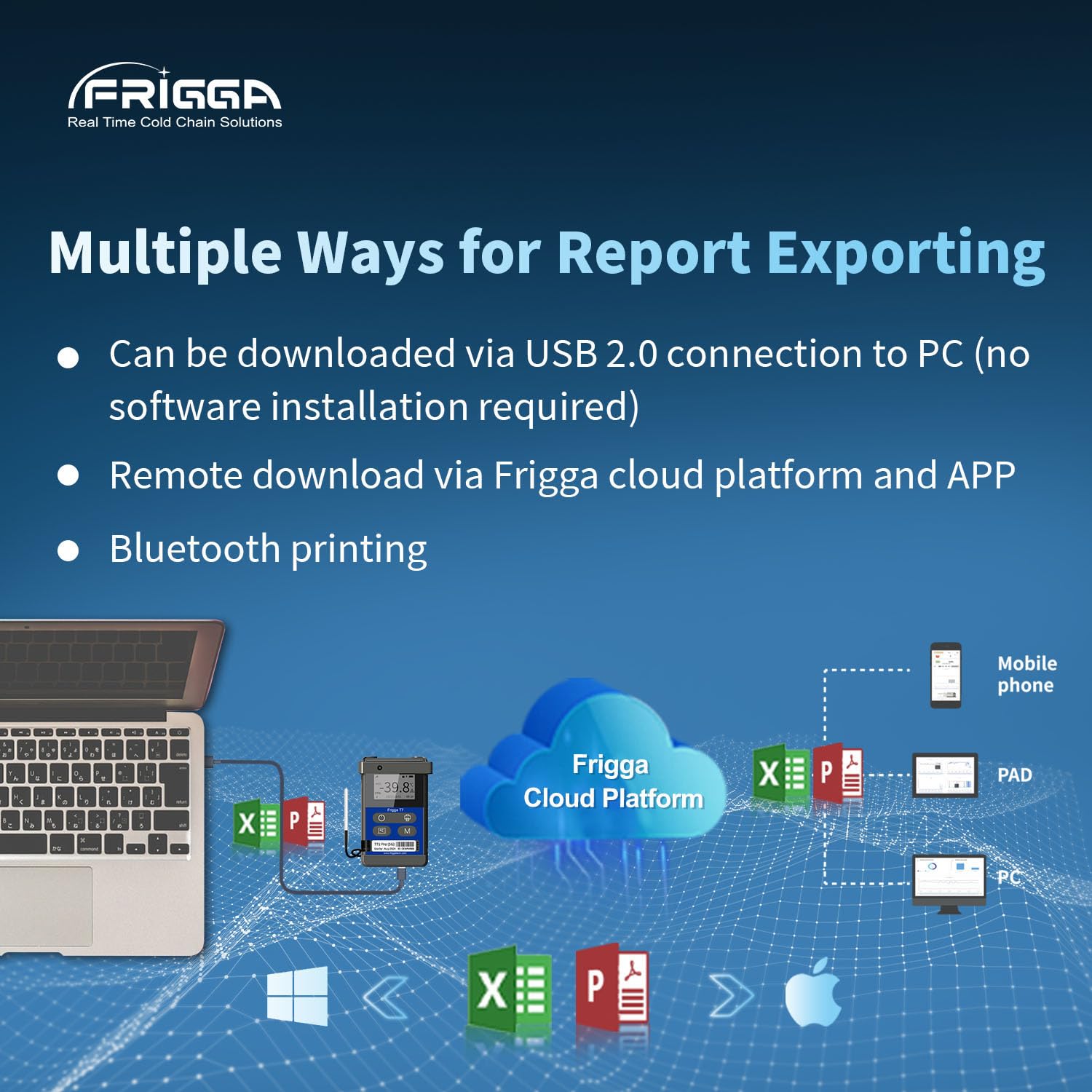
Image 4.2: Illustrates the various methods for exporting data reports, including direct USB connection, remote access via the Frigga cloud platform and app, and Bluetooth printing.

Image 4.3: The device display showing current readings and a graphical representation of temperature and humidity data over time, demonstrating its large capacity data storage and logging capabilities.
5. Pangropéa
5.1 beberesih
Wipe the device clean with a soft, dry cloth. Avoid using abrasive cleaners or solvents that could damage the polycarbonate (PC) outer material or electronic components.
5.2 Manajemén batré
The T71 Pro is equipped with a rechargeable battery. Ensure the device is charged regularly, especially before long monitoring periods. The battery life can extend up to 120 days on a full charge with a 1-hour uploading interval.
6. Cara ngungkulan
6.1 Pencegahan Leungitna Data
The T71 Pro features a dual PDF report system and local storage to prevent data loss. If network connectivity is lost, data is stored locally and transmitted once the signal is restored. Always ensure the device has sufficient battery life for the duration of monitoring.
6.2 Masalah konektipitas
If the device is not transmitting data or receiving alerts, check the following:
- Ensure the device is within an area with 4G/5G network coverage.
- Verify that the device is not in flight mode unintentionally.
- Pariksa tingkat batré alat.
- Confirm that the device is correctly linked to your Frigga cloud account.
6.3 Masalah tampilan
If the LCD display is not functioning correctly, ensure the device is charged. If the issue persists, contact customer support.
7. Spésifikasi
| Parameter | Nilai |
|---|---|
| Nomer modél | T71 Pro |
| Rentang Suhu Internal | -30°C nepi ka +70°C (-22°F nepi ka +158°F) |
| External Temperature Range | -40°C nepi ka +80°C (-40°F nepi ka +176°F) |
| Akurasi Suhu | ±0.5°C (-20°C to +40°C), ±1°C (other ranges) |
| Range Kelembapan | 5% nepi ka 95% RH |
| Akurasi asor | ±3% (20% to 80% RH), ±5% (other ranges) |
| Deteksi cahaya | 0-52000 Lux |
| Deteksi shock | 1-8 G |
| Detéksi Dengdekkeun | 0-180 ° |
| Konektipitas | Global LTE 4G/5G, fallback 2G network, USB |
| Kapasitas Panyimpenan Data | 50,000 points (offline backup) |
| Kahirupan batré | Up to 120 days (at 1-hour uploading interval) |
| Tipe tampilan | LCD Digital |
| Bahan Luar | Polikarbonat (PC) |
| Komponén Kaasup | T71 Pro data logger, warranty card, calibration certificate, USB connector |
8. Garansi jeung Rojongan
8.1 Émbaran jaminan
Your Frigga T71 Pro comes with a warranty card. Please refer to the card for specific warranty terms and conditions. A multi-point temperature calibration certificate issued by the original factory is also included with each device.
8.2 Rojongan Téknis
For any problems or technical assistance, please contact Frigga customer support. 24/7 technician support is available via email.


