Bubuka
Welcome to the iRobot Roomba i1 (1152) Robot Vacuum user manual. This guide provides essential information for setting up, operating, maintaining, and troubleshooting your robot vacuum. The Roomba i1 is designed to efficiently clean hard floors and carpets, utilizing Wi-Fi connected mapping technology to navigate your home.
Émbaran Kasalametan penting
Before using your Roomba i1 robot vacuum, please read all safety instructions carefully. Failure to follow these instructions may result in electric shock, fire, or serious injury.
- Alat ieu tiasa dianggo ku murangkalih umur 8 taun ka luhur sareng jalma anu kakurangan kamampuan fisik, indrawi atanapi mental atanapi kurang pangalaman sareng pangaweruh upami aranjeunna dipasihan pangawasan atanapi petunjuk ngeunaan panggunaan alat dina cara anu aman sareng ngartos bahaya anu aya. .
- Children should not play with the appliance. Cleaning and user maintenance shall not be made by children without supervision.
- Anggo ngan sakumaha anu dijelaskeun dina manual ieu.
- Ulah make di luar atawa dina surfaces baseuh.
- Ulah ngantep dipaké salaku cocooan. Perhatian caket diperyogikeun nalika dianggo ku atanapi caket barudak.
- Ulah make jeung ari ruksak atawa colokan. Upami alat henteu jalan sakumaha sakuduna, parantos diturunkeun, ruksak, ditinggalkeun di luar, atanapi murag kana cai, balikkeun deui ka pusat layanan.
- Ulah narik atawa mawa ku ari, make ari salaku cecekelan, nutup panto dina ari, atawa narik ari sabudeureun ujung seukeut atawa juru. Ulah ngajalankeun alat ngaliwatan kabel. Tetep ari jauh ti surfaces dipanaskeun.
- Ulah cabut colokan ku cara narik kana kabel. Pikeun cabut colokan, keupeul colokan, teu ari.
- Ulah nanganan colokan atawa alat ku leungeun baseuh.
- Ulah nempatkeun obyék nanaon kana bukaan. Entong nganggo sareng bukaan anu diblokir; tetep bébas tina lebu, serat, rambut, sareng naon waé anu tiasa ngirangan aliran hawa.
- Jauhkeun buuk, pakean longgar, ramo, sareng sadaya bagian awak tina bukaan sareng bagian anu obah.
- Ulah nyokot naon bae anu kaduruk atawa ngaroko, kayaning roko, korek api, atawa lebu panas.
- Entong dianggo pikeun nyandak cairan anu gampang kaduruk atanapi kaduruk, sapertos béngsin, atanapi dianggo di daérah anu aya.
- Ulah make tanpa kantong lebu jeung/atawa saringan di tempat.
- Nyegah ngamimitian teu dihaja. Pastikeun saklar dina posisi pareum samemeh nyambung ka pak batre, nyokot atawa mawa alat.
- Ngecas ukur nganggo carjer anu ditunjuk ku produsén. Pangecas anu cocog pikeun hiji jinis pak batré tiasa nyababkeun résiko seuneu nalika dianggo sareng pak batré anu sanés.
- Anggo alat ukur nganggo bungkus batré anu ditunjuk sacara khusus. Pamakéan bungkusan batré anu sanés tiasa nyababkeun résiko tatu sareng seuneu.
- Lamun pak batré teu dipake, jauhkeun tina objék logam lianna, kawas klip kertas, koin, kenop, paku, screws atawa objék logam leutik lianna, nu bisa nyieun sambungan ti hiji terminal ka nu sejen. Kosot terminal batré babarengan bisa ngabalukarkeun kaduruk atawa seuneu.
- Dina kaayaan kasar, cairan bisa ejected tina batréna; nyingkahan kontak. Upami kontak teu kahaja, siram ku cai. Lamun cairan kontak panon, tambahan neangan pitulung médis. Cairan anu dikaluarkeun tina batré tiasa nyababkeun iritasi atanapi kaduruk.
- Ulah make pak batré atawa alat nu ruksak atawa dirobah. Batré anu ruksak atanapi dirobih tiasa nunjukkeun paripolah anu teu kaduga anu nyababkeun seuneu, ngabeledug atanapi résiko tatu.
- Entong ngalaan bungkus batré atanapi alat pikeun kahuruan atanapi suhu anu kaleuleuwihi. Paparan seuneu atanapi suhu di luhur 130 ° C (265 ° F) tiasa nyababkeun ledakan.
- Turutan sadaya parentah ngecas jeung ulah ngeusi batre pak atawa alat di luar rentang suhu nu ditangtukeun dina parentah. Ngecas teu leres atanapi dina suhu di luar rentang anu ditangtukeun tiasa ngaruksak batré sareng ningkatkeun résiko kahuruan.
- Geus ngalayanan dipigawé ku jalma perbaikan mumpuni ngagunakeun ukur bagian ngagantian idéntik. Ieu bakal mastikeun yén kasalametan produk dijaga.
- Ulah ngarobah atawa nyoba ngalereskeun alat atawa pak batré (sakumaha lumaku) iwal sakumaha dituduhkeun dina parentah pikeun pamakéan sarta perawatan.
Eusi pakét
Verify that all original components are included in your package:
- iRobot Roomba i1 Robot Vacuum
- Imah Base Ngecas Station
- Tali Jalur
- 1 Lithium Ion Battery (pre-installed)
- Sikat Sisi
- Filter (Cloth Type)
- Dual Multi-Surface Rubber Brushes
Disetél
Follow these steps to set up your Roomba i1 robot vacuum for first use:
- Choose a Location for the Home Base: Place the Home Base charging station against a wall in an open, uncluttered area. Ensure there is at least 1.5 feet (0.5 meters) of clear space on each side of the Home Base and 4 feet (1.2 meters) in front of it.
- Sambungkeun kabel listrik: Plug the line cord into the Home Base and then into a wall outlet. Ensure the Home Base is powered on.
- Ngecas Robot: Place your Roomba i1 onto the Home Base. The robot will emit a tone to confirm it is properly docked and charging. Allow the robot to charge for at least 3 hours before its first cleaning mission. The light ring around the CLEAN button will pulse white while charging and turn solid white when fully charged.
- Unduh Aplikasi iRobot Home: For full functionality, download the iRobot Home App on your smartphone or tablet. The app will guide you through connecting your robot to your Wi-Fi network and setting up cleaning schedules.
- Nyambung ka Wi-Fi: Follow the in-app instructions to connect your Roomba i1 to your home Wi-Fi network. This enables smart features like mapping, scheduling, and integration with voice assistants.

Operating Your Roomba i1
Your Roomba i1 is designed for intelligent and efficient cleaning. Here's how to operate it:
Starting a Cleaning Job
- Using the CLEAN Button: Press the large CLEAN button on top of the robot once to wake it up, then press it again to start a cleaning cycle.
- Ngagunakeun iRobot Home App: Open the app and tap the "CLEAN" button to start a cleaning job from anywhere. You can also schedule cleaning times and customize cleaning preferences through the app.
- Kontrol sora: The Roomba i1 is compatible with Google Home. Once connected via the iRobot Home App, you can use voice commands like "Hey Google, ask Roomba to start cleaning."
Fitur beberesih
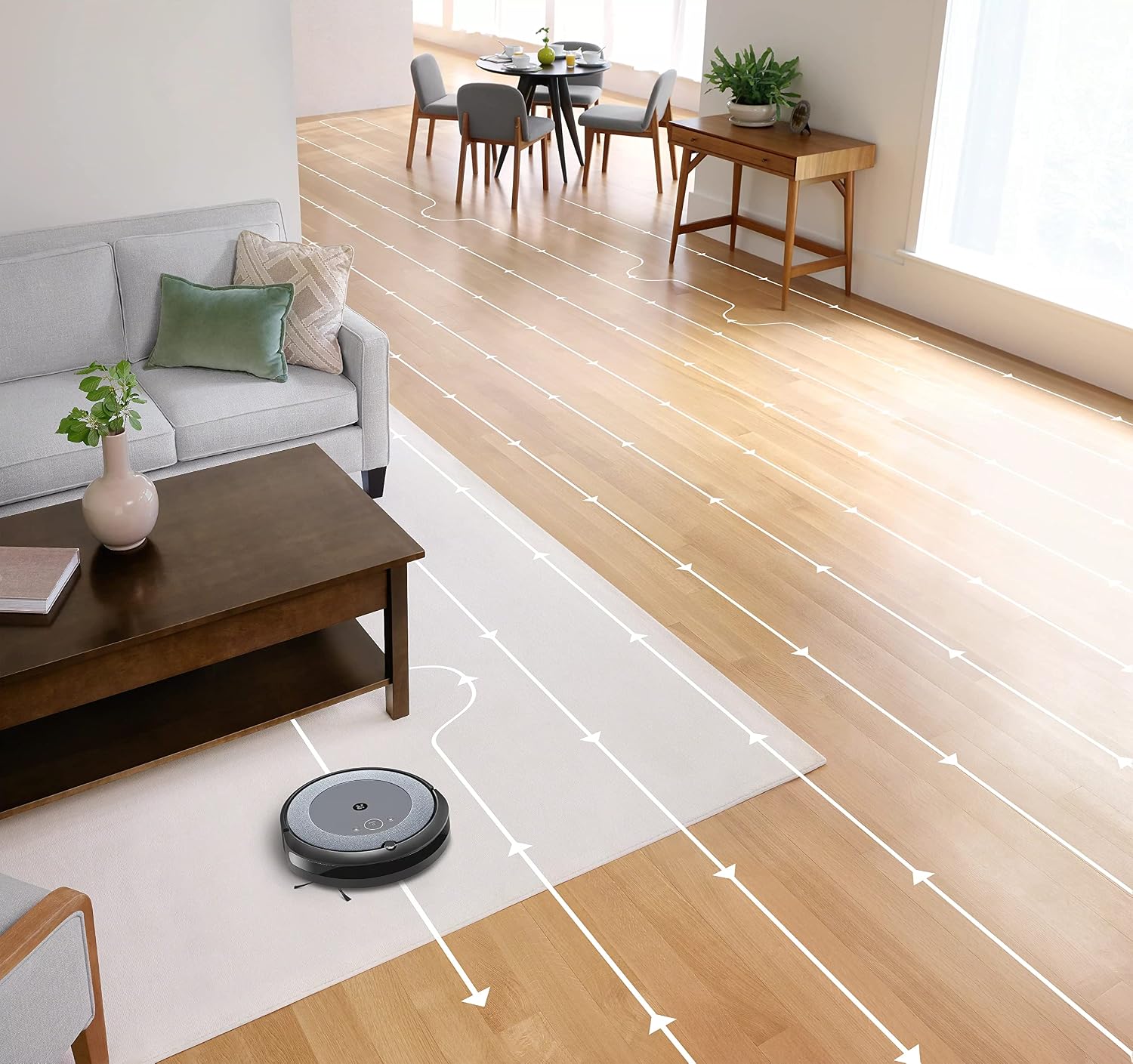
- Napigasi calakan: The robot cleans in neat, efficient rows, adapting to different floor types including carpets and hard floors.
- Dual Multi-Surface Rubber Brushes: These brushes are designed to prevent tangles with pet hair and effectively pick up dirt and debris from various surfaces.
- Dirt Detect™ Technology: The robot uses acoustic and optical sensors to find dirtier areas and spends more time cleaning them.
- Automatic Dirt Disposal (with compatible Clean Base): If you have a compatible Clean Base (sold separately), the robot will automatically empty its dustbin into an enclosed bag, allowing for weeks of hands-free cleaning.


Pangropéa
Regular maintenance ensures your Roomba i1 operates at peak performance. Always turn off the robot and disconnect it from the Home Base before performing any maintenance.
Ngosongkeun Tong Debu
- Press the bin release button and pull out the bin.
- Open the bin door and empty debris into a trash can.
- Tap the bin against the trash can to dislodge any trapped debris.
Cleaning the Filter (Cloth Type)
- Cabut saringan tina tong lebu.
- Tap the filter against a trash can to remove debris. Do not wash the filter.
- Replace the filter every 2 months, or more frequently if you have pets.
Ngabersihan Sikat
- Pinch the yellow brush release tabs to lift the brush frame.
- Remove the brushes and remove any hair or debris wrapped around them or trapped beneath the yellow caps.
- Pasang deui sikat-sikatna, pastikeun sikatna ngaklik dina tempatna.
Ngabersihan Sikat Sisi
- Use a coin or small screwdriver to remove the screw holding the side brush.
- Remove the side brush and clean any hair or debris from the brush and its post.
- Pasang deui sikat sisina sareng kencengkeun sekrup.
Ngabersihan Sénsor sareng Ngecas Kontak
- Wipe the charging contacts on the robot and Home Base with a clean, dry cloth.
- Wipe the cliff sensors (located on the bottom of the robot) and the front bumper sensor window with a clean, dry cloth.
Pamérésan masalah
If your Roomba i1 encounters an issue, the robot will play an audible alert and the light ring around the CLEAN button will flash. Consult the iRobot Home App for specific error messages and solutions.
Masalah umum sareng Solusi:
- Robot teu ngecas: Ensure the Home Base is plugged in and the robot is properly docked. Clean the charging contacts on both the robot and Home Base.
- Robot stuck or trapped: Clear obstacles from the robot's path. If it frequently gets stuck in the same area, consider using Virtual Wall Barriers (sold separately) or adjusting furniture.
- Kinerja beberesih goréng: Empty the dust bin, clean or replace the filter, and clean the main brushes and side brush. Ensure the robot's sensors are clean.
- Robot teu nyambung ka Wi-Fi: Ensure your Wi-Fi router is on and within range. Restart your router and the robot. Follow the Wi-Fi setup instructions in the iRobot Home App again.
- Robot nyieun sora anu teu biasa: Check the brushes and wheels for any trapped debris or hair. Clean them thoroughly.
For more detailed troubleshooting, refer to the iRobot Home App or the iRobot support websitus.
spésifikasi
| merek | iRobot |
| Ngaran modél | Roomba i1 (1152) |
| Fitur husus | Smart, Wi-Fi Connected Mapping |
| Warna | Hideung / kulawu |
| Komponén Kaasup | Robot Vacuum, Home Base, Line Cord, Battery, Side Brush, Filter, Dual Multi-Surface Rubber Brushes |
| Jenis Filter | Kaén |
| Sumber Daya | Batré Powered |
| Batré | 1 batré Litium Ion (kaasup) |
| Métode kontrol | App |
| Alat nu cocog | Imah Google |
| Faktor Bentuk | Robotik |
| Dimensi produk | 13.5 x 3.6 x 13.4 inci |
| Item Beurat | 13.2 pon |
| Surface Rekomendasi | Karpét, Hard Floors |
| UPC | 657768820809 |
| ASIN | B0CPQ3RVDK |
Garansi sareng Rojongan
This product is sold as a renewed item. Please refer to the specific warranty terms provided by the seller or Amazon Renewed at the time of purchase. For technical support, troubleshooting assistance, or to purchase replacement parts, please visit the official iRobot support website or contact iRobot customer service. You can also find helpful resources within the iRobot Home App.
Dukungan Online: www.irobot.com/support


