
1. Bubuka
This manual provides essential information for the installation, operation, and maintenance of your SYLVOX 43-inch Outdoor Signage TV (Model SS43A0KAGD). Please read this manual thoroughly before using the product to ensure proper function and safety. This television is designed for commercial outdoor use, offering high brightness and robust weather protection.
2. Émbaran Kasalametan
Perhatikeun pancegahan kaamanan di handap ieu pikeun nyegah karusakan produk sareng mastikeun kasalametan pangguna:
- Sasayogian tanaga: Pastikeun sumber kakuatan cocog voltage syarat dieusian dina labél produk.
- Cai sareng Uap: While the TV is IP55 waterproof, avoid direct high-pressure water jets. Ensure all port covers are securely closed when not in use.
- Ventilasi: Ulah ngahalangan liang ventilasi. Aliran hawa anu cekap diperyogikeun pikeun nyegah panas teuing.
- Pamasangan: Use appropriate mounting hardware and follow VESA standards (400 x 200 mm) for secure installation. Professional installation is recommended for outdoor environments.
- beberesih: Pegatkeun sambungan kakuatan saméméh beberesih. Ngagunakeun lemes, damp lawon. Hindarkeun bahan kimia anu kasar.
- Suhu: Operate the TV within the specified temperature range (-4°F to 113°F).
3. Eusi Paket
Pastikeun yén sadaya item aya dina bungkusan:
- SYLVOX 43-inch Outdoor Signage TV
- Remote Control (2 batré AAA kaasup)
- Kabel listrik
- Manual pamaké
- Kartu Garansi
- Screws for mounting (BM8X14MM for full motion cantilever mount, BM8X28MM & Gasket for fixed wall mount)

Figure 3.1: Included accessories with the SYLVOX 43-inch Outdoor Signage TV.
4. Produk Langkungview
4.1 Fitur konci
- tampilan: 43-inch 4K UHD (3840x2160) LED display with 1000 nits brightness and 1.07 Billion Colors.
- Daya tahan: IP55 waterproof rating, corrosion-resistant and scratch-resistant metal casing. Designed for 7x24 hour operation with temperature protection.
- Sistem operasi: Linux-based system with pre-installed applications (Netflix, Pandora, Facebook, YouTube, Twitter). Note: Signage 1.0 series does not support downloading additional apps.
- Konektipitas: Built-in ATSC & NTSC tuners, Bluetooth, 2.4G WiFi.
- Audio: Diwangun-di spiker.

Figure 4.1: SYLVOX 43-inch Outdoor Signage TV in a commercial setting, showcasing its bright 4K display.

Figure 4.2: The TV's IP55 waterproof and wide temperature range capabilities.

Figure 4.3: Visual representation of 4K UHD picture quality and color depth.

Gambar 4.4: Leuwihview of the Linux system and integrated features.
4.2 Port sareng Koneksi
The TV offers a variety of input and output ports for versatile connectivity:
- RS232
- USB Input x 2 (USB 1.0, USB 2.0, USB 3.0 compatible)
- RJ45 (Ethernet)
- HDMIx3
- Optik Kaluar
- Audio L/R In
- YPbPr In
- Antenna In (ATSC/NTSC Tuner)
- Earphone Kaluar
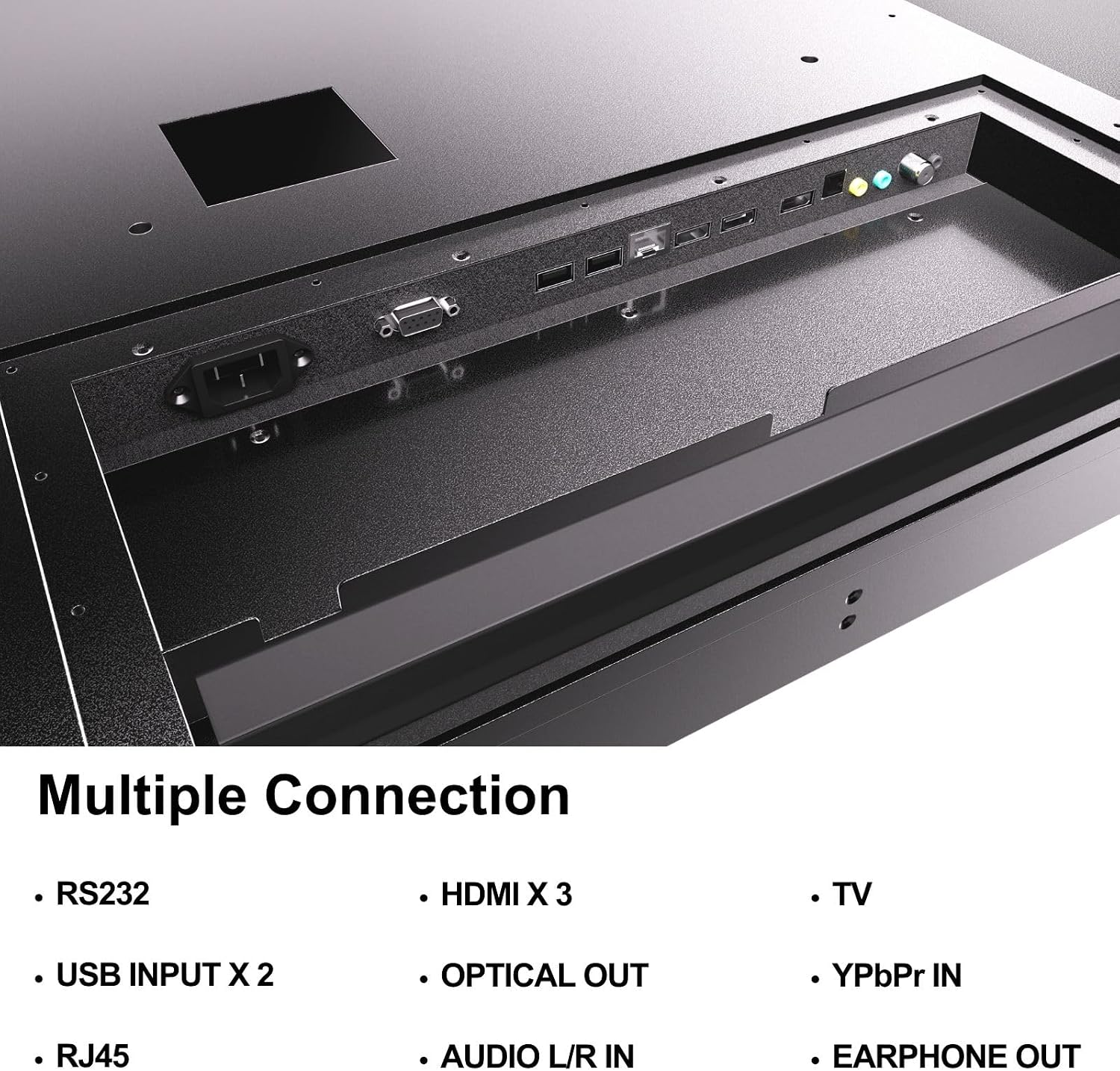
Figure 4.5: Rear panel connections of the SYLVOX Outdoor Signage TV.
5. Setélan
5.1 Masang TV
The SYLVOX Outdoor Signage TV supports wall mounting. Ensure the mounting surface is sturdy enough to support the TV's weight and is suitable for outdoor conditions.
- Pilih Lokasi: Select a location that provides optimal viewing and protection from extreme weather, even with the TV's waterproof rating.
- Pasang Wall Mount: Attach a VESA-compatible wall mount (400 x 200 mm) to the desired location according to the mount manufacturer's instructions. Use the provided screws (BM8X14MM for full motion, BM8X28MM with gasket for fixed mount).
- Attach TV to Mount: Carefully lift the TV and secure it to the installed wall mount. Ensure all connections are tight and secure.
5.2 Daya Awal Hurung
- Sambungkeun Kakuatan: Plug the power cord into the TV's power input and then into a grounded outdoor-rated power outlet.
- Selapkeun Batré: Buka kompartemen batré remot kontrol teras pasangkeun dua batré AAA, bari perhatikeun polaritasna.
- Daya Hurung: Pencét tombol daya dina kadali jauh atanapi TV.
- Wizard Setup Awal: Follow the on-screen instructions to select language, time zone, and perform initial channel scanning.
5.3 Sambungan Jaringan
To access smart TV features and streaming applications, connect the TV to your network.
- Sambungan Wi-Fi: Navigate to the TV's settings menu, select 'Network', then 'Wi-Fi'. Choose your network from the list and enter the password.
- Sambungan Ethernet: Connect an Ethernet cable from your router to the RJ45 port on the TV. The TV will automatically detect the wired connection.
- Bluetooth: For connecting audio devices, go to the Bluetooth settings, enable Bluetooth, and pair with your desired device.
6. Parentah Operasi
6.1 Fungsi TV Dasar
- kakuatan: Pencét éta Kakuatan tombol dina jauh pikeun ngahurungkeun TV atawa mareuman.
- Sumber Input: Pencét éta Input button to cycle through available input sources (HDMI 1/2/3, TV, YPbPr, USB).
- Volume: Ngagunakeun éta Jilid +/- tombol pikeun nyaluyukeun tingkat sora.
- Saluran: Ngagunakeun éta Saluran +/- buttons to change channels when using the built-in tuner.
- Napigasi: Use the directional arrows and OK tombol pikeun nganapigasi ménu.
6.2 Fitur TV Smart
The TV runs on a Linux operating system and comes with several pre-installed applications:
- Aksés layar utama pikeun view and launch applications like Netflix, Pandora, Facebook, YouTube, and Twitter.
- Use the remote control's dedicated app buttons (if available) for quick access.
- Note that the Signage 1.0 series does not support downloading additional applications.
6.3 Screencasting (Android Only)
The TV supports screencasting from Android mobile phones:
- Ensure your Android device and the TV are connected to the same Wi-Fi network.
- On your Android phone, enable the screen mirroring or screencasting feature (names may vary by device, e.g., 'Smart View', 'Cast', 'Wireless Display').
- Select your SYLVOX TV from the list of available devices.
6.4 Vertical/Horizontal Display
The TV can be installed and operated in both horizontal (landscape) and vertical (portrait) orientations. When using the screen vertically, the display direction is adjusted by the input device or content source.
7. Pangropéa
Proper maintenance ensures the longevity and performance of your outdoor TV:
- Ngabersihan layar: Lembut usap layar nganggo lawon anu lemes sareng teu aya serat. Pikeun tanda nekad, rada dampen lawon jeung cai. Ulah menyemprot cleaners langsung kana layar.
- Ngabersihan Casing: Ngagunakeun lemes, damp lawon pikeun ngabersihkeun logam casing. Hindarkeun pembersih abrasive atanapi pangleyur.
- Panutup Port: Regularly check that all unused port covers are securely sealed to maintain the IP55 waterproof rating.
- Pamariksaan Lingkungan: Periodically inspect the TV and mounting hardware for any signs of wear, corrosion, or damage, especially after severe weather conditions.
- Apdet parangkat lunak: Check for available software updates through the TV's settings menu to ensure optimal performance and security.
8. Cara ngungkulan
If you encounter issues with your SYLVOX Outdoor Signage TV, refer to the following common problems and solutions:
| Masalah | Mungkin Cukang lantaranana | Solusi |
|---|---|---|
| Taya kakuatan | Power cord disconnected; no power from outlet; remote batteries dead. | Check power cord connection; test outlet; replace remote batteries. |
| Henteu aya gambar, tapi aya sora | Sumber input salah dipilih; masalah alat éksternal. | Press 'Input' button to select correct source; check external device connections. |
| Henteu aya sora, tapi aya gambar | Volume diheureuyan atawa handap teuing; masalah alat audio éksternal. | Unmute volume or increase level; check audio cables for external devices. |
| Wi-Fi connection unstable or disconnected | Router issue; TV too far from router; incorrect password. | Restart router; move TV closer or use a Wi-Fi extender; re-enter Wi-Fi password. |
| Kadali jauh teu jalan | Batteries dead or incorrectly inserted; obstruction between remote and TV. | Ganti batré; pastikeun garis paningal anu jelas ka panarima IR TV. |
If the problem persists after trying these solutions, please contact SYLVOX customer support.
9. Spésifikasi
| Ngaran modél | SS43A0KAGD |
| Ukuran layar | 43 inci |
| Téknologi tampilan | LED |
| Resolusi | 4K (3840x2160) |
| Refresh Laju | 60 Hz |
| Maximum Display Brightness | 1000 Nit |
| Babandingan Kontras | 3000:1 |
| Waktu Tanggapan | 8 Milidetik |
| Peunteun waterproof | IP55 |
| Sistem operasi | Linux |
| Téhnologi konektipitas | Wireless (Bluetooth, Wi-Fi), Wired (HDMI, USB, RJ45, RS232) |
| Input Audio | HDMI, Optical, USB, Audio L/R In |
| Format Sinyal | ATSC, NTSC |
| Total Number of HDMI Ports | 3 |
| Total palabuhan USB | 2 |
| Ukuran produk (D x W x H) | 3.4 "D x 38.6" W x 22.4" H |
| VESA Gunung Standar | 400 x 200 mm |
| Wattage | 120 Watt-jam |
| Produsén | Kontech Electronics Co., Ltd. |
| UPC | 810079224838 |
10. Garansi jeung Rojongan
10.1 Émbaran jaminan
SYLVOX provides a 2-taun jaminan produsén urang pikeun produk ieu. Garansi ieu ngawengku cacad dina bahan sareng padamelan dina panggunaan normal. Mangga simpen bukti pameseran anjeun pikeun klaim garansi.
10.2 Rojongan Palanggan
If you require assistance with installation, operation, troubleshooting, or warranty service, please contact SYLVOX customer support. We recommend checking the product upon receipt to ensure it is in good condition and functions normally.
For further support, please visit the official SYLVOX website or refer to the contact information provided on your warranty card.