
IPRO IPRO P1
IPRO P1 GSM 2G Mobile Phone User Manual
Model: IPRO P1
Bubuka
This manual provides comprehensive instructions for the IPRO P1 GSM 2G Mobile Phone. Designed for ease of use, particularly for seniors, this phone features large buttons, a clear display, and essential functions. Please read this manual carefully before using your device to ensure proper operation and maintenance.
Naon dina Box
Saatos unboxing, mangga pariksa yen sakabeh item di handap ieu kaasup:
- 1 x IPRO P1 Mobile Phone
- 1 x Micro-USB Charger
- 1 x Batré
- 1 x Manual Pamaké
Disetél
1. Nyelapkeun Kartu SIM sareng Batré
- Cabut panutup tukang telepon sacara saksama.
- Insert your 2G GSM SIM card(s) into the designated SIM card slot(s). This phone supports Dual SIM.
- Insert the battery into the battery compartment, ensuring the gold contacts align with the phone's terminals.
- Ganti panutup tukang nepi ka klik aman kana tempatna.
2. Ngecas Batré
Sateuacan dianggo anu munggaran, eusian heula batré telepon sacara pinuh.
- Connect the Micro-USB charger cable to the charging port on the phone.
- Colokkeun carjer ka colokan listrik.
- The charging indicator on the phone will show the charging status. Once fully charged, disconnect the charger.

Gambar 1: Hareup jeung tukang view of the IPRO P1 mobile phone, showcasing its compact design and textured back cover.
Parentah Operasi
1. Daya Hurung / Pareum
- To power on: Press and hold the Power/End Call button (usually red) until the screen lights up.
- To power off: Press and hold the Power/End Call button until the power off options appear, then select "Power off".
2. Nelepon
- Asupkeun nomer telepon nganggo alas kenop.
- Pencét tombol Telepon (biasana héjo) pikeun ngamimitian nelepon.
- To end a call, press the Power/End Call button.
3. Sending SMS Messages
- Navigate to the "Messages" menu from the main screen.
- Select "Write message" or "New SMS".
- Lebetkeun pesen anjeun nganggo keypad.
- Asupkeun nomer telepon panarima atawa pilih tina kontak.
- Pilih "Kirim".
4. Using Key Features

Gambar 2: The IPRO P1 phone with visual representations of its core functionalities, including communication, settings, multimedia, and utility features.
- Radio FM: Plug in headphones (not included) to use as an antenna, then navigate to the FM Radio application.
- Kaméra: Access the camera application from the menu to take photos. The phone has a basic camera.
- Bluetooth: Enable Bluetooth in the settings menu to connect to compatible devices like headsets.
- Senter: The phone features a powerful LED flashlight. It can usually be activated by a dedicated button or a long press of a specific key (refer to quick guide or on-screen prompts).
- Jam alarem: Set alarms through the "Clock" or "Alarm" application.
- Calendar & Calculator: Basic utility applications are available in the menu.

Gambar 3: The IPRO P1 phone demonstrating its powerful LED flashlight feature, illuminating a dark path.
Pangropéa
- beberesih: Anggo lawon anu lemes sareng garing pikeun ngabersihkeun permukaan telepon. Hindarkeun pembersih cair atanapi bahan anu kasar.
- Perawatan batré: Ulah nepikeun batréna ka suhu anu ekstrim. Upami telepon moal dianggo kanggo waktos anu lami, ngecasna sacara berkala pikeun ngajaga kasehatan batréna.
- Panyimpenan: Simpen telepon di tempat anu tiis sareng garing, jauh tina sinar panonpoé langsung sareng kalembaban.
- Hindarkeun tetes: While durable, avoid dropping the phone to prevent damage to internal components or the screen.
Pamérésan masalah
| Masalah | Mungkin Cukang lantaranana | Solusi |
|---|---|---|
| Telepon teu hurung | Batré lemah atanapi henteu leres diselapkeun. | Cas batréna. Pastikeun batréna dipasang kalayan leres. |
| Teu tiasa nelepon atanapi nampi telepon | No SIM card, SIM card not active, or out of network coverage. | Ensure SIM card is inserted and active. Check network signal strength. Contact your service provider. |
| Kualitas panggero goréng | Sinyal jaringan lemah atanapi gangguan. | Move to an area with better signal. Avoid using near other electronic devices. |
| Batré gancang boros | Frequent use, background applications, or old battery. | Kurangan kacaangan layar. Tutup aplikasi anu teu dianggo. Pertimbangkeun pikeun ngaganti batréna upami parantos lami. |
| Layar teu ngaréspon | Software glitch. | Remove and reinsert the battery to restart the phone. |
spésifikasi
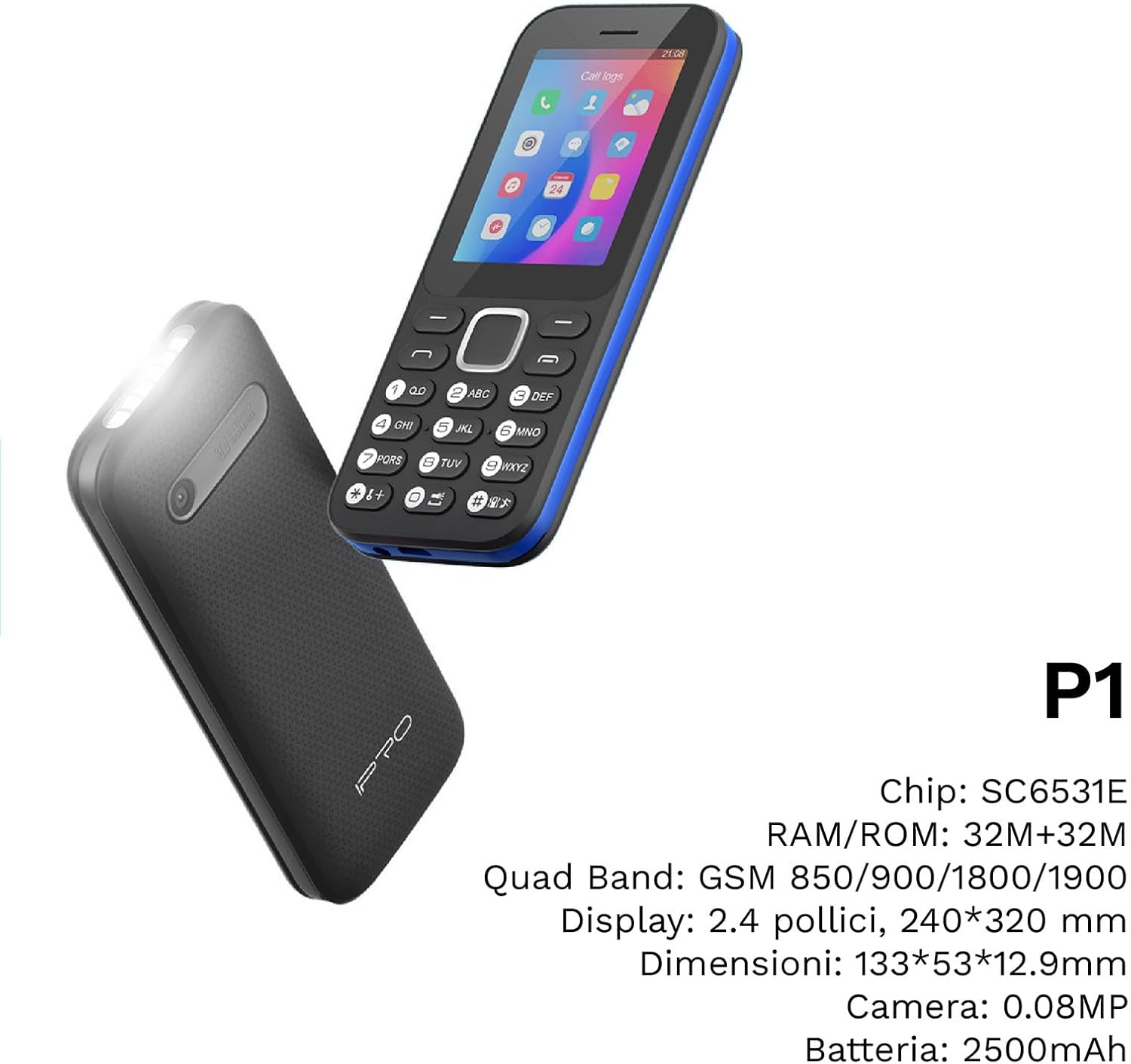
Gambar 4: Hiji angled view of the IPRO P1 phone, accompanied by a summary of its technical specifications.
- Jaringan: 2G GSM Quad Band (850/900/1800/1900 MHz)
- Chipset: SC6531E
- tampilan: 2.4-inch Color Display (240 x 320 resolution)
- RAM: 4 MB
- ROM: 4 MB
- Mémori anu tiasa dilegakeun: Supports up to 16 GB (MicroSD card not included)
- SIM: rojongan SIM ganda
- Konektipitas: Bluetooth
- Fitur: Camera, FM Radio, MP3, MP4, Alarm Clock, Calendar, Calculator, Integrated Games, LED Flashlight
- Batré: 2500 mAh Litium-Ion
- Basa: Spanish, English, French, Italian, Portuguese
- warna: Hideung
- Ukuran produk: 133 x 53 x 12.9 mm
- beurat: Kira-kira 200 gram

Gambar 5: A close-up of the IPRO P1's screen, illustrating its 2.4-inch display size for clear viewing.
Garansi sareng Rojongan
IPRO offers technical service and customer support for two years from the date of purchase. This warranty covers manufacturing defects but does not include artificial damage.
For support, please contact IPRO customer service through the details provided on the product packaging or the official IPRO website. When contacting support, please have your product model number (IPRO P1) and purchase details ready.

Gambar 6: A visual representation of the IPRO P1 phone's target audience, showing various seniors comfortably interacting with mobile devices, highlighting its user-friendly design.

Gambar 7: Display of the IPRO P1 phone in two color variants: classic black and a version with a distinctive blue trim.
Ask a question about this manual
Ask about setup, troubleshooting, compatibility, parts, safety, or missing instructions. Manuals+ will review the question and use this page’s manual context to help answer it.