
Andoer T64
Andoer T64 Pocket LED Light User Manual
Modél: T64
Bubuka
The Andoer T64 Pocket LED Light is a compact and versatile lighting solution designed for various photography and videography needs, including vlogging, video conferencing, live streaming, and small product photography. It features adjustable color temperature and brightness, ensuring optimal illumination for different scenarios.
fitur konci ngawengku:
- Versatile Mounting Capability: Equipped with a threaded screw hole and 3 cold shoe mounts for easy attachment to tripods, stabilizers, and selfie sticks.
- High Quality Beads: Contains 64 LED beads (32 white, 32 yellow) for bright and satisfactory illumination.
- Kompak & Gampang Dibawa: Portable design ideal for on-the-go use.
- 95+ High Color Rendering (CRI): Ensures accurate and faithful color representation in images and footage.
- Sababaraha Modeu Warna: Color temperature range of 2500K-9000K±200K with bi-color light modes to create desired moods.
Naon dina Box
Saatos unboxing, mangga pariksa yen sakabeh komponen aya:
- 1 x Andoer T64 Photography Lamp
- 1 x Kabel Ngecas Tipe-C
- 1 x Manual Pamaké

Gambar: Hareup jeung tukang view of the Andoer T64 Pocket LED Light, showing the light panel on one side and control buttons, battery indicator, and cold shoe mount on the other.
Disetél
Ngecas Alat
Before first use, fully charge the Andoer T64 LED light. The device is equipped with a built-in 1200mAh lithium battery.
- Locate the Type-C charging port on the side of the light.
- Connect the provided Type-C cable to the light and the other end to a compatible USB power adapter (not included) or a computer USB port.
- The battery indicator lights will show the charging progress. A full charge typically takes approximately 2 hours.
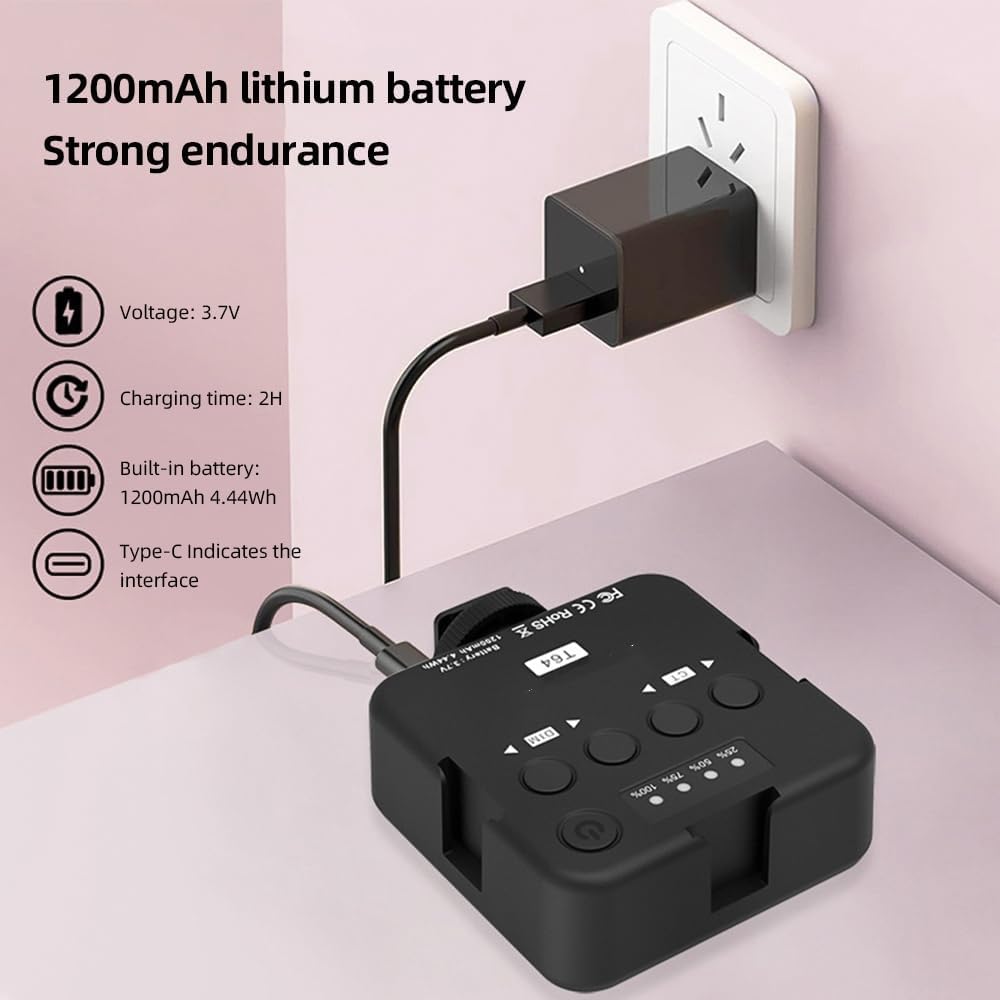
Image: The Andoer T64 LED light being charged via its Type-C port, with an illustration of the 1200mAh lithium battery and 2-hour charging time.
Pilihan Pamasangan
The Andoer T64 offers flexible mounting options:
- Gunung Sapatu Tiis: The light features a standard cold shoe mount at the bottom, allowing it to be attached directly to a camera's hot shoe, a camera cage, or other accessories with a cold shoe receiver.
- 1/4-inch Screw Hole: A 1/4-inch threaded screw hole is located at the bottom, compatible with tripods, light stands, and other photographic equipment.
- Multiple Cold Shoe Mounts: The light also includes three additional cold shoe mounts on its sides, enabling you to connect multiple T64 lights together for increased illumination or attach other accessories like microphones.

Image: Three Andoer T64 LED lights connected to each other and mounted on a DSLR camera, demonstrating the multi-light splicing capability using the cold shoe mounts.
Parentah Operasi
Familiarize yourself with the controls of the Andoer T64 LED light:

Image: A detailed diagram of the Andoer T64 LED light's back panel, labeling the power/brightness/color temperature indicator, switch/function button, brightness control buttons (DIM), color temperature control buttons (CT), cold shoe mounts, and Type-C port.
- Power/Brightness/Color Temperature Indicator: Displays the current battery level, brightness level, and color temperature setting.
- Switch/Function Button (Power Button): Press and hold to power the light on or off. Short press to cycle through different display modes or confirm settings.
- Brightness Control (DIM) Buttons: Use the left and right arrow buttons under "DIM" to decrease or increase the brightness level.
- Color Temperature Control (CT) Buttons: Use the left and right arrow buttons under "CT" to adjust the color temperature from 2500K (warm) to 9000K (cool).
Nyaluyukeun Caang sareng Suhu Warna
The Andoer T64 allows for precise control over your lighting environment:
- Daya Hurung: Press and hold the power button until the light turns on.
- Saluyukeun Caang: Use the "DIM" arrow buttons to set the desired brightness level. The indicator will show the current percentage.
- Saluyukeun Suhu Warna: Use the "CT" arrow buttons to change the color temperature. You can select from a range of 2500K (warm, yellowish light) to 9000K (cool, bluish light).

Image: Visual representation of the Andoer T64's dual color temperature adjustment, showing light output at 2500K (warm), 4500K (neutral), and 9000K (cool), with corresponding example portraits.
The compact size and versatile features make the T64 suitable for various applications:

Gambar: Témbongkeun kolasecasing the Andoer T64 LED light being used for different purposes, including live food photography, conference video calls, video fill light, camera fill light, and selfie fill light.
Pangropéa
To ensure the longevity and optimal performance of your Andoer T64 Pocket LED Light, follow these maintenance guidelines:
- beberesih: Use a soft, dry cloth to wipe the surface of the light. Do not use abrasive cleaners or solvents, as they may damage the finish or internal components.
- Panyimpenan: Upami teu dianggo, simpen lampu di tempat anu tiis sareng garing, jauh tina sinar panonpoé langsung sareng suhu anu ekstrim.
- Perawatan batré: To maintain battery health, avoid fully discharging the battery frequently. If storing for an extended period, charge the battery to about 50% capacity.
- Nanganan kalayan ati-ati: Avoid dropping the light or subjecting it to strong impacts, which could damage the LED beads or internal circuitry.
Pamérésan masalah
If you encounter issues with your Andoer T64 Pocket LED Light, refer to the following common troubleshooting steps:
- Lampu teu hurung:
- Ensure the battery is sufficiently charged. Connect the light to a power source using the Type-C cable and allow it to charge for at least 30 minutes.
- Pencét jeung tahan tombol daya pikeun sababaraha detik pikeun mastikeun éta teu ngan pencét pondok.
- Cahya taram atawa kedip-kedip:
- Check the battery level; a low battery can affect brightness. Recharge the device.
- Ensure the brightness setting is not at its lowest. Adjust using the "DIM" buttons.
- Cannot adjust color temperature:
- Ensure the light is powered on.
- Use the "CT" buttons to adjust the color temperature. If the buttons are unresponsive, try powering the device off and on again.
- Alat teu ngecas:
- Verify that the Type-C cable is securely connected to both the light and the power source.
- Try a different Type-C cable or a different USB power adapter to rule out faulty accessories.
- Pastikeun sumber daya aktip sareng nyayogikeun daya anu cekap.
spésifikasi
| Modél | T64 |
| Warna | Hideung |
| Bahan | ABS |
| Batré | 1200mAh, 4.44Wh |
| Waktu Ngecas | 2 jam |
| Gawé Voltage | 3.7V |
| Waktu sayaga | 60 minutes (at maximum brightness) |
| Port ngecas | Tipe-C |
| Kakuatan | 3.7W |
| Suhu Warna | 2500K-9000K±200K |
| Manik LED | 64 pieces (32 white light; 32 yellow light) |
| Sudut Beam | 120° |
| CRI | ≥95Ra |
| Luminance | 600LUX / 0.3m |
| Ukuran barang | 8.5 * 7.2 * 2.8 cm |
| Item Beurat | 91g (3.21 oz) |

Image: An infographic highlighting key product functions and specifications, including High Brightness LED Beads (32 white + 32 yellow), Dual Color Temperature (2500K-9000K±200K), CRI ≥95, Universal Cold Shoe, Portable & Light (8.5*7.2*2.8cm), and Built-in lithium battery (1200mAh 4.44Wh).
Precautions Kasalametan
Please read and adhere to the following safety precautions to ensure safe operation and prevent damage to the device or injury:
- Ulah ngalaan alat ka cai atawa kalembaban kaleuleuwihan.
- Avoid operating the device in extremely high or low temperatures.
- Ulah nyobian ngabongkar atawa ngaropéa alat. Perbaikan ngan kedah dilakukeun ku tanaga anu otorisasi.
- Jauhkeun alat tina médan magnét anu kuat.
- When disposing of the product, follow local regulations for electronic waste.

Image: A warning sign indicating a suffocation hazard. Text advises to keep plastic bags away from babies and children.
Garansi sareng Rojongan
For information regarding warranty coverage, technical support, or service inquiries, please refer to the warranty card included with your product or visit the official Andoer website. Contact details for customer support are typically provided in the product packaging or on the manufacturer's websitus.
Ask a question about this manual
Ask about setup, troubleshooting, compatibility, parts, safety, or missing instructions. Manuals+ will review the question and use this page’s manual context to help answer it.