Émbaran Kasalametan penting
Please read all instructions carefully before using the TYLT Smart Water Bottle. Keep this manual for future reference.
- Do not immerse the Bluetooth speaker base in water. The speaker is water-resistant (IP66 rated) but not fully waterproof for submersion.
- Always detach the speaker base before washing the water bottle.
- Keep the charging ports dry and clean to prevent damage.
- Ulah ngalaan produk ka suhu ekstrim atawa sinar panonpoé langsung pikeun période berkepanjangan.
- Paké ngan kabel ngecas disadiakeun atawa kabel USB-C Certified pikeun ngeusi batre.
- Jauhkeun tina jangkauan barudak.
Produk Leuwihview
The TYLT Smart Water Bottle combines a 24oz insulated stainless steel water bottle with a detachable Bluetooth speaker and wireless charging capability. It is designed for convenience and versatility.

Image: The TYLT Smart Water Bottle, showcasing its sleek black design and integrated speaker base.
Disetél
1. Inspection Awal
Upon unboxing, ensure all components are present: the water bottle, the detachable Bluetooth speaker base, the flip straw, and the USB-C charging cable.

Image: The water bottle with its speaker base detached, showing the separate components.
2. Ngecas Speaker
- Locate the USB-C charging port on the speaker base. It is usually covered by a protective flap.
- Connect the provided USB-C cable to the speaker base and plug the other end into a compatible USB power adapter (not included).
- The LED indicator on the speaker will show charging status. A full charge provides up to 12 hours of audio playback.
Video: An official TYLT video demonstrating the features of the speaker bottle, including charging.
3. Attaching/Detaching the Speaker Base
- To attach: Align the speaker base with the bottom of the water bottle and twist clockwise until securely fastened.
- To detach: Twist the speaker base counter-clockwise until it separates from the bottle. This is necessary for cleaning the bottle.
4. Filling the Bottle
Unscrew the lid and fill the 24oz stainless steel bottle with your desired beverage. The wide-mouth design allows for easy filling and adding ice. Insert the flip straw into the lid before securing the lid back onto the bottle.
Parentah Operasi
1. Powering On/Off the Speaker
Press and hold the power button on the speaker base for a few seconds until you hear an audible prompt ("Power On") and the LED indicator illuminates.
To power off, press and hold the power button again until you hear "Power Off".
2. Papasangan Bluetooth
- Ensure the speaker is powered on and in pairing mode (LED will blink).
- On your mobile device, go to Bluetooth settings and search for "TYLT Speaker Bottle".
- Select the device to pair. You will hear "Bluetooth Connected" upon successful pairing.
3. Midangkeun Audio
Once paired, you can stream audio from your device to the speaker. Use your device's controls to manage playback (play, pause, skip tracks, adjust volume).
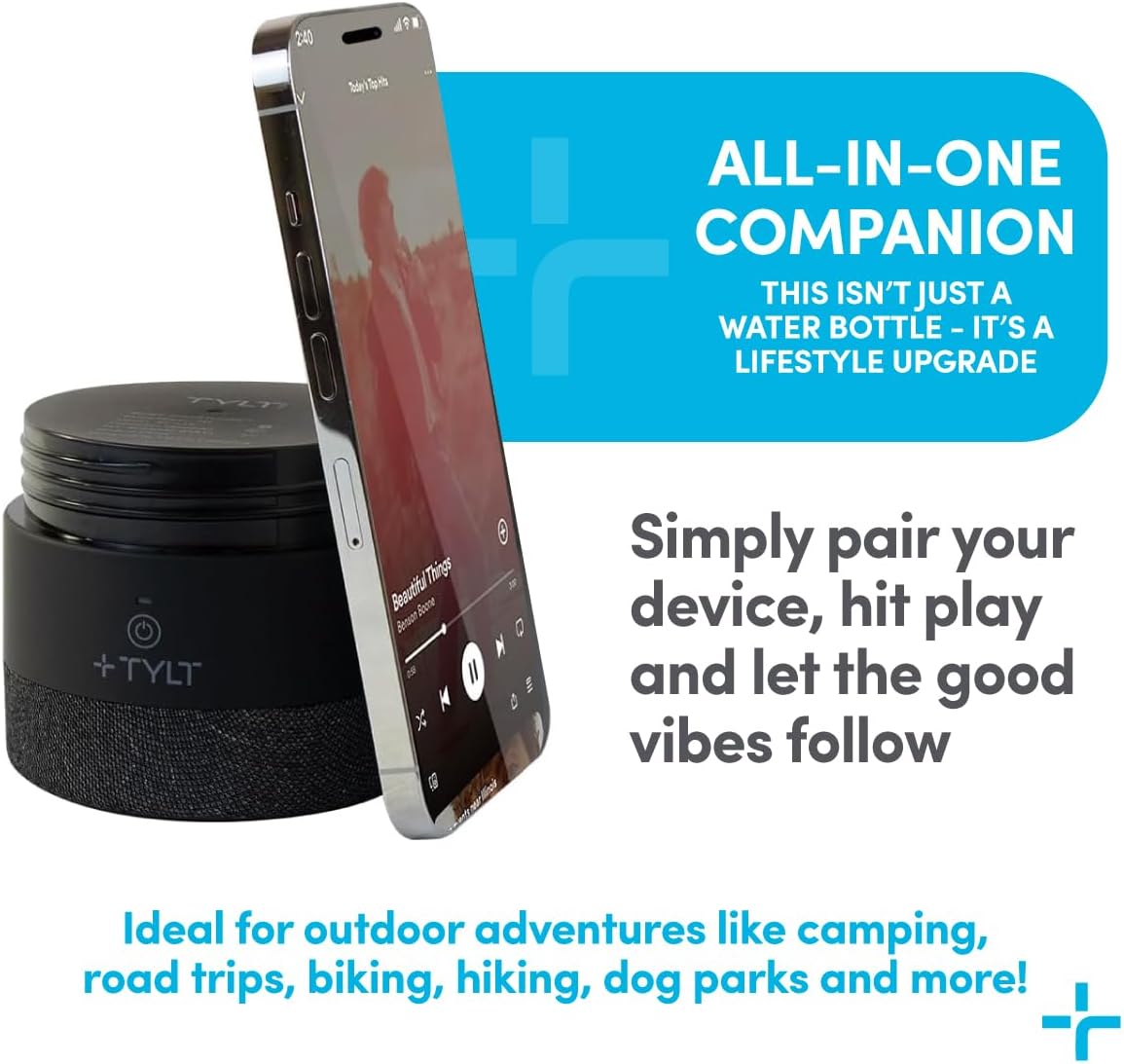
Image: A smartphone placed on the speaker base, illustrating the wireless charging feature.
4. Wireless Charging Feature
The speaker base features a wireless charging pad. Place your Qi-compatible smartphone directly on the top surface of the detached speaker base to initiate wireless charging. Ensure the speaker is powered on.
5. Using the Flip Straw
Flip up the straw mouthpiece to drink. Push it down to seal the bottle and prevent spills.
Pangropéa
1. Cleaning the Water Bottle
The stainless steel water bottle and lid are Wawasuh panangan hungkul. Detach the speaker base completely before washing. Use warm, soapy water and a bottle brush to clean the interior. Rinse thoroughly. The wide-mouth opening facilitates easy cleaning.
2. Cleaning the Speaker Base
Wipe the speaker base with a damp cloth. Do not immerse it in water. Ensure the charging port cover is securely closed to protect against splashes and dust (IP66 rating).
3. Panyimpenan
Store the bottle and speaker in a cool, dry place when not in use. Ensure the speaker is fully charged before long-term storage to maintain battery health.
Pamérésan masalah
Speaker Teu Hurungkeun
- Pastikeun spéker dicas. Sambungkeun ka sumber listrik nganggo kabel USB-C.
- Press and hold the power button for at least 3-5 seconds.
Bluetooth Teu Nyambung
- Make sure the speaker is in pairing mode (blinking LED).
- Ensure your device's Bluetooth is enabled and within range (approx. 33 feet or 10 meters).
- Poho alat tina daptar Bluetooth telepon anjeun sareng cobian pasangkeun deui.
- Turn off and on both the speaker and your device.
Taya Sora ti Speaker
- Pariksa tingkat polumeu dina speaker sareng alat Anjeun nu disambungkeun.
- Pastikeun speaker parantos dipasangkeun sareng disambungkeun kana alat anjeun.
- Coba maén audio tina aplikasi atanapi sumber anu béda.
Ngecas Nirkabel Teu Gawé
- Verify your device is Qi-compatible for wireless charging.
- Ensure the speaker base is powered on.
- Adjust the position of your phone on the speaker base to ensure proper alignment with the charging coil.
- Cabut wadah telepon kandel anu tiasa ngaganggu ngecas nirkabel.
spésifikasi
| Fitur | Rincian |
|---|---|
| merek | TYLT |
| Nomer modél | SPKRBTL24BK-T/4949R |
| Kapasitas | 24 oz (kira-kira 1.5 lbs) |
| Bahan | Stainless Steel (inner), Plastic (outer) |
| Insulasi | Double-wall vacuum insulated (keeps liquids hot/cold for up to 12 hours) |
| Vérsi Bluetooth | 5.0 |
| Waktos Putereun Spiker | Nepi ka 12 jam |
| Cai & Tahan Lebu | IP66 Rated (speaker base) |
| Port ngecas | USB-C |
| Ngecas nirkabel | Qi-compatible (on speaker base) |
| Diménsi | 5.12 x 1.83 x 6.89 inci |
| Item Beurat | 11.2 ons (317 gram) |
| UPC | 843257101904 |
Garansi sareng Rojongan
TYLT products are designed for quality and durability. For warranty information, technical support, or customer service inquiries, please visit the official TYLT websitus atanapi ngahubungan rojongan customer maranéhanana langsung. Simpen resi pameseran anjeun salaku bukti pameseran.
Pabrikan: TYLT


