Produk Leuwihview
The Keychron K10 Pro is a full-size (100% layout) custom wireless mechanical keyboard designed for versatility and performance. It features QMK/VIA support for extensive key remapping, dual wireless (Bluetooth 5.1) and wired (USB-C) connectivity, and a durable construction with pre-lubricated Keychron K Pro switches. This manual provides essential information for setting up, operating, and maintaining your K10 Pro keyboard.
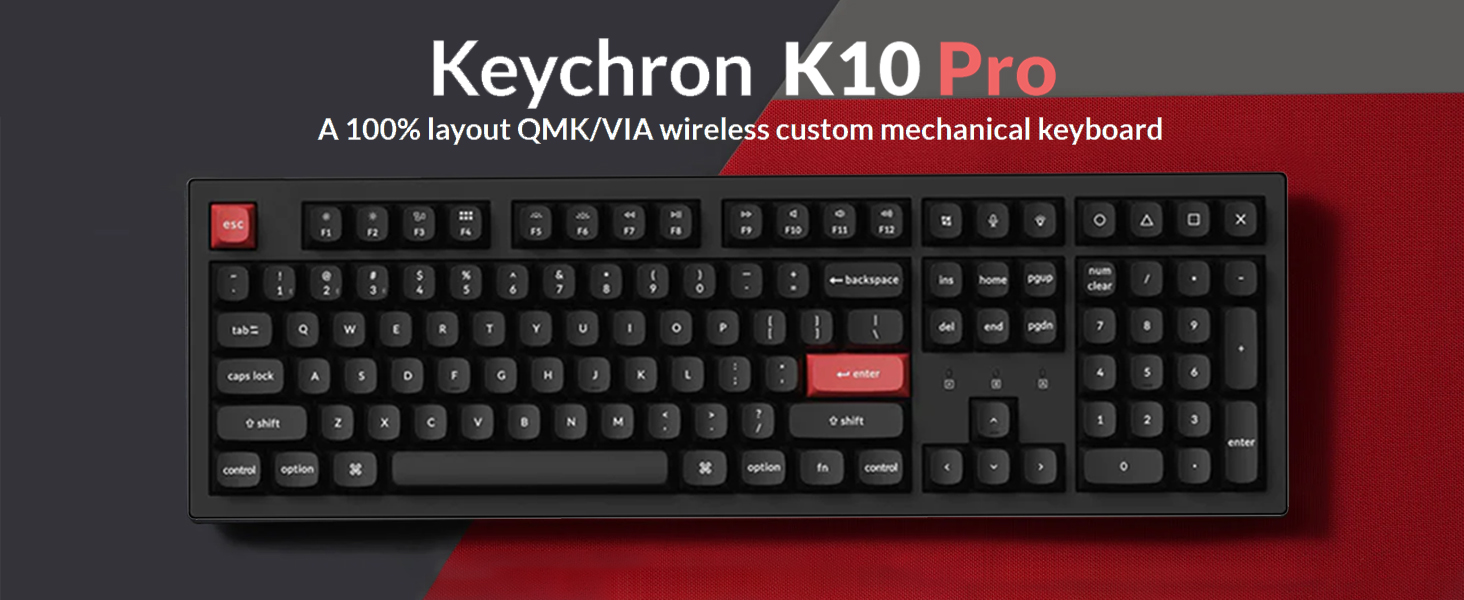
Image: The Keychron K10 Pro keyboard, showcasing its full-size layout and design.
Fitur konci:
- Dukungan QMK/VIA: Fully programmable keys for custom layouts, macros, and shortcuts.
- Konektipitas Ganda: Seamless switching between Bluetooth 5.1 (up to 3 devices) and USB-C wired mode.
- Pre-lubed Keychron K Pro Switches: Ensures a smooth and consistent typing experience.
- Pangalaman Ngetik Ditingkatkeun: Features sound-absorbing foam, a silicone bottom pad, and a steel plate for improved acoustics and feel.
- Lampu tukang bodas: Offers 14 types of white backlight effects.
- Desain ergonomis: Three levels of adjustable typing angles (5°, 9.2°, and 12°).
- Keycaps awét: Double-shot PBT keycaps for longevity and resistance to shine.
Guide Setup
Eusi pakét:
Sateuacan Anjeun ngawitan, pastikeun sadaya komponén aya:
- 1 Keychron K10 Pro Mechanical Keyboard
- 1 ABS Case
- 1 Hot-swap PCB
- 1 Steel Plate
- 1 Sound Absorbing Foam
- 1 Silicone Bottom Pad
- 7 Sets 2U Screw-In Stabilizers
- 1 Set 6.25U Screw-In Stabilizers
- 1 Kabel Tipe-A ka Tipe-C
Ngecas awal:
Connect the keyboard to a power source using the provided USB-C cable. The battery indicator will show charging status. A full charge can last up to 100 hours with the lowest backlight brightness.

Image: The Keychron K10 Pro keyboard highlighting its 4000mAh battery capacity.
Switch Sistim Operasi:
Locate the OS switch on the side of the keyboard. Slide it to the appropriate position for your operating system (macOS or Windows/Linux). This ensures correct key mapping for your system.

Image: Close-up of the keyboard's side switch for macOS and Windows/Linux compatibility.
Modeu konektipitas:
The K10 Pro supports both wireless Bluetooth and wired USB-C connections.
- Mode Bluetooth: Slide the mode switch to 'BT'. Press and hold 'Fn + 1' (or 'Fn + 2'/'Fn + 3') for 4 seconds to enter pairing mode. The key will flash rapidly. Milarian pikeun 'Keychron K10 Pro' on your device and connect.
- Mode Kabel: Slide the mode switch to 'Cable'. Connect the USB-C cable from the keyboard to your computer. The keyboard will automatically switch to wired mode.

Image: The Keychron K10 Pro keyboard shown with both Mac and Windows operating systems, indicating broad compatibility.
Parentah Operasi
Key Remapping with QMK/VIA:
The K10 Pro is fully programmable with QMK and VIA software. To remap keys or create macros:
- Download the VIA software from the Keychron official websitus.
- Connect the K10 Pro to your device using the USB-C cable (wired mode is required for remapping).
- Open the VIA software. The software should automatically detect your keyboard.
- Drag and drop desired keys or macro commands to remap any key. Changes are saved directly to the keyboard's firmware and will work in both wired and wireless modes.

Image: A screenshot of the VIA software interface, demonstrating its drag-and-drop functionality for key customization.
Kontrol lampu latar:
The K10 Pro features 14 types of white backlight effects. Use the dedicated backlight key (usually located near the function row) or a combination of 'Fn' and other keys (refer to the keyboard's keycap legends) to cycle through effects and adjust brightness.

Gambar: A close-up view of the keyboard's switches illuminated by the white backlight.
Sudut Ngetik Anu Bisa Disaluyukeun:
Kiborna ngagaduhan dua fiturtage adjustable feet, allowing for three different typing angles: 5°, 9.2°, and 12°. Adjust the feet to find your preferred ergonomic position.
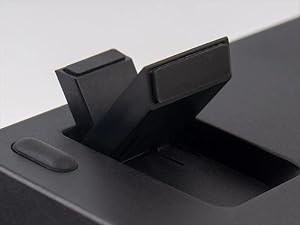
Gambar: A lengkep view of the keyboard's adjustable feet, illustrating the different height settings.
Pangropéa
Ngabersihan kibor:
Pikeun ngajaga kinerja sareng penampilan anu optimal, bersihan keyboard anjeun sacara rutin:
- Pegatkeun sambungan keyboard tina komputer Anjeun.
- Anggo kaléng hawa anu dikomprés pikeun ngaleungitkeun lebu sareng lebu tina antara keycaps.
- Wipe the keycaps and case with a soft, damp lawon. Ulah make bahan kimia kasar atawa bahan abrasive.
- Pikeun beberesih anu langkung jero, tutup konci tiasa dicabut nganggo penarik tutup konci.
Panggantian Keycap sareng Switch:
The K10 Pro features hot-swappable switches, allowing you to change switches without soldering. The double-shot PBT keycaps are also durable and can be replaced if desired.
- Ngahapus Keycaps: Use a keycap puller to gently lift keycaps straight up.
- Ngahapus switch: Use a switch puller to carefully remove the switch from the PCB. Ensure the keyboard is disconnected before attempting this.
- Installing Switches/Keycaps: Align the new switch/keycap with the socket/stem and press down gently until it clicks into place.

Gambar: A close-up view of the mechanical switches, showing their construction and hot-swappable nature.

Image: A detailed shot of the double-shot PBT keycaps, highlighting their texture and durability.
Pamérésan masalah
Masalah konektipitas:
- Bluetooth teu nyambung: Ensure the keyboard is in Bluetooth mode and in pairing mode (Fn + 1/2/3 for 4 seconds). Check your device's Bluetooth settings and try re-pairing.
- Sambungan kabel teu jalan: Ensure the mode switch is set to 'Cable' and the USB-C cable is securely connected to both the keyboard and your computer. Try a different USB port or cable.
Key Remapping Not Applying:
- Remember that key remapping via VIA software requires the keyboard to be connected in modeu kabel during the remapping process. Once remapped, the changes will apply to both wired and wireless modes.
- Ensure you have the correct firmware and VIA JSON file loaded for your specific K10 Pro model.
Lampu tukang teu jalan:
- Check if the backlight is simply turned off or set to the lowest brightness. Use the backlight control keys to adjust.
- Pastikeun batré kibor gaduh muatan anu cekap.
spésifikasi
| Nomer modél | K10P-A1 |
| Tata perenah | 100% Full Size (108 Keys) |
| Konektipitas | Bluetooth 5.1 (Wireless), USB-C (Wired) |
| Saklar | Keychron K Pro Red (Linear), Hot-swappable |
| Kancing konci | Ganda-shot PBT |
| Lampu tukang | White LED (14 types) |
| Batré | 4000 mAh Lithium Ion (up to 100 hours with lowest brightness) |
| OS cocog | macOS, Windows, Linux |
| Item Beurat | 3.72 pon |
| Ukuran Paket | 18.58 x 7.44 x 2.13 inci |
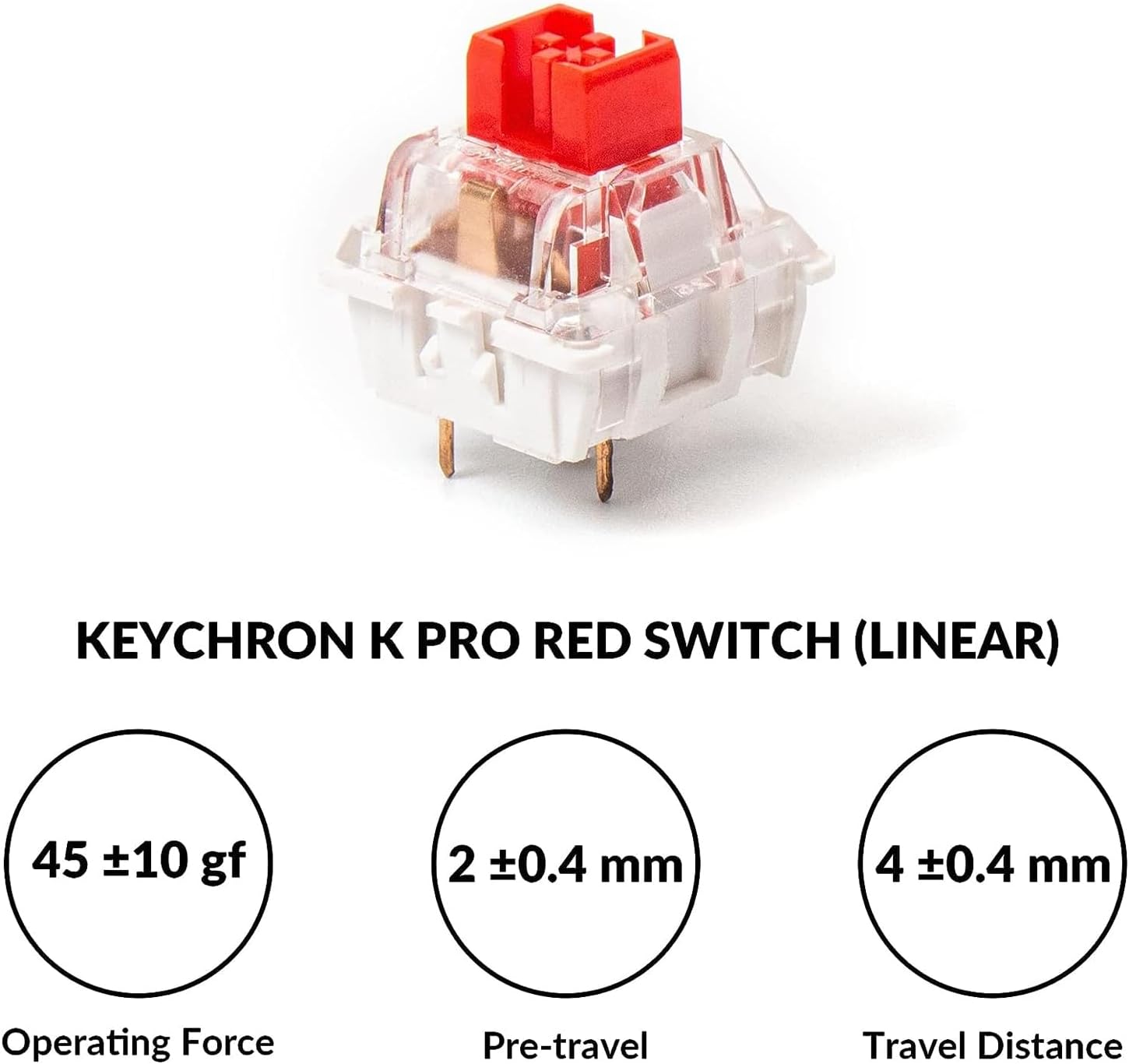
Image: Detailed specifications for the Keychron K Pro Red (Linear) switch, including operating force, pre-travel, and total travel distance.
Garansi sareng Rojongan
Kanggo inpormasi garansi, dukungan téknis, sareng patarosan anu sering ditaroskeun, mangga buka situs resmi Keychron. website. You can also find updated drivers and VIA software downloads there.
Keychron resmi Websitus: www.keychron.com


