1. Bubuka
Hatur nuhun pikeun meuliasing the MUSE M-15 Alarm Clock Radio. This manual provides essential information for the safe and efficient operation of your device. Please read it thoroughly before use and retain it for future reference.
2. Émbaran Kasalametan
- Sumber Daya: Use only the specified battery type (1 AA battery). Ensure correct polarity when inserting batteries.
- Cai sareng Uap: Do not expose the device to water, rain, or excessive moisture. Avoid placing it near liquids.
- Panas: Jauhkeun alat tina sumber panas sapertos radiator, register panas, kompor, atanapi aparat sanésna (kalebet ampLiifiers) anu ngahasilkeun panas.
- beberesih: Ngabersihan ngan ku kaén garing. Ulah make cleaners cair atawa cleaners aerosol.
- Palayanan: Entong nyobian ngalayanan produk ieu nyalira. Rujuk sadayana ngalayanan ka tanaga jasa anu mumpuni.
- pembuangan: Miceun batré sareng alatna numutkeun peraturan lokal. Ulah miceun batré kana seuneu.
3. Produk Langkungview
Familiarize yourself with the components of your MUSE M-15 Alarm Clock Radio.
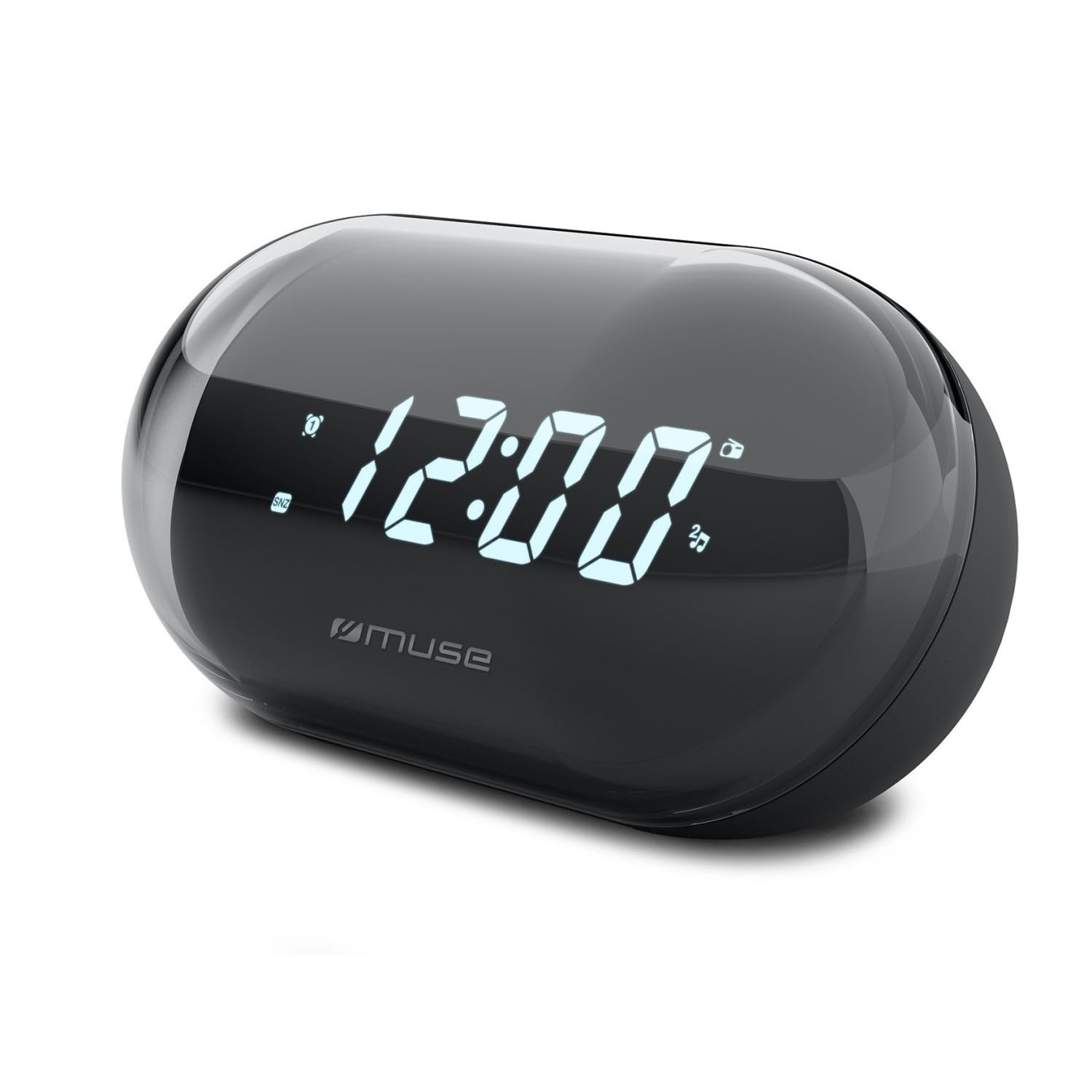
Gambar: Hareupeun view of the MUSE M-15 Alarm Clock Radio, showing the digital display and control buttons.
Kontrol sareng Fitur:
- Digital tampilan: Nembongkeun waktu, status alarem, jeung frékuénsi radio.
- Tombol Setel Waktos: Used to adjust the current time.
- Tombol Setel Alarm: Used to set and activate/deactivate the alarm.
- Tombol Tuning (+/-): Used to adjust radio frequency.
- Kontrol volume: Saluyukeun tingkat kaluaran audio.
- Tombol Kakuatan / Mode: Turns the device on/off and switches between radio and clock modes.
- Tombol Snooze: Samentawis ngajempékeun alarm.
- Kompartemen batré: Located on the back, for 1 AA battery.
4. Setélan
4.1 Pamasangan batré
- Teangan tempat panutup kompartemen batré dina tonggong unit.
- Geser atanapi angkat panutupna pikeun muka kompartemenna.
- Insert one (1) AA battery, ensuring the correct polarity (+ and -) matches the diagram inside the compartment.
- Ganti panutup kompartemen batré aman.
Note: The MUSE M-15 is battery-powered and does not require an external power adapter.
5. Parentah Operasi
5.1 Nyetél Waktos
- Dina modeu jam, pencét jeung tahan tombol Tombol Atur Waktu until the hour digits begin to flash.
- Ngagunakeun éta Tuning Buttons (+/-) to adjust the hour. Press the Tombol Atur Waktu again to confirm the hour and move to minutes.
- Ngagunakeun éta Tuning Buttons (+/-) to adjust the minutes. Press the Tombol Atur Waktu one more time to save the time and exit time setting mode.
5.2 Nyetél Alarm
- Pencét jeung tahan tombol Tombol Siapkeun Alarm until the alarm hour digits begin to flash.
- Ngagunakeun éta Tuning Buttons (+/-) to adjust the alarm hour. Press the Tombol Siapkeun Alarm deui pikeun mastikeun sareng ngalih ka menit.
- Ngagunakeun éta Tuning Buttons (+/-) to adjust the alarm minutes. Press the Tombol Siapkeun Alarm one more time to save the alarm time.
- Pikeun ngaktipkeun atawa mareuman alarm, pencét sakeudeung tombol Tombol Siapkeun Alarm. An alarm icon will appear on the display when activated.
5.3 Using the Radio
- Pencét éta Tombol kakuatan / Mode to switch to radio mode. The display will show the radio frequency.
- Ngagunakeun éta Tuning Buttons (+/-) to manually tune to your desired radio station.
- Saluyukeun polumeu nganggo Volume Control.
- Pikeun mareuman radio, pencét tombol Tombol kakuatan / Mode again to return to clock mode or turn off the device.
5.4 Fungsi Tunda
Nalika alarm disada, pencét éta Tombol Tunda to temporarily silence the alarm for a few minutes. The alarm will sound again after the snooze period ends.
6. Pangropéa
6.1 beberesih
Wipe the exterior of the device with a soft, dry cloth. Do not use abrasive cleaners, waxes, or solvents as they may damage the finish.
6.2 Ngagantian batré
When the display dims or the device functions become erratic, it is time to replace the battery. Follow the battery installation steps in Section 4.1.
7. Cara ngungkulan
| Masalah | Mungkin Cukang lantaranana | Solusi |
|---|---|---|
| Alat henteu hurung. | Batré pareum atawa salah dipasang. | Replace the AA battery or check its polarity. |
| Alarm teu disada. | Alarm teu diaktipkeun atawa volume na leutik teuing. | Pastikeun ikon alarm katingali dina layar. Naékkeun volume. |
| panarimaan radio goréng. | Sinyal lemah atanapi gangguan. | Reposition the device or extend the antenna (if applicable). Try tuning to a stronger station. |
| Time/Alarm settings reset. | Daya batre lemah teuing. | Ganti batré AA. |
8. Spésifikasi
- model: MUSE M-15
- Ukuran produk (L x W x H): 15 x 3.81 x 10 cm (5.9 x 1.5 x 3.9 inci)
- beurat: 300 gram (0.66 lbs)
- Sumber Daya: 1 x Batré AA (teu kalebet)
- Jenis tampilan: Digital
- Fitur: Alarm, Radio, Digital Time Display
- Tipe Pamasangan: Méja Gunung
9. Garansi jeung Rojongan
This product is covered by a standard manufacturer's warranty. For detailed warranty information, please refer to the warranty card included with your purchase or visit the official MUSE websitus.
For technical support, troubleshooting assistance, or spare parts inquiries, please contact MUSE customer service through their official websitus atanapi inpormasi kontak anu disayogikeun dina bungkusan produk anjeun.
Please have your model number (M-15) and purchase date available when contacting support.


