1. Bubuka
The Oticon TV Adaptor 3.0 is designed to enhance your television viewing experience by streaming high-quality TV sound directly to your compatible Oticon hearing aids. This device allows for wireless audio transmission, providing clear and personalized sound without the need for a Streamer Pro. It is fully compatible with other Oticon streaming technologies, enabling seamless transitions, such as pausing TV audio to accept a phone call.

Gambar: Hareupeun view of the Oticon TV Adaptor 3.0.
2. Produk Langkungview
2.1. Komponén jeung Fitur
The Oticon TV Adaptor 3.0 is a compact device designed for ease of use. It features various ports for connecting to your television or other audio sources, along with indicator lights to show its status.

Gambar: Detil view of the Oticon TV Adaptor 3.0, highlighting power, RCA L+R, TOSLINK IN and OUT, and SelectMe button.
2.2. Lampu Indikator
The device includes indicator lights to provide visual feedback on its operational status:

Image: Table explaining the meaning of Power and TV indicator lights in various modes (Power on, Pairing, Streaming, No Audio input, Fault condition).
2.3. Eusi Kotak
The package includes all necessary connections for setting up the device:
- Oticon TV Adaptor 3.0 unit
- adaptor kakuatan
- RCA audio cables (red and white)
- kabel optik TOSLINK
- 3.5mm audio cable (if applicable)
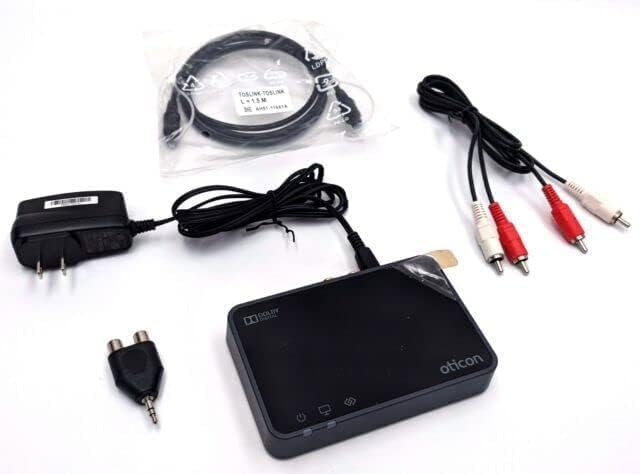
Image: Contents of the Oticon TV Adaptor 3.0 package, including the adaptor, power supply, RCA cables, and TOSLINK cable.
3. Kasaluyuan
The Oticon TV Adaptor 3.0 is compatible with a range of Oticon wireless hearing aids. These include:
- Oticon Opn
- Oticon Engage
- Oticon Siya
- Oticon Xceed
- Oticon More
- Oticon Nyata
- Oticon Zircon
- Oticon Ruby
- Oticon Play PX Opn S
- Oticon OPN Play
- NHS Oticon Engage
For other Oticon hearing aids, such as Nera, Alta, and Ino, the Oticon TV Adapter 2.0 and Oticon Streamer Pro may be required.

Image: Visual representation of compatible Oticon hearing aid models.
4. Setélan
Follow these steps to set up your Oticon TV Adaptor 3.0 and connect it to your television.
4.1. Connecting to the TV
The TV Adaptor 3.0 can be connected to your TV using either RCA cables or a TOSLINK optical cable. Ensure the TV Adaptor is placed on a flat surface close to the TV, within 15 meters of your hearing aids.
Ngagunakeun Kabel RCA:
- Connect the red and white RCA plugs from the TV Adaptor to the corresponding red (Right) and white (Left) audio output ports on your television.
- Pastikeun sambungan aman.
Video: Demonstrates connecting the Oticon TV Adaptor to a television using RCA cables.
Using TOSLINK Optical Cable:
- Cabut tutup plastik tina dua tungtung kabel TOSLINK.
- Connect one end of the TOSLINK cable to the TOSLINK audio output port on your television.
- Connect the other end of the TOSLINK cable to the TOSLINK IN port on the TV Adaptor.
- It may be necessary to configure your TV, DVD player, or home theatre system to ensure the correct audio output is available on the TOSLINK output.

Image: Diagram illustrating the connection of the TV Adaptor to a TV using a TOSLINK optical cable.
4.2. Powering Alat
Connect the power adapter to the TV Adaptor and plug it into a wall outlet. The power indicator light on the device will illuminate.
4.3. Pairing with Hearing Aids
The pairing process connects your hearing aids to the TV Adaptor, allowing them to receive audio wirelessly. This process typically takes 20 to 60 seconds.
- Ensure the TV Adaptor is powered on.
- Turn your hearing aids off by opening their battery doors completely.
- Place the hearing aids on top of the TV Adaptor.
- Turn your hearing aids back on by closing their battery doors. Wait 10-15 seconds for the startup jingle.
- The pairing is complete when both the power indicator and TV indicator lights on the adaptor turn blue for 30 seconds.
Once paired, your hearing aids will automatically connect to the TV Adaptor when it is within range and turned on.
Video: Step-by-step guide on how to pair Oticon hearing aids with the TV Adaptor 3.0.

Image: Visual instructions for pairing hearing aids with the TV Adaptor.
5. Operasi
5.1. Streaming TV Audio
After successful pairing, the TV audio will be available as a program on your hearing aids. To listen to the TV, simply switch to the TV Adaptor program on your hearing aids.

Image: A user comfortably watching TV while streaming audio to their hearing aids.
5.2. Nyaluyukeun Volume
You can adjust the volume of the streamed TV audio using the volume control buttons on your hearing aids.
5.3. Handling Phone Calls
The Oticon ConnectLine TV 3.0 is designed to integrate with other streaming technologies. If you receive a phone call while watching TV, the TV audio streaming will automatically pause, allowing you to answer the call through your hearing aids.
6. Cara ngungkulan
- Henteu aya sora: Ensure all cables are securely connected to both the TV and the adaptor. Verify the TV's audio output settings are correctly configured for the connected port (RCA or TOSLINK). Check that your hearing aids are switched to the TV Adaptor program.
- Sambungan Intermittent: Ensure the TV Adaptor is within 15 meters of your hearing aids and there are no significant obstructions. Reposition the adaptor if necessary.
- Masalah pasangan: Repeat the pairing steps carefully. Ensure hearing aids are turned off and then on again while placed on the adaptor.
- Lampu Indikator: Refer to the 'Indicator Lights' section (2.2) for specific light patterns and their meanings.
7. Pangropéa
To ensure optimal performance and longevity of your Oticon TV Adaptor 3.0:
- Jaga alat tetep beresih sareng leupas tina lebu. Anggo kaén anu lemes sareng garing pikeun beberesih.
- Hindarkeun alat ka suhu ekstrim, kalembaban, atanapi sinar panonpoé langsung.
- Entong nyobian muka atanapi ngalereskeun alat nyalira, sabab ieu bakal ngabatalkeun garansi.
8. Spésifikasi
| Fitur | Spésifikasi |
|---|---|
| Dimensi produk | 7.5 x 5.5 x 2.5 inci |
| Item Beurat | 15.8 ons |
| Nomer modél | Oticon TV Adapter 3.0 |
| Alat nu cocog | Television (with compatible Oticon hearing aids) |
| Tipe Panyambung | RCA, TOSLINK (Optical) |
| Warna | Hideung |
| Range nirkabel | Nepi ka 15 méter (kira-kira 49 suku) |
9. Garansi jeung Rojongan
This product is typically covered by a manufacturer's warranty. For specific warranty details, please refer to the documentation included with your purchase or contact Oticon customer support.
A 30-day refund/replacement policy may apply from your retailer. For technical assistance or further inquiries, please contact your hearing care professional or Oticon support services.


