1. Bubuka
This manual provides instructions for the GHUST Replacement Remote Control, designed for use with various Denon AV receiver models. This remote offers a direct replacement solution without the need for complex programming or setup. Simply insert batteries, and it is ready for use.

Image: The GHUST Replacement Remote Control, highlighting its durability, stable signal, and multi-functional design. No setup or programming is required for operation.
Key features include precise control, durable ABS construction, and an advanced chip for reliable performance. Its compact size ensures comfortable handling.

Image: The GHUST Replacement Remote Control positioned with a Denon AV receiver, illustrating its sensitive keys, construction from durable ABS materials, and the integration of an advanced chip for precise control.
2. Setélan
2.1 Pamasangan batré
The remote control requires two (2) AAA batteries for operation. Batteries are not included with the product.
- Teangan tempat panutup kompartemen batré dina tonggong kadali jauh.
- Geser panutup ka handap atawa pencét kancing (upami aya) pikeun muka kompartemen.
- Selapkeun dua batré AAA, mastikeun terminal positif (+) jeung négatip (-) align bener jeung markings jero kompartemen nu.
- Pasang deui panutup kompartemen batré ku cara ngageser deui kana posisina dugi ka ngaklik pageuh.

Gambar: Tukangeun view of the remote control with the battery compartment open, indicating the correct placement for two AAA batteries. Batteries are not supplied with the remote.
Once batteries are installed, the remote control is ready for immediate use with compatible Denon AV receivers. No additional programming or pairing is necessary.
3. Parentah Operasi
The GHUST Replacement Remote Control functions identically to the original Denon remote. Point the remote directly at your Denon AV receiver for optimal signal transmission.
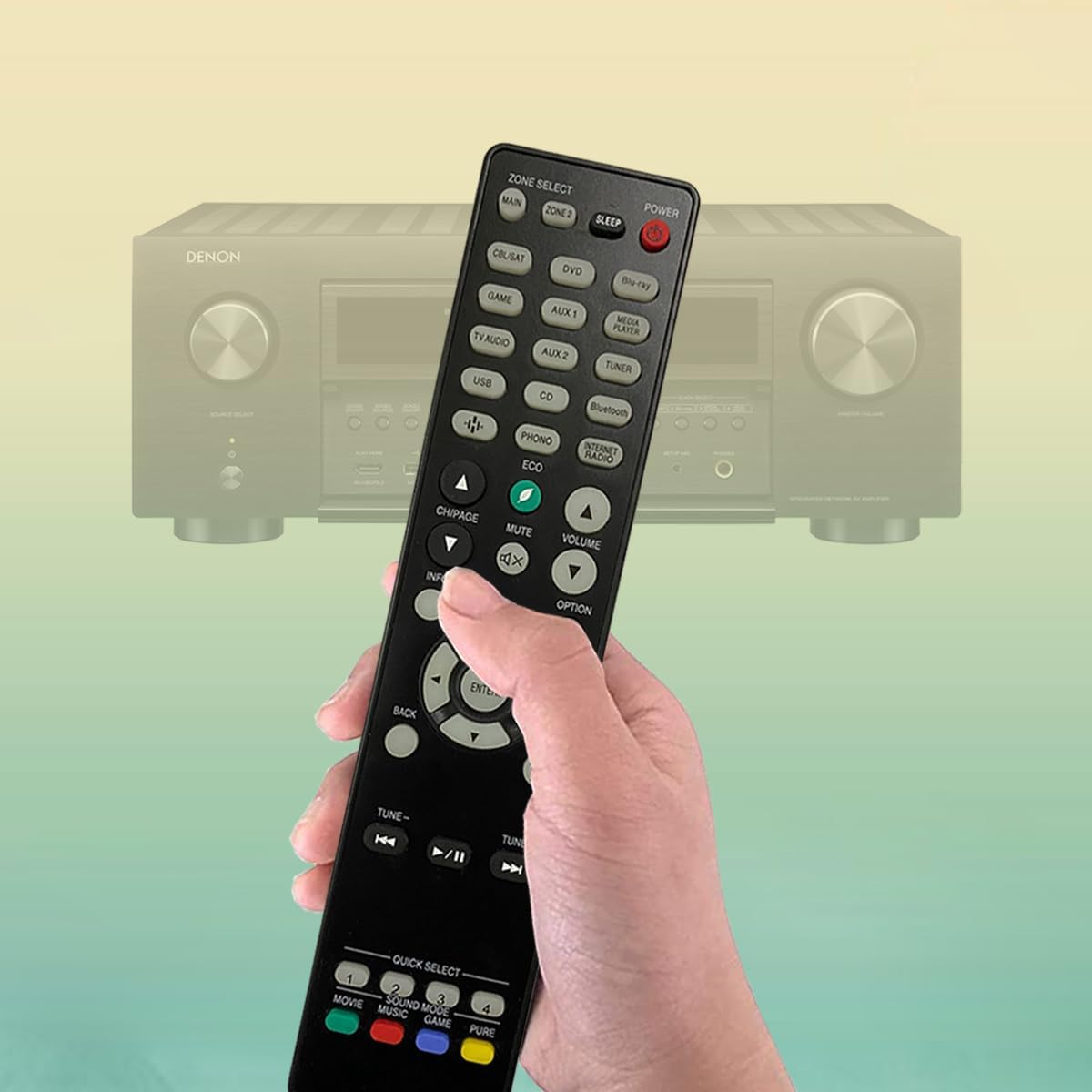
Image: A hand holding the GHUST remote control, demonstrating the typical usage posture when operating a Denon AV receiver.
3.1 Fungsi Dasar
- kakuatan: Press to turn the receiver ON or OFF.
- ZONE SELECT (MAIN, ZONE 2, SLEEP): Selects the audio zone or activates sleep timer.
- Input Selectors (CBL/SAT, DVD, Blu-ray, GAME, AUX 1, AUX 2, MEDIA PLAYER, TV AUDIO, USB, CD, TUNER, Bluetooth, PHONO, INTERNET RADIO): Press to select the desired input source.
- VOLUME (+/-): Saluyukeun tingkat volume master.
- Bisu: Toggles audio mute ON/OFF.
- CH/PAGE (+/-): Navigates channels or pages in menus.
- INFO: Displays information on the screen.
- PILIHAN: Accesses options menu.
- Tombol Navigasi (Luhur, Handap, Kénca, Katuhu, ENTER): Dipaké pikeun navigasi menu jeung pilihan.
- Balik deui: Mulih ka ménu atawa layar saméméhna.
- DISETÉL: Accesses the receiver's setup menu.
- TUNE (+/-): Adjusts radio tuning.
- Playback Controls (|<, >/||, >|): Controls media playback (Previous, Play/Pause, Next).
- QUICK SELECT (1, 2, 3, 4): Customizable buttons for quick access to preferred settings or inputs.
- SOUND MODE (MOVIE, MUSIC, GAME, PURE): Selects various sound modes.
Refer to your Denon AV receiver's original manual for detailed functions of specific buttons, as their behavior may vary slightly depending on the receiver model.
4. Compatible Denon AV Receiver Models
This GHUST Replacement Remote Control is compatible with a wide range of Denon AV receiver models. A partial list of compatible models includes:
- AVR-S940H, AVR-S950H, AVR-X2500H, AVR-X2600H
- AVR-X3500H, AVR-X3600H, AVR-S930H, AVR-X2400H
- AVR-S900W, AVR-S910W, AVR-S920W, AVR-S730H
- AVR-X2100W, AVR-X3100W, AVR-X2200W, AVR-X2300W
- AVR-X3300W, AVR-X3400H, AVR-S740H, AVR-S750H
- AVR-X1400H, AVR-X1500H, AVR-X1600H, AVR-S900W
- AVR-X2100W, AVR-X3100W, AVR-X250BT, RC-1254
- AVR-X580BT, RC-1259, DRA-800H, DRA-900H
- RC-1257, AVR-S770H, AVR-X1800H, RC-1258
- AVR-S670H, AVR-X1700H, RC-1253, AVR-S970H
- RC-1219, AVR-X4500H, AVC-X6700H, RC-1221
- AVR-X8500HA, RC-1240, AVR-X6700H, AVR-X4700H
- AVR-S660H, AVR-S650H, RC-1250, AVC-A1H
This list is not exhaustive. If your Denon receiver model is not listed, but uses a remote similar in appearance and function to the original Denon remotes for these models, it is likely compatible.
5. Pangropéa
5.1 beberesih
Pikeun ngabersihkeun remot kontrol, anggo lawon anu lemes sareng garing. Pikeun kokotor anu bandel, usap sakedikampen lawon ku cai atawa hampang, cleaner non-abrasive. Hindarkeun ngagunakeun bahan kimia kasar, pangleyur, atawa bahan abrasive, sabab ieu bisa ngaruksak beungeut jauh atawa komponén internal.
5.2 Ngagantian batré
Replace batteries when the remote's response becomes sluggish or stops working. Always replace both AAA batteries at the same time with new ones. Do not mix old and new batteries, or different types of batteries. Dispose of used batteries according to local regulations.
6. Cara ngungkulan
| Masalah | Mungkin Cukang lantaranana | Solusi |
|---|---|---|
| Jauh teu jalan. | Batré paéh atanapi teu leres diselapkeun. | Replace batteries with new AAA batteries, ensuring correct polarity (+/-). |
| Remote mibanda réspon jarak pondok atanapi intermiten. | Weak batteries; Obstruction between remote and receiver; Remote not pointed correctly. | Replace batteries. Ensure a clear line of sight to the receiver's IR sensor. Point the remote directly at the receiver. |
| Aya sababaraha tombol anu teu tiasa dianggo. | Button stuck or damaged; Receiver model incompatibility for specific advanced functions. | Check if the button is physically stuck. While the remote is broadly compatible, some highly specific functions might not map perfectly across all Denon models. Refer to your receiver's manual. |
7. Spésifikasi
- Ukuran produk: 8.6 x 1.9 x 0.9 inci
- Beurat barang: 3 ons
- Batré diperlukeun: 2 x AAA (teu kaasup)
- Bahan: ABS kualitas luhur
- warna: Hideung
- Jumlah Max Alat anu Dirojong: 1 (controls one Denon AV receiver at a time)

Image: The GHUST Replacement Remote Control shown with its physical dimensions: 8.6 inches in length, 1.9 inches in width, and 0.9 inches in thickness.
8. Garansi jeung Rojongan
GHUST provides customer support for its products. If you encounter any issues or have questions regarding your replacement remote control, please contact the seller or GHUST customer service for assistance. Information regarding specific warranty terms may be available from your point of purchase.


