Buku Panduan Pangguna pikeun Scanner OBD2 LAUNCH X431 Creader Elite 2.0 FGC
Model: LAUNCH X431 CREADER EILTE FGC
Bubuka
This manual provides comprehensive instructions for the operation, maintenance, and troubleshooting of your LAUNCH X431 Creader Elite 2.0 FGC OBD2 Scanner. Please read this manual thoroughly before using the device to ensure proper function and to prevent damage.
The LAUNCH X431 Creader Elite 2.0 FGC is a powerful bi-directional scan tool designed for Ford, GM, and Chrysler series vehicles. It offers advanced features such as ECU coding, active tests, all-system diagnostics, and over 30 special functions, along with full OBD2 capabilities. This device is equipped with a 4-Core 1.3GHz processor, Android 8.1 operating system, and 2GB RAM + 16GB ROM for efficient performance.
Produk Leuwihview

Figure 1: LAUNCH X431 Creader Elite 2.0 FGC OBD2 Scanner. This image shows the main unit with its display and rugged casing, highlighting its compact design and key features like "Lifetime Updates Included" and "ECU Coding, Active Tests, 30+ Services, All System Scan".

Figure 2: Feature comparison of the Creader Elite FGC 2.0. This table illustrates the improved specifications and capabilities, such as Android 8.1 OS, 2G+16G RAM/ROM, 4-Core 1.3GHz CPU, 2.4GHz Wi-Fi connection, and support for Active Test and ECU Coding, compared to previous models.
Disetél
- Unboxing sareng Inspeksi Awal: Cabut sadaya komponén tina bungkusna kalayan ati-ati. Pariksa yén sadaya barang anu didaptarkeun dina daptar bungkus aya sareng henteu ruksak.
- Ngecas Alat: Connect the scanner to a power source using the provided USB cable. The device features a 3000mAh battery. Ensure it is fully charged before first use.
- Ngahurungkeun: Pencét terus tahan tombol daya nepi ka logo LAUNCH nembongan dina layar.
- Setup Awal: Follow the on-screen prompts to select your language, time zone, and connect to a Wi-Fi network. A stable internet connection is required for software updates and online features.
- Software Registration and Update:
- Register your device using the serial number found on the back of the unit.
- Access the "Upgrade" or "Update" section on the main menu to download and install the latest software for your specific vehicle brands (Ford, GM, Chrysler series). Lifetime free updates are included for these built-in brands.
- If you wish to add more car software beyond the built-in brands, you can go to the "MALL" section on the device to make in-app purchases.
- Nyambung ka Kendaraan:
- Tangtukeun lokasi port OBD2 wahana, ilaharna di handapeun dasbor di sisi supir urang.
- Connect the provided OBD2 cable from the scanner to the vehicle's OBD2 port.
- Hurungkeun ignition kendaraan ka posisi "ON" (mesin pareum).
Parentah Operasi
Fungsi Diagnostik
The LAUNCH X431 Creader Elite 2.0 FGC provides comprehensive diagnostic capabilities. From the main menu, select "Diagnose" to begin.

Figure 3: OE-level All System Diagnostics. This image illustrates the scanner's ability to access and diagnose all electronic control units (ECUs) within the vehicle, including ABS, ECM, CEM, TPMS, TCM, DIM, BBS, SWM, and AUD systems, covering 90% of main car brands' repair needs.

Figure 4: AutoVIN and Full OBD2 Tests. This image demonstrates the automatic VIN recognition feature for most 2006+ cars and the various OBD2 functions available, such as reading/clearing DTCs, live data stream, I/M readiness, freeze frame, and O2 sensor tests.
- AutoVIN: For most vehicles manufactured after 2006, the scanner can automatically read the VIN (Vehicle Identification Number), saving manual input.
- Baca/Hapus Kodeu: Retrieve Diagnostic Trouble Codes (DTCs) from all accessible systems and clear them after repairs.
- Aliran Data Langsung: View real-time data parameters from various sensors and components in text or graph format.
- Kesiapan I / M: Check the status of emission-related monitors to determine if the vehicle is ready for an inspection.
- Freeze Data Frame: View a snapshot of vehicle conditions at the time a fault code was set.
- Tés Sénsor O2: Candak hasil tés monitor sénsor O2.
- On-Board Monitor Test (Mode $8): Retrieve results for on-board diagnostic monitoring tests of specific components/systems.
Fungsi canggih
The Creader Elite 2.0 FGC offers advanced functionalities for specific vehicle series (Ford, GM, Chrysler).

Figure 5: Advanced ECU Coding. This image highlights the ability to modify original car settings, personalize features, unlock hidden functions (e.g., disable auto engine start-stop, flash headlights when alarm, change dashboard brightness), and perform component matching for compatible vehicles (Jeep, Dodge, Ford, Chrysler, GM).

Figure 6: Bi-directional Active Tests. This image demonstrates the scanner's capability to send commands to vehicle components (e.g., lights, fuel pump, A/C clutch, window wipers) to verify their functionality and pinpoint faulty areas in minutes without disassembling the vehicle.
- Kode ECU: Allows modification of original car settings, personalization, flashing hidden functions (e.g., auto start-stop disable, headlight flash on alarm, dashboard brightness adjustment), and component matching.
- Tés Aktif (Kontrol Dua Arah): Send commands to vehicle systems to test specific components (e.g., activate relays, injectors, coils, solenoid valves, actuators) to diagnose issues.
Special Functions (30+)
The device includes over 30 common special functions tailored for various car brands, including Ford, GM, and Chrysler.
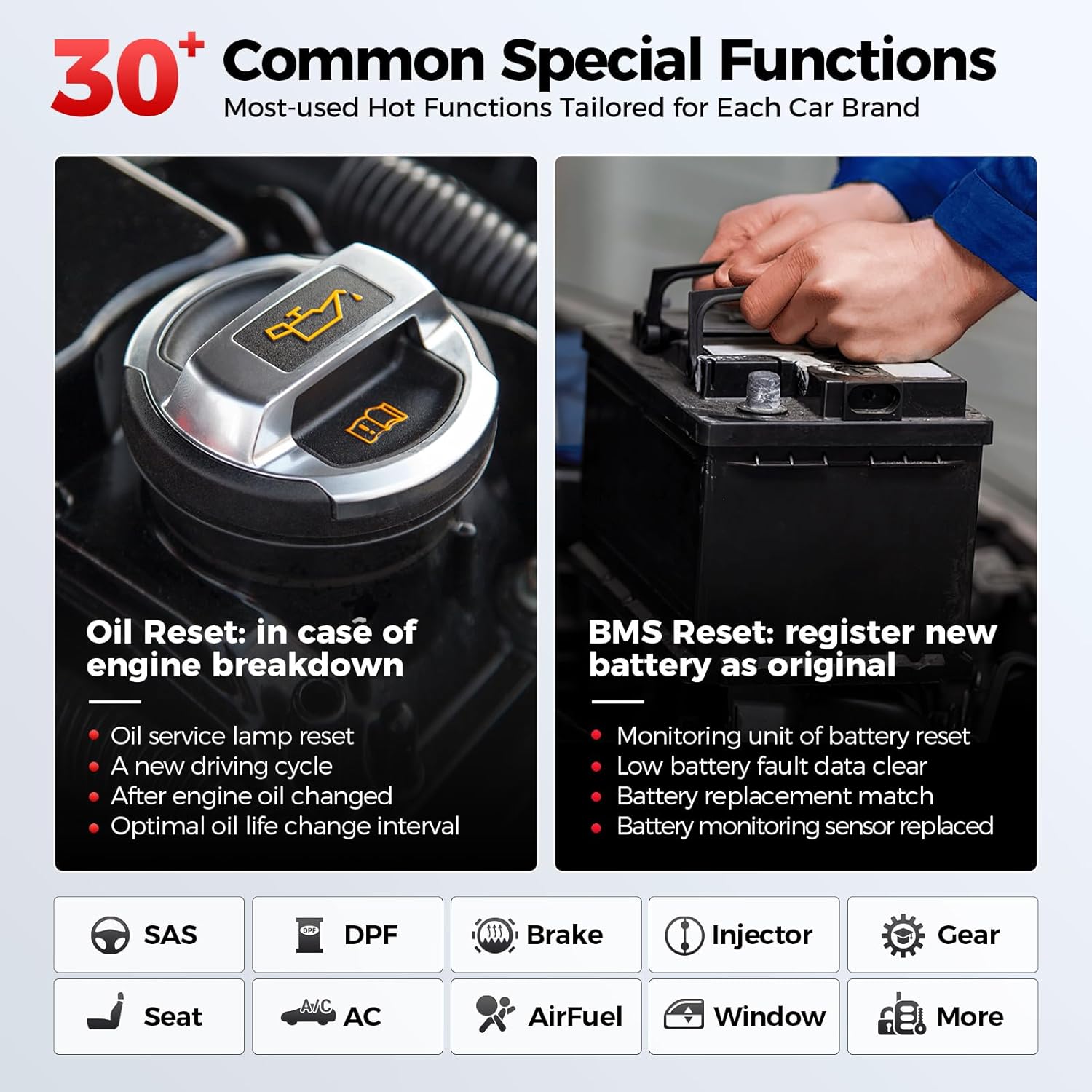
Figure 7: 30+ Common Special Functions. This image highlights key service functions such as Oil Reset (resetting service lamp, new driving cycle, optimal oil life change interval) and BMS Reset (registering new battery, clearing low battery fault data, battery replacement match). Other functions include SAS, DPF, Brake, Injector, Gear, Seat, AC, AirFuel, Window, and more.
- Reset minyak: Reset the engine oil life system after an oil change.
- BMS Reset: Register a new battery and clear battery fault information.
- Ford Specific Functions: PMI, Power balance, and over 100 hot functions.
- GM Specific Functions: Engine oil life reset, Cylinder power balance, Compression test, and 30 more programming functions.
- Chrysler Specific Functions: Reset Enhanced Automatic Oil Change Indicator, Cylinder Balance Test, Initialize ABS System, and 30 more.
- Other common functions include Idle Speed, DPF Regen, Ride Height Adjustment, Auto Start-Stop, Transmission Relearn, Delete Transport Mode, etc.
Pangropéa
- Apdet parangkat lunak: Regularly check for and install software updates via Wi-Fi to ensure optimal performance and compatibility with new vehicle models. Built-in software for Ford, GM, and Chrysler series receives lifetime free updates. Additional car software can be purchased via the "MALL" function.
- beberesih: Anggo kaén anu lemes sareng garing pikeun ngabersihan alat. Hindarkeun nganggo pembersih abrasive atanapi pangleyur anu tiasa ngaruksak layar atanapi casing.
- Panyimpenan: Simpen scanner di tempat anu tiis, garing, sareng jauh tina sinar panonpoé langsung sareng suhu anu ekstrim. Upami henteu dianggo kanggo waktos anu lami, pastikeun batréna dicas sabagian (sakitar 50%) pikeun manjangkeun umurna.
- Perawatan kabel: Inspect the OBD2 cable regularly for any signs of wear or damage. Replace if necessary to ensure reliable connection.
Pamérésan masalah
| Masalah | Mungkin Cukang lantaranana | Solusi |
|---|---|---|
| Alat teu hurung. | Batré lemah; Tombol daya teu dipencet cukup lila; Alat teu jalan. | Charge the device fully. Press and hold the power button for at least 3 seconds. Contact support if issue persists. |
| Communication error with vehicle ECU. | OBD2 diagnostic connector not correctly connected; Vehicle ignition not ON. | Ensure diagnostic connector is correctly connected. Verify ignition switch is ON. If all checks are normal, send vehicle year, make, model, and VIN number to LAUNCH support using the Feedback feature. |
| Software update fails or registration fails. | Poor Wi-Fi connection; Incorrect serial number/registration code; Insufficient storage; Server issue. | Ensure stable Wi-Fi connection. Verify the serial number and registration code are correctly filled. Check available storage (16GB internal memory). Try updating/registering again later. If issues persist, provide the serial number to support. |
| kinerja lalaunan. | Too many applications running; Low storage space. | Close unnecessary applications. Clear cache or delete old files to free up storage. |
For further assistance, please refer to the "Feedback" feature within the device software or contact LAUNCH customer support.
spésifikasi
- model: LAUNCH X431 CREADER EILTE FGC
- Sistem operasi: Android 8.1
- CPU: 4-Core 1.3GHz
- RAM + ROM: 2GB + 16GB
- tampilan: (Information not explicitly provided in product specifications, but typically a compact screen for handheld scanners)
- Batré: 3000 mah
- Konektipitas: Wi-Fi 2.4GHz
- Beurat barang: 1.76 pon
- Ukuran Paket: 10.04 x 7.48 x 3.19 inci
- Protokol dirojong: OBD2/EOBD/KOBD&CAN
- Kasaluyuan kandaraan: Ford, GM, Chrysler series (Buick, Cadillac, Chevrolet, Dodge, Jeep), also compatible with GMC, Alpheon, Ravon, Pontiac, Saturn, Hummer, Oldsmobile, Holden, Daewoo, Workhorse. Supports Diesel (12v only), 12V Passenger car, Hybrid car, Pickup, Light-duty Truck, SUV, Gasoline, Minivans, Caravan, Van from 1996-2025.
- Nomer Bagian Pabrikan: FGC 2.0
- UPC: 850052860103
Garansi sareng Rojongan
Émbaran jaminan
The LAUNCH X431 Creader Elite 2.0 FGC comes with a manufacturer's warranty. Please refer to the warranty card included in your product packaging for specific terms and conditions, including warranty period and coverage details. Lifetime free software updates are provided for the built-in Ford/GM/Chrysler series software.
Rojongan Palanggan
For technical assistance, product inquiries, or troubleshooting not covered in this manual, please contact LAUNCH customer support. You can often find contact information on the official LAUNCH website or through the "Feedback" feature within the device's software.
Common FAQs from LAUNCH:
- Naon anu kuring kedah laksanakeun upami pendaptaran gagal? Ensure the serial number and registration code are correctly filled and the network is working. If issues persist, provide the serial number (found on the back of the unit) to support.
- Kasalahan komunikasi sareng ECU kendaraan? Verify the diagnostic connector is correctly connected and the ignition switch is ON. If all checks are normal, send vehicle year, make, model, and VIN number to LAUNCH support using the Feedback feature.


