Bubuka
Hatur nuhun pikeun meuliasing the Camiysn Retro Punk Mechanical Keyboard. This full-size, 104-key keyboard features a unique retro design with round keycaps, gold LED backlighting, and durable blue mechanical switches for a tactile and audible typing experience. This manual provides detailed instructions on setting up, operating, maintaining, and troubleshooting your new keyboard to ensure optimal performance and longevity.
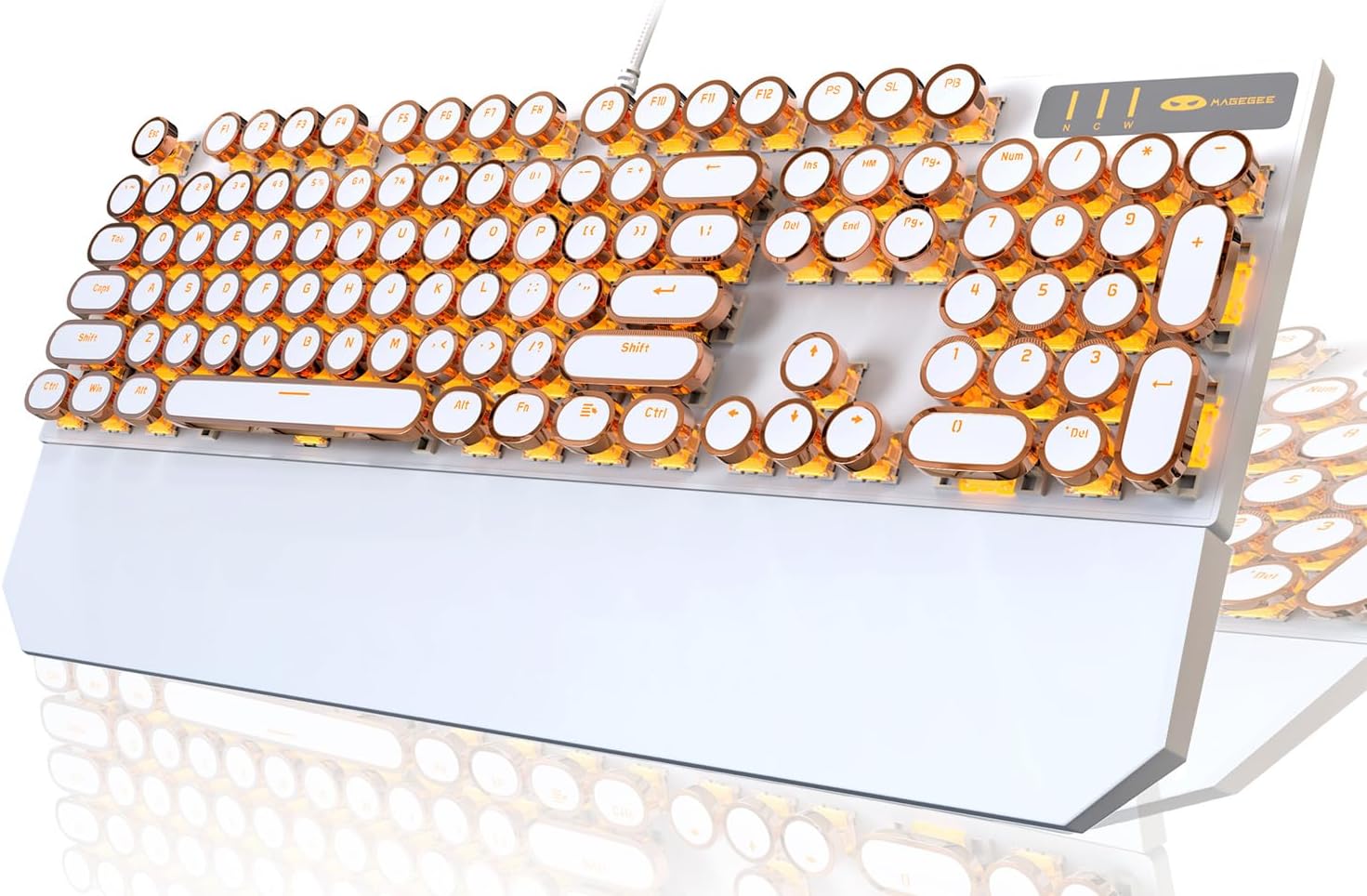
Image: The Camiysn Retro Punk Mechanical Keyboard, showcasing its full layout, white body, and gold-accented round keycaps with bright gold LED backlighting.
Eusi pakét
- Camiysn Retro Punk Mechanical Keyboard (Model: MK-STORM)
- Manual pangguna (dokumén ieu)
Disetél
- Ngabongkar bungkusan: Cabut keyboard sacara saksama tina bungkusanna.
- panempatan: Place the keyboard on a stable, flat surface. Ensure adequate space for comfortable use. The keyboard features adjustable rear feet for ergonomic positioning.
- Sambungan: The keyboard connects via a USB cable. Locate an available USB port on your computer (PC, Laptop, Mac) or compatible device.
- Nyolok sareng Puter: Insert the USB connector into the USB port. The keyboard is designed for plug-and-play functionality and should be automatically recognized by your operating system (Windows 2000/7/8/10/XP, Vista, Linux, Mac). No additional drivers are typically required.
- Tés awal: Once connected, test the keyboard by typing in a text editor or browser to ensure all keys are functioning correctly.

Image: A user's hands positioned over the Camiysn Retro Punk Mechanical Keyboard, demonstrating typical usage during typing.
Parentah Operasi
Fitur konci:
- Saklar Mekanik Biru: Provides a distinct tactile bump and an audible click sound for clear feedback with each keystroke.
- Anti-Ghosting (N-Key Rollover): All 104 keys feature anti-ghosting, ensuring that every key press is registered accurately, even during rapid or simultaneous key inputs, which is beneficial for both typing and gaming.
- Durable Round Keycaps: The unique round keycaps are manufactured using a two-color injection molding process, enhancing their durability and preventing legends from fading.
- Sésana pigeulang magnét: The keyboard includes a magnetic wrist rest for added comfort during extended use.

Gambar: A close-up view of the Camiysn keyboard, showing the blue mechanical switches beneath the removable round keycaps, highlighting the clicky switch mechanism.

Image: The Camiysn keyboard demonstrating its N-Key Rollover capability and the included magnetic wrist rest, which attaches to the front of the keyboard.
Kontrol lampu latar:
The keyboard features multiple white LED backlight modes. Use the following key combinations to control the lighting:
- Robah Mode Lampu: Pencét Fn + Ins pikeun siklus ngaliwatan modeu lampu tukang béda.
- Saluyukeun Caang: Pencét Fn + ↑ pikeun ningkatkeun kacaangan, sareng Fn + ↓ pikeun ngurangan kacaangan.
- Saluyukeun Speed: Pencét Fn + ← to decrease animation speed, and Fn + → to increase animation speed.

Image: The Camiysn keyboard illuminated by its gold LED backlight in a dark setting, showcasing the glow from under and around the keycaps.

Image: A close-up of the Camiysn keyboard's backlit keys, demonstrating the intensity and distribution of the gold LED lighting.
Tombol Multimedia:
The keyboard includes dedicated multimedia function keys accessible by pressing the Fn key in combination with the corresponding F-keys (F1-F12).
| Kombinasi konci | Fungsi |
|---|---|
| Fn + F1 | Pamuter média |
| Fn + F2 | Ngurangan Volume |
| Fn + F3 | Ngaronjatkeun volume |
| Fn + F4 | Ngajempékeun |
| Fn + F5 | eureun |
| Fn + F6 | Lagu Terakhir |
| Fn + F7 | Play/Suspend |
| Fn + F8 | Lagu salajengna |
| Fn + F9 | Surélék |
| Fn + F10 | Kaca utama |
| Fn + F11 | Komputer abdi |
| Fn + F12 | Kalkulator |

Image: A visual guide to the multimedia functions available on the Camiysn keyboard, showing the Fn key combinations for various controls like media playback, volume, and quick access to applications.
Pangropéa
- beberesih:
- Pegatkeun sambungan keyboard tina komputer Anjeun sateuacan beberesih.
- Make kaen nu lemes, teu aya lint rada dampened with water or a mild cleaning solution to wipe the surface of the keyboard and keycaps.
- Pikeun lebu sareng lebu antara konci, paké hawa anu dikomprés.
- Hindarkeun nganggo bahan kimia anu kasar, pembersih abrasive, atanapi kalembaban anu kaleuleuwihan, sabab ieu tiasa ngaruksak keyboard.
- Ngahapus Keycap: The round keycaps can be carefully removed for deeper cleaning or switch maintenance. Use a keycap puller (not included) if available, or gently pry them off from the edges. Reattach by aligning and pressing firmly until they click into place.
- Panyimpenan: Upami teu dianggo salami lami, simpen kibor di tempat anu bersih sareng garing, jauh tina sinar panonpoé langsung sareng suhu anu ekstrim.
Pamérésan masalah
- Keyboard Teu Ngabales:
- Pastikeun kabel USB dipasang pageuh kana kibor sareng port USB komputer.
- Coba colokkeun keyboard kana port USB anu béda dina komputer anjeun.
- Balikan deui komputer anjeun.
- Tés kibor dina komputer séjén pikeun nangtukeun naha masalahna aya dina kibor atawa komputer aslina.
- Lampu Latar Teu Jalan atanapi Kedip-kedip:
- Pastikeun keyboard disambungkeun leres.
- Ngagunakeun éta Fn + Ins combination to cycle through backlight modes.
- Paké Fn + ↑ pikeun ngaronjatkeun kacaangan.
- If the issue persists, try reconnecting the keyboard or restarting your computer.
- Konci Henteu Ngadaptar atanapi Ngetik Ganda:
- Pastikeun kibor bersih sareng bébas tina kokotor di handapeun tutup tombol.
- If a specific key is problematic, gently remove the keycap and inspect the switch for any obstructions.
- If the issue is widespread, try reconnecting the keyboard or restarting your computer.
- Incorrect Characters Typed:
- Check your operating system's keyboard language settings to ensure they match your physical keyboard layout.
spésifikasi
| Fitur | Rincian |
|---|---|
| merek | Camiysn |
| Nomer modél | MK-STORM |
| Konektipitas | Kabel USB |
| Jenis konci | Mechanical (Blue Switches) |
| Jumlah konci | 104 kenop (ukuran pinuh) |
| Tipe Keycap | Round, Two-color Injection Molding |
| Lampu tukang | Gold LED Backlit (Multiple White Light Modes) |
| Anti Ghosting | N-Konci Rollover |
| Kasaluyuan | Windows 2000/7/8/10/XP, Vista, Linux, Mac, PC, Laptop |
| Ukuran (L x W x H) | 45.21 x 16.79 x 6.2 cm (approx. 17.0 x 5.1 x 1.45 inches from image) |
| Beurat | 1.28 kg |
| Fitur husus | Ergonomic design, Adjustable rear feet, Magnetic wrist rest |
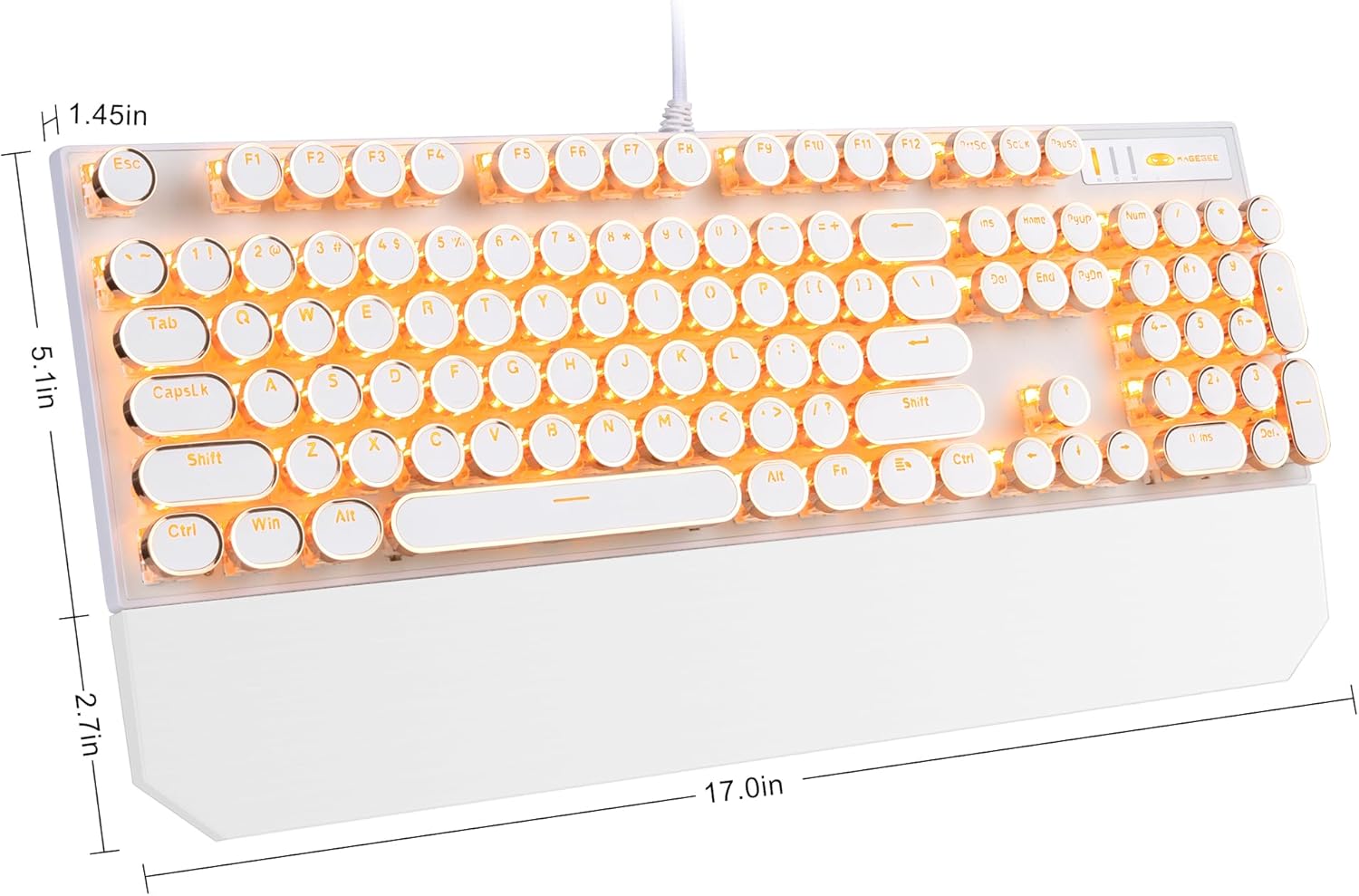
Image: A diagram illustrating the dimensions of the Camiysn Retro Punk Mechanical Keyboard, showing approximate measurements of 17.0 inches in length, 5.1 inches in width, and 1.45 inches in height.
Garansi sareng Rojongan
For warranty information and technical support, please refer to the warranty card included with your product or contact Camiysn customer service directly. Details for contacting support are typically available on the manufacturer's official websitus atawa ngaliwatan titik pameseran Anjeun.
Punten tahan bukti pameseran anjeun pikeun klaim garansi.


