Bubuka
This manual provides instructions for the AVATTO GW16-W Zigbee and Bluetooth Gateway. It covers setup, operation, maintenance, and troubleshooting to ensure optimal performance and safe use of your device. The GW16-W acts as a central hub, enabling communication between various smart home devices using both Zigbee 3.0 and Bluetooth protocols.
Émbaran Kasalametan
- Baca sagala parentah taliti saméméh pamakéan.
- Ulah ngalaan alat ka suhu ekstrim, kalembaban, atawa sinar panonpoé langsung.
- Use only the specified power adapter (5V DC/1A).
- Jauhkeun tina jangkauan barudak.
- Ulah nyobian ngabongkar atawa ngalereskeun alat sorangan.
- Pastikeun ventilasi ditangtoskeun sabudeureun alat pikeun nyegah overheating.
Eusi pakét
Pastikeun yén sadaya item aya dina bungkusan:
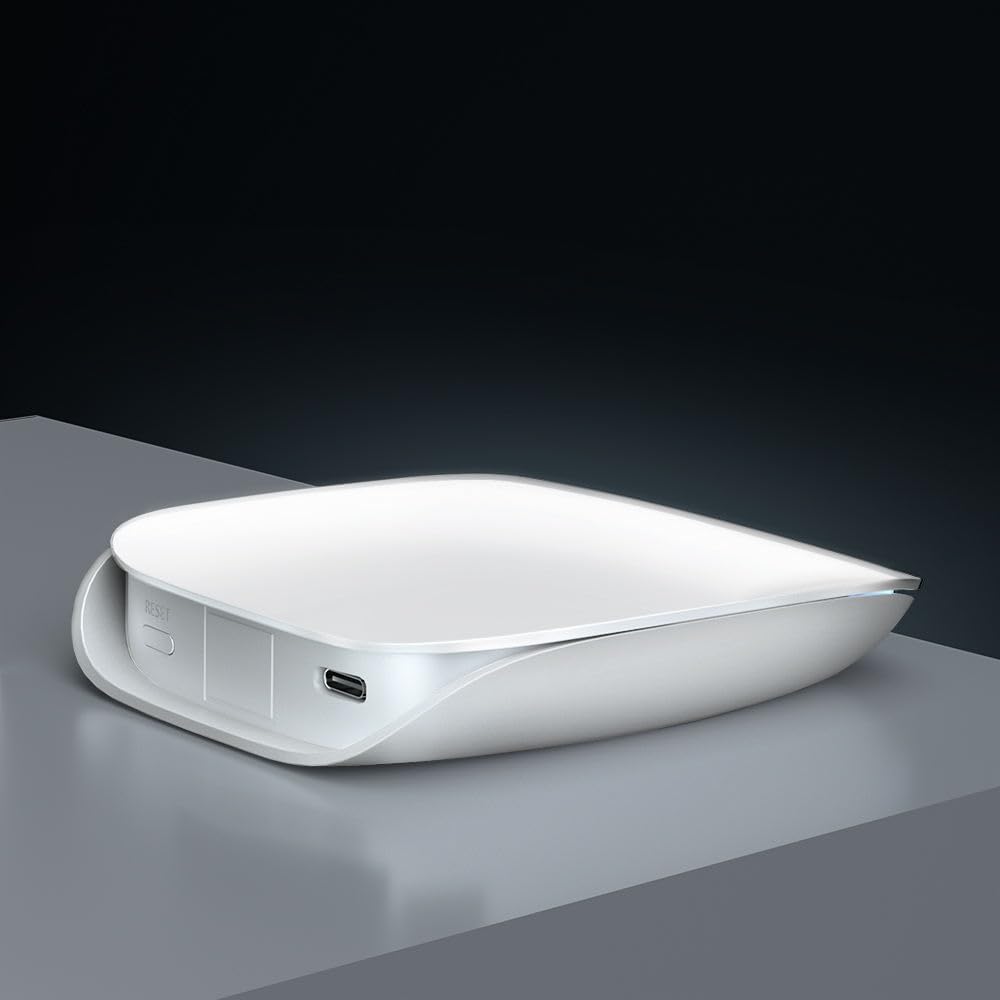
- Smart Gateway (GW16-W) x 1
- Kabel Data USB x 1
- User Manual x 1 (often a QR code or link to digital version)
Produk Leuwihview
The AVATTO GW16-W is a dual-protocol gateway that combines Zigbee and Bluetooth connectivity, allowing it to manage a wide range of smart home devices efficiently.
Komponén Alat
- Indikator Status: Displays the current operational status of the gateway.
- Reset saklar: Dipaké pikeun ngareset alat ka setélan pabrik.
- Tipe-C Port: For power input (5V DC/1A).
spésifikasi
| Fitur | Rincian |
|---|---|
| Ngaran produk | ZigBee/Bluetooth Wireless Gateway |
| Nomer modél | GW16-W |
| Diménsi | 85mm * 100mm * 23mm |
| Input kakuatan | 5V DC / 1A |
| Téhnologi nirkabel | Zigbee 3.0/Bluetooth |
| Suhu Gawé | -20°C ~ 45°C |
| Suhu Panyimpenan | 5°C ~ 30°C |
| Kalembaban Gawé | 10% ~ 90% RH (Non-condensing) |
| Kalembaban Panyimpenan | 30% ~ 70% RH |
Disetél
1. Ngahurungkeun
Connect the provided USB data cable to the Type-C port on the gateway and plug the other end into a 5V DC/1A power adapter (not included). The status indicator light will illuminate, indicating the device is powered on.
2. Pamasangan Aplikasi sareng Konéksi Jaringan
- Unduh Tuya Pinter or Hirup Pinter app from your mobile device's app store (available on iOS and Android).
- Ngadaptar atanapi log in kana akun anjeun dina aplikasi.
- Follow the in-app instructions to add the GW16-W gateway. This typically involves selecting "Gateway" or "Hub" from the device list and following the pairing prompts. Ensure your phone is connected to a 2.4GHz Wi-Fi network during setup, as the gateway does not support 5GHz Wi-Fi.
3. Adding Sub-Devices (Zigbee/Bluetooth Devices)
Once the gateway is successfully connected to the app, you can add compatible Zigbee and Bluetooth sub-devices to expand your smart home system.

- In the Tuya Smart/Smart Life app, navigate to the gateway's control interface and select "Add sub-device" or a similar option.
- Put your Zigbee or Bluetooth device into pairing mode (refer to the sub-device's individual manual for specific instructions).
- The gateway will discover and add the device. Once added, you can rename it and assign it to a room within the app.
Parentah Operasi
Remote Control via App
After adding sub-devices, you can control them remotely through the Tuya Smart or Smart Life app from anywhere with an internet connection.

The app allows you to monitor device status, set schedules, create automation routines, and manage all connected smart devices from a single interface.
Integrasi Kontrol Sora
The AVATTO GW16-W gateway is compatible with popular voice assistants like Amazon Alexa and Google Assistant, providing hands-free control of your smart devices.

- To enable voice control, link your Tuya Smart/Smart Life account to your Alexa or Google Home app.
- Once linked, you can use voice commands such as "Alexa, turn on the light" or "Hey Google, set the thermostat to 22 degrees" to control your connected devices.
Pangropéa
- Jaga alat tetep bersih ku cara ngusap ku kaén anu lembut sareng garing.
- Avoid using harsh chemicals or abrasive cleaners, which can damage the device's surface.
- Pastikeun ventilasi ditangtoskeun sabudeureun alat pikeun nyegah overheating.
- Regularly check for firmware updates through the Tuya Smart/Smart Life app to ensure optimal performance, security, and compatibility with new devices.
Pamérésan masalah
Gateway not connecting to Wi-Fi:
- Ensure your Wi-Fi network is 2.4GHz. The gateway does not support 5GHz Wi-Fi.
- Pariksa naha kecap akses Wi-Fi anu diasupkeun kana aplikasi éta leres.
- Pindahkeun gateway langkung caket kana router Wi-Fi anjeun pikeun ningkatkeun kakuatan sinyal.
- Restart your router and the gateway, then attempt the connection process again.
Sub-alat teu dipasangkeun:
- Ensure the sub-device is in pairing mode (refer to its specific manual).
- Check if the sub-device is compatible with Zigbee 3.0 or Bluetooth standards.
- Move the sub-device closer to the gateway to ensure it's within range.
- Reset the sub-device to factory settings and try pairing again.
Kontrol sora teu jalan:
- Verify that your Tuya Smart/Smart Life account is correctly linked to your Alexa or Google Home app.
- Ensure your voice assistant device (e.g., Amazon Echo, Google Home speaker) is online and functioning correctly.
- Check the device names in the Tuya app and ensure they are recognized by Alexa/Google. Try re-discovering devices in the voice assistant app.
Garansi sareng Rojongan
For warranty information and technical support, please refer to the purchase platform or contact AVATTO customer service directly. Keep your purchase receipt or proof of purchase for any warranty claims or support inquiries.


