Bubuka
Thank you for choosing the Nillkin Keyboard Case for your iPad. This manual provides detailed instructions for setting up, operating, and maintaining your new keyboard case to enhance your iPad experience, transforming it into a versatile laptop-like device.
Kasaluyuan
This Nillkin Keyboard Case is compatible with the following iPad models:
- iPad 11th Generation A16 2025 (Models: A3354, A3355, A3356)
- iPad 10th Generation 10.9 inch 2022 (Models: A2696, A2757, A2777, A3162)

Image: Compatibility chart for Nillkin Keyboard Case, highlighting compatible iPad models and incompatible models.
Naon dina Box
- 1 x Detachable Keyboard Case
- 1 x Kabel USB (Tipe-C)
- 1 x Multi-language Manual
- Slide Camera Cover (integrated)
- Kotak bungkusan endah pisan
Disetél
1. Installing the iPad into the Case
- Tilt the corner of the tablet with the camera into the case.
- Press down on the other corners to secure the iPad in place.
- Gently lift the shell's edges to ensure the tablet fits securely.
Video: Demonstrates how to correctly install the iPad into the Nillkin keyboard case, ensuring a secure fit and protection.
2. Ngecas kibor
Before first use, fully charge the keyboard.
- Connect the provided USB Type-C charging cable to the keyboard's charging port.
- The power indicator light will be red during charging.
- Charging is complete when the power indicator turns green.
- Ngeusi batre pinuh butuh kurang leuwih 2-3 jam.
Video: Shows the process of charging the Nillkin keyboard case, including connecting the cable and observing the indicator lights.
3. Connecting the Keyboard via Bluetooth
- Turn on the power switch located on the right side of the keyboard.
- Press the "Fn" and "C" keys simultaneously. The indicator light on the keyboard will start to flash, indicating it's in pairing mode.
- Dina iPad anjeun, buka Setélan > Bluetooth sareng hurungkeun Bluetooth.
- In the list of available devices, select "Bluetooth Keyboard".
- Confirm the pairing request on your iPad. The keyboard will now be connected.
Video: Step-by-step guide on how to connect the Nillkin keyboard case to an iPad via Bluetooth, including activating pairing mode and selecting the device.
4. Adjusting Trackpad Settings (for optimal touch experience)
To get a better touch experience, you may want to enable "Tap to Click" and adjust pointer speed.
- Dina iPad anjeun, buka Setélan > Umum > Trackpad.
- Turn on "Tap to Click". This allows you to open apps by tapping the icon without pressing.
- To adjust trackpad speed, go to Setélan > Manajemén Umum > Mouse and Trackpad.
- Adjust the "Pointer speed" and "Wheel scrolling speed" to your preference.
Video: Instructions on how to enable "Tap to Click" and adjust trackpad speed settings on your iPad for improved usability with the Nillkin keyboard case.
Parentah Operasi
1. Keyboard Backlighting
- The keyboard features 7 backlit colors (white, purple, cyan, red, green, yellow, blue) and 3 adjustable brightness levels.
- Pencét éta Konci lampu tukang (usually represented by a lightbulb icon) to cycle through brightness levels.
- Pencét Fn + Konci Lampu Latar pikeun ngarobah warna lampu tukang.

Image: The Nillkin keyboard with its keys illuminated in blue, demonstrating the 7 backlit color options and adjustable brightness.
Video: Demonstrates how to use the FN key in combination with other keys on the Nillkin keyboard for various functions, including changing backlight colors and brightness.
2. Trackpad Multi-Toél
The built-in precision trackpad supports full multi-touch gestures for efficient navigation:
- Ketok: Single tap to click.
- Gesek: Use two fingers to scroll.
- Ciwit: Use two fingers to zoom in/out.
- Ganti Aplikasi: Gesek ka luhur ku tilu ramo pikeun view aplikasi kabuka.
Anti-misoperation technology automatically disables the touchpad when typing to prevent accidental inputs.

Image: A hand demonstrating multi-touch gestures on the trackpad of the Nillkin keyboard case, illustrating its functionality.
Video: Shows smooth operation of the Nillkin keyboard case's trackpad, demonstrating various gestures and responsive control.
3. Detachable Two-Piece Design
The case features a flexible and detachable two-piece design, allowing you to use the iPad with or without the keyboard.
- To detach, gently pull the iPad in its protective shell away from the keyboard base.
- To reattach, align the buttons on the case with the corresponding slots on the keyboard base and press down firmly.
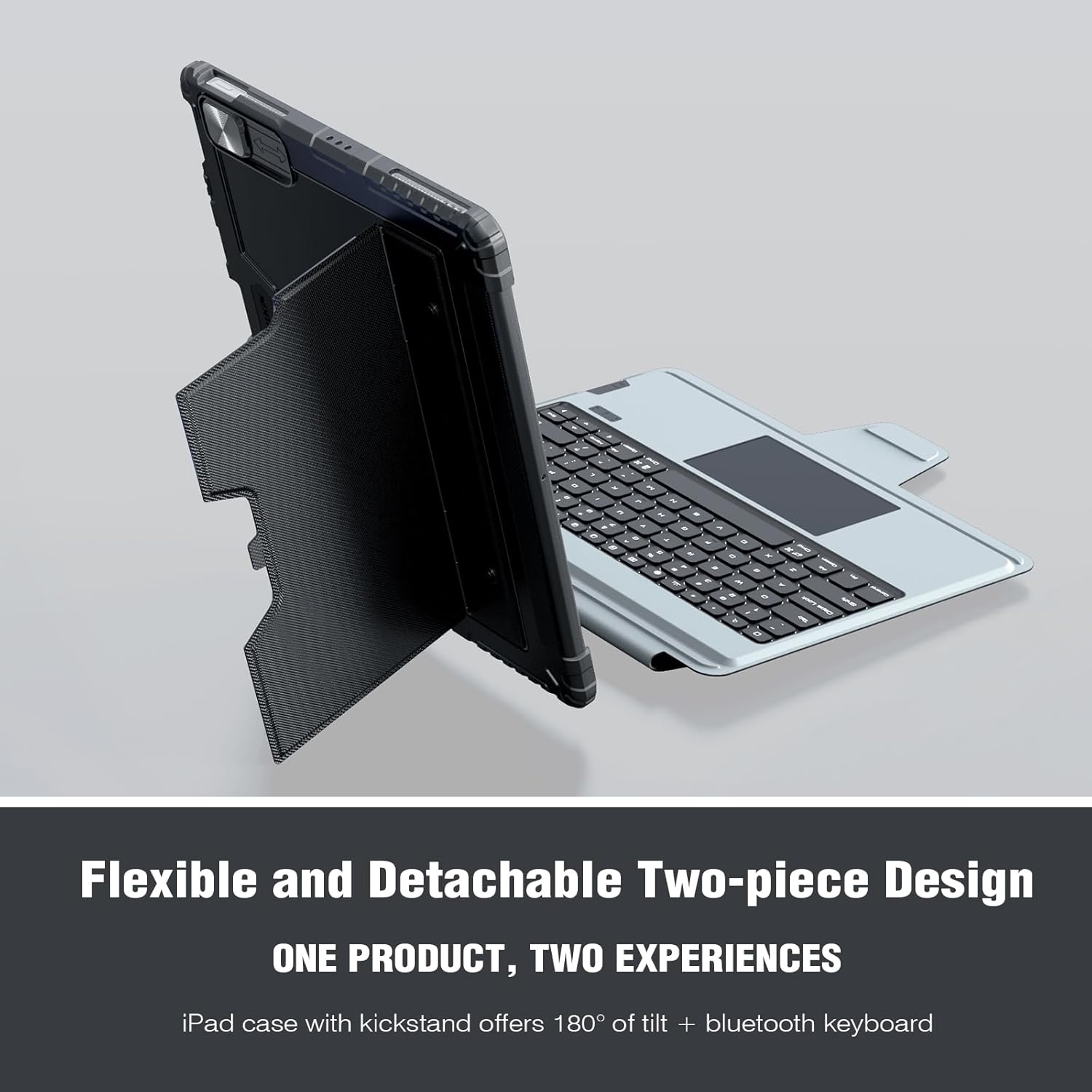
Image: The Nillkin keyboard case demonstrating its detachable design, allowing the iPad to be used independently from the keyboard.
4. Sababaraha Viewdina Angles
The easy-set stand is adjustable from 0-180°, providing stable viewing angles for various activities such as typing, drawing, or watching videos.

Image: The Nillkin keyboard case configured for multiple viewing angles, illustrating its versatility for different tasks.
5. Slide Camera Cover
A unique patented sliding camera cover protects your iPad's lens from scratches and ensures your privacy. Simply slide the cover to open or close it.

Gambar: Detil view of the Nillkin case's sliding camera cover, designed to protect the iPad's camera lens.
6. Apple Pencil Holder
The case includes a built-in Apple Pencil holder with magnetic attachment and wireless charging support for your Apple Pencil (Apple Pencil not included).

Image: The Nillkin case featuring a dedicated slot for the Apple Pencil, indicating magnetic attachment and charging compatibility.
7. Mariksa Level Batré
To check the keyboard's battery level, press Fn + Alt katuhu. The indicator light will flash a certain number of times to show the remaining battery life:
- 1 flash: 0-25%
- 2 kedip-kedip: 25-50%
- 3 kedip-kedip: 50-75%
- 4 kedip-kedip: 75-100%
Pangropéa
- Keep the keyboard and case clean by wiping with a soft, dry cloth.
- Hindarkeun ngalaan alat ka suhu anu ekstrim atanapi sinar panonpoé langsung.
- Entong nganggo bahan kimia kasar atanapi beberesih kasar.
- Pastikeun port ngecas bébas tina lebu sareng kokotor.
Pamérésan masalah
- Keyboard teu nyambung: Ensure the keyboard is charged and powered on. Re-attempt Bluetooth pairing by pressing Fn+C and re-selecting "Bluetooth Keyboard" in your iPad's settings.
- Trackpad unresponsive: Check if the trackpad is disabled (Fn + Left Alt). Ensure "Tap to Click" is enabled in iPad settings (Settings > General > Trackpad).
- Lampu tukang teu jalan: Press the Backlight Key to adjust brightness. Ensure the keyboard is sufficiently charged.
- Konci henteu ngabales: Ensure the keyboard is properly connected via Bluetooth. Try restarting both the iPad and the keyboard.
spésifikasi
| merek | Nillkin |
| Nomer modél | iPad 10th Keyboard Case (10.9", 2022) |
| Alat nu cocog | iPad 10th Generation (10.9", 2022) - Model: A2757, A2777, A2696, A3162; iPad 11th (A16, 2025) - Model: A3354, A3355, A3356 |
| Téhnologi konektipitas | Bluetooth |
| Katerangan kibor | Multi Fungsional |
| Fitur husus | Backlit, Hotkeys and Media Keys, Integrated Stand, Slide Camera Cover, Trackpad |
| Keyboard Backlighting Rojongan Warna | RGB (7 kelir) |
| Bahan | Polycarbonate, TPU silica gel |
| Item Beurat | 1.96 pon |
| Batré | 1 batré Lithium Ion (kaasup), 500mAh |
| Battery Life (continuous use) | 100 hours (without backlighting), 14 hours (with backlighting) |
| Waktu Ngecas | 2-3 hours (Type-C) |
Garansi sareng Rojongan
For warranty information, technical support, or customer service inquiries, please refer to the contact details provided in your product packaging or visit the official Nillkin websitus. Simpen resi pameseran anjeun pikeun klaim jaminan.


