
Bubuka
Hatur nuhun pikeun meuliasing the Arafuna Portable CD Player. This versatile device combines a CD player, Bluetooth speaker, FM radio, USB player, and AUX-in functionality, offering multiple ways to enjoy your audio. Designed for portability and ease of use, it features a built-in rechargeable battery and powerful stereo speakers. Please read this manual carefully before use to ensure proper operation and to maximize your listening experience.
Eusi pakét
Mangga parios pakét kanggo barang-barang ieu:
- Arafuna Portable CD Player x1
- Jauh Jauh x1
- Adaptor kakuatan x1
- USB to Type-C Charging Cable x1
- Buku Panduan x1
Fitur produk
- Multi-functional Audio Device: Supports CD, Bluetooth, FM Radio, USB, and AUX-in playback modes.
- Batré anu tiasa dieusi deui: Integrated 2000mAh battery for portable use without constant power connection.
- Spiker Stereo anu Kuat: Equipped with two 15W front-facing stereo speakers for enhanced sound quality.
- Perlindungan Anti Skip: Ensures uninterrupted playback even during movement, suitable for car use.
- Tampilan backlit: Clear visibility of information in low-light conditions.
- Fungsi Timer Saré: Allows setting a timer for automatic power off.
- Protective CD Lid: Helps protect CDs from dust and damage.
Kontrol jeung palabuhan
Familiarize yourself with the controls and ports of your Arafuna Portable CD Player.

Gambar: luhur jeung samping view of the Arafuna Portable CD Player, highlighting numbered controls and ports.
- Antosan: Daya hurung / pareum.
- Setélan Timer Saré: Setel timer sare.
- MODÉ: Switch between CD, Bluetooth, FM, USB, AUX modes.
- saméméhna: Skip to previous track/station.
- Reureuh/ulin: Play or pause current audio.
- Eureun: Eureun playback.
- Teras: Skip to next track/station.
- VOL +: Ningkatkeun volume.
- VOL -: Ngurangan volume.
- Ulang deui: Cycle through repeat modes (Repeat All, Repeat One, Random Play, A-B Repeat).
- CD Cover Open: Latch to open the CD compartment.
- CD Dust Lid: Transparent lid protecting the CD.
- Port ngecas DC: Connect power adapter for charging.
- Daya on/off: switch kakuatan utama.
- Earphone / AUX Out Port: 3.5mm jack for headphones or external speaker output.
- AUX Dina Port: Jack 3.5mm pikeun nyambungkeun sumber audio éksternal.
- Port USB: Pikeun playback USB drive.
Disetél
1. Ngecas Awal
Before first use, fully charge the device. Connect the USB to Type-C charging cable to the DC Charging Port (13) and the other end to the power adapter. Plug the adapter into a wall outlet. The charging indicator will show the charging status. A full charge typically takes a few hours.
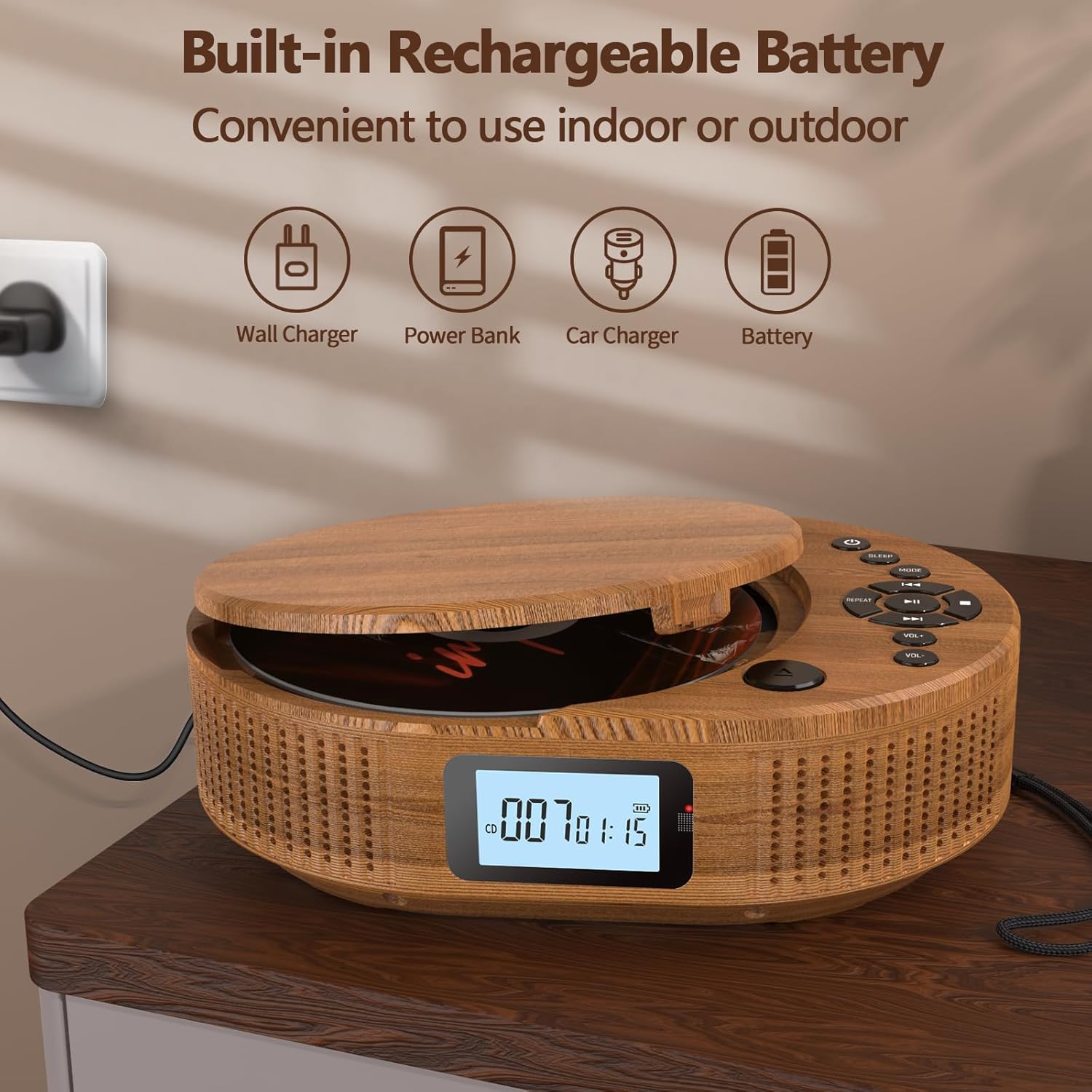
Image: The Arafuna Portable CD Player connected to a power source, illustrating its rechargeable battery feature.
2. Daya Hurung / Pareum
To power on the device, slide the main Power On/Off switch (14) to the "ON" position. Press the Standby button (1) to turn the display on. To power off, press the Standby button (1) again or slide the main Power On/Off switch (14) to "OFF" for complete shutdown.
Parentah Operasi
1. CD Playback Mode
- Open the CD cover by gently lifting the CD Cover Open latch (11).
- Teundeun CD kana spindle kalawan sisi labél nyanghareup ka luhur.
- Close the CD cover until it clicks securely.
- Press the MODE button (3) until "CD" mode is displayed.
- The player will automatically start reading the CD. Press the Play/Pause button (5) to start or pause playback.
- Use the Previous (4) and Next (7) buttons to skip tracks.
- Adjust volume with VOL + (8) and VOL - (9).
- Press the Repeat button (10) to cycle through repeat options (e.g., repeat one, repeat all, random play, A-B repeat).
- Press the Stop button (6) to stop playback.

Image: The Arafuna Portable CD Player in CD mode, demonstrating its primary function.
2. Mode Bluetooth
- Press the MODE button (3) until "bt" (Bluetooth) mode is displayed. The device will enter pairing mode, indicated by a flashing Bluetooth icon.
- Dina telepon pinter, tablet, atanapi alat Bluetooth anjeun anu sanés, aktipkeun Bluetooth teras milarian alat anu sayogi.
- Select "Arafuna BP2211T" (or similar name) from the list to pair.
- Once paired, the Bluetooth icon on the player's display will stop flashing. You can now play audio from your connected device.
- Use the player's controls (Play/Pause, Previous, Next, Volume) or your connected device's controls to manage playback.

Image: The Arafuna Portable CD Player in Bluetooth mode, showing connectivity with a mobile phone.
3. Modeu Radio FM
- Press the MODE button (3) until "FM" mode is displayed.
- To auto-scan and save stations, press and hold the Play/Pause button (5). The player will scan and store available FM stations (76MHz-108MHz).
- Use the Previous (4) and Next (7) buttons to navigate through saved stations.
- Adjust volume with VOL + (8) and VOL - (9).

Image: The Arafuna Portable CD Player displaying FM radio frequency and demonstrating the sleep timer function.
4. USB Playback Mode
- Insert a USB flash drive into the USB Port (17).
- Press the MODE button (3) until "USB" mode is displayed.
- The player will automatically detect and start playing compatible audio files (MP3, WAV, AAC, FLAC, SBC).
- Use the Play/Pause (5), Previous (4), Next (7), and Volume (8, 9) buttons to control playback.
5. Modeu AUX-in
- Connect an external audio device (e.g., smartphone, MP3 player) to the AUX In Port (16) using a 3.5mm audio cable (not included).
- Press the MODE button (3) until "AUX" mode is displayed.
- Play audio from your external device. The volume can be controlled both on the external device and the CD player.
6. Timer Saré
To set the sleep timer, press the Sleep Timer Setting button (2). Repeatedly press the button to cycle through available timer options (e.g., 15, 30, 60, 90 minutes, OFF). The device will automatically power off after the selected time.
Pangropéa
- beberesih: Anggo lawon anu lemes sareng garing pikeun ngabersihkeun bagian luar pamaén. Entong nganggo pembersih atanapi pangleyur anu abrasif.
- Perawatan CD: Handle CDs by their edges. Clean CDs with a soft, lint-free cloth, wiping from the center outwards.
- Panyimpenan: Lamun teu dipake, nyimpen pamuter dina tiis, tempat garing jauh ti sinar panonpoé langsung jeung hawa ekstrim.
- Batré: Pikeun manjangkeun umur batre, ulah miceun batre pinuh. Ngeusi batre alat sacara rutin, sanajan henteu dianggo kanggo waktos anu lami.
Pamérésan masalah
| Masalah | Mungkin Cukang lantaranana | Solusi |
|---|---|---|
| Alat teu hurung. | Batré béak. Saklar daya utama pareum. | Charge the device. Ensure the main Power On/Off switch (14) is in the "ON" position. |
| CD teu diputer atawa skip. | CD is dirty, scratched, or inserted incorrectly. CD format not supported. | Clean the CD. Reinsert the CD correctly. Ensure the CD is an audio CD or compatible format. |
| Taya sora. | Volumena leutik teuing. Alatna dieureunkeun sakeudeung. Modeu anu dipilih salah. | Increase volume. Press Play/Pause (5). Ensure the correct mode (CD, BT, FM, USB, AUX) is selected. |
| Papasangan Bluetooth gagal. | Device is not in pairing mode. Bluetooth is off on external device. | Ensure the player is in "bt" mode. Enable Bluetooth on your external device and search again. |
| panarimaan radio FM goréng. | Sinyal lemah. | Try repositioning the player or moving to an area with better reception. |
spésifikasi
| merek | Arafuna |
| Ngaran modél | BP2211T |
| Nomer modél | 2211T-05UK |
| Warna | Warna Kayu |
| Téhnologi konektipitas | Bluetooth |
| Alat nu cocog | General audio devices with USB, auxiliary or Bluetooth connectivity (PC, smartphone, tablet) |
| Jenis Batré | Lithium-ion (2000mAh built-in) |
| Batré Rechargeable | Sumuhun |
| Kaluaran Speaker | 2 x 15W Speaker Stereo |
| Format audio didukung | MP3, WAV, AAC, FLAC, SBC (via USB) |
| Frékuénsi Radio FM | 76MHz-108MHz |
| Tipe Panyambung | 3.5 mm Jack (AUX In/Out), USB |
| Jumlah Saluran | 2 |
| Item Beurat | 800 gram |
Garansi sareng Rojongan
Arafuna provides a 100% risk-free purchase. If you encounter any issues with your product, please do not hesitate to contact us. Our customer support team is available to assist you.
For support, please refer to the contact information provided on the product packaging or the official Arafuna websitus.