1. Bubuka
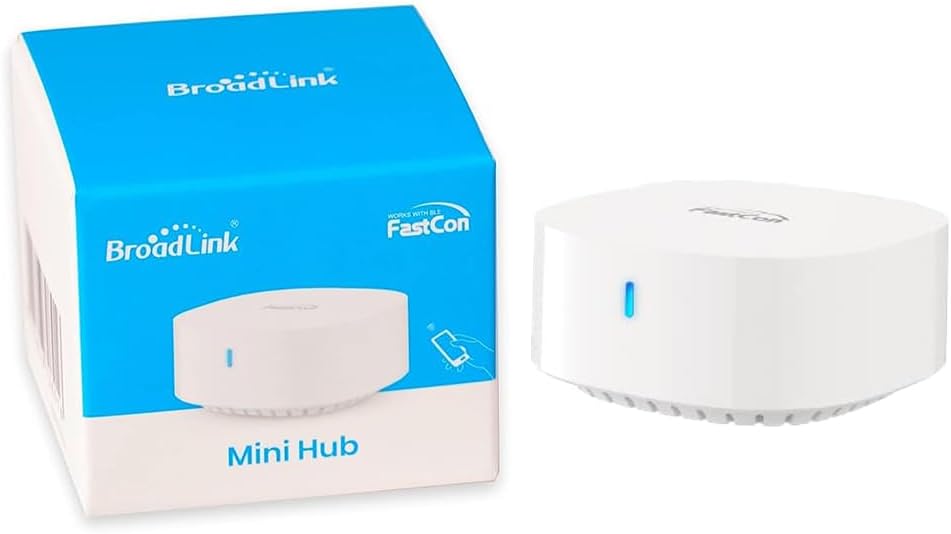
Thank you for choosing the BroadLink FastCon Mini Hub (GW4C). This device serves as a central controller for your BroadLink FastCon smart home devices, enabling remote control and voice command integration. This manual provides essential information for setting up, operating, and maintaining your Mini Hub.
2. Émbaran Kasalametan
- Pastikeun alat ieu disimpen di lingkungan anu garing, jauh tina cai atanapi kalembaban anu kaleuleuwihi.
- Ulah ngalaan alat ka suhu ekstrim atawa sinar panonpoé langsung.
- Hindarkeun ragrag atanapi ngagentoskeun alat kana tabrakan anu kuat.
- Ulah nyobian ngabongkar atawa ngalereskeun alat sorangan. Kontak rojongan customer pikeun pitulung.
- Anggo ukur adaptor listrik anu disayogikeun atanapi sumber listrik anu cocog.
3. Eusi Paket
Pariksa yén pakét anjeun ngandung barang-barang ieu:
- BroadLink FastCon Mini Hub (GW4C)
- Kabel Daya USB
- Manual pangguna (dokumén ieu)
4. Setélan
4.1 Setup Awal jeung App Papasangan
- Daya Hurung: Connect the Mini Hub to a power source using the provided USB cable. The indicator light will begin to flash.
- Unduh App: Download the BroadLink App from your smartphone's app store (iOS or Android).
- Tambahkeun Alat: Open the BroadLink App, create an account if you haven't already, and follow the in-app instructions to add a new device. Select the FastCon Mini Hub.
- Konfigurasi Wi-Fi: The app will guide you through connecting the Mini Hub to your 2.4 GHz Wi-Fi network. Ensure your phone is connected to the same 2.4 GHz network during setup. Catetan: Jaringan Wi-Fi 5GHz teu dirojong.
- FastCon Device Connection: Once the Mini Hub is successfully connected, any BroadLink FastCon devices (version 4.0 and above) within range will automatically connect to the hub without further pairing steps.

5. Nyuping
5.1 Jauh Jauh
The BroadLink App allows you to control your connected FastCon devices from anywhere, as long as your Mini Hub has an internet connection. You can turn devices on/off, adjust settings, and monitor their status directly from your smartphone.

5.2 Pamaduan Control Sora
The Mini Hub enables voice control for your FastCon devices through compatible smart assistants like Amazon Alexa and Google Home. Link your BroadLink account within the Alexa or Google Home app to enable voice commands.

5.3 Device Timer
Utilize the BroadLink App to set schedules and timers for your connected FastCon devices. This allows for automated operation, such as turning lights on or off at specific times.

6. Pangropéa
6.1 beberesih
To clean the Mini Hub, gently wipe its surface with a soft, dry cloth. Do not use liquid cleaners or abrasive materials, as these can damage the device.
6.2 Panyimpenan
When not in use for extended periods, store the Mini Hub in a cool, dry place, away from direct sunlight and extreme temperatures.
7. Cara ngungkulan
If you encounter issues with your BroadLink FastCon Mini Hub, refer to the following table for common problems and solutions:
| Masalah | Solusi anu mungkin |
|---|---|
| Mini Hub not connecting to Wi-Fi | Ensure your Wi-Fi network is 2.4 GHz. Check Wi-Fi password. Move the hub closer to the router. Restart the hub and your router. |
| FastCon devices not connecting to Mini Hub | Ensure the Mini Hub is successfully connected to Wi-Fi. Verify FastCon devices are within range and are FastCon 4.0 or above. Restart the FastCon devices. |
| Voice control not working with Alexa/Google Home | Ensure your BroadLink account is linked correctly in the Alexa/Google Home app. Check internet connectivity for both the hub and your voice assistant device. Try re-discovering devices in the Alexa/Google Home app. |
| App cannot find the Mini Hub | Ensure your smartphone is connected to the same 2.4 GHz Wi-Fi network as the hub during setup. Restart the app and the hub. |
8. Spésifikasi
| Fitur | Rincian |
|---|---|
| Nomer modél | GW4C |
| merek | Broadlink |
| Téhnologi konektipitas | FastCon (4.0 and above), 2.4 GHz Wi-Fi |
| Alat nu cocog | BroadLink FastCon devices |
| Kasaluyuan Asistén Sora | Amazon Alexa, Imah Google |
| Alat disambungkeun maksimum | Up to 250 BroadLink FastCon devices |
| Item Beurat | 1.13 ons |
| Ukuran Paket | 3.98 x 3.43 x 0.94 inci |
| Bahan | alumunium |
| Warna | Bodas |
| Voltage | 120 volt |
| Wattage | 4.5 watt |
9. Garansi jeung Rojongan
9.1 Émbaran jaminan
BroadLink products typically come with a limited manufacturer's warranty. Please refer to the warranty card included with your product or visit the official BroadLink websitus pikeun istilah jaminan lengkep jeung kaayaan husus pikeun wewengkon Anjeun.
9.2 Rojongan Palanggan
For technical assistance, troubleshooting, or warranty claims, please contact BroadLink customer support through their official website or the contact information provided in the BroadLink App. Have your product model number (GW4C) and purchase details ready when contacting support.


