1. Bubuka jeung Leuwihview
The Gemini ES-210MXBLU-ST is a comprehensive 600W 10" portable PA system designed for audio enthusiasts and professionals requiring a complete stereo sound solution. This system includes a powerful mixer, two loudspeakers, speaker stands, a microphone, and all necessary cables, providing a full-frequency output suitable for various applications.
Key features include a Class-D amplifier, a built-in media player with USB and SD card support, and a wireless Bluetooth receiver for seamless audio streaming. The mixer offers multiple input channels with XLR and 1/4" inputs, +48V phantom power, 2-band EQ, and echo effects, allowing for versatile sound customization.

Figure 1.1: The complete Gemini ES-210MXBLU-ST Portable PA System, showcasing the two loudspeakers, powered mixer, speaker stands, microphone, and various cables included in the bundle.
2. Eusi Paket
Saatos ngabongkar bungkusan, mangga pariksa yén sadaya barang anu didaptarkeun di handap aya sareng dina kaayaan anu saé:
- 1x Gemini ES-210MXBLU-ST Portable PA System (includes 1x Powered Mixer, 2x 10" Loudspeakers)
- 2x Tripod Speaker Stands
- 1x Polsen M-85 Professional Dynamic Handheld Microphone
- 2x Auray MS-5230F Tripod Microphone Stands with Fixed Boom
- 1x XLR-XLR Cable (for microphone)
- 2x Speaker Cables (1/4" to 1/4")
- 1x Kabel Listrik

Figure 2.1: The included microphone and XLR cable, essential for vocal or instrument input.
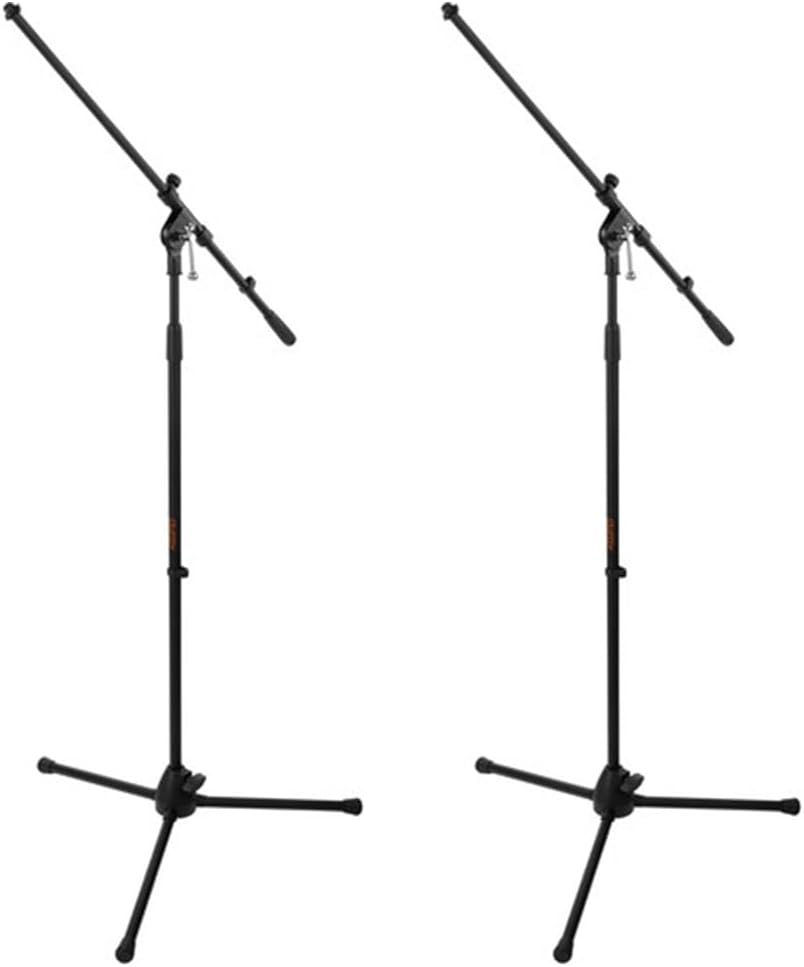
Figure 2.2: The two tripod microphone stands, providing stable support for microphones during performances or presentations.
3. Setup Guide
Follow these steps to correctly set up your Gemini ES-210MXBLU-ST PA system:
- Ngatur posisi Mixer: Place the powered mixer on a stable, flat surface. Ensure adequate ventilation around the unit.
- Setting up Speaker Stands: Extend the legs of the tripod speaker stands to a stable width. Adjust the height to your desired level, ensuring the locking pin is securely inserted.
- Spiker Pamasangan: Carefully lift each 10" loudspeaker and place it onto the pole of a speaker stand. Ensure the speaker is firmly seated on the stand.
- Connecting Speakers to Mixer: Use the provided 1/4" speaker cables to connect the "Speaker Out" jacks on the rear of the mixer to the "Input" jacks on each loudspeaker.
- Nyambungkeun Mikropon:
- For the Polsen M-85 microphone, connect the XLR cable to the microphone's output and then to one of the XLR inputs (Channels 1-4) on the mixer.
- If using other microphones, connect them to the appropriate XLR or 1/4" inputs.
- Sambungan Daya: Ensure all connections are secure before plugging the power cord into the mixer's ICE power input, and then into a grounded AC power outlet.
- Daya mimiti Hurung: Turn on the mixer using the power switch. Observe the power indicator light.

Gambar 3.1: Hareupeun view of one of the 10-inch loudspeakers, showing the protective grille and Gemini branding.

Gambar 3.2: Tukangeun view of a loudspeaker, indicating the pole mount receptacle for stand placement.
4. Parentah Operasi
This section details the operation of the ES-210MXBLU-ST powered mixer and its various functions.

Gambar 4.1: Detil view of the powered mixer's control panel, highlighting input channels, EQ, effects, and media player controls.
4.1. Mixer Controls Overview
- Saluran 1-4: Each channel features XLR and 1/4" inputs. These are suitable for microphones (XLR) and line-level instruments (1/4").
- + 48V Phantom Power: A switch is available to activate +48V phantom power for condenser microphones on Channels 1-4. Ensure phantom power is off before connecting or disconnecting microphones that do not require it.
- 2-Band EQ: Each channel (1-4) includes independent Treble and Bass controls to adjust the tonal characteristics of the input signal.
- Pangaruh Gema: An Echo send control is available on Channels 1-4 to apply a reverberation effect to the input signal. The overall Echo level can be adjusted.
- Saluran 5/6: These channels feature two 1/4" inputs and a stereo RCA input, ideal for connecting external audio devices like keyboards, CD players, or laptops.
- Jilid Master: Ngontrol tingkat kaluaran sakabéhna sistem PA.
- Kaluaran Monitor: Stereo 1/4" and RCA monitor outputs are provided for connecting external monitoring systems.
- Kaluaran headphone: A 3.5mm headphone output allows for private monitoring of the mix.
4.2. Media Player Operation (USB/SD/Bluetooth)
The built-in media player supports playback from USB drives, SD cards, and Bluetooth devices.
- USB/SD Playback: Insert a USB drive or SD card into the respective slot. The player will automatically detect and begin playing compatible audio files. Use the control buttons (Play/Pause, Next, Previous, Mode) to navigate.
- Masangkeun Bluetooth:
- Press the "Mode" button on the media player until "Bluetooth" is selected.
- On your Bluetooth-enabled device (smartphone, tablet, etc.), search for available devices.
- Select "ES-210MXBLU" (or similar) from the list to pair.
- Once paired, you can stream audio wirelessly from your device to the PA system.
5. Pangropéa
Proper maintenance ensures the longevity and optimal performance of your PA system.
- beberesih: Use a soft, dry cloth to wipe down the mixer and speakers. Avoid using abrasive cleaners or solvents, which can damage the finish.
- Panyimpenan: When not in use, store the system in a cool, dry place, away from direct sunlight and extreme temperatures. It is recommended to use protective covers or cases for transport and storage.
- Perawatan kabel: Always coil cables neatly after use to prevent tangling and damage. Avoid sharp bends or kinks.
- Ventilasi: Ensure the mixer's ventilation openings are clear and unobstructed during operation to prevent overheating.
6. Cara ngungkulan
Bagian ieu ngabahas masalah umum anu anjeun tingali sareng solusina.
| Masalah | Mungkin Cukang lantaranana | Solusi |
|---|---|---|
| Teu aya sora ti panyatur |
|
|
| Sora distort |
|
|
| Masalah papasangan Bluetooth |
|
|
7. Spésifikasi
Detailed technical specifications for the Gemini ES-210MXBLU-ST PA System:
- Kaluaran Wattage: 600 Watt (Puncak)
- Jumlah Saluran: 8
- Ukuran Loudspeaker: 10-inch LF Woofer, 1-inch Titanium Compression Driver
- Amptipe lifier: Kelas-D
- Téknologi konektipitas: USB, SD card, Bluetooth, XLR, 1/4" TRS, RCA
- Kakuatan Phantom: +48V (Channels 1-4)
- EQ: 2-Band (Treble, Bass) per channel (1-4)
- Balukar: Gema
- Alat anu cocog: Microphones, Instruments, MP3 Players, Smartphones, Laptops
- Tipe Pamasangan: Pole Mount (for speakers)
- warna: Hideung
- Beurat barang: 44.1 pon (total sistem)
- Ukuran Paket: 19.3 x 12.4 x 12.4 inci
8. Garansi jeung Rojongan
For warranty information, technical support, or service inquiries regarding your Gemini ES-210MXBLU-ST Portable PA System, please contact Gemini customer support directly. You can typically find contact details on the official Gemini websitus atanapi dina bungkusan produk.
For additional resources and product registration, visit the official Gemini websitus: www.geminisound.com


