1. Bubuka
Thank you for choosing the Vector Optics Forester 6x21 OLED Rangefinder GenII 1600 Yards (SCRF-16). This device is designed for precise distance measurement, offering a 6x magnification and an OLED display for clear readings in various lighting conditions. It is suitable for a range of outdoor activities, including golf and hunting. This manual provides essential information for the safe and effective use of your rangefinder.
2. Émbaran Kasalametan
PERHATOSAN: RADIASI LASER
This product emits Class 1 laser radiation (905nm, invisible). Avoid direct eye exposure to the laser beam. Do not look directly into the sun through the rangefinder. Always use the device responsibly and in accordance with local regulations.
- Ulah ngabongkar atawa ngaropéa alat.
- Jauhkeun tina jangkauan barudak.
- Anggo ngan ukur jinis batré anu ditangtukeun (CR2).
3. Eusi Paket
Saatos muka bungkusan, mangga pariksa yén sadaya barang aya sareng dina kaayaan anu saé:
- Vector Optics Forester 6x21 OLED Rangefinder GenII 1600 Yards (SCRF-16)
- Protective Carrying Case (typically included)
- Cleaning Cloth (typically included)
- Manual pangguna (dokumén ieu)
Note: A CR2 battery is required for operation and is not included in the package.

Image 3.1: Product packaging for the Vector Optics Forester 6x21 OLED Rangefinder.
4. Produk Langkungview
Familiarize yourself with the components of your rangefinder:

Gambar 4.1: Hareupeun view of the rangefinder, showing the objective lens and laser emitter/receiver.
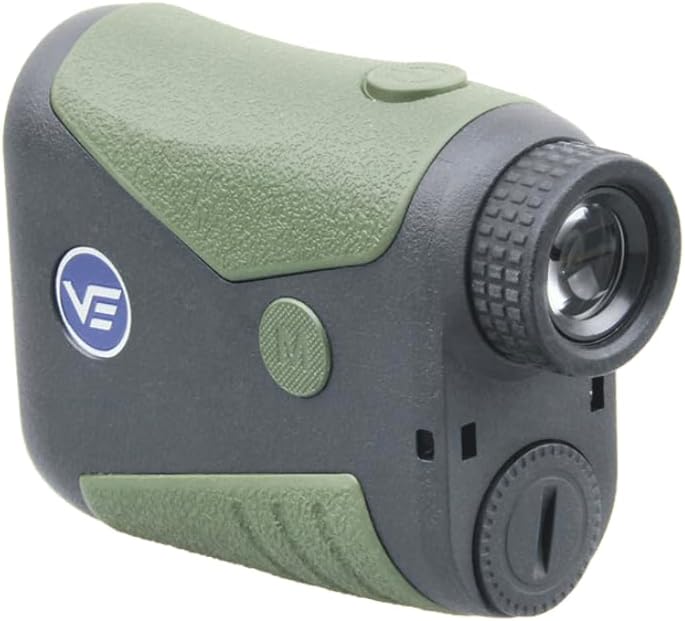
Gambar 4.2: Tukangeun view, highlighting the eyepiece with diopter adjustment and the 'M' (Mode) button.

Gambar 4.3: Sisi view, illustrating the main power/measurement button.

Gambar 4.4: Handap view, showing the battery compartment cap.
5. Setélan
5.1 Pamasangan batré
- Locate the battery compartment cap on the bottom of the rangefinder (refer to Image 4.4).
- Rotate the cap counter-clockwise to open.
- Insert one CR2 3V battery, ensuring the positive (+) and negative (-) terminals are correctly aligned as indicated inside the compartment.
- Replace the cap and rotate it clockwise to secure.
5.2 Daya Hurung/Pareuman
Press the main power/measurement button (refer to Image 4.3) once to power on the device. The OLED display will activate. The device will automatically power off after 20 seconds of inactivity to conserve battery life.
5.3 Diopter adjustment
Pikeun mastikeun jelas view of the display and target, rotate the eyepiece (refer to Image 4.2) until the reticle and measurements appear sharp and in focus for your vision.
6. Parentah Operasi
6.1 Pangukuran Dasar
- Power on the device by pressing the main power/measurement button.
- Arahkan reticle kana target anu dipikahoyong.
- Press the main power/measurement button again. The distance will be displayed on the OLED screen within approximately 0.2 seconds.
6.2 Pamilihan Mode
Press the 'M' (Mode) button (refer to Image 4.2) to cycle through different measurement modes. The available modes typically include:
- Standard Measurement: Displays direct line-of-sight distance.
- Pin Lock Mode: Designed for golf, this mode helps to lock onto the flagstick, ignoring background objects. It can lock onto targets up to 450 yards.
- Pangukuran sudut: Provides the angle of inclination/declination to the target.
- Horizontal Distance (Slope Compensation): Calculates the true horizontal distance to the target, compensating for uphill or downhill slopes.
6.3 Ngalihkeun Unit (Yards/Meter)
To switch between yards and meters, press and hold the 'M' (Mode) button for a few seconds while the device is powered on. The unit displayed on the OLED screen will change.
6.4 Quick Scan Feature
For continuous measurement, press and hold the main power/measurement button. The device will continuously scan and display distances as you pan across multiple targets. Release the button to stop scanning.
7. Pangropéa
7.1 beberesih
- Use the provided cleaning cloth or a soft, lint-free cloth to gently wipe the lenses. Avoid using abrasive materials or harsh chemicals.
- For the body of the rangefinder, a damp cloth can be used. Ensure no moisture enters the battery compartment or other openings.
7.2 Panyimpenan
- Upami teu dianggo, simpen rangefinder dina wadah pelindungna.
- Simpen di tempat anu tiis, garing, jauh tina sinar panonpoé langsung sareng suhu anu ekstrim.
- Cabut batré upami alatna moal dianggo kanggo waktos anu panjang pikeun nyegah bocor.
8. Cara ngungkulan
| Masalah | Mungkin Cukang lantaranana | Solusi |
|---|---|---|
| Alat teu hurung. | Batré pareum atawa salah dipasang. | Replace the CR2 battery or ensure it is inserted with correct polarity. |
| Bacaan anu teu akurat atanapi henteu konsisten. |
|
|
| Tampilanna burem. | Diopter teu disaluyukeun kalawan bener. | Puterkeun eyepiece pikeun nyaluyukeun diopter dugi ka tampilanna jelas. |
| Cannot lock onto flag (Pin Lock Mode). | Flag is beyond the maximum pin lock range (450 yards) or too small. | Ensure the flag is within range and try to hold the device steady. |
9. Spésifikasi
| Fitur | Spésifikasi |
|---|---|
| Magnification | 6x |
| Diaméter lénsa obyektif | 21 mm |
| Kaluar Murid | 15 mm |
| Lapisan lénsa | Pinuh Multi-coated |
| Rentang pangukuran | 5m-1500m / 5yards-1600yards |
| Rentang Ukur Sudut | -70 ° ka 70 ° |
| widang View | 6° |
| Reticle | 12 MOA |
| Waktu Tanggapan | 0.2 detik |
| Pin Lock Range | Max 450 yards (Golf Flag) |
| Akurasi sudut | 1° |
| Jenis Batré | CR2 (teu kaasup) |
| Diménsi | 98.5x77x37mm / 3.8x3x1.4in |
| Beurat | 130g / 4.6oz |
| Bahan Perumahan | Rubberized Plastic |
| Ngirit daya | 20 seconds auto shut-off |
| Peunteun waterproof | IPX4 |
| Kelas laser | Class 1, 905nm (Invisible) |
| Reflective Target Range | 1600 Yards (1500 m) |
| Building (Concrete) Target Range | 1200 Yards (1100 m) |
| Large Tree Target Range | 900 Yards (825 m) |
| Deer Target Range | 700 Yards (640 m) |
10. Garansi jeung Rojongan
Vector Optics products are designed for durability and performance. For specific warranty details, please refer to the warranty card included with your product or visit the official Vector Optics website. For technical support, troubleshooting assistance, or service inquiries, please contact Vector Optics customer service through their official channels.
Punten nahan resi pameseran anjeun salaku bukti pameseran pikeun klaim garansi.


