1. Bubuka
Welcome to your new Porodo 2-in-1 Wireless Office Mouse. This device offers versatile connectivity options (2.4G USB and Bluetooth 5.1), adjustable DPI settings, and a long-lasting battery, designed for efficient and comfortable use across various devices.
This manual provides detailed instructions for setup, operation, maintenance, and troubleshooting to ensure you get the most out of your mouse.
2. Eusi Paket
- Porodo 2-in-1 Wireless Office Mouse
- USB Receiver (for 2.4G connection)
- Kabel Ngecas
- Manual pamaké
3. Produk Langkungview
Familiarize yourself with the components and design of your Porodo wireless mouse.

Gambar: luhur-handap view of the Porodo PD-21MIOM-BK wireless mouse, highlighting the scroll wheel, main buttons, and brand logo.
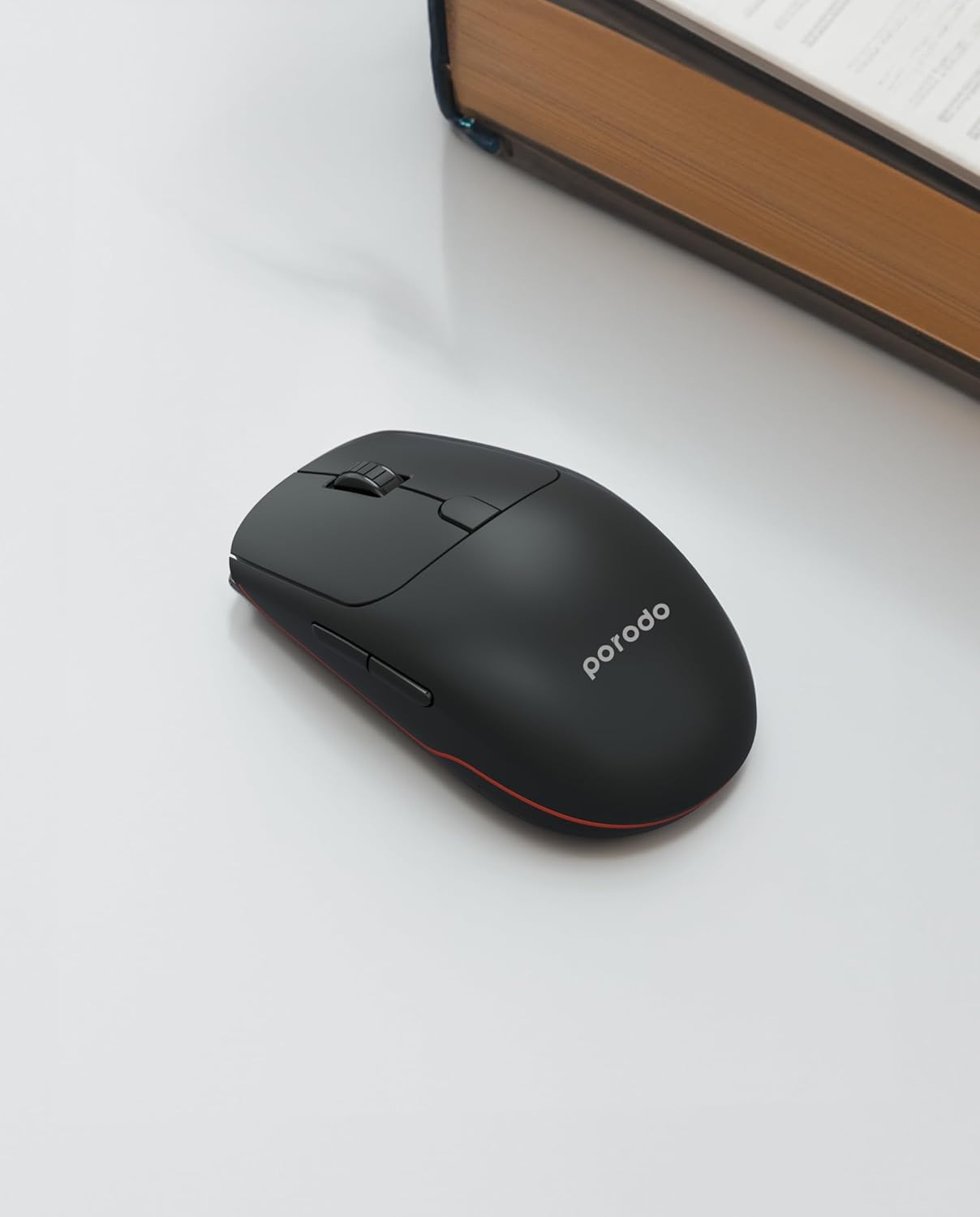
Gambar: Angled view of the Porodo PD-21MIOM-BK wireless mouse, showing its ergonomic design and side buttons.
4. Setélan
4.1 Ngecas Mouse
The mouse features a built-in 500mAh 3.7V battery. Before first use, or when the battery is low, connect the mouse to a USB power source using the provided charging cable. A full charge provides approximately 480 hours of usage.
4.2 Connecting via 2.4G USB Receiver
- Panggihan panarima USB, biasana disimpen dina kompartemen di handapeun beurit.
- Colokkeun panarima USB ka port USB nu sadia dina komputer Anjeun.
- Turn on the mouse using the power switch (usually on the underside). The mouse should automatically connect to the receiver.
- Your computer will typically install the necessary drivers automatically.
4.3 Nyambungkeun via Bluetooth 5.1
- Pastikeun beurit diaktipkeun.
- Switch the mouse to Bluetooth mode using the mode switch on the underside.
- On your device (laptop, tablet, smartphone), navigate to the Bluetooth settings.
- Milarian pikeun new devices. The mouse should appear as "Porodo Mouse" or similar.
- Pilih beurit pikeun dipasangkeun.
- Sakali dipasangkeun, beurit siap dianggo.
5. Parentah Operasi
5.1 DPI adjustment
The mouse supports adjustable DPI settings between 800 and 1600. To change the DPI, press the DPI button (usually located near the scroll wheel or on the underside). Each press cycles through the available DPI settings. Adjust the DPI to suit your preference for cursor speed and precision.
5.2 Ngaganti Modeu Konéksi
If your mouse supports both 2.4G and Bluetooth, there is a switch on the underside to select the desired connection mode. Move the switch to the 2.4G position for USB receiver connection or to the Bluetooth position for Bluetooth pairing.
5.3 Fungsi Dasar
- Klik Kénca: Seleksi sareng aktivasi primér.
- Klik katuhu: Aksés ménu kontekstual.
- Gulung kabayang: Dokumén gulungan sareng web kaca. Ogé bisa diklik pikeun fungsi-klik tengah.
- Kancing samping: Often used for forward/back navigation in web panyungsi.
6. Pangropéa
6.1 beberesih
Pikeun ngabersihan beurit anjeun, paké kaén anu lembut sareng garing. Keur kokotor bandel, rada dampen the cloth with water or a mild cleaning solution. Avoid using harsh chemicals or abrasive materials. Do not immerse the mouse in water or any liquid.
6.2 Perawatan Batré
To prolong battery life, avoid fully discharging the mouse frequently. Recharge when the low battery indicator appears. If storing the mouse for an extended period, ensure it is partially charged and turn off the power.
7. Cara ngungkulan
7.1 Beurit Teu Ngabales
- Pariksa tingkat batré jeung ngecas lamun perlu.
- Pastikeun beurit diaktipkeun.
- For 2.4G connection: Ensure the USB receiver is securely plugged into a working USB port. Try a different USB port.
- For Bluetooth connection: Ensure Bluetooth is enabled on your device and the mouse is in pairing mode or already paired. Try re-pairing the mouse.
- Balikan deui komputer atanapi alat anjeun.
7.2 Gerakan Kursor Erratic
- Ngabersihan sensor optik dina underside beurit.
- Pastikeun anjeun nganggo beurit dina permukaan anu cocog (henteu mantulkeun cahaya, warnana seragam).
- Pariksa gangguan tina alat nirkabel séjén.
8. Spésifikasi
| Fitur | Rincian |
|---|---|
| merek | Porodo |
| Nomer modél | PD-21MIOM-BK (7267547498421) |
| Téhnologi konektipitas | 2.4G USB, Bluetooth 5.1 |
| Jenis Batré | 500mAh 3.7V Built-In Lithium Battery |
| Rata Kahirupan Batré | Nepi ka 480 Jam |
| Range nirkabel | 8 méter |
| Téhnologi Deteksi Gerakan | Optik |
| Setélan DPI | 800-1600 DPI |
| Jumlah Kancing | 3 |
| Orientasi leungeun | Ambidextrous |
| Item Beurat | 60 g |
| Dimensi produk | 12 x 6 x 0.1 cm |
| Alat nu cocog | Laptop, Komputer Pribadi, Smartphone, Tablet |
| Sistem operasi | Linux, Windows XP (and modern operating systems) |
9. Garansi jeung Rojongan
Your Porodo PD-21MIOM-BK 2-in-1 Wireless Office Mouse comes with a standard manufacturer's warranty. Please refer to the warranty card included in your package or visit the official Porodo websitus pikeun istilah jeung kaayaan jaminan lengkep.
For technical support or customer service, please contact Porodo customer support through their official channels.


