1. Bubuka
Hatur nuhun pikeun meuliasing the Lehmann LHOHH-2013A Wall Heater. This manual provides important information regarding the installation, operation, and maintenance of your new appliance. Please read this manual thoroughly before use and keep it for future reference.
2. Parentah Kasalametan penting
Nalika nganggo alat-alat listrik, pancegahan dasar kedah salawasna diturutan pikeun ngirangan résiko kahuruan, kejutan listrik, sareng cilaka jalma.
- Baca sadaya parentah sateuacan nganggo manaskeun ieu.
- PERHATOSAN: This heater is not intended for use in bathrooms or damp areas. Do not install in locations where it may come into contact with water.
- Pastikeun voltage dituduhkeun dina labél rating pakait jeung vol mains Anjeuntage.
- Ulah nutupan pemanasna. Bisa jadi panas teuing.
- Keep combustible materials, such as furniture, pillows, bedding, papers, clothes, and curtains at least 1 meter (3 feet) from the front of the heater and away from the sides and rear.
- Entong beroperasi manaskeun naon waé ku kabel anu rusak atanapi colokkeun atanapi saatos panéangna rusak, parantos lungsur atanapi ruksak sagala cara.
- Entong nyelapkeun atanapi ngantepkeun barang asing asup kana ventilasi atanapi bukaan knalpot sabab ieu tiasa nyababkeun shock listrik atanapi seuneu, atanapi ngaruksak manaskeun.
- Salawasna cabut pamanas nalika henteu dianggo.
- Alat ieu henteu dimaksudkeun pikeun dianggo ku jalma (kalebet murangkalih) anu ngirangan kamampuan fisik, indrawi atanapi mental, atanapi kirang pangalaman sareng pangaweruh, kecuali aranjeunna dipasihan pangawasan atanapi petunjuk ngeunaan panggunaan alat ku jalma anu tanggung jawab kana kasalametanana.
3. Eusi Paket
Mangga cék kotak pikeun item di handap ieu:
- Lehmann LHOHH-2013A Wall Heater
- Kadali jauh
- Manual pangguna (dokumén ieu)
- Pemasangan Hardware (sekrup, jangkar dinding)
4. Produk Langkungview & Fitur
The Lehmann LHOHH-2013A is an advanced wall-mounted electric heater designed for efficient and convenient heating.

Figure 4.1: Lehmann LHOHH-2013A Wall Heater with remote and app interface.
Fitur konci:
- Kontrol calakan: Equipped with an LED display for intuitive operation and includes a remote control for convenient adjustments from a distance.
- Konektipitas Wi-Fi: Control your heater remotely via your smartphone or tablet using the dedicated app (e.g., Tuya Smart Life app), allowing temperature adjustments and programming even when you are away from home.

Gambar 4.2: Kadali jarak jauh ngalangkungan aplikasi smartphone.
- Dua-Stage Power Regulation: Choose between 1000W or 2000W heating power to adapt to your current needs, offering flexibility and energy savings.

Figure 4.3: Power regulation options.
- Fungsi Osilasi: The heater features an oscillation function that distributes heat evenly throughout the room, ensuring consistent temperature without needing to reposition the device.
- Deteksi Jandela Buka: An intelligent sensor detects if a window or door is open. If a draft is detected, the heater automatically reduces its heating power to save energy and maintain the desired room temperature.
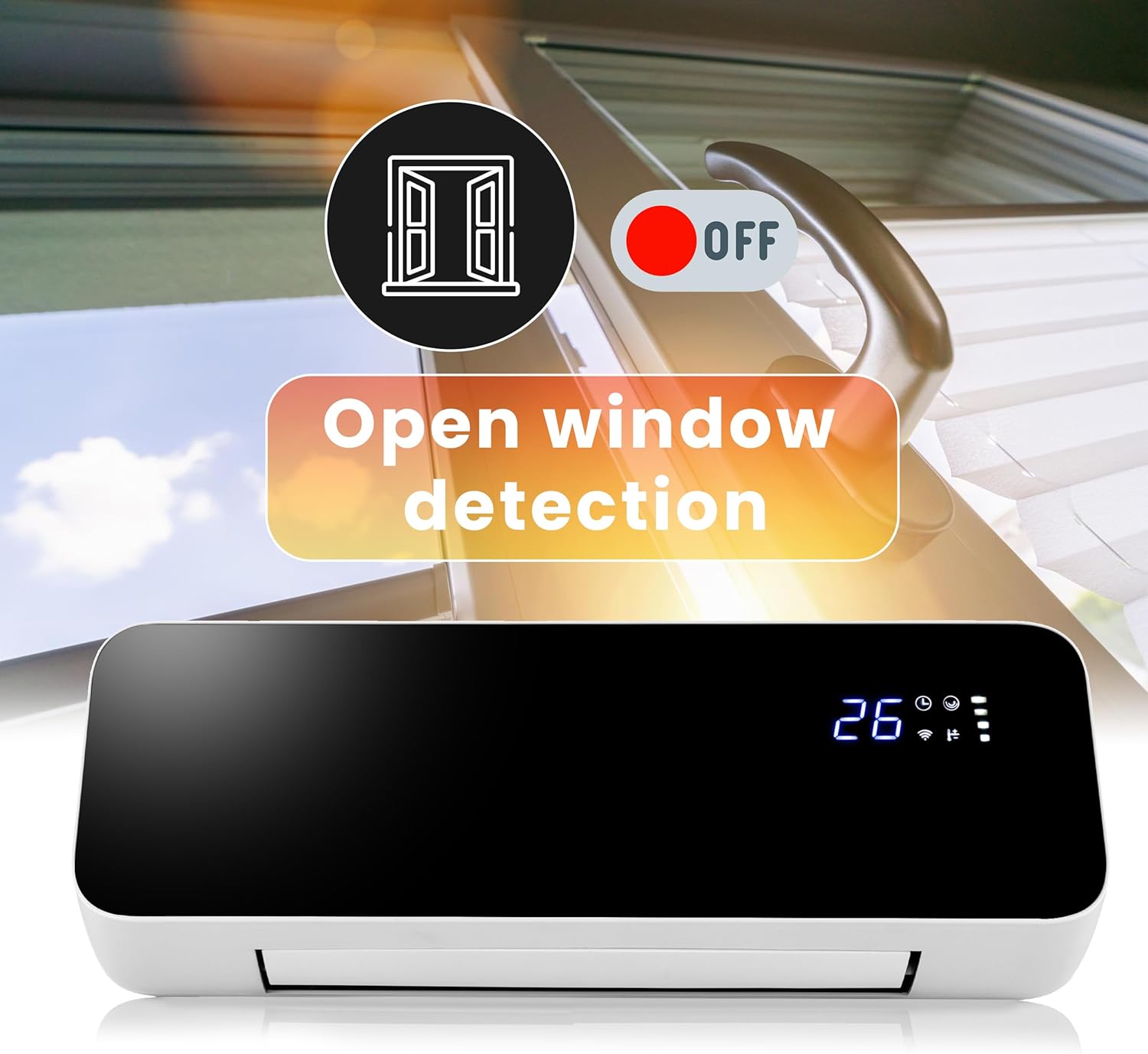
Figure 4.4: Open window detection feature.
- Pamakéan Sapanjang Taun: Can be used for heating in winter and as a fan for air circulation in summer.

Figure 4.5: Winter heating and summer fan modes.
Komponén produk:
- Témbong LED: Shows current temperature, Wi-Fi status, timer, and power settings.

Figure 4.6: LED Display.
- Outlet hawa: Located at the bottom, with adjustable louvers for oscillation.
- Saklar kakuatan: Main power switch located on the side/back of the unit.

Gambar 4.7: Tukangeun view with power switch and mounting points.
- Panarima Remote Control: Pikeun narima sinyal ti remot kontrol.
5. Pamasangan
Pamasangan témbok:
The Lehmann LHOHH-2013A is designed for wall mounting. Choose a suitable location, ensuring it is not in a damp area and has sufficient clearance from combustible materials.
- Select a wall location that is sturdy and can support the weight of the heater (approx. 2.88 kg).
- Mark the drilling points on the wall using the heater's mounting holes as a template. Ensure the marks are level.
- Drill holes at the marked positions. Insert wall anchors if necessary (e.g., for drywall).
- Secure the mounting bracket (if separate) or the heater directly to the wall using the provided screws.
- Ensure the heater is securely fastened to the wall before plugging it in.
Sambungan Daya:
Plug the power cord into a standard 230V electrical outlet. Ensure the outlet is easily accessible for disconnecting power if needed.
6. Parentah Operasi
Daya mimiti Hurung:
- After installation, ensure the heater is securely mounted and plugged in.
- Flip the main power switch on the side/back of the unit to the 'ON' position. The LED display will illuminate.
Ngagunakeun Remote Control:
The remote control allows full functionality from a distance.

Gambar 6.1: Remot kontrol nuju dianggo.
- Tombol Daya (⏻): Hurungkeun manaskeun ON atawa OFF.
- Tombol Mode (M): Cycles through heating modes (e.g., 1000W, 2000W, Fan only).
- Penyesuaian Suhu (+/-): Ngaronjatkeun atawa ngurangan setelan suhu nu dipikahoyong.
- Tombol Osilasi (⟳): Ngaktipkeun atanapi nganonaktipkeun fungsi osilasi.
- Tombol Timer (◷): Nyetél timer operasi.
- Open Window Detection Button: Toggles the open window detection feature.
Wi-Fi Connectivity & App Control:
For advanced control and scheduling, connect your heater to your home Wi-Fi network and use the compatible smart home app (e.g., Tuya Smart Life).
- Unduh aplikasi 'Tuya Smart' atanapi 'Smart Life' tina toko aplikasi telepon pinter anjeun (iOS atanapi Android).
- Daptar atanapi lebet kana akun anjeun.
- Ensure your heater is powered on and in pairing mode (refer to the app's instructions for specific pairing steps, usually involves holding a button on the heater or remote for a few seconds until a Wi-Fi indicator blinks).
- In the app, tap 'Add Device' or the '+' icon and select 'Heater' or 'Air Conditioner' from the device list.
- Follow the on-screen instructions in the app to connect the heater to your Wi-Fi network.
- Once connected, you can control the heater's power, temperature, mode, oscillation, timer, and set schedules from anywhere via the app.
7. Pangropéa
beberesih:
Salawasna cabut pamanas sarta ngidinan pikeun niiskeun sagemblengna saméméh beberesih.
- Ngusap permukaan luar kalayan lemes, damp lawon. Ulah make cleaners abrasive atawa pangleyur.
- Ulah neuleumkeun manaskeun dina cai atawa cairan séjén.
- Clean the air inlet and outlet vents regularly with a vacuum cleaner or a soft brush to prevent dust buildup.
Panyimpenan:
If the heater is not used for extended periods, store it in a cool, dry place, preferably in its original packaging, away from direct sunlight and moisture.
8. Cara ngungkulan
Upami anjeun ngalaman masalah sareng pemanas anjeun, mangga tingali masalah sareng solusi umum ieu:
| Masalah | Mungkin Cukang lantaranana | Solusi |
|---|---|---|
| Pemanas teu hurung. | No power supply; Main power switch off; Overheat protection activated. | Check power outlet; Ensure main power switch is ON; Unplug, wait 30 mins, then plug in again. |
| Pemanas ngahasilkeun panas anu teu cekap. | Low power setting; Room too large; Open window detection active. | Increase power setting to 2000W; Ensure room size is appropriate for heater capacity; Close windows/doors or disable open window detection. |
| Pemanasna ribut. | Normal fan operation; Loose components; Dust buildup. | Some fan noise is normal; Check for loose parts (if safe); Clean air vents. |
| Kadali jauh teu jalan. | Batteries dead; Obstruction between remote and heater. | Ganti batréna; Pastikeun garis paningalna jelas. |
| Masalah sambungan Wi-Fi. | Sandi Wi-Fi salah; Router jauh teuing; Masalah aplikasi. | Re-enter password; Move heater closer to router; Restart app/router; Consult app's troubleshooting guide. |
Lamun masalah persists sanggeus nyobian solusi ieu, mangga ngahubungan rojongan customer.
9. Spésifikasi
| Spésifikasi | Nilai |
|---|---|
| merek | Lehmann |
| Nomer modél | LHOHH-2013A |
| Kaluaran kakuatan | 1000W / 2000W |
| Voltage | 230 volt |
| Item Beurat | 2.88 kg |
| Dimensi produk | 15.8D x 58.5B x 23H séntiméter |
| Warna | Hideung |
| Sumber Énergi | Kabel Listrik |
| Tipe Pamasangan | Tembok Gunung |
| Fitur husus | Oscillating, Adjustable Temperature, Remote Control, Digital Display, Adjustable Speed, Wi-Fi, Open Window Detection |
| Dianjurkeun Mangpaat | Garage, Terrace, Office, Home (Indoor use only) |
10. Garansi jeung Rojongan
Lehmann products are manufactured to the highest quality standards. This product comes with a standard manufacturer's warranty. Please refer to the warranty card included in your package for specific terms and conditions.
For technical support, troubleshooting assistance, or warranty claims, please contact Lehmann customer service through the retailer where you purchased the product or visit the official Lehmann websitus pikeun inpo kontak.


