1. Bubuka
This manual provides detailed instructions for the proper use and maintenance of the Launch X-431 Key Programmer and its accompanying remote key set. This device is designed to be used in conjunction with Launch X431 IMMO diagnostic tablets to facilitate vehicle key programming, transponder identification, and remote key generation. Please read this manual thoroughly before operation to ensure correct usage and to prevent damage to the device or vehicle systems.
2. Produk Langkungview
2.1 Komponén
The Launch X-431 Key Programmer set includes the following items:
- Launch X-431 Key Programmer Unit
- USB ka Tipe-C Cable
- LS Nissan Smart Card Remote Key (4-button) - 01
- LN Peugeot DS Folding Remote Key (3-button) - 01
- LE Volkswagen Super Remote Key (3-button folding) - 01
- LE Ford Super Remote Key (4-button folding) - 01
- Super Chip (for transponder conversion)

Figure 2.1: Contents of the Launch X-431 Key Programmer package, showing the programmer unit, cables, and four types of remote keys.
2.2 Fitur konci
The Launch X-431 Key Programmer offers the following functionalities:
- Transponder Simulation: Supports simulation of multiple immobilizer transponders, including 8A/4D/4A/46/47/48/49/MQB48/MQB49, 11/12/13/7936/7937/7946/7947, etc.
- Reprogrammable Proxy Key: Allows for reprogramming of proxy keys.
- Smart Key Replacement: Facilitates smart key replacement procedures.
- Wireless Programming Support: Enables wireless programming capabilities.
- Cakupan Kandaraan éksténsif: Supports over 2000+ vehicle models.
- Reprogrammable Normal Remote: Capable of reprogramming standard remote keys.
- Built-in Cloneable Transponder: Features an integrated cloneable transponder.
- Original NXP Immobilizer Transponder: Utilizes original NXP immobilizer transponder technology.

Figure 2.2: Visual representation of the key features supported by the Launch X-431 Key Programmer.
2.3 Kasaluyuan
The Launch X-431 Key Programmer is designed to work seamlessly with various Launch X431 IMMO diagnostic tablets. Compatible models include:
- X431 IMMO PLUS
- X431 IMMO ELITE
- X431 IMMO PRO
- X431 IMMO PAD
Additional models may become compatible in the future.

Figure 2.3: The Launch X-431 Key Programmer shown with compatible Launch X431 IMMO diagnostic tablets.
3. Setélan
3.1 Connecting the Key Programmer
- Ensure your Launch X431 IMMO diagnostic tablet is powered on and updated to the latest software version.
- Connect one end of the provided USB to Type-C cable to the Launch X-431 Key Programmer unit.
- Connect the other end of the USB to Type-C cable to the appropriate USB port on your Launch X431 IMMO diagnostic tablet.
- The diagnostic tablet should automatically detect the Key Programmer. Follow any on-screen prompts for initial setup or driver installation if necessary.
3.2 Preparing Remote Keys
The included remote keys are designed for specific vehicle types and functionalities:
- LS4-NISN-01 (Nissan Smart Card): Compatible with vehicles equipped with Kessy systems, supporting keyless starting and door edge sensing. Requires a CR2032 button cell battery.
- LN3-PUGOT-01 (Peugeot DS Folding Key): For car models with electronic chip keys or chips 11/12/13/7936/7937/7947/7946. Requires a CR2032 button cell battery.
- LE-VOLWG-01 (Volkswagen Super Remote): For car models without electronic chip keys or with chips 46, 48, 4D/70, 83, 8A/H, G, 4E, 11/12/13/4C, 42, 33, 47, 8C, 8C. Requires a CR2032 button cell battery.
- LE4-FRD-01 (Ford Super Remote): Similar to LE-VOLWG-01, for car models without anti-theft chip or with specific chip types. Requires a CR2032 button cell battery.
Ensure the correct remote key is selected for the target vehicle and that it has a functional battery installed before proceeding with programming.
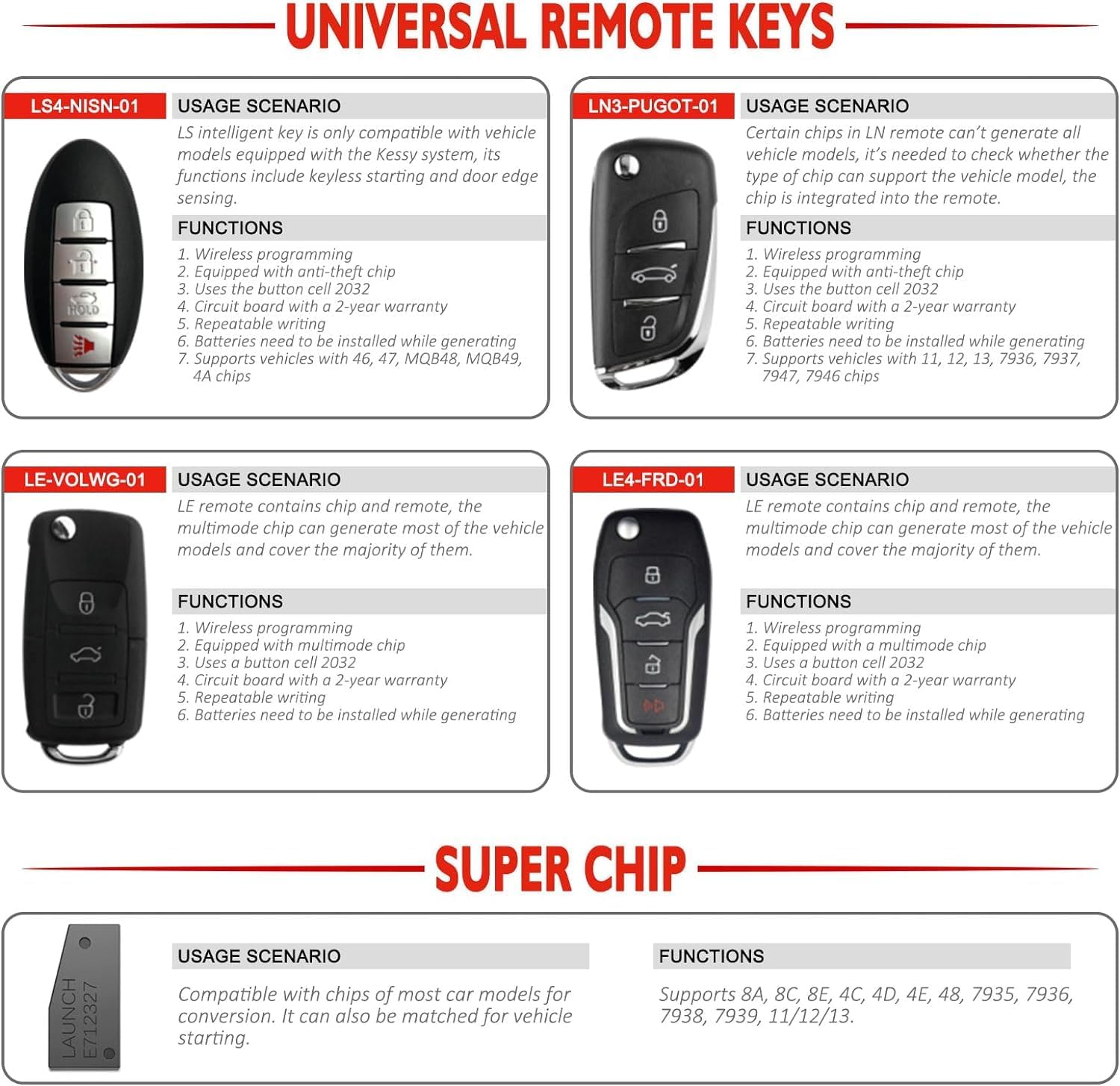
Gambar 3.1: Leuwihview of the universal remote keys included in the set, detailing their usage scenarios and functions.
4. Parentah Operasi
The Launch X-431 Key Programmer operates through the interface of your connected Launch X431 IMMO diagnostic tablet. The following steps outline general procedures; specific menu navigation may vary slightly depending on your tablet's software version.
4.1 Identifying Chip Keys and Remote Frequencies
- From the main menu of your X431 IMMO tablet, navigate to the 'IMMO' or 'Key Programming' function.
- Select the option for 'Identify Key' or 'Read Transponder'.
- Place the vehicle's existing key or the new remote key into the designated slot on the Launch X-431 Key Programmer.
- The tablet will display information about the key's chip type and remote frequency.
4.2 Generating Chip Models with Super Chip
The Super Chip supports conversion for most car model chip types, enabling separate adaptation for vehicle startup.
- Within the key programming software, select the 'Generate Chip' or 'Transponder Generation' function.
- Choose the desired chip type from the available options (e.g., 8A, 8C, 8E, 4C, 4D, 4E, 48, 7935, 7936, 7938, 7939, 11/12/13).
- Place the Super Chip into the programmer's slot.
- Follow the on-screen instructions to generate the required chip model onto the Super Chip.
4.3 Programming Remote Keys
To program the included remote keys or other compatible keys:
- Select the 'Remote Key Programming' or 'Key Matching' function on your X431 IMMO tablet.
- Choose the vehicle make, model, and year.
- Select the type of key to be programmed (e.g., LS Nissan, LN Peugeot DS, LE Ford, LE Volkswagen).
- Place the new remote key into the programmer's slot or follow the on-screen instructions for vehicle-specific procedures (e.g., inserting key into ignition, pressing buttons).
- Follow all prompts on the diagnostic tablet to complete the programming process. This may involve reading immobilizer data, writing key data, and performing synchronization steps.
- After successful programming, test the new key's functions (lock, unlock, engine start) to ensure proper operation.

Figure 4.1: The Launch X-431 Key Programmer unit, the Super Chip, and the four types of remote keys ready for programming.
5. Pangropéa
To ensure the longevity and optimal performance of your Launch X-431 Key Programmer, adhere to the following maintenance guidelines:
- beberesih: Anggo lawon anu lemes sareng garing pikeun ngabersihkeun bagian luar alat. Ulah nganggo pembersih atanapi pangleyur anu abrasif.
- Panyimpenan: Store the device and its components in a cool, dry place, away from direct sunlight, extreme temperatures, and high humidity.
- Perawatan kabel: Handle the USB to Type-C cable carefully. Avoid bending or twisting it excessively, which can damage internal wires.
- Apdet parangkat lunak: Regularly check for and install software updates for your Launch X431 IMMO diagnostic tablet. These updates often include improvements for key programming functions and expanded vehicle coverage.
- Battery Replacement (Remote Keys): Replace the CR2032 button cell batteries in the remote keys as needed to ensure reliable operation.
6. Cara ngungkulan
This section addresses common issues you might encounter while using the Launch X-431 Key Programmer.
| Masalah | Mungkin Cukang lantaranana | Solusi |
|---|---|---|
| Key Programmer not detected by X431 IMMO tablet. | Loose cable connection, damaged cable, outdated tablet software. | Ensure the USB to Type-C cable is securely connected at both ends. Try a different USB port or cable. Update the X431 IMMO tablet software. Restart both devices. |
| Remote key programming fails. | Incorrect key type selected, low battery in remote key, vehicle not in programming mode, software incompatibility. | Verify the correct remote key type is selected for the vehicle. Replace the remote key battery. Ensure the vehicle is correctly prepared for programming according to its service manual. Confirm your X431 IMMO tablet software is compatible with the specific vehicle and key. |
| Cannot identify transponder chip. | Key not placed correctly in programmer, damaged transponder, unsupported chip type. | Ensure the key is fully and correctly inserted into the programmer's slot. Try another key if available. Verify the chip type is supported by the Launch X-431 Key Programmer. |
| Device becomes unresponsive. | Temporary software glitch, power issue. | Disconnect the Key Programmer from the tablet, restart the tablet, then reconnect the programmer. |
7. Spésifikasi
| Spésifikasi | Rincian |
|---|---|
| merek | ngaluncurkeun |
| Nomer modél | YZH08 |
| Item Beurat | 310 gram |
| Ukuran produk (L x W x H) | 30 x 4 x 25 cm |
| Sumber Daya | Battery Powered (via connected diagnostic tablet) |
| UPC | 884508007712 |
| Supported Transponder Types | 8A, 8C, 8E, 4C, 4D, 4E, 48, 7935, 7936, 7938, 7939, 11/12/13, etc. |
| Supported Remote Key Types | LS series (Nissan), LN series (Peugeot DS), LE series (Ford), LK series (Volkswagen) |
8. Garansi jeung Rojongan
For warranty information, technical support, or service inquiries, please refer to the documentation provided with your Launch X431 IMMO diagnostic tablet or contact LAUNCH customer service directly. Keep your purchase receipt as proof of purchase for warranty claims.
You can visit the official LAUNCH website or contact their authorized distributors for assistance. Ensure you have your product model number (YZH08) and serial number ready when contacting support.


