
Bubuka
Thank you for choosing the Andoer Mini Photography Lamp. This portable LED light panel is designed to provide versatile and high-quality illumination for various applications, including vlogging, video conferencing, live broadcasting, and small product photography. This manual provides essential information for the safe and effective use of your device. Please read it thoroughly before operation and retain it for future reference.

Image: The Andoer Mini Photography Lamp in use, illustrating its professional lighting capabilities. It features 196 LED beads, 2500K-9000K color temperature, CRI ≥95, 20 lighting effects, and 1750LUX/0.5m illumination.

Image: The compact and portable design of the Andoer Mini Photography Lamp, shown alongside everyday items like a smartphone and wallet. The lamp measures approximately 15.1 x 10.1 x 2 cm and weighs 130g, making it easy to carry.
Émbaran Kasalametan
- Ulah ngalaan alat ka cai atawa kalembaban luhur.
- Ulah ngabongkar atanapi nyobian ngalereskeun alat sorangan. Rujuk sadayana jasa ka tanaga anu mumpuni.
- Use only NP-F series batteries as specified. Ensure correct battery polarity when inserting.
- Hindarkeun panon langsung kakeunaan lampu LED, khususna dina setélan kacaangan anu luhur.
- Jauhkeun alat ti barudak.
- Jalankeun alat dina kisaran suhu anu ditangtukeun.
Eusi pakét
Mangga parios pakét pikeun mastikeun yén sadaya barang aya:
- 1 x Andoer Mini Photography LED Lamp
- 1 x Hot Shoe Holder
- 1 x Manual Pamaké

Image: The Andoer Mini Photography Lamp, hot shoe holder, and the instruction manual as included in the product package.
Produk Leuwihview
Familiarize yourself with the components of your Andoer Mini Photography Lamp:
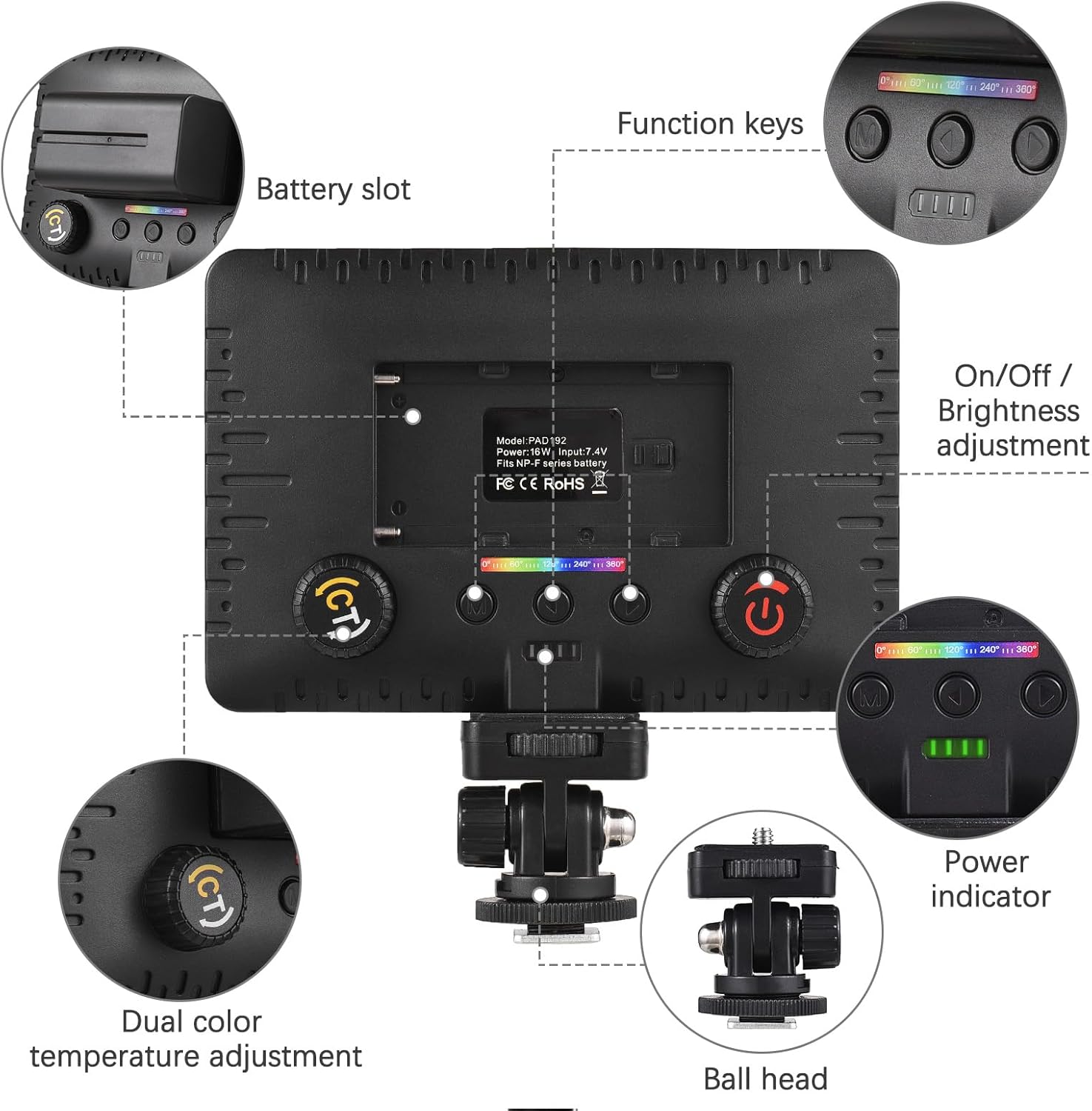
Gambar: A lengkep view of the Andoer Mini Photography Lamp, highlighting key components such as the battery slot, function keys, On/Off and brightness adjustment dial, power indicator, dual color temperature adjustment dial, and the ball head mount.
- Slot batré: For inserting NP-F series batteries.
- Tombol Fungsi: Buttons for mode selection and special effects.
- On/Off / Brightness Adjustment: A dial to power the unit on/off and adjust light intensity.
- Indikator kakuatan: LEDs indicating battery level.
- Dual Color Temperature Adjustment: A dial (CT button) to change the color temperature from warm to cool.
- Kepala Bola: For mounting the light and adjusting its angle.
Disetél
- Attach Hot Shoe Holder: Secure the hot shoe holder to the 1/4-inch threaded hole at the bottom of the LED lamp.
- Selapkeun Batré: Open the battery slot cover and insert a compatible NP-F series battery, ensuring correct orientation.
- Pasang Lampu: Attach the hot shoe holder to your camera's hot shoe mount, a tripod, or other compatible devices. Tighten the locking ring to secure it.

Image: The Andoer Mini Photography Lamp securely mounted on top of a camera, demonstrating a typical setup for use.
Parentah Operasi
- Hurungkeun/Pareuman: Rotate the On/Off / Brightness Adjustment dial to turn the light on or off.
- Saluyukeun Caang: While the light is on, continue rotating the On/Off / Brightness Adjustment dial to increase or decrease the light intensity from 0% to 100%.
- Adjust Color Temperature (CCT Mode): Press the CT button (Dual Color Temperature Adjustment dial) to enter CCT mode. Rotate the dial to adjust the color temperature between 2500K (warm) and 9000K (cool).
- Select Special Lighting Effects: Use the function keys to cycle through the 20 available special lighting effects. Refer to the on-screen display for effect names or numbers.

Image: Visual representation of the adjustable brightness and color temperature features. The lamp offers a wide range from 2500K (warm) to 9000K (cold) and brightness levels from 0% to 100%.
Kasaluyuan
The Andoer Mini Photography Lamp is designed for wide compatibility:
- Dudukan Sepatu Panas: Easily attaches to most cameras with a standard hot shoe.
- 1/4-inch Threaded Hole: Allows mounting on tripods, light stands, phone holders, and other accessories with a 1/4-inch screw.

Image: The Andoer Mini Photography Lamp demonstrating its wide compatibility, showing it can be used with cameras, smartphones (via a phone holder), and tripods, thanks to its hot shoe mount and 1/4-inch threaded hole.
Pangropéa
- beberesih: Paké lemes, lawon garing pikeun ngabersihan lamp body. For the LED panel, use a microfiber cloth to gently wipe away dust or smudges. Do not use harsh chemicals or abrasive materials.
- Perawatan batré: Remove the battery if the lamp will not be used for an extended period. Store batteries in a cool, dry place.
- Panyimpenan: Nyimpen lamp in a dry, dust-free environment, away from direct sunlight and extreme temperatures.
Pamérésan masalah
| Masalah | Mungkin Cukang lantaranana | Solusi |
|---|---|---|
| Lampu henteu hurung. | Battery is not inserted correctly or is depleted. | Ensure battery is inserted with correct polarity. Charge or replace the battery. |
| Kacaangan atanapi suhu warna teu tiasa disaluyukeun. | Incorrect mode selected or controls are not functioning. | Ensure you are in the correct mode (CCT for color temperature). Check if the dials are obstructed. |
| Cahaya kedip-kedip atanapi teu stabil. | Low battery power or faulty battery. | Charge or replace the battery. If the problem persists, contact support. |
spésifikasi
| Fitur | Spésifikasi |
|---|---|
| Manik LED | 196 (54 White, 54 Yellow, 88 RGB) |
| Special Lighting Effects | 20 |
| Paneangan | 1750 LUX / 0.5m |
| Sudut Beam | 120° |
| Kakuatan | 16W |
| Voltage | 7.4 V |
| Sasayogian tanaga | NP-F Series Batteries |
| CRI (Indéks Rendering Warna) | 95 |
| Suhu Warna | 2500K - 9000K |
| Ukuran barang | 15 x 10 x 1.5 cm (kira-kira 5.9 x 3.9 x 0.6 inci) |
| Item Beurat | 81g (kira-kira 2.86 oz) |
| Téhnologi konektipitas | USB (for potential charging/control, power via NP-F batteries) |
| Tingkat Résistansi Cai | Henteu Tahan Cai |
| Nomer modél | HXH7438494991380KD |
Garansi sareng Rojongan
This product comes with a standard manufacturer's warranty. For specific warranty terms and conditions, please refer to the documentation provided with your purchase or contact the seller directly. For technical support or inquiries, please reach out to Andoer customer service through their official channels or the retailer where the product was purchased.