1. Produk Langkungview
The AOPUTTRIVER AP-189A is a high-accuracy digital dual-port manometer designed for measuring differential, positive, and negative air pressure. It is suitable for a wide range of applications including HVAC system control, airflow measurement, air quality monitoring, and gas pressure system calibration.

Figure 1: AOPUTTRIVER AP-189A Digital Manometer and accessories.
Fitur konci:
- High Accuracy: ±0.3%FSO (at 25°C) with a measurement range of ±2.000psi.
- Multi-functional: Supports differential pressure, positive pressure, negative pressure, data hold, MAX/MIN/Average, and DIF functions.
- Data Recording and Zeroing: Ability to record data and view MAX/MIN/AVG values. Features a zeroing function for accurate measurements.
- 11 Selectable Units: Easily switch between psi, kPa, Kgfcm², ozin², Bar, mbar, inHg, mmHg, inH₂O, ftH₂O, cmH₂O.
- User-Friendly Display: Large LCD with backlight for clear readability.
- Power Management: Low battery indicator and automatic power-off after 25 minutes of inactivity.
Eusi pakét:
- 1x AP-189A Manometer
- 1x Kantong Pelindung
- 1x Obeng Leutik
- Batré AAA 2x 1.5V
- 1x User Manual (6 languages)

Figure 2: Included items in the AP-189A package.
2. Device Layout and Dimensions
Familiarize yourself with the physical components and dimensions of the AP-189A manometer.

Figure 3: AP-189A Manometer dimensions and port details.
Button Functions and Display:
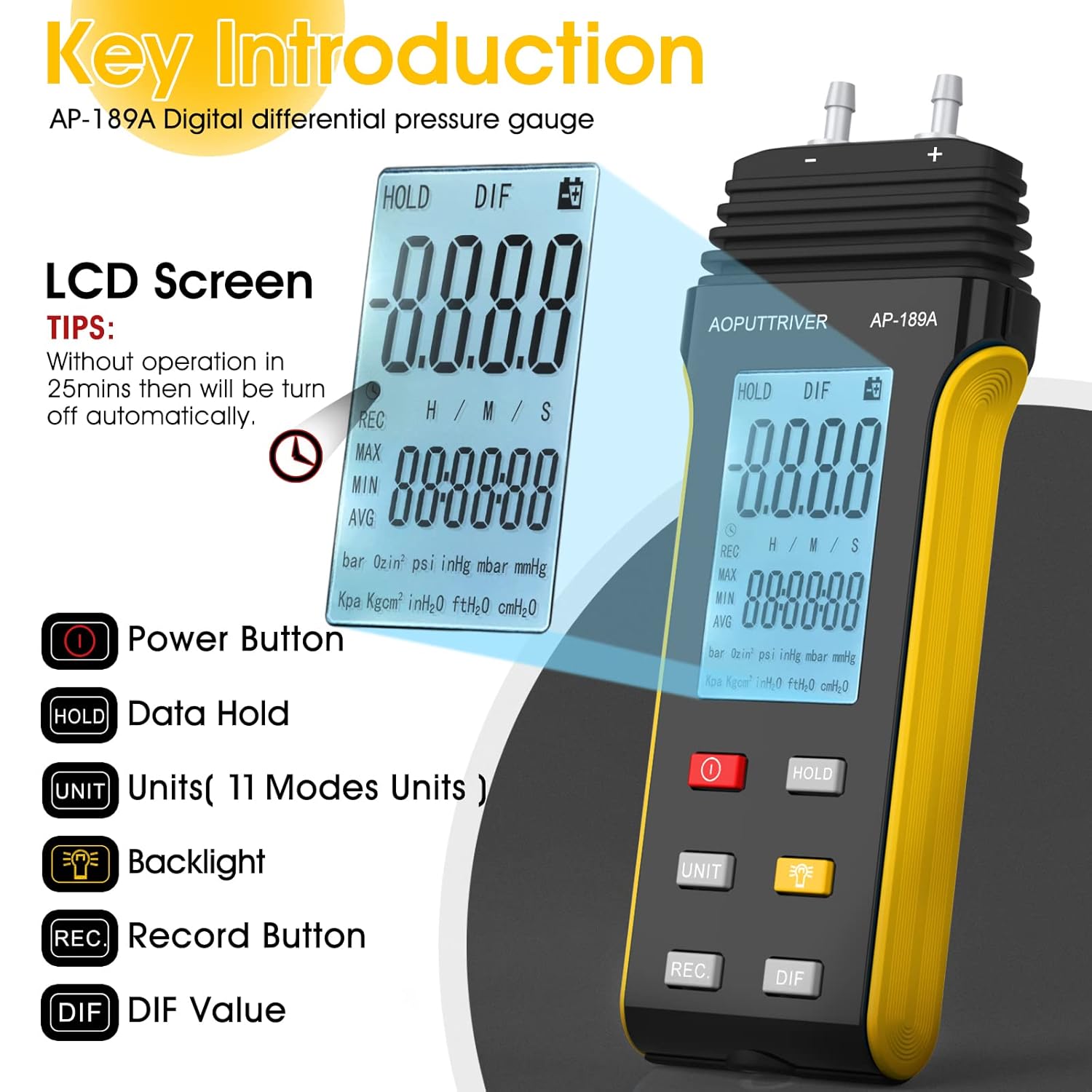
Figure 4: Key Introduction to AP-189A buttons and LCD screen.
- Tombol Daya (ⓘ): Ngahurungkeun atawa mareuman alat.
- Tombol Tahan: Freezes the current reading on the display.
- Tombol UNIT: Cycles through the 11 available pressure units.
- Backlight Button (🔆): Activates or deactivates the LCD backlight.
- Tombol REC: Initiates or stops data recording (MAX/MIN/AVG).
- Tombol DIF: Displays the differential pressure value.
3. Setelan sareng Pamasangan Batré
3.1 Pamasangan Batré:
- Panggihan kompartemen batréna di tukang manometer.
- Use the included small screwdriver to open the battery compartment cover.
- Selapkeun dua batré 1.5V AAA, mastikeun polaritasna bener (+/-).
- Ganti panutup kompartemen batré jeung amankeun ku screw nu.
3.2 Connecting Pressure Hoses:
The AP-189A features dual ports for differential pressure measurement. Connect the pressure hoses to the (+) and (-) ports as required for your application. The (+) port measures positive pressure, and the (-) port measures negative pressure relative to the other port.
4. Parentah Operasi
4.1 Hurung/Pareuman:
Pencét éta Tombol Daya (ⓘ) to turn the manometer on. Press and hold the same button to turn it off.
4.2 Unit Selection:
Pencét éta UNIT button to cycle through the 11 available pressure units: psi, kPa, Kgfcm², ozin², Bar, mbar, inHg, mmHg, inH₂O, ftH₂O, cmH₂O. The selected unit will be displayed on the LCD.
4.3 Data Hold Function:
Pencét éta TAHAN tombol pikeun ngabekukeun bacaan ayeuna dina tampilan. Pencét deui pikeun ngaleupaskeun panahan sareng ngahanca bacaan langsung.
4.4 Zero Setting:
To ensure accurate differential pressure measurements, it is crucial to zero the gauge before use. Ensure both pressure ports are open to atmospheric pressure or connected to the same pressure source before zeroing.
- First, briefly press the TAHAN kancing.
- Teras, pencét sareng tahan tombol TAHAN button for more than 5 seconds. The display will show a "---" symbol, indicating successful zeroing.

Figure 5: Zero Setting procedure.
4.5 MAX/MIN/AVG/DIF Functions:
Pencét éta REC button to enter data recording mode. Subsequent presses will cycle through MAX (maximum), MIN (minimum), and AVG (average) values recorded during the session. The DIF button displays the differential pressure.
4.6 Lampu tukang:
Pencét éta Tombol Lampu tukang (🔆) to illuminate the LCD for better visibility in low-light conditions. Press again to turn off the backlight.

Figure 6: Manometer with backlight and auto-shutdown reminder.
4.7 Automatic Power Off:
The device will automatically power off after approximately 25 minutes of no operation to conserve battery life. This feature can typically be disabled or enabled through specific button combinations (refer to the included 6-language manual for details if available).
5. Pangropéa sarta perawatan
- beberesih: Ngusap alat ku lemes, damp lawon. Ulah make cleaners abrasive atawa pangleyur.
- Panyimpenan: Store the manometer in its protective pouch in a dry, cool place when not in use. Remove batteries if storing for extended periods to prevent leakage.
- Ngagantian batré: Ganti batré sawaktos indikator batré lemah nembongan dina tampilan.
- Perawatan selang: Inspect pressure hoses regularly for cracks or damage. Replace if necessary to ensure accurate readings.
6. Cara ngungkulan
| Masalah | Mungkin Cukang lantaranana | Solusi |
|---|---|---|
| Alat teu hurung. | Batré paéh atawa salah dipasang. | Check battery polarity. Replace with new 1.5V AAA batteries. |
| Inaccurate readings or "doesn't zero out". | Incorrect zeroing procedure; blocked or damaged pressure ports/hoses; device not at stable temperature. | Perform zero setting correctly (long press HOLD button for 5 seconds). Ensure ports are clear. Check hoses for leaks or blockages. Allow device to stabilize at ambient temperature. |
| Tampilanna taram atawa kedip-kedip. | batré lemah. | Ganti batré. |
| Pareuman otomatis lumangsung gancang teuing. | Standard auto-off feature. | This is a power-saving feature. Refer to the full manual for options to disable or adjust auto-off if available. |
7. Spésifikasi
| Parameter | Nilai |
|---|---|
| Rentang pangukuran | ±2.000psi (±13.79Kpa) |
| Akurasi | ±0.3%FSO (at 25°C) |
| Repeatability | ±0.25%FSO |
| Linieritas/Histeresis | ±0.1%FSO of full scale |
| Limit Maximum Pressure | 6 Psi |
| Selectable Units | psi, kPa, Kgfcm², ozin², Bar, mbar, inHg, mmHg, inH₂O, ftH₂O, cmH₂O (11 units) |
| Fungsi | Backlight, Data Hold, Auto Power Off (25 mins), MAX/MIN/AVG/DIF, Zero Setting |
| Sasayogian tanaga | Batré AAA 2x 1.5V |
| Nomer Modél Item | AP-189A |
| Produsén | AOPUTTRIVER |
| Ukuran Paket | 7.28 x 3.62 x 1.69 inci |
| Item Beurat | 8.29 ons |

Figure 7: Professional features and specifications overview.
8. Garansi jeung Rojongan
The AOPUTTRIVER AP-189A manometer comes with a 365-day warranty and lifetime technical support. If you encounter any product quality issues, please contact AOPUTTRIVER customer service for assistance. They are committed to resolving problems promptly.
For further support or to explore other AOPUTTRIVER products, visit the official AOPUTTRIVER Store on Amazon.
9. Aplikasi umum
The AP-189A differential pressure gauge is a versatile tool applicable in various professional and domestic settings:
- Sistem HVAC: For balancing airflows, checking filter pressure drop, and verifying fan performance.
- Air Conditioning & Ventilation Systems: Monitoring pressure differences across coils and ducts.
- Clean Rooms: Maintaining precise pressure differentials to prevent contamination.
- Laboratory Testing: For various experiments requiring accurate pressure measurements.
- Gas Pressure Systems: On-site calibration and troubleshooting of gas appliances and lines.

Gambar 8: Kelamples of common applications for the differential pressure gauge.


