
Audizio Frisco
Audizio Frisco Turntable User Manual
Model: Frisco (102.200)
1. Bubuka
Hatur nuhun pikeun meuliasing the Audizio Frisco Turntable. This multifunctional audio system combines vintage aesthetics with modern technology, allowing you to enjoy your vinyl collection, digital radio, and streaming services. This manual provides essential information for safe operation, setup, and maintenance of your device. Please read it thoroughly before use and retain it for future reference.
2. Parentah Kasalametan
- Sumber Daya: Pastikeun catu daya voltage matches the rating label on the unit. Use only the provided power cable.
- Cai sareng Uap: Ulah ngalaan unit ka hujan, Uap, dripping, atawa splashing. Ulah nempatkeun objék ngeusi cairan, kayaning vases, dina unit.
- Ventilasi: Ensure adequate ventilation. Do not cover ventilation openings with items like newspapers, tablecloths, or curtains.
- Panas: Ulah nempatkeun unit deukeut sumber panas kayaning radiators, registers panas, kompor, atawa alat sejenna (kaasup ampLiifiers) anu ngahasilkeun panas.
- beberesih: Ngabersihan ngan ku kaén garing.
- Palayanan: Ulah nyobian ngalayanan unit sorangan. Rujuk sadayana jasa ka tanaga jasa anu mumpuni.
- panempatan: Tempatkeun unit dina permukaan anu stabil sareng rata pikeun nyegah karusakan murag.
3. Eusi Paket
Carefully unpack your Audizio Frisco Turntable and ensure all items are present and in good condition.
- Audizio Frisco Turntable Unit
- Kabel Daya
- Manual pangguna (dokumén ieu)
4. Produk Langkungview
Familiarize yourself with the various parts and controls of your Audizio Frisco Turntable.
4.1 Kadali Panel hareup

This image displays the front panel of the Audizio Frisco turntable, highlighting the control knobs for volume and tuning/selection, along with buttons for power, scan, menu, info, alarm, mode, and preset. The central display shows 'BBC WS WORLD SERVICE' and 'DAB', indicating DAB+ radio functionality.
- Tombol DAYA: Ngahurungkeun atanapi mareuman unit.
- Tombol SCAN: Initiates scanning for radio stations.
- Tombol MENU: Ngaksés pilihan ménu.
- Tombol INFO: Displays information about the current track or station.
- Tombol ALARM: Sets and manages alarm functions.
- Tombol MODE: Switches between different input modes (Phono, DAB+, FM, Bluetooth, USB, AUX).
- Tombol PRESET: Ngaksés prasetél radio anu disimpen.
- Tombol VOLUME: Saluyukeun tingkat kaluaran audio.
- TUNE / SELECT Knob: Tunes radio frequencies or navigates menu options and confirms selections.
- Layar tampilan: Némbongkeun modeu ayeuna, informasi stasiun, rinci lagu, sareng pilihan menu.
4.2 komponén turntable

Gambar ieu nyadiakeun close-up view of the turntable's platter area, showing the speed selector switch (33, 45, 78 RPM) and the auto-stop switch (ON/OFF). These controls are essential for proper vinyl playback.
- Panutup lebu: Ngajaga turntable tina lebu nalika teu dianggo.
- Piring: Platform anu muter tempat rékaman disimpen.
- Spindle: Nyimpen rékaman dina tempatna dina piring.
- Tonearm: Nyepeng stylus sareng ngalacak alur rékaman.
- Stylus (jarum): Komponen anu maca alur rékaman.
- Tonearm Lift Lever: Ngangkat sareng nurunkeun nada nada.
- Switch Pamilih Speed: Allows selection of 33, 45, or 78 RPM playback speeds.
- Saklar Eureun Otomatis: When ON, the platter stops rotating automatically at the end of a record. When OFF, the platter continues to rotate.
4.3 Sambungan pungkur
- Port USB: For connecting USB storage devices for playback.
- AUX IN Jack: Pikeun nyambungkeun alat audio éksternal liwat kabel audio 3.5mm.
- Jack headphone: Pikeun nyambungkeun headphone kanggo ngadangukeun sacara pribadi.
- Input kakuatan: Pikeun nyambungkeun kabel kakuatan.
5. Setélan
5.1 Ngabongkar sareng Nempatkeun
- Sacara saksama piceun unit tina bungkusanna.
- Simpen meja putar dina permukaan anu stabil sareng rata, jauh tina sinar panonpoé langsung, sumber panas, sareng lebu atanapi geteran anu kaleuleuwihi.
- Pastikeun aya rohangan anu nyukupan di sabudeureun unit pikeun ventilasi.

This image shows the Audizio Frisco turntable positioned on a cabinet in a living room, demonstrating a typical setup environment. The dust cover is open, and the unit is ready for use.
5.2 Sambungan Daya
- Connect the provided power cable to the Power Input on the rear of the unit.
- Colokkeun tungtung kabel daya anu sanésna kana stop kontak témbok anu cocog.
5.3 Daya Awal Hurung
- Pencét éta POWER tombol dina panel hareup pikeun ngaktipkeun unit.
- The display screen will illuminate.
6. Parentah Operasi
6.1 Vinyl Playback
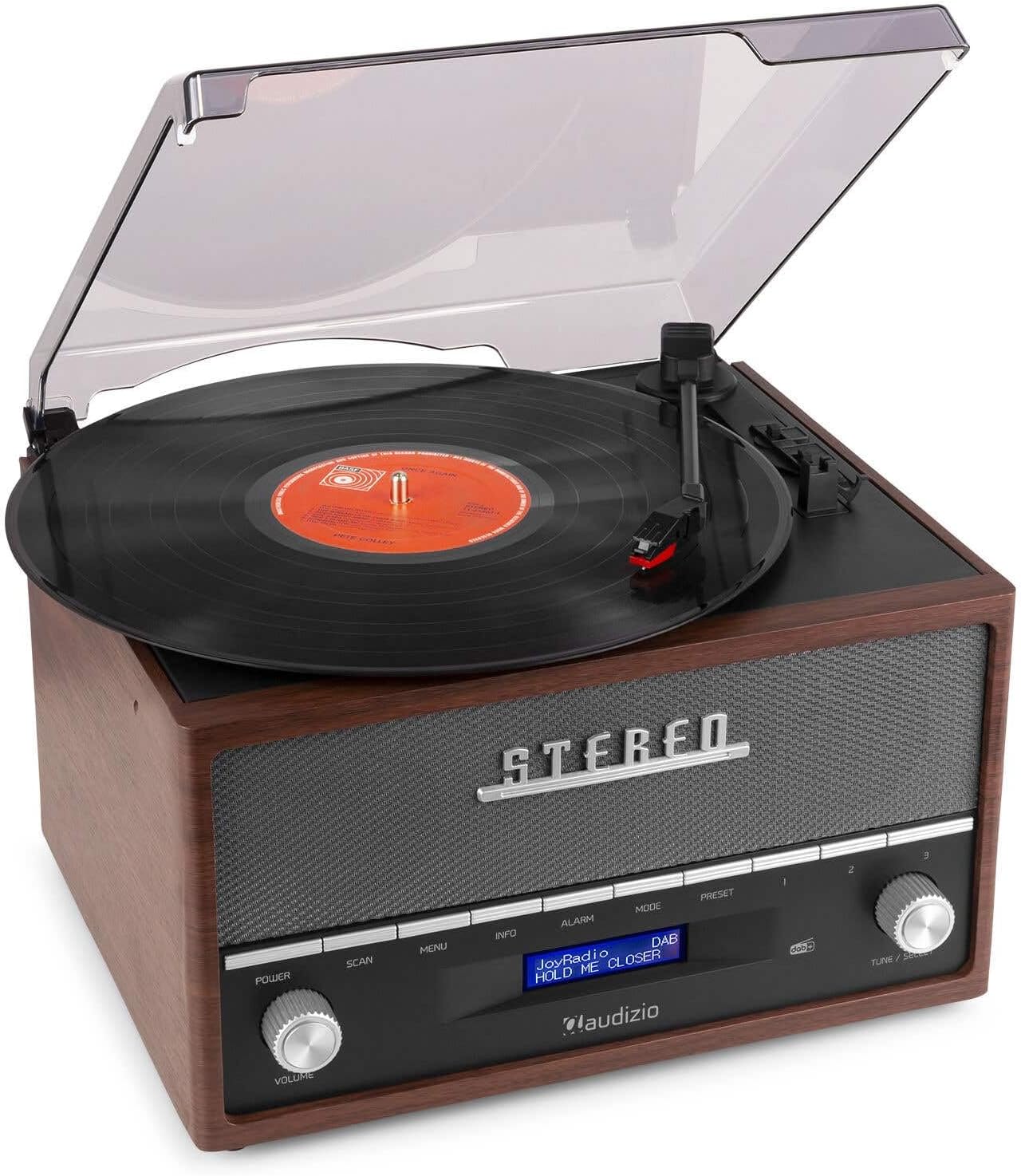
This image shows a vinyl record spinning on the Audizio Frisco turntable, with the tonearm positioned over the record, indicating active playback.
- Buka panutup lebu.
- Teundeun rékaman vinyl dina platter nu.
- Select the correct speed (33, 45, or 78 RPM) using the Speed Selector Pindah. For 45 RPM records, place the included adapter on the spindle if needed.
- Nyetél Otomatis-Stop Pindah to ON if you want the platter to stop automatically at the end of the record, or OFF for continuous rotation.
- Gently move the tonearm over the record and use the Tonearm Angkat Lever to lower the stylus onto the desired track.
- Saluyukeun polumeu nganggo VOLUME kenop.
- At the end of the record, lift the tonearm using the lever and return it to its rest.
6.2 DAB+ / FM Digital Radio
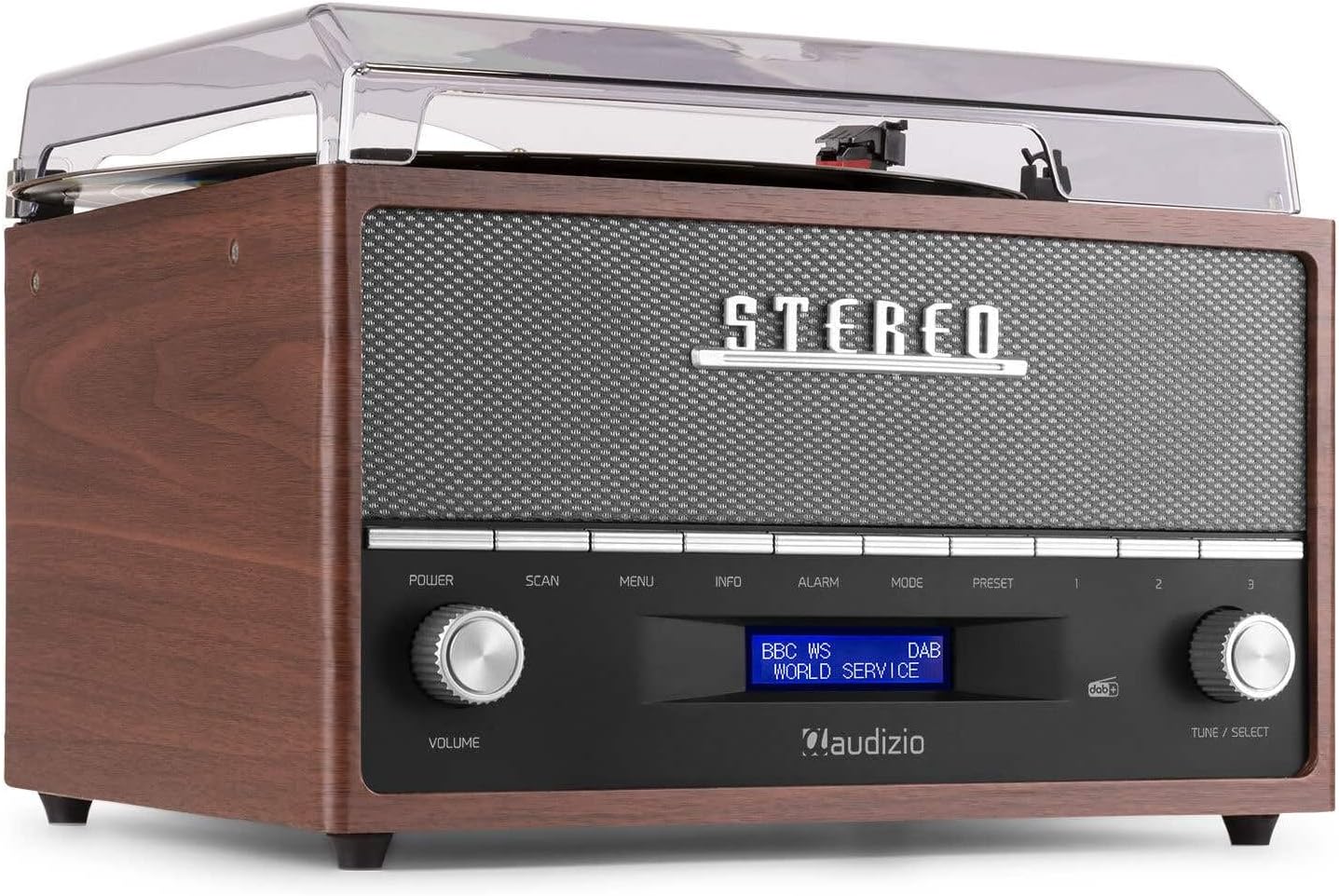
This image focuses on the display screen of the Audizio Frisco turntable, showing 'BBC WS WORLD SERVICE' and 'DAB', confirming active DAB+ radio reception and station identification.
- Pencét éta MODÉ button to select DAB+ or FM radio mode.
- Dina modeu DAB+, pencét tombol SCAN button to perform an auto-scan for available stations.
- Dina modeu FM, anggo TUNE / SELECT knob to manually tune to a station or press SCAN pikeun auto-scan.
- To save a preset, tune to the desired station, then press and hold the PRESET kancing. Ngagunakeun éta TUNE / SELECT knob to choose a preset number, then press the knob to confirm.
- Pikeun ngelingan prasetél, pencét tombol PRESET tombol, teras anggo TUNE / SELECT kenop pikeun milih setélan anu dipikahoyong.
6.3 Streaming Bluetooth
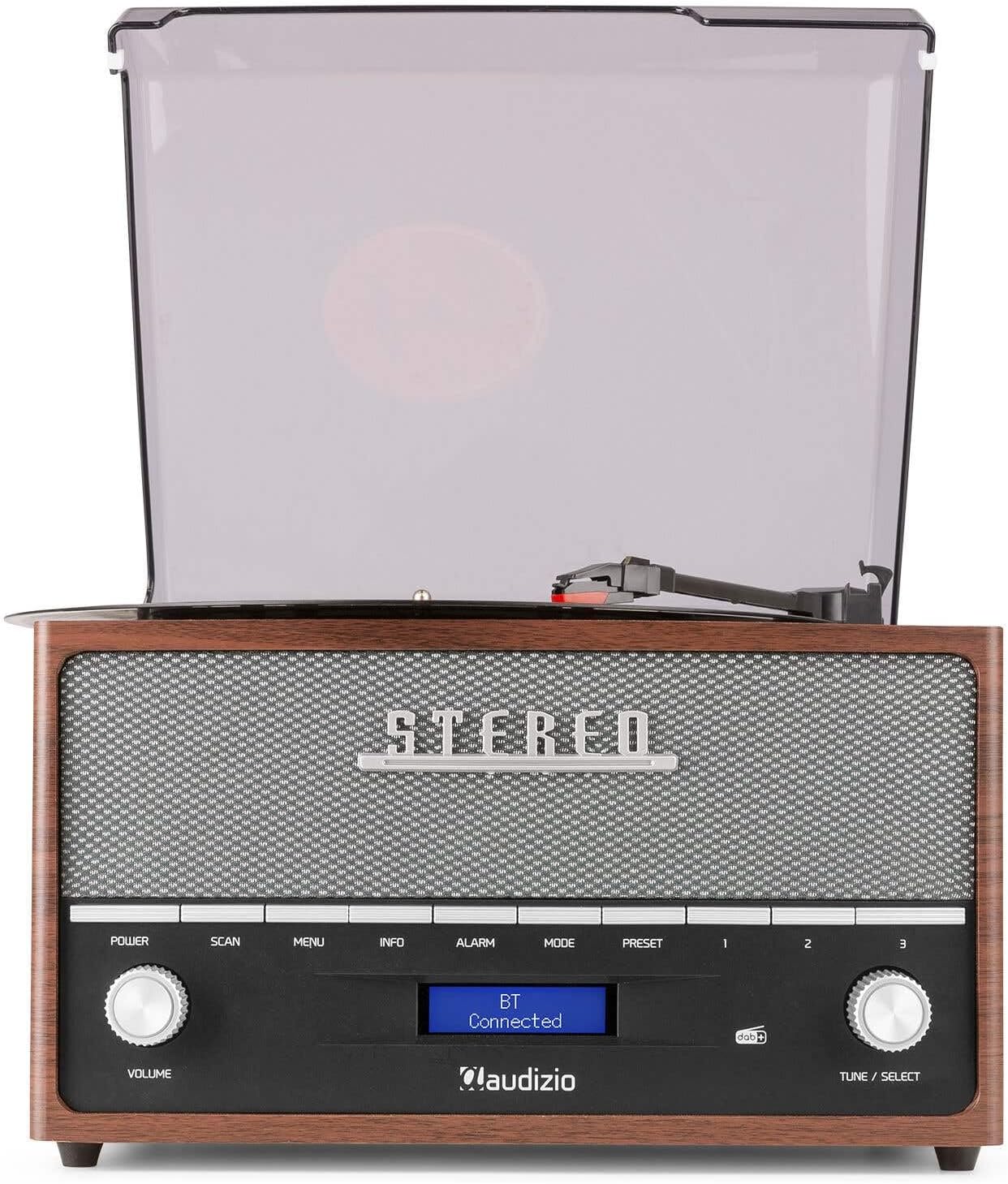
This image shows the Audizio Frisco turntable's display screen indicating 'BT Connected', signifying a successful Bluetooth connection with an external device.
- Pencét éta MODÉ button to select Bluetooth mode. The display will show "BT Pairing" or similar.
- Dina smartphone Anjeun atawa alat Bluetooth sejen, aktipkeun Bluetooth tur neangan alat nu sadia.
- Select "Audizio Frisco" from the list of devices.
- Once connected, the display will show "BT Connected". You can now play audio from your device through the turntable's speakers.
6.4 Playback USB
- Insert a USB flash drive into the USB port on the rear of the unit.
- Pencét éta MODÉ tombol pikeun milih modeu USB.
- Unit bakal otomatis mimiti muterkeun audio anu cocog files ti USB drive.
- Ngagunakeun éta TUNE / SELECT knob to navigate tracks or folders.
6.5 Input AUX
- Sambungkeun alat audio éksternal (contona, pamuter MP3, pamuter CD) ka NGARÉMÉ DI jack on the rear of the unit using a 3.5mm audio cable (not included).
- Pencét éta MODÉ tombol pikeun milih modeu AUX.
- Puterkeun audio tina alat éksternal anjeun. Sora bakal dikaluarkeun ngalangkungan spiker turntable.
6.6 Fungsi Jam Alarm
- Pencét éta alarem tombol pikeun ngakses setelan alarm.
- Ngagunakeun éta TUNE / SELECT knob to set the alarm time and select the alarm source (e.g., DAB+, FM, Buzzer).
- You can set alarms for daily, weekend, or specific days of the week. Follow the on-screen prompts and use the TUNE / SELECT knob to confirm your selections.
7. Pangropéa
7.1 Ngabersihan Unit
- Salawasna cabut unit tina stop kontak sateuacan beberesih.
- Anggo kaén anu lembut sareng garing pikeun ngusap permukaan luar.
- Ulah make cleaners abrasive, lilin, atawa pangleyur sabab bisa ngaruksak finish.
- Pikeun panutup lebu, anggo lawon lemes sareng pembersih anu hampang sareng henteu abrasif upami diperyogikeun.
7.2 Kamanusaan sarta Studi Stylus
- Stylus mangrupikeun komponén anu hipu. Nanganan kalayan ati-ati.
- Ngabersihan stylus périodik ngagunakeun sikat lemes, brushing gently ti tukang ka hareup.
- Stylus anu tos ruksak atanapi tos teu dianggo tiasa ngaruksak rékaman anjeun sareng ngirangan kualitas sora. Ganti stylus upami diperyogikeun.
8. Cara ngungkulan
| Masalah | Mungkin Cukang lantaranana | Solusi |
|---|---|---|
| Taya kakuatan | Kabel listrik teu nyambung; Stop kontak teu aktip | Ensure power cable is securely connected; Try a different outlet |
| Taya sora | Volume too low; Incorrect mode selected; Headphones connected | Increase volume; Select correct input mode; Disconnect headphones if using speakers |
| Turntable teu spinning | Power off; Auto-stop engaged at end of record | Ensure unit is powered on; Check Auto-Stop switch position |
| Ngaliwatan rékaman | Record dirty or scratched; Stylus worn or dirty; Turntable not level | Clean record; Clean or replace stylus; Place turntable on a level surface |
| Bluetooth teu nyambung | Turntable not in Bluetooth mode; Device too far; Device already connected to another unit | Select Bluetooth mode; Move device closer; Disconnect from other devices and try again |
| panarimaan radio goréng | Weak signal; Antenna not extended | Adjust antenna position; Try repositioning the unit for better signal |
9. Spésifikasi
| merek | Audizio |
| Ngaran modél | Frisco |
| Nomer modél | 102.200 |
| Max Rotasi Speed | 78 rpm |
| Bahan | Kai |
| Item Beurat | 3.8 kg |
| Fitur husus | DAB+ Radio, Bluetooth streaming, USB playback, Alarm Clock |
| Téhnologi konektipitas | Auxiliary, Bluetooth, USB |
| Sumber Daya | Kabel Listrik |
| Voltage | 220 volt |
| Konsumsi Daya | 60 Watt |
| Rasio Signal-to-Noise | 60 dB |
| Tipe Motor | Motor DC |
| Ukuran (L x W x H) | Refer to product packaging for accurate dimensions (Note: Provided dimensions of 2.8L x 3.18W x 2.35H meters are likely incorrect and should be verified) |
10. Émbaran jaminan
This product is designed and manufactured to the highest quality standards. For specific warranty terms and conditions, please refer to the warranty card included with your purchase or the retailer's policy where the product was acquired. Information regarding the availability of spare parts is typically for a period of 2 years from the date of purchase.
11. Rojongan Palanggan
If you encounter any issues or have questions regarding your Audizio Frisco Turntable that are not covered in this manual, please contact your retailer or the manufacturer's customer support for assistance. Please have your model number (Frisco, 102.200) and purchase details ready when contacting support.
Ask a question about this manual
Ask about setup, troubleshooting, compatibility, parts, safety, or missing instructions. Manuals+ will review the question and use this page’s manual context to help answer it.