
Bubuka
This manual provides detailed instructions for the proper setup, operation, and maintenance of your Cuifati Caller ID Corded Phone. Please read this manual thoroughly before using the product to ensure optimal performance and longevity. This phone is designed for reliable communication in both home and office environments, featuring a clear caller ID display, convenient call storage, and adjustable volume controls.

The Cuifati Caller ID Corded Phone, featuring a clear display and large buttons, designed for reliable communication.
Disetél
1. Connecting the Phone Line
Locate the telephone line input port on the back of the phone. Connect one end of the provided telephone line cord to this port and the other end to your wall telephone jack.

The back of the phone includes the telephone line input and slots for optional wall mounting.
2. Nyambungkeun Handset
Connect the coiled handset cord to the designated port on the side of the phone base and to the handset itself. Ensure both connections are secure.

The phone comes with a standard coiled cord for the handset, providing flexibility during calls.
3. Pamasangan Tembok (Opsional)
The phone can be wall-mounted using the integrated slots on the back. Securely attach the phone to a wall using appropriate hardware (not included).
This video showcases the phone's design and demonstrates its wall-mounting capability.
Parentah Operasi
1. Nelepon
- Angkat héndsét.
- Dengekeun nada dial.
- Pencét nomer telepon anu dipikahoyong nganggo alas kenop.
- Once the call is complete, replace the handset.
2. Narima Telepon
- Sawaktos telepon hurung, angkat handset pikeun ngajawab.
- Once the call is complete, replace the handset.
3. Caller ID Function
The phone's display will show the incoming caller's number (if available) before you answer. This feature supports DTMF standard caller ID.

The phone's display clearly shows caller ID information, including call number and time, for easy identification.

The large display and clear caller ID make the phone convenient for both home and office use.
4. Call Number Storage and Inquiry
The phone stores up to 30 groups of incoming call numbers. You can long-press the 'CALL IN' button to quickly review stored call information. It also has a built-in 5-group call number and call time query function, supporting callback and one-key replay.
5. Volume Control
Adjust the ringer volume using the two-level volume control switch located on the side of the phone base.
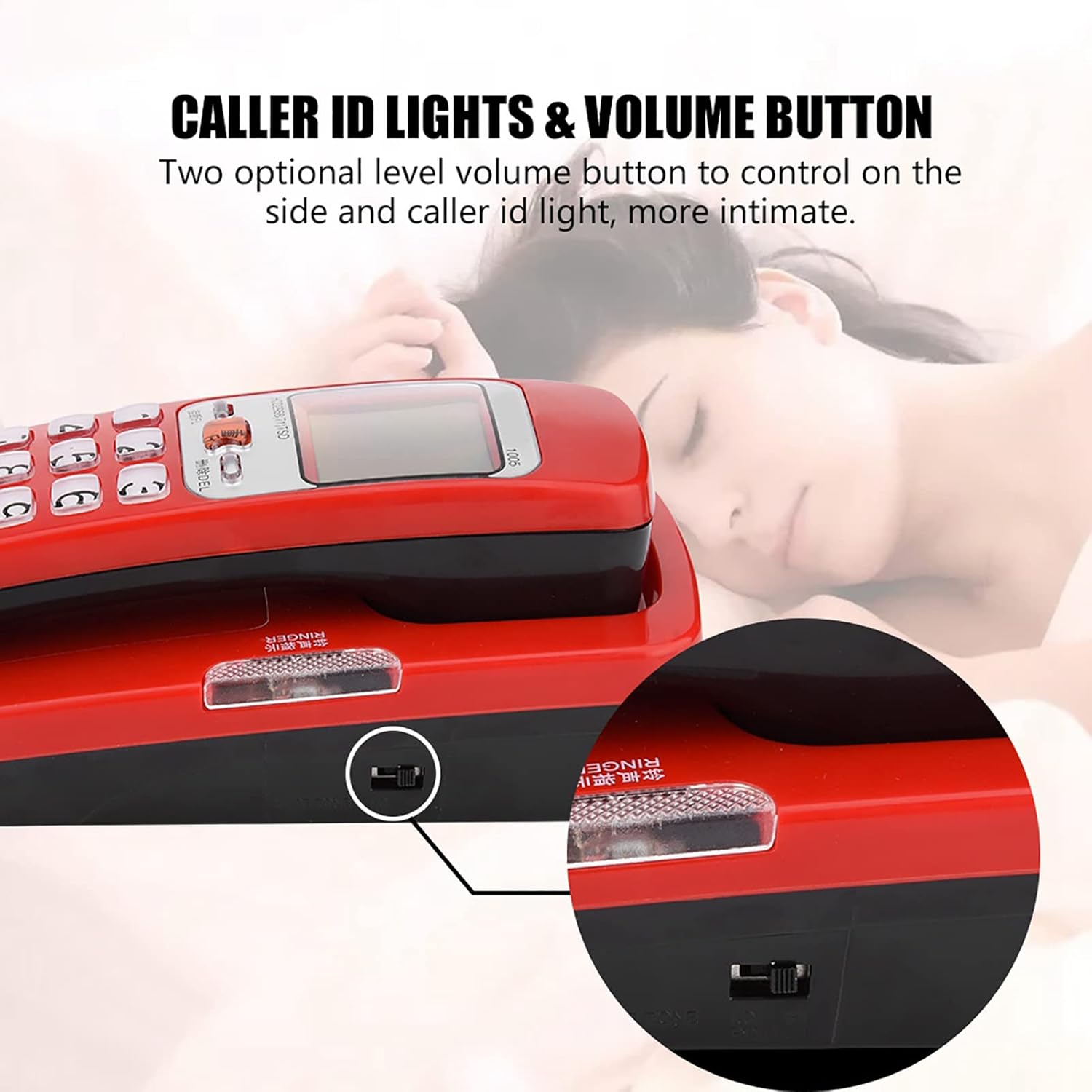
Adjust the ringer volume using the two-level volume control switch located on the side of the phone.
6. Anti-Jamming Function
The phone is equipped with an anti-jamming function to ensure clear and uninterrupted communication.
This video provides a visual guide to the features and operation of a corded phone, including FSK/DTMF caller ID functionality and the ease of use provided by large number buttons.
Pangropéa
To maintain your Cuifati Caller ID Corded Phone in good condition:
- Usap beungeut telepon ku kaén nu lemes,amp lawon. Hindarkeun ngagunakeun bahan kimia anu kasar atanapi pembersih abrasive.
- Keep the phone away from direct sunlight, excessive heat, and moisture.
- Ensure the phone is placed on a stable surface or securely wall-mounted to prevent accidental falls.
- Pariksa rutin sadaya sambungan kabel pikeun mastikeun aranjeunna aman.
Pamérésan masalah
Taya Nada Dial
- Check if the telephone line cord is securely connected to both the phone and the wall jack.
- Test the wall jack with another working phone to ensure the line is active.
- Ensure the handset cord is properly connected.
Caller ID Not Displaying
- Verify that your telephone service provider offers Caller ID service.
- Ensure the phone is correctly connected to the telephone line.
- Some calls, especially international or private numbers, may not display Caller ID.
Ringer Not Working
- Check the volume control switch on the side of the phone and ensure it is not set to the lowest level or 'Off'.
- Ensure the phone line is active and receiving calls.
spésifikasi
| Ngaran Brand | Cuifati |
| Item Beurat | 10.2 ons |
| Ukuran Paket | 7.48 x 3.27 x 3.15 inci |
| Nomer Modél Item | CUIFATIvyt497cxe2-01 |
| ASIN | B0CH3L3WRL |
| Tanggal Kahiji Sadia | 1 Séptémber 2023 |

Physical dimensions of the phone are 18cm (7.09 inches) in length, 7.5cm (2.95 inches) in width, and 6.5cm (2.56 inches) in height.
Garansi sareng Rojongan
For warranty information or technical support, please refer to the product packaging or contact your retailer. Keep your purchase receipt as proof of purchase for any warranty claims.