Bubuka
This manual provides instructions for the ALLIMITY replacement remote control, designed for various AKAI TV models. This remote control is a direct replacement and requires no programming for immediate use. Please read this manual carefully to ensure proper operation and longevity of your remote control.
Compatible AKAI TV Models
This remote control is compatible with the following AKAI TV models:
- AKTV 3923S SMART
- AKTV 704S
- AKTV 6536S
- AKTV 5836
- AKTV 5537S
- AKTV 5536S
- AKTV 5036S
- AKTV 4622S
- AKTV 4336S
Also compatible with models: AKTV3923S-SMART, AKTV704S, AKTV6536S, AKTV5836, AKTV5537S, AKTV5536S, AKTV5036S, AKTV4622S, AKTV4336S.
Disetél
1. Pamasangan batré
The remote control requires alkaline batteries for operation. No programming is needed; simply insert the batteries correctly, and the remote will be ready to use.
- Teangan tempat panutup kompartemen batré dina tonggong kadali jauh.
- Geser panutup ka handap atawa pencét kancing pikeun mukakeunana.
- Insert two new alkaline batteries (AAA, not included) into the compartment, ensuring the positive (+) and negative (-) terminals match the diagrams inside the compartment.
- Ganti panutup kompartemen batré, geser deui kana tempatna nepi ka klik aman.
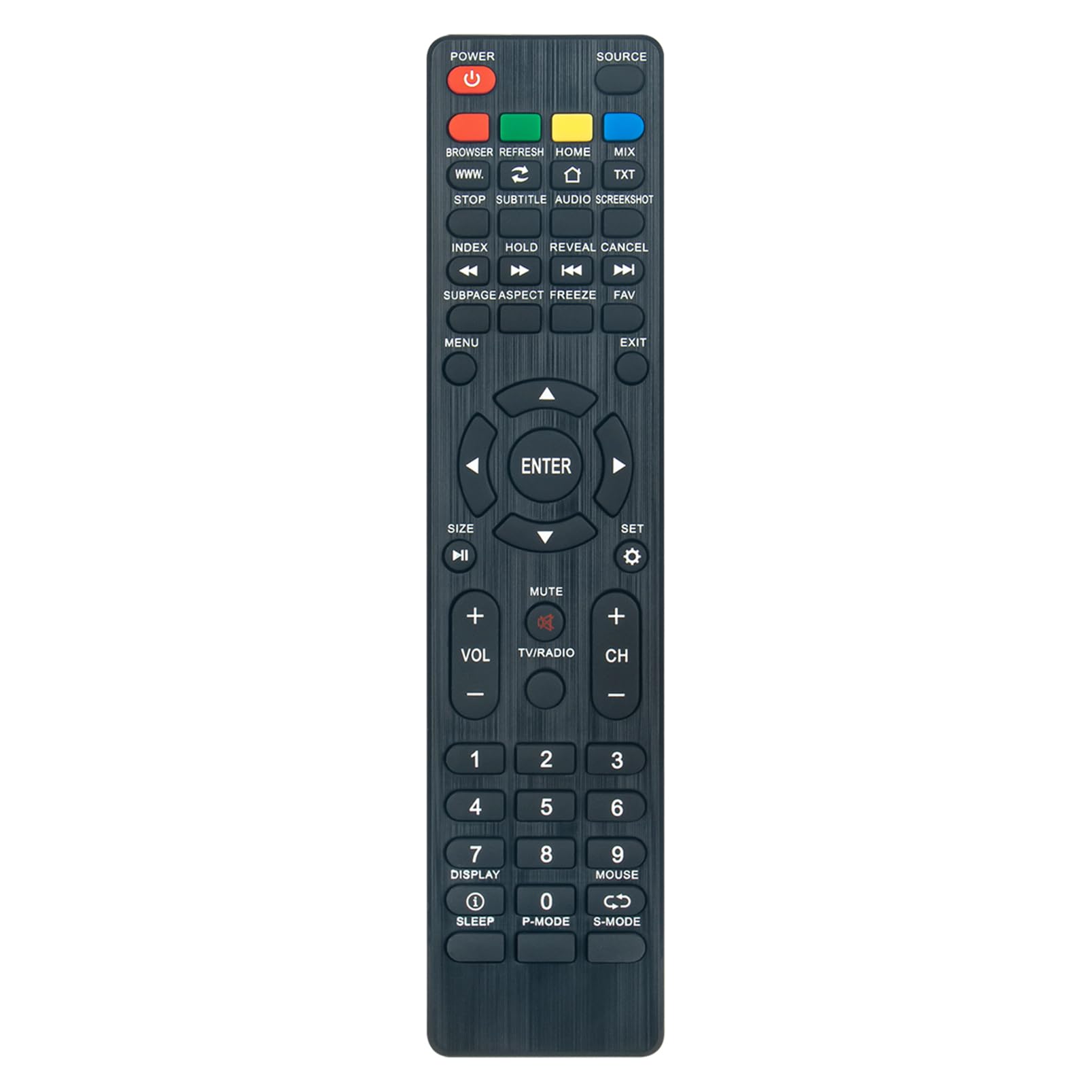
Gambar 1: Hareupeun view of the ALLIMITY replacement remote control. This image shows the layout of all buttons, including power, source, navigation, volume, channel, and number keys.
Parentah Operasi
This remote control is designed to cover all functions of your original AKAI TV remote. Point the remote control directly at your AKAI TV's infrared sensor for optimal performance.
Fungsi konci Leuwihview
- kakuatan: Ngahurungkeun atawa mareuman TV.
- SUMBER: Milih sumber input (HDMI, AV, jsb.).
- Tombol Jumlah (0-9): Pilih saluran langsung.
- VOL +/-: Saluyukeun tingkat polumeu.
- CH +/-: Robah saluran kaluhur atanapi kahandap.
- Bisu: Ngajempékeun atanapi nganonaktipkeun sora TV.
- MENU: Ngaksés ménu utama TV.
- Tombol Navigasi (Luhur, Handap, Kénca, Katuhu): Navigates ngaliwatan ménu jeung pilihan.
- Asupkeun: Konfirmasi pilihan dina ménu.
- KALUAR: Kaluar tina ménu atanapi pungsi ayeuna.
- BANDUNG: Returns to the TV's home screen (for Smart TV models).
- BROWSER/WWW: Mukakeun web browser (for Smart TV models).
- SMART TV Specific Buttons: Buttons like "SMART", "MIX", "TXT", "SUBTITLE", "AUDIO", "SCREENSHOT", "INDEX", "HOLD", "REVEAL", "CANCEL", "SUBPAGE", "ASPECT", "FREEZE", "FAV" are available for specific Smart TV functionalities. Refer to your AKAI TV's original manual for detailed use of these advanced features.
- SARE: Nyetél waktos bobo.
- TAMPILAN: Némbongkeun inpormasi saluran ayeuna.
- P-MODE: Changes picture modes.
- S-MODE: Changes sound modes.
- BEURIT: Activates mouse pointer function (if supported by TV).

Gambar 2: Angled view of the ALLIMITY replacement remote control, highlighting the ergonomic design and button placement for easy access.
Pangropéa
beberesih
Pikeun ngabersihkeun remot kontrol, anggo lawon anu lemes sareng garing. Entong nganggo pembersih cair, semprotan, atanapi bahan anu kasar, sabab ieu tiasa ngaruksak permukaan remot atanapi komponén internal.
Ngagantian batré
Replace batteries when the remote control's response becomes sluggish or stops working. Always replace both batteries at the same time with new alkaline batteries of the same type. Do not mix old and new batteries, or different types of batteries.
Panyimpenan
Store the remote control in a cool, dry place away from direct sunlight and extreme temperatures. If the remote will not be used for an extended period, remove the batteries to prevent leakage and potential damage.
Pamérésan masalah
- Jauh teu ngabales:
- Pariksa naha batréna diselapkeun leres kalayan polaritasna anu leres.
- Ganti batréna ku nu anyar.
- Pastikeun teu aya halangan antara remot kontrol sareng sénsor infrabeureum TV.
- Pastikeun anjeun aya dina jarak operasi efektif (dugi ka 10 méter).
- Sababaraha tombol teu jalan:
- This remote is designed to cover all functions. If specific buttons are not working, ensure your TV model supports that particular function (e.g., Smart TV features on a non-Smart TV).
- Clean the remote control, especially around the non-responsive buttons, to remove any dirt or debris.
- Operasi intermittent:
- Weak batteries are often the cause. Replace them.
- Ensure no strong light sources (like direct sunlight or bright fluorescent lights) are interfering with the infrared signal.
spésifikasi
| Fitur | Rincian |
|---|---|
| merek | KAKATAAN |
| Nomer modél | QYSY-AKTV3923S-QYSY |
| Téhnologi konektipitas | Infrabeureum |
| Fitur husus | Desain ergonomis |
| Alat nu cocog | AKAI TV models: AKTV 3923S SMART, AKTV 704S, AKTV 6536S, AKTV 5836, AKTV 5537S, AKTV 5536S, AKTV 5036S, AKTV 4622S, AKTV 4336S, and their variations. |
| Rentang maksimum | 10 méter |
| Jumlah Kancing | 30 |
| Katerangan batré | Alkaline (AAA, not included) |
| Produsén | ALLIMITYQYSY |
| Negara asal | Cina |
