1. Bubuka
This manual provides detailed instructions for the setup, operation, maintenance, and troubleshooting of your Montech MKey Mechanical Gaming Keyboard, model MK105FR. This keyboard features Gateron G Red Pro 2.0 pre-lubed switches, premium MDA profile PBT keycaps, customizable RGB LED lighting, and a hot-swappable design for personalized use.
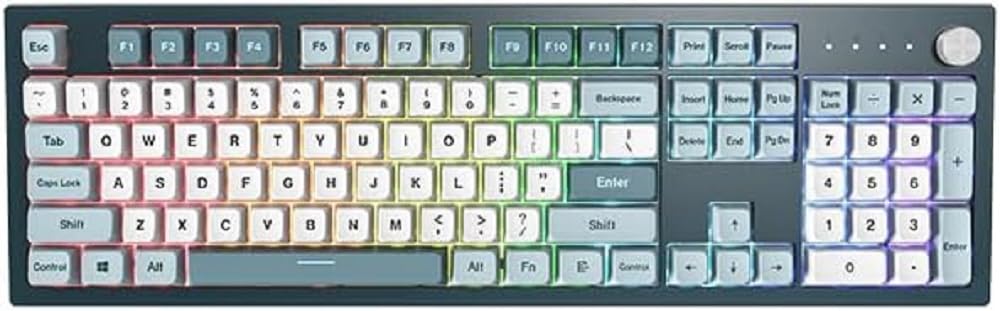
Gambar 1.1: Hareupeun view of the Montech MKey Mechanical Gaming Keyboard.
2. Eusi Paket
Pastikeun yén sadaya item aya dina bungkusan:
- Montech MKey Mechanical Gaming Keyboard (MK105FR)
- Kabel USB Type-C anu tiasa dicabut
- Keycap Puller
- Pindah Puller
- Additional Keycaps (Osaka Castle themed)
3. Setélan
3.1 Nyambungkeun kibor
- Panggihan port USB Type-C dina tonggong kibor.
- Connect the provided USB Type-C cable to the keyboard.
- Sambungkeun ujung kabel USB nu sejen ka port USB nu sadia dina komputer Anjeun.
- The keyboard will automatically be detected by your operating system (Windows 10 or later recommended).
3.2 Pamasangan Parangkat Lunak (Opsional)
For advanced customization of RGB lighting effects and key functions, download the official Montech MKey software from the Montech websitus. Turutan parentah dina-layar pikeun pamasangan.
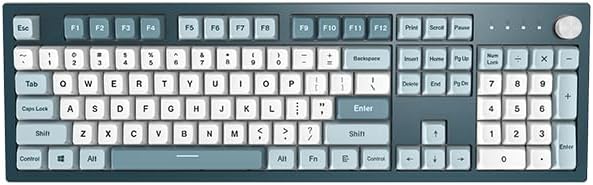
Image 3.1: The Montech MKey keyboard ready for connection.
4. Parentah Operasi
4.1 Fungsi Konci Dasar
The Montech MKey MK105FR features a full-size layout with standard QWERTY keys, a numeric keypad, and function keys (F1-F12).
4.2 Function Key (Fn) Combinations
Mangpaatkeun Fn key (located near the right Alt key) in combination with other keys to access various functions:
- Fn+F1-F12: Multimedia controls (e.g., volume, play/pause, stop, next/previous track). Specific functions may vary.
- Fn + Tombol Panah: Adjust RGB lighting effects (e.g., brightness, speed, direction).
- Fn + Specific Keys: Cycle through different RGB lighting modes. Refer to the keyboard's quick guide or software for exact combinations.
4.3 Fungsi Kenop Putar
The rotary knob, located on the top right of the keyboard, offers multi-functional control:
- Muterkeun: Adjusts volume by default.
- Pencét: Mutes/unmutes audio by default.
- Pencét jeung tahan: Cycles through different modes (e.g., volume, zoom, RGB lighting brightness/mode).
4.4 Panas-Swappable switch
The Montech MKey keyboard features Kailh's Hot-swap sockets, allowing you to change mechanical switches without soldering. This enables customization of typing feel and sound.
- Removing a Keycap: Use the provided keycap puller to gently lift the keycap straight up.
- Nyoplokkeun Switch: Use the provided switch puller to grasp the top and bottom clips of the switch. Apply gentle pressure and pull the switch straight up.
- Installing a New Switch: Align the pins of the new switch with the holes on the PCB. Gently press the switch down until it clicks into place. Ensure pins are not bent.
- Installing a Keycap: Place the keycap over the switch stem and press down firmly until it is seated.

Image 4.1: Illustration of hot-swappable switches, keycap puller, and switch puller.

Image 4.2: Detail of a keycap removed, revealing the Gateron G Red Pro 2.0 mechanical switch.
4.5 Keycap Profile: MDA
Kiborna dilengkepan ku MDA pro premiumfile PBT keycaps. The MDA profile is a sculpted keycap profile designed for ergonomic comfort and a unique aesthetic, offering a slightly lower and more uniform height compared to some other profiles, while still providing a comfortable typing angle.
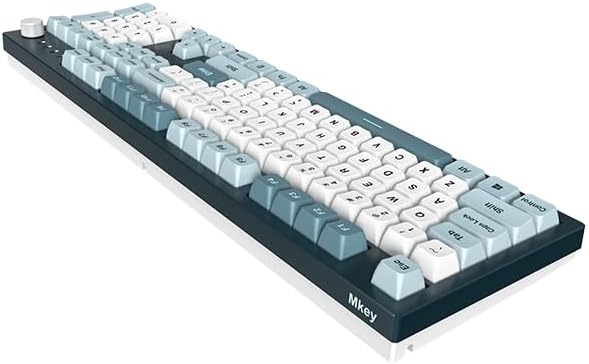
Image 4.3: Comparison diagram illustrating the MDA keycap profile.
5. Pangropéa
5.1 Ngabersihan kibor
Pikeun ngajaga kinerja optimal sareng penampilan:
- Pegatkeun sambungan keyboard tina komputer Anjeun sateuacan beberesih.
- Make lawon anu lemes, teu aya serat dampdikumbah ku saeutik cai atawa larutan pembersih anu hampang pikeun ngusap tutup tombol jeung sasis.
- Pikeun lebu jeung lebu antara keycaps, make hawa dikomprés atawa sikat leutik.
- Hindarkeun ngagunakeun bahan kimia anu kasar atanapi bahan abrasive.
5.2 Keycap sarta perawatan switch
When removing or installing keycaps and switches, always use the provided tools and apply gentle, even pressure to prevent damage to the components or the keyboard PCB.
6. Cara ngungkulan
If you encounter issues with your Montech MKey keyboard, refer to the following common problems and solutions:
- Kibor Teu Ngabales: Ensure the USB cable is securely connected to both the keyboard and the computer. Try connecting to a different USB port or using a different USB cable. Restart your computer.
- Lampu RGB Teu Gawé: Check Fn key combinations for lighting control. Ensure the keyboard software is installed and configured correctly if you are using it.
- Konci Husus Henteu Jalan: If a specific key is not registering, try removing and re-seating its switch. If the issue persists, consider replacing the switch (refer to Section 4.4).
- Ghosting or Input Lag: Ensure the keyboard is connected directly to a USB port on your computer, avoiding unpowered USB hubs. Update your computer's USB drivers.
For further assistance, please contact Montech customer support.
7. Spésifikasi
| Fitur | Rincian |
|---|---|
| merek | Montech |
| Nomer modél | MK105FR |
| Runtuyan | MKey Freedom |
| Téhnologi konektipitas | USB (Detachable Type-C) |
| Katerangan kibor | Mékanis |
| Pindah Tipe | Gateron G Red Pro 2.0 (Pre-lubed) |
| Bahan Keycap | PBT |
| Keycap Profile | MDA |
| Fitur husus | Hot-Swappable, RGB Backlighting |
| Sistem operasi | Windows 10 (and later) |
| Ukuran produk (L x W x H) | 17.44 x 5.35 x 1.61 inci |
| Item Beurat | 4.49 pon |
8. Garansi jeung Rojongan
8.1 Émbaran jaminan
Montech products are covered by a limited warranty. Please refer to the official Montech websitus atawa dokuméntasi pameseran Anjeun pikeun istilah jeung kaayaan jaminan husus lumaku pikeun wewengkon Anjeun.
8.2 Rojongan Palanggan
For technical support, troubleshooting assistance, or warranty claims, please visit the official Montech website and navigate to the support section. You may find FAQs, driver downloads, and contact information for customer service representatives.
Resmi Montech Websitus: www.montechpc.com


